編輯:關於android開發
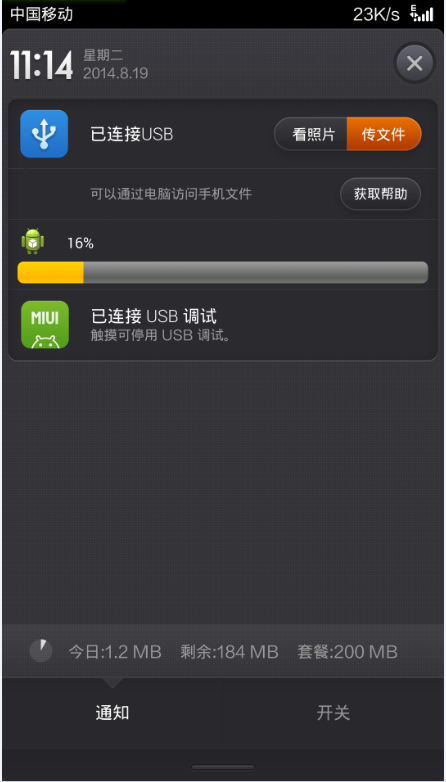
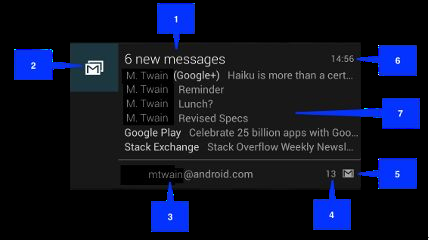
Android應用檢查版本更新後,在通知欄下載,更新下載進度,下載完成自動安裝,效果圖如下:
AndroidManifest文件中的versionCode用來標識版本,在服務器放一個新版本的apk,versioncode大於當前版本,下面代碼用來獲取versioncode的值
PackageInfo packageInfo = context.getPackageManager().getPackageInfo(context.getPackageName(), 0);
int localVersion = packageInfo.versionCode;
用當前versioncode和服務端比較,如果小於,就進行版本更新

 /**
   * 下載apk
   *
   * @param apkUri
   */
private void downLoadNewApk(String apkUri, String version) {
        manager = (NotificationManager) context
                .getSystemService((context.NOTIFICATION_SERVICE));
        notify = new Notification();
        notify.icon = R.drawable.ic_launcher;
        // 通知欄顯示所用到的布局文件
        notify.contentView = new RemoteViews(context.getPackageName(),
                R.layout.view_notify_item);
        manager.notify(100, notify);
        //建立下載的apk文件
      File fileInstall = FileOperate.mkdirSdcardFile("downLoad", APK_NAME
                + version + ".apk");
        downLoadSchedule(apkUri, completeHandler, context,
                fileInstall);
    }
FileOperate是自己寫的文件工具類
通知欄顯示的布局,view_notify_item.xml
<?xml version="1.0" encoding="utf-8"?>
<RelativeLayout xmlns:android="http://schemas.android.com/apk/res/android"
    android:layout_width="match_parent"
    android:layout_height="match_parent"
    android:layout_marginLeft="10dp"
    android:background="#00000000"
    android:padding="5dp" >

    <ImageView
        android:id="@+id/notify_icon_iv"
        android:layout_width="25dp"
        android:layout_height="25dp"
        android:src="@drawable/ic_launcher" />

    <TextView
        android:id="@+id/notify_updata_values_tv"
        android:layout_width="wrap_content"
        android:layout_height="wrap_content"
        android:layout_centerHorizontal="true"
        android:layout_marginBottom="6dp"
        android:layout_marginLeft="15dp"
        android:layout_marginTop="5dp"
        android:layout_toRightOf="@id/notify_icon_iv"
        android:gravity="center_vertical"
        android:text="0%"
        android:textColor="@color/white"
        android:textSize="12sp" />

    <ProgressBar
        android:id="@+id/notify_updata_progress"
       >


   /**
     * 連接網絡,下載一個文件,並傳回進度
     *
     * @param uri
     * @param handler
     * @param context
     * @param file
     */
public static void downLoadSchedule(final String uri,
            final Handler handler, Context context, final File file) {
        if (!file.exists()) {
            handler.sendEmptyMessage(-1);
            return;
        }
        // 每次讀取文件的長度
        final int perLength = 4096;
        new Thread() {
            @Override
            public void run() {
                super.run();
                try {
                    URL url = new URL(uri);
                    HttpURLConnection conn = (HttpURLConnection) url
                            .openConnection();
                    conn.setDoInput(true);
                    conn.connect();
                    InputStream in = conn.getInputStream();
                    // 2865412
                    long length = conn.getContentLength();
                    // 每次讀取1k
                    byte[] buffer = new byte[perLength];
                    int len = -1;
                    FileOutputStream out = new FileOutputStream(file);
                    int temp = 0;
                    while ((len = in.read(buffer)) != -1) {
                        // 寫入文件
                        out.write(buffer, 0, len);
                        // 當前進度
                        int schedule = (int) ((file.length() * 100) / length);
                        // 通知更新進度(10,7,4整除才通知,沒必要每次都更新進度)
                        if (temp != schedule
                                && (schedule % 10 == 0 || schedule % 4 == 0 || schedule % 7 == 0)) {
                            // 保證同一個數據只發了一次
                            temp = schedule;
                            handler.sendEmptyMessage(schedule);
                        }
                    }
                    out.flush();
                    out.close();
                    in.close();
                } catch (IOException e) {
                    e.printStackTrace();
                }
            }
        }.start();
    }


handler根據下載進度進行更新
/**
  * 更新通知欄
  */
 private Handler completeHandler = new Handler() {
        public void handleMessage(android.os.Message msg) {
            // 更新通知欄
            if (msg.what < 100) {
                notify.contentView.setTextViewText(
                        R.id.notify_updata_values_tv, msg.what + "%");
                notify.contentView.setProgressBar(R.id.notify_updata_progress,
                        100, msg.what, false);
                manager.notify(100, notify);
            } else {
                notify.contentView.setTextViewText(
                        R.id.notify_updata_values_tv, "下載完成");
                notify.contentView.setProgressBar(R.id.notify_updata_progress,
                        100, msg.what, false);// 清除通知欄
                manager.cancel(100);
                installApk(fileInstall);
            }
        };
    };
下載完成後調用系統安裝。
/**
  * 安裝apk
  *
  * @param file
  */
private void installApk(File file) {
        Intent intent = new Intent();
        intent.addFlags(Intent.FLAG_ACTIVITY_NEW_TASK);
        intent.setAction(android.content.Intent.ACTION_VIEW);
        intent.setDataAndType(Uri.fromFile(file),
                "application/vnd.android.package-archive");
        context.startActivity(intent);
    }
安裝完成搞定
 linux2.4.18----25.文件系統的構建
linux2.4.18----25.文件系統的構建一. 文件系統的構建1.busybox的編譯方法: 用虛擬機的redhat9.0進行編譯版本: busybox-1.00
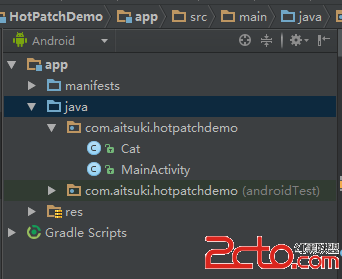 Android熱補丁動態修復技術(二):實戰!CLASS_ISPREVERIFIED問題!
Android熱補丁動態修復技術(二):實戰!CLASS_ISPREVERIFIED問題! 一、前言 上一篇博客中,我們通過介紹dex分包原理引出了Android的熱補丁
 Android 巧妙實現圖片和文字上下布局或者左右布局,
Android 巧妙實現圖片和文字上下布局或者左右布局,最近去了一家新公司,然後開始做新的項目,看其代碼發現了一個很巧妙的方法來實現圖片在上面文字在下面的布局方式。只需要
 (轉)根據ImageView的大小來壓縮Bitmap,避免OOM,imageviewoom
(轉)根據ImageView的大小來壓縮Bitmap,避免OOM,imageviewoom本文轉載於:http://www.cnblogs.com/tianzhijiex
 Android中使用Notification實現寬視圖通知欄(Notification示例二),notification大視圖
Android中使用Notification實現寬視圖通知欄(Notif