編輯:關於android開發
網絡連接工具類整理:
  1 package com.gzcivil.utils;
  2
  3 import java.io.IOException;
  4 import java.util.ArrayList;
  5 import java.util.List;
  6 import java.util.Map;
  7
  8 import org.apache.http.HttpEntity;
  9 import org.apache.http.HttpResponse;
 10 import org.apache.http.HttpStatus;
 11 import org.apache.http.NameValuePair;
 12 import org.apache.http.client.HttpClient;
 13 import org.apache.http.client.entity.UrlEncodedFormEntity;
 14 import org.apache.http.client.methods.HttpGet;
 15 import org.apache.http.client.methods.HttpPost;
 16 import org.apache.http.impl.client.DefaultHttpClient;
 17 import org.apache.http.message.BasicNameValuePair;
 18 import org.apache.http.params.BasicHttpParams;
 19 import org.apache.http.params.HttpConnectionParams;
 20 import org.apache.http.params.HttpParams;
 21 import org.apache.http.util.EntityUtils;
 22
 23 import android.content.Context;
 24
 25 /**
 26  * 網絡連接類
 27  *
 28  * @author LiJinlun
 29  *
 30  */
 31 public class NetUtils {
 32
 33     /**
 34      * 獲取Json數據
 35      *
 36      * @param param
 37      * @return
 38      */
 39
 40     public static String post(Map<String, String> paramMap, String URL, Context context) {
 41
 42         String result = null;
 43         HttpPost httpRequest = new HttpPost(URL);
 44         List<NameValuePair> params = new ArrayList<NameValuePair>();
 45
 46         paramMap.put("machineCode", CommonUtil.GetMachineCode(context));
 47         paramMap.put("cid", CommonUtil.GetCid(context).toString());
 48
 49         for (Map.Entry<String, String> param : paramMap.entrySet()) {
 50             params.add(new BasicNameValuePair(param.getKey(), param.getValue()));
 51         }
 52         // 打印去包日志
 53         LogUtils.d(SysUtils.LOG_TAG, "去包:" + URL + params.toString());
 54         HttpEntity httpEntity;
 55         HttpClient httpClient = null;
 56         try {
 57             httpEntity = new UrlEncodedFormEntity(params, "UTF-8");
 58             httpRequest.setEntity(httpEntity);
 59             httpClient = getHttpClient();
 60             HttpResponse httpResponse = httpClient.execute(httpRequest);
 61
 62             int status = httpResponse.getStatusLine().getStatusCode();
 63             if (status == HttpStatus.SC_OK) {
 64                 result = EntityUtils.toString(httpResponse.getEntity());
 65                 // 打印回包日志
 66                 LogUtils.d(SysUtils.LOG_TAG, "回包:" + result.toString());
 67                 return result;
 68             }
 69         } catch (IOException e) {
 70             e.printStackTrace();
 71             return SysUtils.errorcode.ERROR_TIMEOUT + "";
 72         } finally {
 73             if (httpClient != null)
 74                 httpClient.getConnectionManager().shutdown();
 75         }
 76         return null;
 77     }
 78
 79     /**
 80      * get獲取數據
 81      *
 82      * @param url
 83      * @return
 84      */
 85     public static String get(String url) {
 86         // 打印去包日志
 87         LogUtils.d(SysUtils.LOG_TAG, "去包:" + url.toString());
 88         String result = null;
 89         HttpGet get = new HttpGet(url);
 90         HttpClient client = new DefaultHttpClient();
 91         try {
 92             HttpResponse response = client.execute(get);
 93             int status = response.getStatusLine().getStatusCode();
 94             if (status == HttpStatus.SC_OK) {
 95                 result = EntityUtils.toString(response.getEntity(), "UTF-8");
 96                 // 打印回包日志
 97                 LogUtils.d(SysUtils.LOG_TAG, "回包:" + result.toString());
 98                 return result;
 99             }
100         } catch (IOException e) {
101             e.printStackTrace();
102             return SysUtils.errorcode.ERROR_TIMEOUT + "";
103         } finally {
104             client.getConnectionManager().shutdown();
105         }
106         return null;
107     }
108
109     public static HttpClient getHttpClient() {
110         HttpParams httpParams = new BasicHttpParams();
111         HttpConnectionParams.setConnectionTimeout(httpParams, 8 * 1000);
112         HttpConnectionParams.setSoTimeout(httpParams, 8 * 1000);
113         // HttpClientParams.setRedirecting(httpParams, true);
114         HttpClient client = new DefaultHttpClient(httpParams);
115         // client.getParams().setIntParameter( HttpConnectionParams.SO_TIMEOUT,
116         // 8*1000); // 超時設置
117         // client.getParams().setIntParameter(
118         // HttpConnectionParams.CONNECTION_TIMEOUT, 8*1000);// 連接超時
119         return client;
120     }
121
122 }
 Android音樂播放器源碼(歌詞.均衡器.收藏.qq5.0菜單.通知),android.qq5.0
Android音樂播放器源碼(歌詞.均衡器.收藏.qq5.0菜單.通知),android.qq5.0一款Android音樂播放器源碼,基本功能都實現了 qq5.0菜單(歌
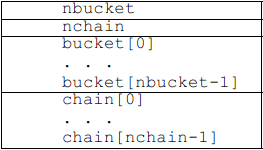 ELF Format 筆記(十五)—— 符號哈希表,elfformat
ELF Format 筆記(十五)—— 符號哈希表,elfformatilocker:關注 Android 安全(新手) QQ: 2597294287 符號哈希表用於支援
 Android新手入門2016(8)--ListView之ArrayAdapter
Android新手入門2016(8)--ListView之ArrayAdapter ListView是Android中常用的控件。 什麼是列表視圖,讓我們先看看圖:
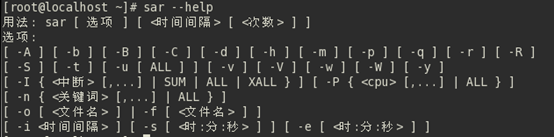 linux性能測試與監控 sar 命令
linux性能測試與監控 sar 命令sar(System Activity Reporter系統活動情況報告)是目前Linux上最為全面的系統性能分析工具之一,可以從多