編輯:關於android開發
WebView是View的一個子類,可以讓你在activity中顯示網頁。可以在布局文件中寫入WebView:比如下面這個寫了一個填滿整個屏幕的WebView:
1 <?xml version="1.0" encoding="utf-8"?>
2 <WebView  xmlns:android="http://schemas.android.com/apk/res/android"
3     android:id="@+id/webview"
4     android:layout_width="fill_parent"
5     android:layout_height="fill_parent"
6 />
加載一個網頁,使用loadUrl():
WebView myWebView = (WebView) findViewById(R.id.webview);
myWebView.loadUrl(http://www.example.com);
注意要在manifest中加上訪問網絡的權限:
<manifest ... >
    <uses-permission android:name="android.permission.INTERNET" />
    ...
</manifest>
設置WevView要顯示的網頁方法有很多:
互聯網頁面直接用:
myWebView.loadUrl(“http://www.google.com“);
本地文件用:
myWebView.loadUrl(“file:///android_asset/XX.html“);
本地文件存放在:assets文件中。
還可以直接載入html的字符串,如:
String htmlString = "<h1>Title</h1><p>This is HTML text<br /><i>Formatted in italics</i><br />Anothor Line</p>";
// 載入這個html頁面
myWebView.loadData(htmlString, "text/html", "utf-8");
如果你想要載入的頁面中用了JavaScript,你必須為你的WebView使能JavaScript。
一旦使能之後,你也可以自己創建接口在你的應用和JavaScript代碼間進行交互。
使能JavaScript可以通過getSettings()獲得WebSettings,然後用setJavaScriptEnabled()使能JavaScript:
WebView myWebView = (WebView) findViewById(R.id.webview);
WebSettings webSettings = myWebView.getSettings();
webSettings.setJavaScriptEnabled(true);
WebSettings中提供了很多有用的設置。
當用戶點擊了你的WebView中的一個鏈接,默認的行為是Android啟動一個處理URL的應用,通常,默認的浏覽器打開並下載目標URL。
但是,你可以在你的WebView中覆蓋這一行為,使得連接仍在你的WebView中打開。
之後,根據在WebView中維護的網頁浏覽歷史,你可以允許用戶向前或向後浏覽他們的網頁。
在WebView中打開所有鏈接
要打開用戶點擊的鏈接,只需要用setWebViewClient()方法向你的WebView提供一個WebViewClient 比如:
WebView myWebView = (WebView) findViewById(R.id.webview);
myWebView.setWebViewClient(new WebViewClient());
此時就OK了, 就可以在你的WebView中打開鏈接了。
關於打開鏈接位置的更多控制
如果你對在哪裡打開鏈接需要更多的控制,你可以創建自己的類,繼承 WebViewClient,然後覆寫shouldOverrideUrlLoading() 方法。
比如下面這個:
 1 private class MyWebViewClient extends WebViewClient
 2     {
 3         @Override
 4         public boolean shouldOverrideUrlLoading(WebView view, String url)
 5         {
 6
 7        if(Uri.parse(url).getHost().equals(www.example.com))
 8             {
 9                 // This is my web site, so do not override; let my WebView load
10                 // the page
11                 return false;
12             }
13             // Otherwise, the link is not for a page on my site, so launch
14             // another Activity that handles URLs
15             Intent intent = new Intent(Intent.ACTION_VIEW, Uri.parse(url));
16             startActivity(intent);
17             return true;
18         }
19     }
將特定的鏈接用自己的WebView打開,其他鏈接用浏覽器(intent啟動了默認的處理URL的Activity)。
定義完之後把這個類的對象傳入setWebViewClient()方法即可。
WebView myWebView = (WebView) findViewById(R.id.webview);
myWebView.setWebViewClient(new MyWebViewClient());
實踐驗證:在直接設置setWebViewClient(new WebViewClient());時驗證正確,即所有鏈接都是在WebView中打開。
在設置為自定義的WebViewClient子類對象時,發現鏈接仍然都是從默認浏覽器中打開。
浏覽網頁歷史回退
當你的WebView覆寫了URL載入的行為,它會自動地對訪問過的網頁積累一個歷史,你可以利用 goBack() 和 goForward()方法在這個歷史中前進或後退。
比如說使用後退鍵進行網頁後退:
 1 /**
 2      * 按鍵響應,在WebView中查看網頁時,按返回鍵的時候按浏覽歷史退回,如果不做此項處理則整個WebView返回退出
 3      */
 4     @Override
 5     public boolean onKeyDown(int keyCode, KeyEvent event)
 6     {
 7         // Check if the key event was the Back button and if there's history
 8         if ((keyCode == KeyEvent.KEYCODE_BACK) && myWebView.canGoBack())
 9         {
10             // 返回鍵退回
11             myWebView.goBack();
12             return true;
13         }
14         // If it wasn't the Back key or there's no web page history, bubble up
15         // to the default
16         // system behavior (probably exit the activity)
17         return super.onKeyDown(keyCode, event);
18     }
canGoBack() 方法在網頁可以後退時返回true。
類似的,canGoForward()方法可以檢查是否有可以前進的歷史記錄。
如果你不執行這種檢查,一旦 goBack() 和 goForward()方法到達歷史記錄頂端,它們將什麼也不做。
如果不加這種設置,在用戶按下Back鍵時,如果是WebView顯示網頁,則會將WebView作為整體返回。
附上完整的程序:
  1 WebView Basic
  2
  3 import android.annotation.SuppressLint;
  4 import android.app.Activity;
  5 import android.content.Intent;
  6 import android.net.Uri;
  7 import android.os.Bundle;
  8 import android.view.KeyEvent;
  9 import android.view.Menu;
 10 import android.webkit.WebSettings;
 11 import android.webkit.WebView;
 12 import android.webkit.WebViewClient;
 13
 14 @SuppressLint("SetJavaScriptEnabled")
 15 public class WebActivity extends Activity
 16 {
 17     private WebView myWebView = null;
 18
 19     @Override
 20     public void onCreate(Bundle savedInstanceState)
 21     {
 22         super.onCreate(savedInstanceState);
 23         setContentView(R.layout.activity_web);
 24
 25         // 打開網頁
 26         myWebView = (WebView) findViewById(R.id.webview);
 27         //
 28
 29         // myWebView.loadUrl("http://www.cnblogs.com/mengdd/");// 博客鏈接
 30         myWebView.loadUrl("http://www.baidu.com/");// 百度鏈接
 31
 32         // JavaScript使能(如果要加載的頁面中有JS代碼,則必須使能JS)
 33         WebSettings webSettings = myWebView.getSettings();
 34         webSettings.setJavaScriptEnabled(true);
 35
 36         // 在WebView中打開鏈接(默認行為是使用浏覽器,設置此項後都用WebView打開)
 37         // myWebView.setWebViewClient(new WebViewClient());
 38         // 這樣設置後所有的鏈接都會在當前WebView中打開
 39
 40         // 更強的打開鏈接控制:自己覆寫一個WebViewClient類:除了指定鏈接從WebView打開,其他的鏈接默認打開
 41         myWebView.setWebViewClient(new MyWebViewClient());
 42
 43     }
 44
 45     @Override
 46     public boolean onCreateOptionsMenu(Menu menu)
 47     {
 48         getMenuInflater().inflate(R.menu.activity_web, menu);
 49         return true;
 50     }
 51
 52     /**
 53      * 自定義的WebViewClient類,將特殊鏈接從WebView打開,其他鏈接仍然用默認浏覽器打開
 54      *
 55      * @author 1
 56      *
 57      */
 58     private class MyWebViewClient extends WebViewClient
 59     {
 60         @Override
 61         public boolean shouldOverrideUrlLoading(WebView view, String url)
 62         {
 63             if (Uri.parse(url)
 64                     .getHost()
 65                     .equals("http://www.cnblogs.com/mengdd/archive/2013/02/27/2935811.html")
 66                     || Uri.parse(url).getHost()
 67                             .equals("http://music.baidu.com/"))
 68             {
 69                 // This is my web site, so do not override; let my WebView load
 70                 // the page
 71
 72                 // 這是官網上的例子,但是我點擊特定鏈接的時候仍然是用浏覽器而不是用自己的WebView打開,加上下面這句view.loadUrl(url)仍然是用浏覽器,無解,不知道哪裡出了問題
 73                 // view.loadUrl(url);
 74                 return false;
 75             }
 76             // Otherwise, the link is not for a page on my site, so launch
 77             // another Activity that handles URLs
 78             Intent intent = new Intent(Intent.ACTION_VIEW, Uri.parse(url));
 79             startActivity(intent);
 80             return true;
 81         }
 82     }
 83
 84     /**
 85      * 按鍵響應,在WebView中查看網頁時,按返回鍵的時候按浏覽歷史退回,如果不做此項處理則整個WebView返回退出
 86      */
 87     @Override
 88     public boolean onKeyDown(int keyCode, KeyEvent event)
 89     {
 90         // Check if the key event was the Back button and if there's history
 91         if ((keyCode == KeyEvent.KEYCODE_BACK) && myWebView.canGoBack())
 92         {
 93             // 返回鍵退回
 94             myWebView.goBack();
 95             return true;
 96         }
 97         // If it wasn't the Back key or there's no web page history, bubble up
 98         // to the default
 99         // system behavior (probably exit the activity)
100         return super.onKeyDown(keyCode, event);
101     }
102
103 }
關於Web方面推薦的一個學習網站:
http://www.w3school.com.cn/
API Guides: Building Web Apps in WebView
http://developer.android.com/guide/webapps/webview.html
其他學習鏈接:
http://www.cnblogs.com/aimeng/archive/2012/05/24/2516547.html
http://www.apkbus.com/android-44567-1-1.html
 手機影音10--音樂列表,影音10--列表
手機影音10--音樂列表,影音10--列表 /** * 從本地的sdcard得到數據 * //1.遍歷sdcard,後綴名 * //2.從內容提供者裡面獲取視頻
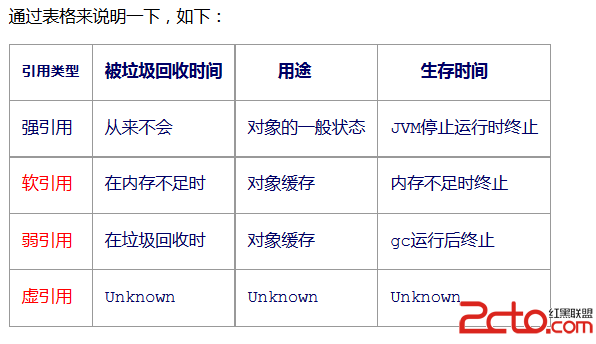 Android 面試題總結(二)
Android 面試題總結(二) 前言 筆者最近離職找工作快兩周了,這段時間陸陸續續也見識了北上廣這邊跟西部城市對待技術理念的差異和學習深度.俗話說:知恥而後勇,在經歷了
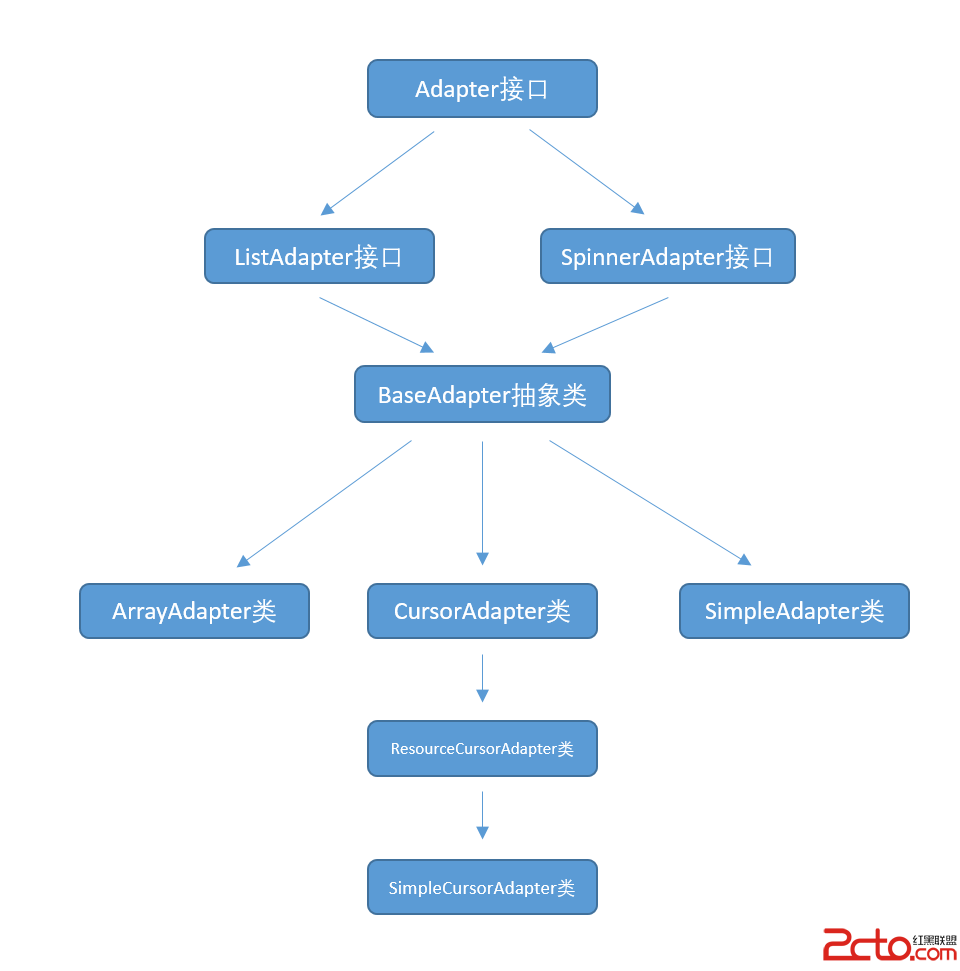 使用數據源碼解析Android中的Adapter、BaseAdapter、ArrayAdapter、SimpleAdapter和SimpleCursorAdapter
使用數據源碼解析Android中的Adapter、BaseAdapter、ArrayAdapter、SimpleAdapter和SimpleCursorAdapter
 android開發中遇到的問題匯總【九】
android開發中遇到的問題匯總【九】 244.http請求的url含有中字符時,需要Uri編碼。Uri.encoder() 245.使用androidstudio時,