編輯:關於android開發
前沿
Android 從5.0開始引入了Material design元素的設計,這種新的設計語言讓整個安卓的用戶體驗煥然一新,google在Android Design Support Library中封裝了一些重要的material design控件,在這之前其實github上也已經出現了許多各種各樣的material design 控件,只不過現在google把有些控件標准化了,注意這個Android Design Support Library和Android Support Library是有區別的,Android Support Library 只是支持了一些基本控件的封裝,而Android Design Support Library主要是一些Material design特效的實現,Android Design Support Library包括以下八種控件:
Navigation View——抽屜導航
TextInputLayout——EditText懸浮標簽
Floating Action Button——懸浮操作按鈕
Snackbar——提示(類似Toast)
TabLayout——選項卡
CoordinatorLayout——滾動控制
CollapsingToolbarLayout——可折疊的Toolbar(Google+、photos中的效果)
AppBarLayout——容器AppBar
本文分章對以上控件主要做使用方式介紹,暫不分析源碼。首先看Navigation View
Navigation View——抽屜導航
非常實用的一種抽屜導航效果,支持直接通過菜單資源文件直接生成導航標簽,實現起來也非常簡單,效果如下圖所示:
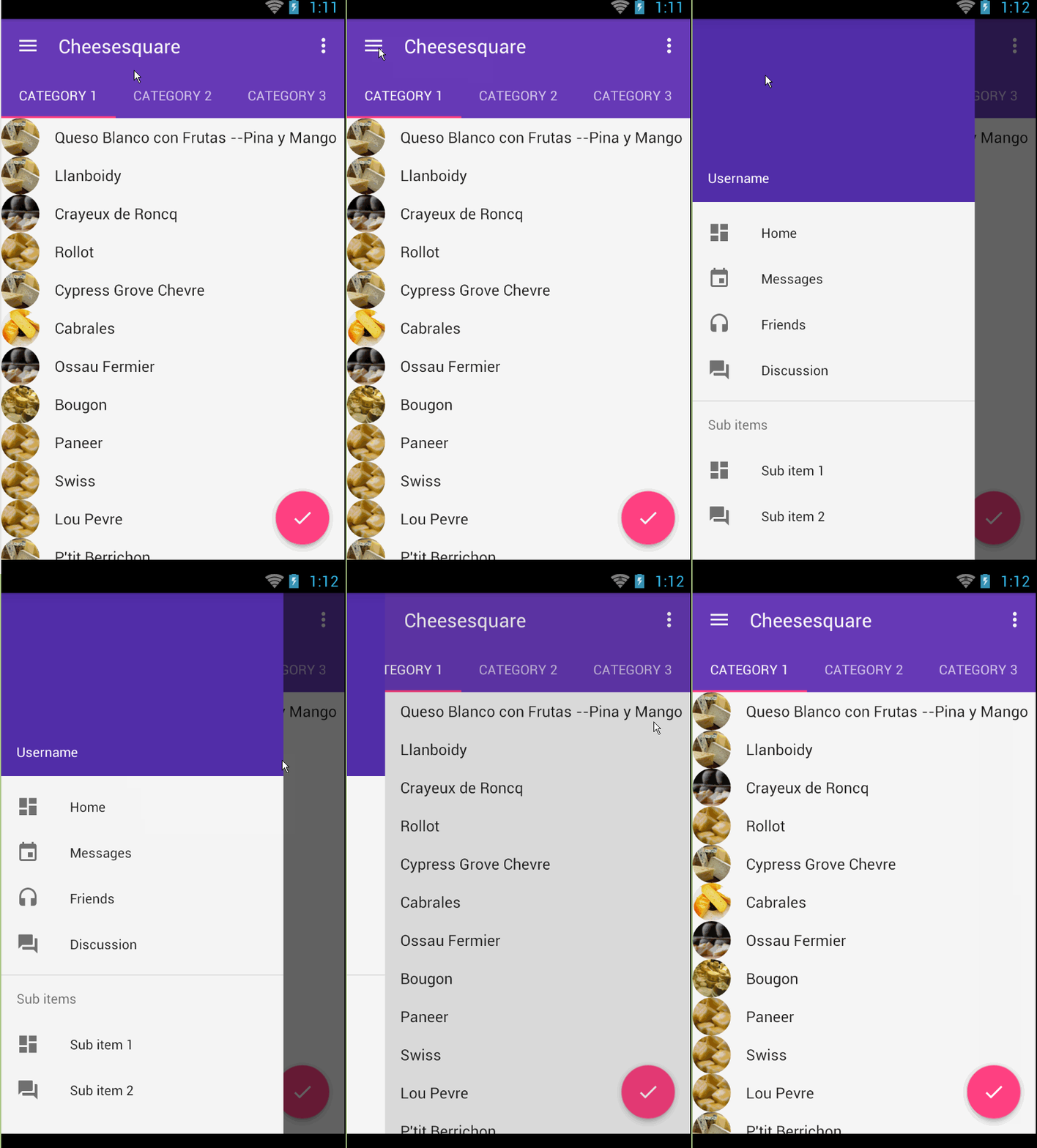
使用步驟:
(1)app的build.gradle中引入design包本文design包版本以23.1.1為例
dependencies {
    compile 'com.android.support:design:23.1.1'
}
(2)xml布局文件(activity_main.xml)和SlideMenu一樣需要使用到DrawerLayout。
<android.support.v4.widget.DrawerLayout xmlns:android="http://schemas.android.com/apk/res/android"
    xmlns:app="http://schemas.android.com/apk/res-auto"
    android:id="@+id/drawer_layout"
    android:layout_width="match_parent"
    android:layout_height="match_parent"
    android:fitsSystemWindows="true">

    <include layout="@layout/include_list_viewpager" /><!-- 展示內容區域的布局-->

    <android.support.design.widget.NavigationView
        android:id="@+id/nav_view"
        android:layout_width="wrap_content"
        android:layout_height="match_parent"
        android:layout_gravity="start"
        android:fitsSystemWindows="true"
        app:headerLayout="@layout/nav_header"
        app:menu="@menu/drawer_view" />

</android.support.v4.widget.DrawerLayout>
兩個重要的屬性
app:headerLayout ——導航頭布局
<LinearLayout xmlns:android="http://schemas.android.com/apk/res/android"
android:layout_width="match_parent"
android:layout_height="192dp"
android:background="?attr/colorPrimaryDark"
android:gravity="bottom"
android:orientation="vertical"
android:padding="16dp"
android:theme="@style/ThemeOverlay.AppCompat.Dark">
<TextView
android:layout_width="match_parent"
android:layout_height="wrap_content"
android:text="Username"
android:textAppearance="@style/TextAppearance.AppCompat.Body1" />
</LinearLayout>
drawer_view.xml(重點是看如何實現分組的)
<?xml version="1.0" encoding="utf-8"?>
<menu xmlns:android="http://schemas.android.com/apk/res/android">
    <group android:checkableBehavior="single"><!-- 實現單選-->
        <item
            android:id="@+id/nav_home"
            android:icon="@drawable/ic_dashboard"
            android:title="Home" />
        <item
            android:id="@+id/nav_messages"
            android:icon="@drawable/ic_event"
            android:title="Messages" />
        <item
            android:id="@+id/nav_friends"
            android:icon="@drawable/ic_headset"
            android:title="Friends" />
        <item
            android:id="@+id/nav_discussion"
            android:icon="@drawable/ic_forum"
            android:title="Discussion" />
    </group>

    <item android:title="Sub items">
        <menu>
            <item
                android:icon="@drawable/ic_dashboard"
                android:title="Sub item 1" />
            <item
                android:icon="@drawable/ic_forum"
                android:title="Sub item 2" />
        </menu>
    </item>

</menu>
(2)在代碼中聲明使用
NavigationView navigationView = (NavigationView) findViewById(R.id.nav_view);
        if (navigationView != null) {
            navigationView.setNavigationItemSelectedListener(
                new NavigationView.OnNavigationItemSelectedListener() {
                    @Override
                    public boolean onNavigationItemSelected(MenuItem menuItem) {
                        menuItem.setChecked(true);
                        mDrawerLayout.closeDrawers();
                        return true;
                    }
                });
        }
在onNavigationItemSelected()方法中就可以獲取導航菜單中的每個Item進而實現相應的功能了。
擴展:如果你想讓你的導航菜單在status bar 上也顯示需要進行如下設置主要針對5.0及以上版本
../valuse-v21/styles.xml
<resources>

    <style name="Theme.DesignDemo" parent="Base.Theme.DesignDemo">
        <item name="android:windowDrawsSystemBarBackgrounds">true</item>
        <item name="android:statusBarColor">@android:color/transparent</item>
    </style>

</resources>
同時在DrawerLayout中加入如下屬性
android:fitsSystemWindows="true"
如果你感覺Navigation View還不夠強大,可以看看MaterialDrawer,連接如下:https://github.com/mikepenz/MaterialDrawer
 Android技巧1:啟動屏+新功能左右導航
Android技巧1:啟動屏+新功能左右導航 前言 很長一段時間沒寫博客了,再不寫點東西真說不過去,把工作上的一些有價值的東西整理出來分享,在當下還有點時效性,不然遲早會
 Android中Canvas繪圖之Shader使用圖文詳解
Android中Canvas繪圖之Shader使用圖文詳解 概述 我們在用Android中的Canvas繪制各種圖形時,可以通過Paint.setShader(shad
 Android最新動畫框架完全解析(二)——Transitions Framework(Transitions 框架)
Android最新動畫框架完全解析(二)——Transitions Framework(Transitions 框架) 前面一篇文章講解了Android動畫Anima
 Android 熱補丁動態修復框架小結
Android 熱補丁動態修復框架小結 一、概述 最新github上開源了很多熱補丁動態修復框架,大致有: 上述三個框架呢,根據其描述,原理都來自