編輯:關於android開發
SeekBar(拖動條)和RatingBar(星級評分條)講解
一、SeekBar(拖動條)
(1)拖動條簡單理解就是可以拖動的線,這個對我們來講很常見,比如視頻播放或者音樂播放我們拖動播放的進度,下面總結一些常用屬性,很多屬性和ProgressBar是一樣的
,可以借鑒。
android:max:設置滑動條的最大值
android:progress:表示當前滑動條的值
android:secondaryProgress:二級滑動條
android:thumb:設置滑塊的drawable
同樣這些屬性也可以在Java中調用和設置
(2)SeeBar的監聽事件,對監聽事件我們應該不會陌生,在j2SE中有一個很重要的知識點監聽機制,同樣如果學過JavaScript裡面也有這樣概念叫事件。
onProgressChanged:進度條改變的時候會觸發
onStartTrackingTouch:安裝SeekBar的時候會觸發
OnStopTrackingTouch:放開SeekBar的時候會觸發
(3)簡單實例
<?xml version="1.0" encoding="utf-8"?><LinearLayout
    xmlns:android="http://schemas.android.com/apk/res/android"
    android:layout_width="match_parent"
    android:layout_height="match_parent"
    android:orientation="vertical">
    <SeekBar
        android:id="@+id/sb1"
        android:layout_width="match_parent"
        android:layout_height="50dp"
        android:max="100"
        android:thumb="@mipmap/ic_launcher"/>
    <TextView
        android:id="@+id/tv1"
        android:layout_width="match_parent"
        android:layout_height="50dp"
        android:layout_marginTop="10dp"
        android:gravity="center_vertical"
        android:text="Seek的當前值是0"
        android:textSize="24sp"/>
</LinearLayout>
Java代碼
package com.example.test3;

import android.app.Activity;
import android.os.Bundle;
import android.widget.SeekBar;
import android.widget.TextView;
import android.widget.Toast;


public class MainActivity extends Activity{
    private  TextView textView;
    private SeekBar seekBar;
    @Override
    protected void onCreate(Bundle savedInstanceState) {
        super.onCreate(savedInstanceState);
        setContentView(R.layout.activity_main);
        seekBar = (SeekBar) findViewById(R.id.sb1);
        textView = (TextView) findViewById(R.id.tv1);
        seekBar.setOnSeekBarChangeListener(new SeekBar.OnSeekBarChangeListener() {
            @Override
            public void onProgressChanged(SeekBar seekBar, int i, boolean b) {
                textView.setText("SeekBar的當前值為" + i);
            }

            @Override
            public void onStartTrackingTouch(SeekBar seekBar) {
                Toast.makeText(MainActivity.this,"你按住了SeekBar",Toast.LENGTH_LONG).show();
            }

            @Override
            public void onStopTrackingTouch(SeekBar seekBar) {
                Toast.makeText(MainActivity.this,"你松開了SeekBar",Toast.LENGTH_LONG).show();
            }
        });
    }
}
(4)定制SeekBar
step1:在drawable定義一個stateListDrawable文件命名為sb_thumb.xml
<?xml version="1.0" encoding="utf-8"?>
<selector xmlns:android="http://schemas.android.com/apk/res/android">
    <item android:state_pressed="true"  android:drawable="@mipmap/press"/>
    <item android:state_pressed="false" android:drawable="@mipmap/nomal"/>
</selector>
step2:在drawable定義一個layer-list,這時層疊圖片這裡是背景和當前進度條,命名為sb_bar.xml
<?xml version="1.0" encoding="utf-8"?>
<layer-list xmlns:android="http://schemas.android.com/apk/res/android">
    <item android:id="@android:id/background">
        <shape>
            <solid android:color="#FFFFD042" />
        </shape>
    </item>
    <item android:id="@android:id/progress">
        <clip>
            <shape>
                <solid android:color="#FF96E85D" />
            </shape>
        </clip>
    </item>
</layer-list>
step3:在布局文件中使用
<?xml version="1.0" encoding="utf-8"?>
<LinearLayout
    xmlns:android="http://schemas.android.com/apk/res/android"
    android:layout_width="match_parent"
    android:layout_height="match_parent"
    android:orientation="vertical">
    <SeekBar
        android:id="@+id/sb1"
        android:layout_width="match_parent"
        android:layout_height="wrap_content"
        android:max="100"
        android:progressDrawable="@drawable/sb_bar"
        android:thumb="@drawable/sb_thumb"/>
</LinearLayout>
效果圖:
二、RatingBar(星級評分條)
(1)星級評分條從這個名詞上面我們就很容易想象它的效果圖,在網上面買東西,經常就有店家讓我們給5星評價,下面總結一下常用的屬性:
android:isIndicator:是否用作指示,用戶無法更改,默認是false
android:numStars:顯示多少個星星,必須是整數
android:rating:默認是評分值,必須是浮點數
android:stepSize:評分每次增加的值,必須是浮點數style:樣式系統提供可選的有?android:attr/ratingBarStyleSmall和?android:attr/ratingBarStyleIndicator
(2)事件處理:只需要為RatinBar設置OnRatingBarChangeListener即可
(3)簡單實例
<?xml version="1.0" encoding="utf-8"?><LinearLayout
    xmlns:android="http://schemas.android.com/apk/res/android"
    android:layout_width="match_parent"
    android:layout_height="match_parent"
    android:orientation="vertical">
   <RatingBar
       android:layout_width="wrap_content"
       android:layout_height="wrap_content"
       android:rating="3.5"/>
</LinearLayout>
(4)定制RatingBar
step1:和前面的SeekBar一樣編寫一個layer-list的文件:ratingbar_full.xml:
<?xml version="1.0" encoding="utf-8"?>
<layer-list xmlns:android="http://schemas.android.com/apk/res/android">
    <item android:id="@android:id/background" android:drawable="@mipmap/press"/>
    <item android:id="@android:id/progress" android:drawable="@mipmap/nomal"/>
</layer-list>
step2:在style文件中使用
step3:在布局文件使用定義的style
效果圖
 算法—2.插入排序,算法插入排序
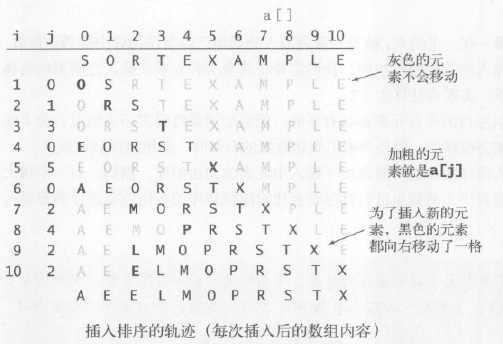
算法—2.插入排序,算法插入排序1.基本思想 通常人們整理橋牌的方法是一張一張的來,將每一張牌插入到其他已經有序的牌中的適當位置。在計算機的實現中,為了給要插入的元素騰出
 Android 框架啟動流程
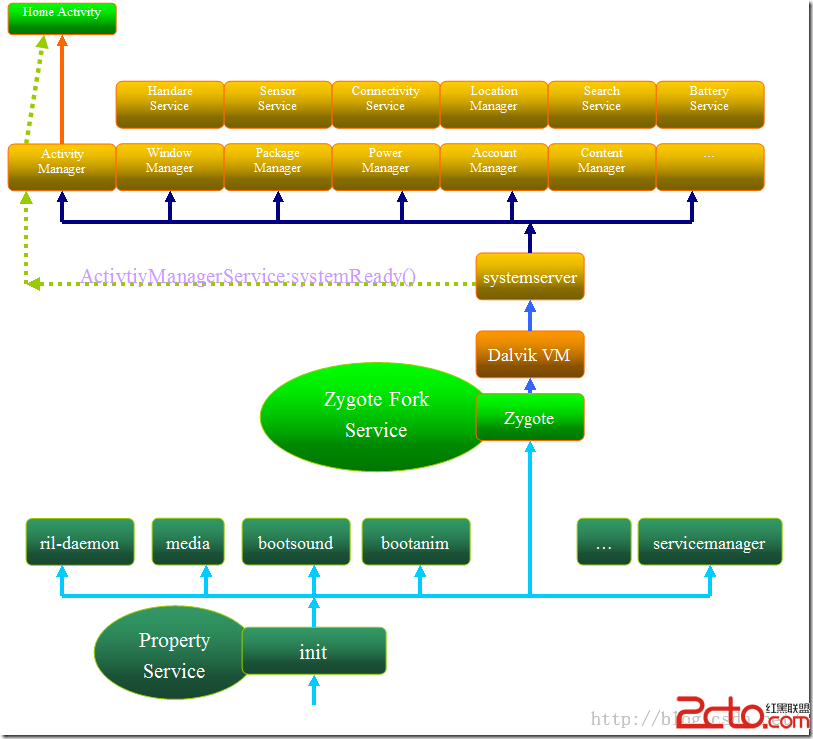
Android 框架啟動流程 As we all know,Android手機系統本質上是一個基於Linux的應用程序,它以Linux系統為內核。因此系統的啟動過程包
 Android—基於微信開放平台v3SDK,開發微信支付填坑。,androidv3sdk
Android—基於微信開放平台v3SDK,開發微信支付填坑。,androidv3sdk接觸微信支付之前聽說過這是一個坑,,,心裡已經有了准備。。。我以為我沒准跳坑出不來
 Android-Universal-Image-Loader (圖片異步加載緩存庫)的源碼解讀
Android-Universal-Image-Loader (圖片異步加載緩存庫)的源碼解讀 前言: 在Android開發中,對於圖片的加載可以說是個老生常談的問題了,