編輯:關於android開發
歸屬地數據源
http://webservice.webxml.com.cn/WebServices/MobileCodeWS.asmx
webxml網站還支持其他請求方式 如SOAP等等
界面比較簡單

下面是MainActivity.java

package com.sphere.guishudi;

import java.util.ArrayList;
import java.util.List;

import org.apache.http.HttpResponse;
import org.apache.http.HttpStatus;
import org.apache.http.NameValuePair;
import org.apache.http.client.HttpClient;
import org.apache.http.client.entity.UrlEncodedFormEntity;
import org.apache.http.client.methods.HttpPost;
import org.apache.http.impl.client.DefaultHttpClient;
import org.apache.http.message.BasicNameValuePair;
import org.apache.http.protocol.HTTP;
import org.apache.http.util.EntityUtils;

import android.app.Activity;
import android.app.ProgressDialog;
import android.os.Bundle;
import android.os.Handler;
import android.os.Message;
import android.view.Menu;
import android.view.View;
import android.view.View.OnClickListener;
import android.widget.Button;
import android.widget.EditText;
import android.widget.TextView;

/**
 * 手機號碼歸屬地查詢
 */
public class MainActivity extends Activity {

    private EditText phoneSecEditText;
    private TextView resultView;
    private Button queryButton;
    private ProgressDialog proDialog;
    private Thread thread;

    //定義消息
    private static final int NUMBER_FORMAT_ERROR = 0;
    private static final int QUERY_SUCCESS_MSG = 1;

    @Override
    protected void onCreate(Bundle savedInstanceState) {
        super.onCreate(savedInstanceState);
        setContentView(R.layout.main);
        phoneSecEditText = (EditText) findViewById(R.id.phone_sec);
        resultView = (TextView) findViewById(R.id.result_text);
        queryButton = (Button) findViewById(R.id.query_btn);
        proDialog = new ProgressDialog(MainActivity.this);
        //proDialog.setTitle("查詢歸屬地");
        proDialog.setMessage("正在查詢,請您耐心等待...");
        queryButton.setOnClickListener(new QueryOnClickListener());
    }

    Handler handler = new Handler(){

        @Override
        public void handleMessage(Message msg) {
            super.handleMessage(msg);
            switch (msg.what) {
            case NUMBER_FORMAT_ERROR:
                phoneSecEditText.setText("");
                resultView.setText("您輸入的號碼格式有誤");
                break;
            case QUERY_SUCCESS_MSG:
                resultView.setText(msg.obj.toString());
                proDialog.dismiss();
                break;

            default:
                break;
            }
        }

    };

    String phoneSec;
    class QueryOnClickListener implements OnClickListener{

        @Override
        public void onClick(View arg0) {
            //得到手機號
            phoneSec = phoneSecEditText.getText().toString().trim();
            if("".equals(phoneSec)||phoneSec.length()<7){
                //發送消息 顯示查詢結果的TextView清空
                handler.sendEmptyMessage(NUMBER_FORMAT_ERROR);
                //鎖定焦點
                phoneSecEditText.requestFocus();
                return;
            }
            // 查詢手機號碼(段)信息
            //getRemoteInfo(phoneSec);
            thread = new Thread(new QueryThread());
            thread.start();
            proDialog.onStart();
            proDialog.show();
        }
    }

    class QueryThread implements Runnable{

        @Override
        public void run() {
            getRemoteInfo(phoneSec);
        }
    }

     /**
     * 手機號段歸屬地查詢
     * @param phoneSec 手機號段
     */
    private void getRemoteInfo(String phoneSec) {
        // TODO Auto-generated method stub
        // 定義待請求的URL
        String requestUrl = "http://webservice.webxml.com.cn/WebServices/MobileCodeWS.asmx/getMobileCodeInfo";
        // 創建HttpClient實例
        HttpClient client = new DefaultHttpClient();
        // 根據URL創建HttpPost實例
        HttpPost post = new HttpPost(requestUrl);
        List<NameValuePair> params = new ArrayList<NameValuePair>();
        // 設置需要傳遞的參數
        params.add(new BasicNameValuePair("mobileCode", phoneSec));
        params.add(new BasicNameValuePair("userId", ""));
        try {
            // 設置URL編碼
            post.setEntity(new UrlEncodedFormEntity(params, HTTP.UTF_8));
            // 發送請求並獲取反饋
            HttpResponse response = client.execute(post);

            // 判斷請求是否成功處理
            if (response.getStatusLine().getStatusCode() == HttpStatus.SC_OK) {
                // 解析返回的內容
                String result = EntityUtils.toString(response.getEntity());
                // 將查詢結果經過解析後顯示在TextView中
                //resultView.setText(filterHtml(result));
                Message msg = new Message();
                msg.what = QUERY_SUCCESS_MSG;
                msg.obj = filterHtml(result);
                handler.sendMessage(msg);
            }
        } catch (Exception e) {
            e.printStackTrace();
        }
    }
    /**
     * 使用正則表達式過濾HTML標記
     *
     * @param source 待過濾內容
     * @return
     */
    private String filterHtml(String source) {
        if(null == source){
            return "";
        }
        return source.replaceAll("</?[^>]+>","").trim();
    }

    @Override
    public boolean onCreateOptionsMenu(Menu menu) {
        getMenuInflater().inflate(R.menu.main, menu);
        return true;
    }

}
記得在AndroidManifest.xml中配置<uses-permission android:name="android.permission.INTERNET" />
給予程序訪問網絡的權限。
使用子線程訪問網絡查詢數據,handler做消息處理。
上面所講解的只是HttpClient最基本的功能(發起POST請求);我們在浏覽器客戶端所執行的大多數操作HttpClient都能夠模擬,例如:提交表單、查詢數據、上傳下載文檔、頁面跳轉、Session存儲等。
getMobileCodeInfo
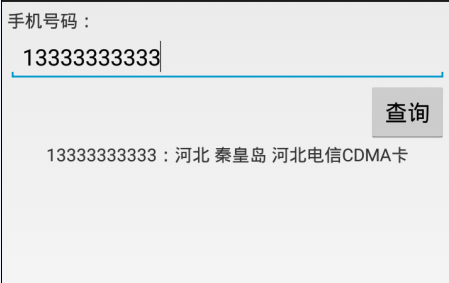
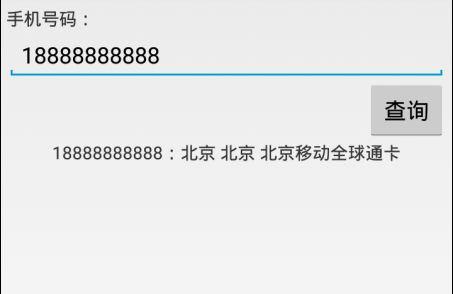
輸入參數:mobileCode = 字符串(手機號碼,最少前7位數字),userID = 字符串(商業用戶ID) 免費用戶為空字符串;返回數據:字符串(手機號碼:省份 城市 手機卡類型)。
測試結果:如下
參考:http://blog.csdn.net/lyq8479/article/details/6413216
 學習Android從0開始之開發工具篇-Android studio詳解
學習Android從0開始之開發工具篇-Android studio詳解 Android studio詳解 我們古人又雲:工欲善其事,必先利其器。 1、android s
 Android中自定義視圖View之---進階篇(Canvas的使用)
Android中自定義視圖View之---進階篇(Canvas的使用) 一、前言 那麼今天,我們繼續來看一篇關於Android中的UI篇,如何自定義視圖View的進階篇,
 msm8909+android5.1.1--打開調試(debug)串口
msm8909+android5.1.1--打開調試(debug)串口 msm8909+android5.1.1--打開調試(debug)串口 1.共同修改的地方 (
 Android基礎入門教程——10.8 LayoutInflater(布局服務)
Android基礎入門教程——10.8 LayoutInflater(布局服務) Android基礎入門教程——10.8 LayoutInflat
 關於jni編譯32位、64位動態庫(Android.mk和Application.mk文件),jniapplication.mk
關於jni編譯32位、64位動態庫(Android.mk和Applica
 Android開發4: Notification編程基礎、Broadcast的使用及其靜態注冊、動態注冊方式,靜態庫與動態庫編程
Android開發4: Notification編程基礎、Broadca