編輯:Android編程入門
get方式
private void doGet(){
  URL httpurl = new URl(url);
  HttpURLConnection  conn = (HttpURLConnection)httpUrl.openConnection();
  conn.setRequestMethod("GET");
  conn.setReadTimeout(5000);
  BufferedReader reader = new BuffedReader(new InputStreamReader(conn.getInputStream));
  String str;
  StringBuffer sb = new StringBuffer();
  while((str = reader.readLine()) != null){
     sb.append(str);
  }
}
post方式
private void doPost(){
  URL httpUrl = new URL(url);
  HttpURLconnection conn = (HttpURLConnection)  httpUrl.openConnection();
  conn.setRequestMethod("POST");
  conn.setReadTimeout(5000);
  OutputStream out = conn.getOutputStream();
  String content = "name"+name+"age"+age;
  out.write(content.getBytes());
  BufferedReader reader = new BufferedReader(new InputStreamReader(conn.getInputStream()));
  StringBuffer sb = new StrintgBuffer();
  String str;
  while((str = reader.readLine())!=null){
      sb.append(str);
  }
}
服務器端解決亂碼問題
String name = request.getParameter("name");
response.setContentType("text/html;charset=utf-8");
PrintWriter out = response.getWriter();
name = new String(name.getBytes("iso-8859-1"),"utf-8");
android解決亂碼問題
get方式:URLEncoder.encode(name,"utf-8");
post方式:不會產生亂碼,因為android系統默認使用utf-8編碼
獲取android系統默認配置信息
Properties property = System.getProperties();
property.list(System.out);
 Android課程---關於數據存儲的學習
activity_data1.xml<?xml version=1.0 encoding=utf-8?><LinearLayout xmlns:andr
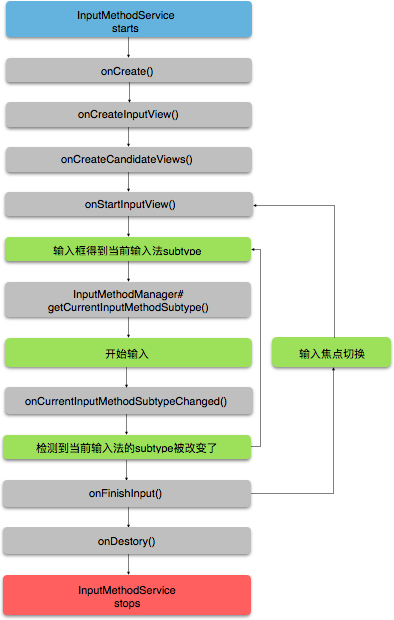 Android下創建一個輸入法
輸入法是一種可以讓用戶輸入文字的控件。Android提供了一套可擴展的輸入法框架,使得應用程序可以讓用戶選擇各種類型的輸入法,比如基於觸屏的鍵盤輸入或者基於語音。當安裝了
 在Ubuntu Server14.04上編譯Android6.0源碼
此前編譯過Android4.4的源碼,但是現在Android都到了7.0的版本,不禁讓我感歎Google的步伐真心難跟上,趁這周周末時間比較充裕,於是在過去的24小時裡,
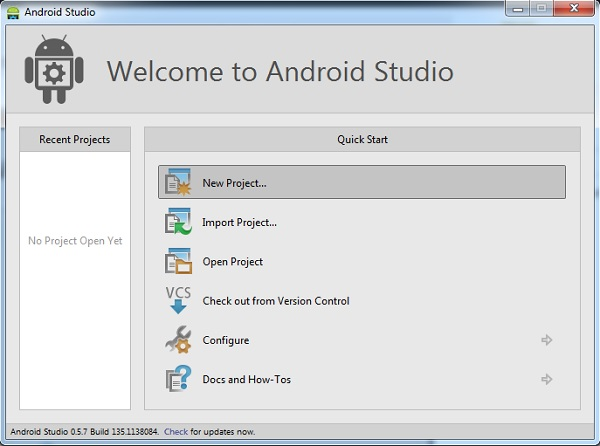 最全面的Android Studio使用教程
最全面的Android Studio使用教程 Android Studio是一套面世時間還不長的IDE(即集成開發環境),目前已經免費向谷歌及Android的開