編輯:Android開發實例
欣賞一下我們清爽的界面吧~
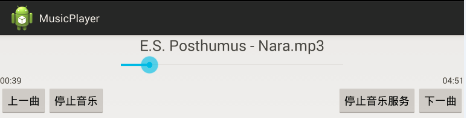
如果是只用activity來制作這樣的東西簡直是太小兒科了,此處我們當然用的是service
首先我們先上service的代碼:
1、如果我們要訪問service的屬性和方法,那麼在activity肯定是以bindservice的方法實現的,而在service中的onbind方法也是必須要實現的,onbind返回的Ibinder對象在activity的serviceconnection中得到使用。
2、activity獲取到Ibinder對象,可以進一步獲取服務對象和player對象,來進行訪問。
3、Environment.getExternalStorageDirectory()是獲取sd中的內容的,不管是手機出場就已經內置的sd卡,還是用戶後來自己添加的sd卡;而getExternalFilesDir()獲取的真正是手機內部的存儲空間,,/data/data/your_package/,隨著應用的卸載存儲的文件會被刪除。
4、service通過發送廣播與activity進行界面交互
public class MusicService extends Service{

 private List<File> musicList;
 private MediaPlayer player;
 private int curPage;
 public static final String MFILTER = "broadcast.intent.action.text";
 public static final String NAME = "name";
 public static final String TOTALTIME = "totaltime";
 public static final String CURTIME = "curtime";

 @Override
 public IBinder onBind(Intent intent) {//1
  // TODO Auto-generated method stub
  return new MBinder();
 }
 public class MBinder extends Binder{//2
  public MusicService getService(){
   return MusicService.this;
  }
  public MediaPlayer getPlayer(){
   return player;
  }
 }
 @Override
 public void onCreate() {
  // TODO Auto-generated method stub
  super.onCreate();
  musicList = new ArrayList<File>();
  File rootDir = Environment.getExternalStorageDirectory();//3
  Log.d("rootname",rootDir.getName());
  Log.d("rootname",rootDir.getAbsolutePath());
  fillMusicList(rootDir);
  Log.d("musiclist",String.valueOf(musicList.size()));
  player = new MediaPlayer();
  if (musicList.size() != 0) {
   startPlay();
  }

  player.setOnCompletionListener(new OnCompletionListener() {

   @Override
   public void onCompletion(MediaPlayer mp) {
    // TODO Auto-generated method stub
    player.reset();
    curPage = curPage==musicList.size()-1? (curPage+1)%musicList.size() : curPage+1;
    startPlay();
   }
  });
 }
 /*迭代獲取 音樂 文件*/
 private void fillMusicList(File dir){
  File[] sourceFiles = dir.listFiles();
  Log.d("長度",String.valueOf(sourceFiles.length));
  for(File file : sourceFiles){
   if (file.isDirectory()) {
    Log.d("文件夾名稱",String.valueOf(file.getName()));
//    if (!file.getName().equals("lost+found")) {
     fillMusicList(file);
//    }

   }
    else {
     String name = file.getName();
     Log.d("childname",file.getName());
     if (name.endsWith(".mp3")||name.endsWith(".acc")) {//支持的格式
      musicList.add(file);
     }
   }
  }
 }
 private void startPlay(){
  mSendBroadCast(NAME,musicList.get(curPage).getName());//4
  try {
   player.setDataSource(musicList.get(curPage).getAbsolutePath());
   player.prepare();
   player.start();
   player.getDuration();
   mSendBroadCast(TOTALTIME,player.getDuration());
   Timer timer = new Timer();
   timer.schedule(new TimerTask() {

    @Override
    public void run() {
     // TODO Auto-generated method stub
     mSendBroadCast(CURTIME,player.getCurrentPosition());
    }
   },0,1000);

  } catch (IllegalArgumentException e) {
   // TODO Auto-generated catch block
   e.printStackTrace();
  } catch (SecurityException e) {
   // TODO Auto-generated catch block
   e.printStackTrace();
  } catch (IllegalStateException e) {
   // TODO Auto-generated catch block
   e.printStackTrace();
  } catch (IOException e) {
   // TODO Auto-generated catch block
   e.printStackTrace();
  }
 }


 public void playNext(){
  curPage = curPage==musicList.size()-1? (curPage+1)%musicList.size() : curPage+1;
  Log.d("curpage",String.valueOf(curPage));
  player.reset();
  startPlay();
 }
 public void playPrevious(){
  curPage = curPage==0? 0 : curPage-1;
  Log.d("curpage",String.valueOf(curPage));
  player.reset();
  startPlay();
 }
 public void parse(){
  player.pause();
 }
 public void restart(){
  player.start();
 }
 private void mSendBroadCast(String key, String value){
  Intent intent = new Intent(MFILTER);
  intent.putExtra(key,value);//發送廣播
  sendBroadcast(intent);
 }

 private void mSendBroadCast(String key, int value){
  Intent intent = new Intent(MFILTER);
  intent.putExtra(key,value);//發送廣播
  sendBroadcast(intent);
 }
}
接下來上activity代碼:
1、通過Ibinder對象獲取服務對象
2、獲取到服務對象以後,再訪問服務的方法。
3、通過receiver刷新頁面
public class MainActivity extends Activity implements OnClickListener{

 SeekBar seekBar;
 TextView curTime,totalTime;
 TextView title;

 private ServiceConnection sc;
 private MusicService ms;
 private boolean isStop;
 private double totalTimeInt;
 @Override
 protected void onCreate(Bundle savedInstanceState) {
  super.onCreate(savedInstanceState);
  setContentView(R.layout.activity_main);
  IntentFilter filter = new IntentFilter(MusicService.MFILTER);
  registerReceiver(new MusicReceiver(),filter);
  sc = new ServiceConnection() {

   @Override
   public void onServiceDisconnected(ComponentName name) {
    // TODO Auto-generated method stub
    ms = null;
   }

   @Override
   public void onServiceConnected(ComponentName name, IBinder service) {
    // TODO Auto-generated method stub
    ms = ((MBinder)service).getService();//1

   }
  };
  Button previous = (Button) findViewById(R.id.previous);
  Button next = (Button) findViewById(R.id.next);
  Button stop = (Button) findViewById(R.id.stop);
  Button stopService = (Button) findViewById(R.id.stopService);
  seekBar = (SeekBar) findViewById(R.id.mSeekbar);
  curTime = (TextView) findViewById(R.id.curTime);
  totalTime = (TextView) findViewById(R.id.totalTime);
  title = (TextView) findViewById(R.id.title);

  previous.setOnClickListener(this);
  next.setOnClickListener(this);
  stop.setOnClickListener(this);
  stopService.setOnClickListener(this);
 }

 @Override
 public void onClick(View v) {
  // TODO Auto-generated method stub
  switch (v.getId()) {
  case R.id.previous:
   ms.playPrevious();//2
   break;
  case R.id.next:
   ms.playNext();
   break;
  case R.id.stop:
   if (isStop) {
    ms.restart();
   }
   else {
    ms.parse();
   }
   isStop = !isStop;
   break;
  case R.id.stopService:
   Intent intent = new Intent("com.intent.musicplayer.MusicService");
   unbindService(sc);
   stopService(intent);

   break;
  default:
   break;
  }
 }

 @Override
 protected void onStart() {
  // TODO Auto-generated method stub
  super.onStart();
  Intent intent = new Intent("com.intent.musicplayer.MusicService");
  bindService(intent,sc,Context.BIND_AUTO_CREATE);//當然你可以用startService的方式啟動服務,這樣結束了activity以後並不會結束service

 }
 private String transferMilliToTime(int millis){
  DateFormat format = new SimpleDateFormat("mm:ss");
  String result = format.format(new Date(millis));
  return result;
 }
 private class MusicReceiver extends BroadcastReceiver{//3

  @Override
  public void onReceive(Context context, Intent intent) {
   // TODO Auto-generated method stub
   if (intent.getIntExtra(MusicService.CURTIME,0)!=0) {
    double curTimeInt = intent.getIntExtra(MusicService.CURTIME,0);
    curTime.setText(transferMilliToTime((int)curTimeInt));
    double result = curTimeInt/totalTimeInt*100;
    seekBar.setProgress((int) Math.floor(result));

   }
   else if(intent.getIntExtra(MusicService.TOTALTIME,0)!=0) {
    totalTimeInt = intent.getIntExtra(MusicService.TOTALTIME,0);
    totalTime.setText(transferMilliToTime((int)(totalTimeInt)));
   }
   else if (!TextUtils.isEmpty(intent.getStringExtra(MusicService.NAME))) {
    title.setText(intent.getStringExtra(MusicService.NAME));
   }
  }

 }
}
4、最後附上xml布局文件,算是代碼上傳完全了:
<LinearLayout xmlns:android="http://schemas.android.com/apk/res/android"
 xmlns:tools="http://schemas.android.com/tools"
 android:layout_width="match_parent"
 android:layout_height="match_parent"
 android:orientation="vertical"
 tools:context="${relativePackage}.${activityClass}" >
 <TextView
  android:id="@+id/title"
  android:layout_width="wrap_content"
  android:layout_height="wrap_content"
  android:layout_gravity="center_horizontal"
  android:textSize="25sp"
  android:textColor="#444444"
  />
 <SeekBar
  android:id="@+id/mSeekbar"
  android:layout_gravity="center_horizontal"
  android:layout_width="400dp"
  android:layout_height="wrap_content"
  android:max="100"
  />
 <RelativeLayout
  android:layout_width="match_parent"
  android:layout_height="wrap_content"
  >
  <TextView
  android:id="@+id/curTime"
  android:layout_height="wrap_content"
  android:layout_width="wrap_content"
  android:layout_alignParentLeft="true"

  />
  <TextView
  android:id="@+id/totalTime"
  android:layout_height="wrap_content"
  android:layout_width="wrap_content"
  android:layout_alignParentRight="true"
  />
 </RelativeLayout>
 <RelativeLayout
  android:layout_width="match_parent"
  android:layout_height="wrap_content"
  >
  <Button
  android:id="@+id/previous"
  android:layout_height="wrap_content"
  android:layout_width="wrap_content"
  android:text="上一曲"
  android:layout_alignParentLeft="true"
  />
  <Button
   android:id="@+id/stop"
   android:layout_height="wrap_content"
   android:layout_width="wrap_content"
   android:text="停止音樂"
   android:layout_toRightOf="@id/previous"
   />

  <Button
  android:id="@+id/next"
  android:layout_height="wrap_content"
  android:layout_width="wrap_content"
  android:text="下一曲"
  android:layout_alignParentRight="true"
  />
   <Button
   android:id="@+id/stopService"
   android:layout_height="wrap_content"
   android:layout_width="wrap_content"
   android:text="停止音樂服務"
   android:layout_toLeftOf="@id/next"
   />
 </RelativeLayout>

</LinearLayout>
以上就是制作Android音樂播放器的全部代碼,希望對大家的學習有所幫助。
 使用User Agent分辨出Android設備類型的安全做法
隨著Android設備增多,不少網站都開始設備Android設備,而Android主流設備類型以手機和平板為主。網站在適配時通過User Agent(用戶代理,以
 Android ApiDemo示例解讀系列之三:App
SDK中的示例程序App->Activity->Animation
 Android開發之時間日期操作實例
相信對於手機的時間日期設置大家一定都不陌生吧,今天舉一個關於時間日期設置的示例,其中有些許不完善之處,例如如何使設置的時間日期和手機系統同步等。感興趣的讀者可以根
 Android TabWidget切換卡的實現應用
TabWidget類似於Android 中查看電話薄的界面,通過多個標簽切換顯示不同內容。要實現這一效果,首先要了解TabHost,它是一個用來存放多個Tab標簽