編輯:Android資訊
介紹 Mono for Android 平台下 ListActivity 的使用, 以及如何進行自定義 ListActivity 的 Adapter。
ListActivity 是 android 開發中很常用的布局組件, 通常用於顯示可以滾動的列表項。 以 ArrayAdapter<T> 為例, 最簡單的使用方法如下:
1、 新建一個 Activity , 名稱為 MyListActivity , 並修改其基類為 Android.App.ListActivity, 代碼如下:
[Activity (Label = "MyListApp", MainLauncher = true)]
public class MyListActivity : ListActivity {

    protected override void OnCreate(Bundle bundle) {
        base.OnCreate(bundle);
    }
}
2、 添加一個字符串數組字段作為數據源, 代碼如下:
// 最簡單的方法, 用數組作為數據源
private readonly string[] _countries = new String[] {
    "Afghanistan","Albania","Algeria","American Samoa","Andorra",
    "Angola","Anguilla","Antarctica","Antigua and Barbuda","Argentina",
    "Armenia","Aruba","Australia","Austria","Azerbaijan",
    "Bahrain","Bangladesh","Barbados","Belarus","Belgium",
    "Belize","Benin","Bermuda","Bhutan","Bolivia",
    "Bosnia and Herzegovina","Botswana","Bouvet Island","Brazil",
    "British Indian Ocean Territory"
};
3、 在 OnCreate 方法中設置 ListView 的數據源, 代碼如下:
protected override void OnCreate(Bundle bundle) {
    base.OnCreate(bundle);
    // 設置 ListAdapter 為 ArrayAdapter<string>
    this.ListAdapter = new ArrayAdapter<string>(this, Resource.Layout.MyListActivityItemLayout, this._countries);
    this.ListView.TextFilterEnabled = true;
    // 添加一個建大的事件處理函數, 以通知的形式顯示選中項。
    this.ListView.ItemClick += (object sender, AdapterView.ItemClickEventArgs e) => {
        var toast = Toast.MakeText(this.Application, ((TextView)e.View).Text, ToastLength.Short);
        toast.Show();
    };

}
現在, 完整的 MyListActivity.cs 看起來應該是這樣子的:
[Activity(Label = "ListDemo", MainLauncher = true)]
public class MyListActivity : ListActivity {

    private readonly string[] _countries = new String[] {
        "Afghanistan","Albania","Algeria","American Samoa","Andorra",
        "Angola","Anguilla","Antarctica","Antigua and Barbuda","Argentina",
        "Armenia","Aruba","Australia","Austria","Azerbaijan",
        "Bahrain","Bangladesh","Barbados","Belarus","Belgium",
        "Belize","Benin","Bermuda","Bhutan","Bolivia",
        "Bosnia and Herzegovina","Botswana","Bouvet Island","Brazil",
        "British Indian Ocean Territory"
    };

    protected override void OnCreate(Bundle bundle) {
        base.OnCreate(bundle);

        // Create your application here
        this.ListAdapter = new ArrayAdapter<string>(this, Resource.Layout.MyListActivityItemLayout, this._countries);
        this.ListView.TextFilterEnabled = true;

        this.ListView.ItemClick += (object sender, AdapterView.ItemClickEventArgs e) => {
            var toast = Toast.MakeText(this.Application, ((TextView)e.View).Text, ToastLength.Short);
            toast.Show();
        };
    }
}
如果現在運行程序, 看到的效果如下:
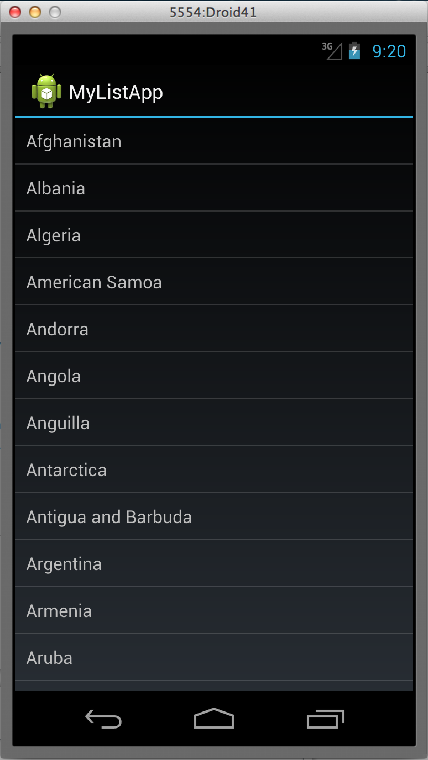
ListActivity的使用就是這麼簡單, 但是這往往不是我們所需要的, 接下來將會對上面的代碼進行一些重構。
把要顯示的列表作為 Android 資源是個不錯的注意, 減少對顯示內容的硬編碼, 必要時還可以方便的實現多語言顯示, 在 Assets/values/strings.xml 文件中添加下面的內容:
<string-array name="CountryArray">
    <item>Afghanistan</item>
    <item>Albania</item>
    <item>Algeria</item>
    <item>American Samoa</item>
    <item>Andorra</item>
    <item>Angola</item>
    <item>Anguilla</item>
    <item>Antarctica</item>
    <item>Antigua and Barbuda</item>
    <item>Argentina</item>
    <item>Armenia</item>
    <item>Aruba</item>
    <item>Australia</item>
    <item>Austria</item>
    <item>Azerbaijan</item>
    <item>Bahrain</item>
    <item>Bangladesh</item>
    <item>Barbados</item>
    <item>Belarus</item>
    <item>Belgium</item>
    <item>Belize</item>
    <item>Benin</item>
    <item>Bermuda</item>
    <item>Bhutan</item>
    <item>Bolivia</item>
    <item>Bosnia and Herzegovina</item>
    <item>Botswana</item>
    <item>Bouvet Island</item>
    <item>Brazil</item>
    <item>British Indian Ocean Territory</item>
</string-array>
然後, 在 OnCreate 方法中這樣初始化 ArrayAdapter :
var countries = Resources.GetStringArray(Resource.Array.CountryArray);
this.ListAdapter = new ArrayAdapter<string>(this,
    Resource.Layout.MyListActivityItemLayout, countries);
現在的 MyListActivity 的源代碼如下:
[Activity(Label = "ListDemo", MainLauncher = true)]
public class MyListActivity : ListActivity {

    protected override void OnCreate(Bundle bundle) {
        base.OnCreate(bundle);

        // 獲取資源中定義的字符串數組
        var countries = Resources.GetStringArray(Resource.Array.CountryArray);
        this.ListAdapter = new ArrayAdapter<string>(this, Resource.Layout.MyListActivityItemLayout, countries);
        this.ListView.TextFilterEnabled = true;

        this.ListView.ItemClick += (object sender, AdapterView.ItemClickEventArgs e) => {
            var toast = Toast.MakeText(this.Application, ((TextView)e.View).Text, ToastLength.Short);
            toast.Show();
        };
    }
}
在很多情況下, 還需要使用自定義的 ListAdapter , Mono for Android 版本的自定義 BaseAdapter 實現如下:
public class MyListAdapter : BaseAdapter<string> {

    private string[] _data;
    private Activity _activity;

    public MyListAdapter(Activity activity) {
        // 引用當前的 activity 是必須的, 否則貌似沒辦法調用 LayoutInflater
        this._activity = activity;
        // 從資源中加載數組數據
        this._data = activity.Resources.GetStringArray(Resource.Array.CountryArray);
    }

    // 重寫 GetItemId 方法,
    public override long GetItemId(int position) {
        return position;
    }

    // 重寫 GetView 方法, 獲取每個數據的單元格。
    public override View GetView(int position, View convertView, ViewGroup parent) {
        TextView view = convertView as TextView;
        if (view == null) {
            // 貌似只有通過 Activity 才能使用 LayoutInflactor ,
            view = (TextView)this._activity.LayoutInflater.Inflate(Resource.Layout.MyListActivityItem, null);
        }
        view.Text = this._data[position];
        return view;
    }

    // 重寫 Count 屬性, 只有 Mono for Android 才有
    public override int Count {
        get {
            return this._data.Length;
        }
    }

    // 實現 this 索引器, 這個也是 Mono for Android 才有的
    public override string this[int position] {
        get {
            return this._data[position];
        }
    }

}
從上面的代碼可以看出, Mono for Android 提供的 BaseAdapter<T> 有著濃厚的 .Net 風格, 比如 Count 屬性, this 索引器 等, 當然, 這些對於有經驗的 .net 開發人員來說, 都是已經掌握的知識了。 使用這個自定義 Adapter 也是非常方便的, 只要用將 ListActivity 的初始化代碼改成這樣就行:
var arrayAdapter = new MyListAdapter(this);
this.ListAdapter = arrayAdapter;
this.ListView.TextFilterEnabled = true;
 Android的官司打贏了 屬於Android社區的勝利
BI 中文站 5 月 27 日報道 美國陪審團裁決剛剛揭曉,根據此次最新的裁決,甲骨文在控訴谷歌侵權之爭中敗訴。陪審團認為,谷歌使用有爭議的代碼程序是“公平使用(
 Android View 自定義 RangeSeekBar 范圍選擇器
前段時間群裡兄弟項目中有類似這樣的需求 我看到兄弟受苦受難,於心不忍。又因事不關己,打算高高掛起。正在愛恨糾結之時,日神對我說:沒事多造點輪子,你的人生會有很多
 Android應用中MVP最佳實踐
所謂MVP(Model-View-Presenter)模式。是將APP的結構分為三層: view – UI顯示層 view 層主要負責: 提供UI交
 Android鏡子應用 一面可編程的鏡子
本文由碼農網 – 小峰原創翻譯,轉載請看清文末的轉載要求,歡迎參與我們的付費投稿計劃! 先來看看我家裡的一面搭載了Android應用的鏡子,上圖: 擁有