編輯:Android資訊
在Android中listview是最常用的控件之一,但是有時候我們會覺得千篇一律的listview看起來過於單調,於是就產生了listView動畫,listview加載了動畫會讓用戶體驗更好,本期就分享一些listview動畫以及實現方法,效果圖
相信大家都熟悉Android的Tween動畫,前四種動畫就是Translate,Alpha,Rotate,Scale,最後一種Rotate3d則是用了一個3D旋轉動畫工具類Rotate3dAnimation,這個類的構造函數中接收一些3D旋轉時所需用到的參數,比如旋轉開始和結束的角度,旋轉的中心點等。
LayoutAnimationController可以控制一組控件按照規定顯示,ListView中的mListView.setLayoutAnimation相信大家都知道是用來干什麼的了,接下來上代碼:
	private Button button, button2, button3, button4, button5;
	private ListView mListView;
	private Animation animation;
	private LayoutAnimationController controller;
	private String[] arry = { "一", "二", "三", "四", "五", "六" };
	private ArrayAdapter<String> adapter;

	protected void onCreate(Bundle savedInstanceState) {
		super.onCreate(savedInstanceState);
		setContentView(R.layout.activity_main);
		initView();
		adapter = new ArrayAdapter<String>(this,
				android.R.layout.simple_list_item_1, arry);
		mListView.setAdapter(adapter);

	}

	private void initView() {
		// TODO Auto-generated method stub
		mListView = (ListView) findViewById(R.id.list);
		button = (Button) findViewById(R.id.btn_tran);
		button.setOnClickListener(this);
		button2 = (Button) findViewById(R.id.btn_alpha);
		button2.setOnClickListener(this);
		button3 = (Button) findViewById(R.id.btn_rotate);
		button3.setOnClickListener(this);
		button4 = (Button) findViewById(R.id.btn_scale);
		button4.setOnClickListener(this);
		button5 = (Button) findViewById(R.id.rotate3d);
		button5.setOnClickListener(this);
	}

	@Override
	public void onClick(View arg0) {
		// LayoutAnimationController.ORDER_NORMAL; 順序顯示
		// LayoutAnimationController.ORDER_REVERSE;反顯示
		// LayoutAnimationController.ORDER_RANDOM; 隨機顯示
		switch (arg0.getId()) {
		case R.id.btn_tran:
			animation = new TranslateAnimation(-50f, 0f, 0f, 0f);
			animation.setDuration(500);
			//1f為延時
			controller = new LayoutAnimationController(animation, 1f);
			controller.setOrder(LayoutAnimationController.ORDER_NORMAL);
			mListView.setLayoutAnimation(controller);
			adapter.notifyDataSetInvalidated();
			break;
		case R.id.btn_alpha:
			animation = new AlphaAnimation(0f, 1f);
			animation.setDuration(500);
			controller = new LayoutAnimationController(animation, 1f);
			controller.setOrder(LayoutAnimationController.ORDER_NORMAL);
			mListView.setLayoutAnimation(controller);
			adapter.notifyDataSetInvalidated();
			break;
		case R.id.btn_rotate:
			animation = new RotateAnimation(0f, 360f);
			animation.setDuration(500);
			controller = new LayoutAnimationController(animation, 1f);
			controller.setOrder(LayoutAnimationController.ORDER_NORMAL);
			mListView.setLayoutAnimation(controller);
			adapter.notifyDataSetInvalidated();
			break;
		case R.id.btn_scale:
			animation = new ScaleAnimation(0.1f, 1.0f, 0.1f, 1.0f);
			animation.setDuration(500);
			controller = new LayoutAnimationController(animation, 1f);
			controller.setOrder(LayoutAnimationController.ORDER_NORMAL);
			mListView.setLayoutAnimation(controller);
			adapter.notifyDataSetInvalidated();
			break;
		case R.id.rotate3d:
			animation = new Rotate3dAnimation(0, 360, 200, 200, 0, true);
			animation.setDuration(1000);
			controller = new LayoutAnimationController(animation, 0.1f);
			controller.setOrder(LayoutAnimationController.ORDER_NORMAL);
			mListView.setLayoutAnimation(controller);
			adapter.notifyDataSetInvalidated();
			break;
		default:
			break;
		}

	}
這樣大家可以隨心所欲的編寫自己喜歡的動畫效果。
 MVP實現Android應用層開發原理及過程
背景 之所以要談這個話題是因為你在開發App時可能會發現,Activity擔負的責任非常之重,如果站在MVC框架角度看自己開發的App,一般xml布局文件科Act
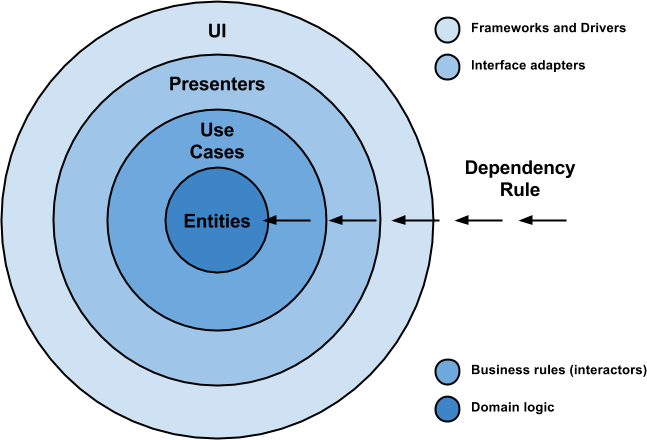 Android 架構演化之路
大家好! 過了一好陣子了(在此期間我收到了大量的讀者反饋) 我決定是時候回到手機程序架構這個話題上了(這裡用android代碼舉例), 給大家另一個我認為好的解決
 十大技巧優化Android App性能
無論錘子還是茄子手機的不斷冒出,Android系統的手機市場占有率目前來說還是最大的,因此基於Android開發的App數量也是很龐大的。那麼,如何能開發出更高性
 Android動態高斯模糊效果教程
寫在前面 最近一直在做畢設項目的准備工作,考慮到可能要用到一個模糊的效果,所以就學習了一些高斯模糊效果的實現。比較有名的就是 FastBlur 以及它衍生的一些優