編輯:關於Android編程
要求:
輸入文件名,文件內容分別存儲在手機內存和外存中,並且都可以讀去取出來。
步驟:
1.創建一個名為CDsaveFile的Android項目
2.編寫布局文件activity_main.xml:
<LinearLayout xmlns:android="http://schemas.android.com/apk/res/android"
 xmlns:tools="http://schemas.android.com/tools"
 android:layout_width="match_parent"
 android:layout_height="match_parent"
 android:orientation="vertical"
 tools:context="hhh.exercise.cdsavefile.MainActivity" >

 <LinearLayout
 android:layout_width="match_parent"
 android:layout_height="wrap_content"
 android:orientation="horizontal" >

 <TextView
  android:layout_width="wrap_content"
  android:layout_height="wrap_content"
  android:text="@string/textView_inputFileName"
  android:textColor="#00ff00"
  android:textSize="26sp" />

 <EditText
  android:id="@+id/editView_fileName"
  android:layout_width="match_parent"
  android:layout_height="wrap_content"
  android:gravity="center"
  android:hint="@string/editView_fileName"
  android:maxLines="1"
  android:textColor="#ff0000"
  android:textSize="26sp" />

 <requestFocus />
 </LinearLayout>

 <TextView
 android:layout_width="match_parent"
 android:layout_height="wrap_content"
 android:text="@string/textView_inputFileContent"
 android:textColor="#00ff00"
 android:textSize="26sp" />

 <EditText
 android:id="@+id/editView_fileContent"
 android:layout_width="match_parent"
 android:layout_height="wrap_content"
 android:gravity="center"
 android:hint="@string/editView_fileContent"
 android:maxLines="2"
 android:minLines="2"
 android:textColor="#ff0000"
 android:textSize="26sp" />

 <LinearLayout
 android:layout_width="match_parent"
 android:layout_height="wrap_content"
 android:orientation="horizontal" >

 <Button
  android:id="@+id/button_saveToPhone"
  android:layout_width="0dp"
  android:layout_height="wrap_content"
  android:layout_weight="1"
  android:text="@string/button_saveToPhone"
  android:textColor="#ff00ff"
  android:textSize="24sp" />

 <Button
  android:id="@+id/button_readFromPhone"
  android:layout_width="0dp"
  android:layout_height="wrap_content"
  android:layout_weight="1"
  android:text="@string/button_readFromPhone"
  android:textColor="#00ffff"
  android:textSize="24sp" />
 </LinearLayout>

 <LinearLayout
 android:layout_width="match_parent"
 android:layout_height="wrap_content"
 android:orientation="horizontal" >

 <Button
  android:id="@+id/button_saveToSD"
  android:layout_width="0dp"
  android:layout_height="wrap_content"
  android:layout_weight="1"
  android:text="@string/button_saveToSD"
  android:textColor="#ff00ff"
  android:textSize="24sp" />

 <Button
  android:id="@+id/button_readFromSD"
  android:layout_width="0dp"
  android:layout_height="wrap_content"
  android:layout_weight="1"
  android:text="@string/button_readFromSD"
  android:textColor="#00ffff"
  android:textSize="24sp" />
 </LinearLayout>

 <EditText
 android:id="@+id/editText_showResult"
 android:layout_width="match_parent"
 android:layout_height="wrap_content"
 android:gravity="center"
 android:maxLines="3"
 android:minLines="3"
 android:hint="@string/editText_showResult"
 android:textColor="#cccc00"
 android:textSize="30sp" />

</LinearLayout>
3.編寫主活動中代碼MainActivity.Java:
package hhh.exercise.cdsavefile;

import android.annotation.SuppressLint;
import android.annotation.TargetApi;
import android.app.Activity;
import android.os.Build;
import android.os.Bundle;
import android.os.Environment;
import android.os.StatFs;
import android.view.View;
import android.view.Window;
import android.view.View.OnClickListener;
import android.widget.Button;
import android.widget.EditText;
import android.widget.Toast;
import hhh.exercise.service.FileService;

public class MainActivity extends Activity implements OnClickListener {

 private EditText editView_fileName;
 private EditText editView_fileContent;
 private EditText editText_showResult;
 private FileService service;

 @Override
 protected void onCreate(Bundle savedInstanceState) {
 super.onCreate(savedInstanceState);
 requestWindowFeature(Window.FEATURE_NO_TITLE);
 setContentView(R.layout.activity_main);

 // 實例化 FileService 類,該類用於處理按鈕觸發的事件的具體操作
 service = new FileService(getApplicationContext());

 // 獲取布局中的控件
 editView_fileName = (EditText) findViewById(R.id.editView_fileName);
 editView_fileContent = (EditText) findViewById(R.id.editView_fileContent);

 editText_showResult = (EditText) findViewById(R.id.editText_showResult);

 // 獲取按鈕並創建觸發事件
 ((Button) findViewById(R.id.button_saveToPhone)).setOnClickListener(this);
 ((Button) findViewById(R.id.button_readFromPhone)).setOnClickListener(this);
 ((Button) findViewById(R.id.button_saveToSD)).setOnClickListener(this);
 ((Button) findViewById(R.id.button_readFromSD)).setOnClickListener(this);

 }

 /**
 * 為每一個按鈕創建觸發的事件
 *
 * @param v觸發事件的View對象
 */
 @Override
 public void onClick(View v) {

 String fileName = editView_fileName.getText().toString();
 String fileContent = editView_fileContent.getText().toString();

 // 判斷文件名,文件名要求不為空
 if (fileName == null || "".equals(fileName.trim())) {
  Toast.makeText(getApplicationContext(), R.string.toast_missFileName, 0).show();
 } else {
  // 輸入的文件名不為空,對每個按鈕的觸發事件進行處理

  String result = null;

  switch (v.getId()) {
  case R.id.button_saveToPhone:
  try {
   // 存儲文件到手機上
   service.saveToPhone(fileName, fileContent);

   // 清空內容輸入框
   editView_fileContent.setText("");

   Toast.makeText(getApplicationContext(), R.string.toast_saveToPhone_success, 0).show();
  } catch (Exception e) {
   Toast.makeText(getApplicationContext(), R.string.toast_saveToPhone_fail, 0).show();
   e.printStackTrace();
  }
  break;

  case R.id.button_readFromPhone:
  try {
   // 讀取手機文件中的內容
   result = service.readFromPhone(fileName);

   // 將內容顯示在空間中
   editText_showResult.setText(result);

  } catch (Exception e) {
   Toast.makeText(getApplicationContext(), R.string.toast_readFromPhone_fail, 0).show();
   e.printStackTrace();
  }
  break;

  case R.id.button_saveToSD:
  // 判斷sd卡是否存在,並且可以使用,空間足夠
  int flag = judgeSD();
  if (flag == 0 || flag == 1) {
   Toast.makeText(getApplicationContext(), R.string.toast_noSD, 0).show();
  } else {
   try {
   service.saveToSD(fileName, fileContent);
   editView_fileContent.setText("");
   Toast.makeText(getApplicationContext(), R.string.toast_saveToSD_success, 0).show();
   } catch (Exception e) {
   Toast.makeText(getApplicationContext(), R.string.toast_saveToSD_fail, 0).show();
   e.printStackTrace();
   }
  }
  break;

  case R.id.button_readFromSD:
  // 判斷SD卡能夠讀取
  int flag2 = judgeSD();
  if (flag2 != 0) {

   try {
   result = service.readFromSD(fileName);
   editText_showResult.setText(result);
   } catch (Exception e) {
   Toast.makeText(getApplicationContext(), R.string.toast_readFromSD_fail, 0).show();
   e.printStackTrace();
   }
  } else {
   Toast.makeText(getApplicationContext(), R.string.toast_noSD, 0).show();
  }
  break;

  default:
  break;
  }
 }
 }

 /**
 * 判斷SD卡是否存在,並且可以讀寫,空間足夠。
 *
 * @return
 */
 @TargetApi(Build.VERSION_CODES.JELLY_BEAN_MR2)
 @SuppressLint("NewApi")
 @SuppressWarnings("deprecation")
 private int judgeSD() {

 int flag = 0;

 // SD卡存在且可以讀取
 if (Environment.MEDIA_MOUNTED.equals(Environment.getExternalStorageState())) {

  // 獲取SD卡的路勁
  String path = Environment.getExternalStorageDirectory().getPath();

  // 調用C的類庫
  StatFs fs = new StatFs(path);

  long availabeBolocks = 0;
  long bolockSize = 0;

  // 為了兼容低版本,所以獲取當前應用所在系統的版本號,進而判斷
  // 分為兩種。版本低於4.3的和高於等於4.3的(4.3的版本等級為18)
  if (Build.VERSION.SDK_INT >= 18) {
  // 獲取可用的塊
  availabeBolocks = fs.getAvailableBlocksLong();
  // 獲取每個塊的大小
  bolockSize = fs.getBlockSizeLong();

  } else {
  // 獲取可用的塊
  availabeBolocks = fs.getAvailableBlocks();
  // 獲取每個塊的大小
  bolockSize = fs.getBlockSize();
  }

  // 計算sd卡可用空間的大小(單位用MB)
  long availableByte = availabeBolocks * bolockSize;
  float availableMB = (float) availableByte / 1024 / 1024;

  // 空間小於1MB,不允許寫入數據(實際上時空間小於寫入文件的大小,就不允許寫入,這裡時認為文件大小為1MB)
  if (availableMB < 1) {
  flag = 1;
  } else {
  flag = 2;
  }

  return flag;

 } else {
  return flag;
 }
 }
}
其中主活動中FileService類是用來處理按鈕點擊後的事務的具體操作的。代碼如下:
package hhh.exercise.service;

import java.io.BufferedReader;
import java.io.BufferedWriter;
import java.io.File;
import java.io.FileReader;
import java.io.FileWriter;
import java.io.InputStream;
import java.io.InputStreamReader;
import java.io.OutputStream;
import java.io.OutputStreamWriter;

import android.content.Context;
import android.os.Environment;

/**
 * @author HHH
 *
 */
public class FileService {

 public Context context;

 public FileService(Context context) {
 super();
 this.context = context;
 }

 /**
 * 保存文件到手機內存中
 *
 * @param fileName
 * @param fileContent
 * @return
 * @throws Exception
 */
 public void saveToPhone(String fileName, String fileContent) throws Exception {

 OutputStream outputStream = context.openFileOutput(fileName, Context.MODE_PRIVATE);
 BufferedWriter bufferedWriter = new BufferedWriter(new OutputStreamWriter(outputStream));
 bufferedWriter.write(fileContent);
 bufferedWriter.close();
 }

 /**
 * 從手機中讀取文件
 *
 * @param fileName
 * @return
 * @throws Exception
 */
 public String readFromPhone(String fileName) throws Exception {

 StringBuilder sBuilder = new StringBuilder();

 InputStream inputStream = context.openFileInput(fileName);
 BufferedReader bufferedReader = new BufferedReader(new InputStreamReader(inputStream));
 String line = null;
 while ((line = bufferedReader.readLine()) != null) {
  sBuilder.append(line);
 }
 bufferedReader.close();

 return sBuilder.toString();
 }

 /**
 * 把輸入的內容存入到SD卡中
 *
 * @param fileName
 * @param fileContent
 * @throws Exception
 */
 public void saveToSD(String fileName, String fileContent) throws Exception {

 // 獲取sd卡的路徑
 String path = Environment.getExternalStorageDirectory().getPath();

 File file = new File(path, fileName);
 BufferedWriter bufferedWriter = new BufferedWriter(new FileWriter(file));
 bufferedWriter.write(fileContent);
 bufferedWriter.close();

 }

 /**
 * 從sd卡中讀取文件
 *
 * @param fileContent
 * @return
 * @throws Exception
 */
 public String readFromSD(String fileName) throws Exception {

 StringBuilder sBuilder = new StringBuilder();
 String path = Environment.getExternalStorageDirectory().getPath();

 BufferedReader bufferedReader = new BufferedReader(new FileReader(new File(path, fileName)));
 String line = null;
 while ((line = bufferedReader.readLine()) != null) {
  sBuilder.append(line);
 }
 bufferedReader.close();

 return sBuilder.toString();
 }

}
strings.xml的代碼如下:
<?xml version="1.0" encoding="utf-8"?>
<resources>

 <string name="app_name">CDsaveFile</string>
 <string name="hello_world">Hello world!</string>
 <string name="action_settings">Settings</string>
 <string name="textView_inputFileName">請輸入文件名</string>
 <string name="editView_fileName">FileName</string>
 <string name="textView_inputFileContent">請輸入文件內容</string>
 <string name="editView_fileContent">FileContent</string>
 <string name="button_saveToPhone">存到手機</string>
 <string name="button_saveToSD">存到SD卡</string>
 <string name="button_readFromPhone">讀取手機</string>
 <string name="button_readFromSD">讀取SD</string>
 <string name="editText_showResult">Here is the result of the reading</string>
 <string name="toast_missFileName">請輸入文件名,文件名不可為空</string>
 <string name="toast_saveToPhone_success">存儲到手機成功</string>
 <string name="toast_saveToPhone_fail">存儲到手機失敗啦......</string>
 <string name="toast_saveToSD_success">存儲到SD成功</string>
 <string name="toast_saveToSD_fail">存儲到SD失敗啦......</string>
 <string name="toast_noSD">sd不存在或空間不足</string>
 <string name="toast_readFromPhone_fail">無法讀取手機文件</string>
 <string name="toast_readFromSD_fail">無法讀取SD文件</string>

</resources>
4.在AndroidManifest.xml添加權限
 <uses-permission android:name="android.permission.WRITE_EXTERNAL_STORAGE"/>
 <uses-permission android:name="android.permission.READ_EXTERNAL_STORAGE"/>
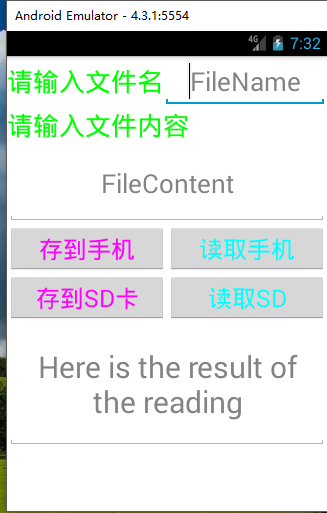
5.項目部署在模擬器上:
進入程序後:
把文件存儲到手機上並讀取:
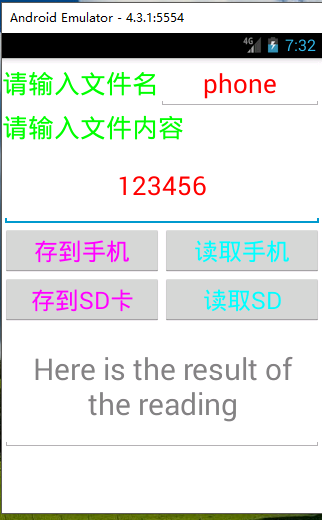
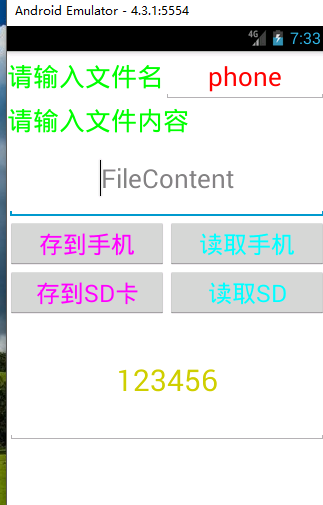
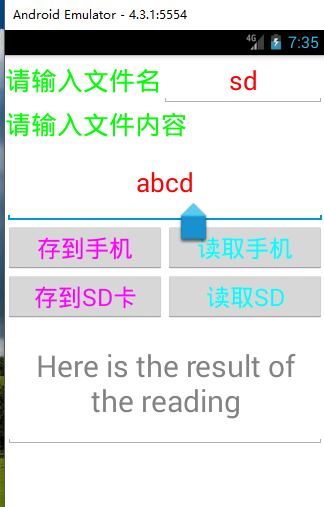
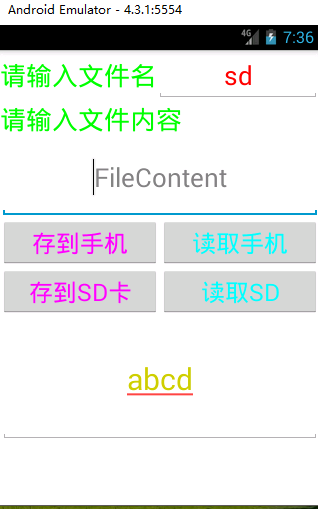
把文件存儲到SD上並讀取:
以上就是本文的全部內容,希望對大家的學習有所幫助,也希望大家多多支持本站。
 [Android] IntentService使用詳解和實例介紹
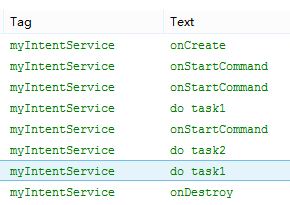
IntentService定義IntentService繼承與Service,用來處理異步請求。客戶端可以通過startService(Intent)方法傳遞請求給Int
 Android照片牆應用實現
照片牆這種功能現在應該算是挺常見了,在很多應用中你都可以經常看到照片牆的身影。它的設計思路其實也非常簡單,用一個GridView控件當作“牆”,然
 Android進階之旅------)解決Jackson、Gson解析Json數據時,Json數據中的Key為Java關鍵字時解析為null的問題
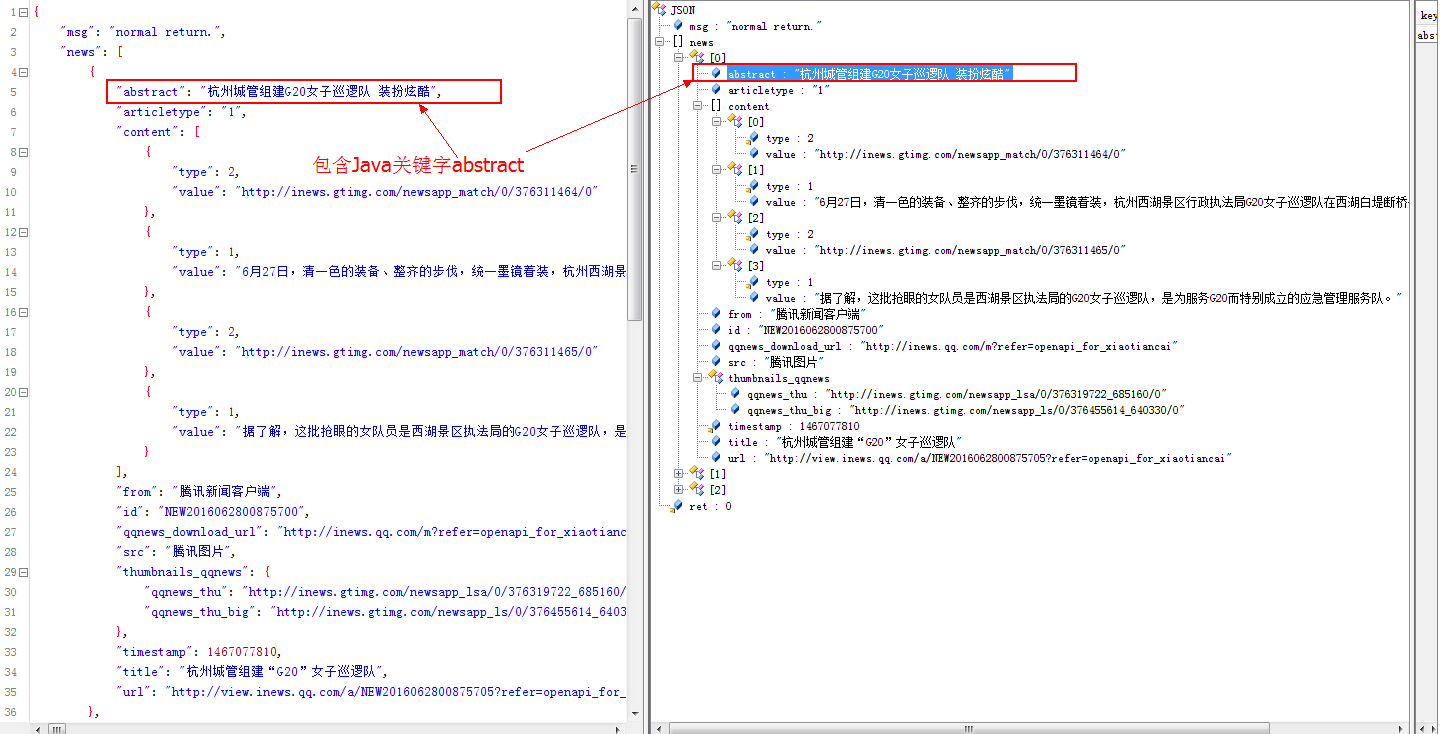
1、問題描述首先,需要解析的Json數據類似於下面的格式,但是包含了Java關鍵字abstract:{ ret: 0, msg: "
 Android Activity啟動模式的功能驗證
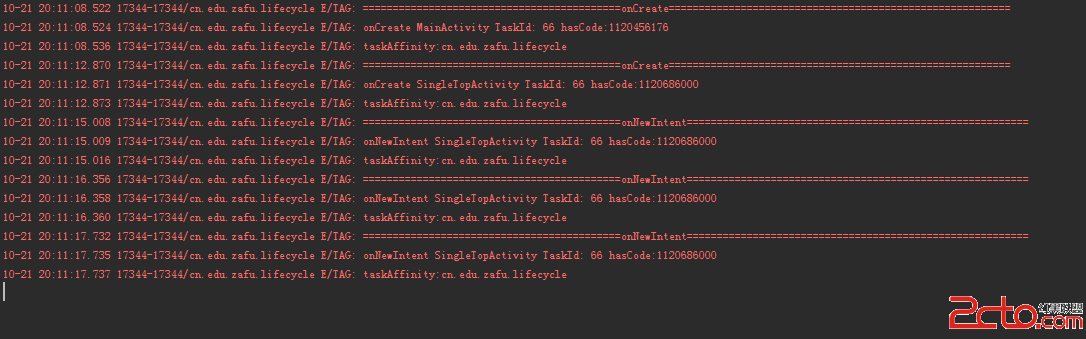
之前一直都是看別人寫的啟動模式,發現網上大多數的內容都是抄襲來抄襲去,直到最近看了開發藝術這本書,發現之前對啟動模式的理解過於簡單,很多東西都沒有考慮到,為了加深理解,於