編輯:關於Android編程
也是今天用到的一個東西,就是簡單實現九宮格的Demo
1.就是定義各種layout 和對應的item
我的:
<?xml version="1.0" encoding="utf-8"?>
<LinearLayout xmlns:android="http://schemas.android.com/apk/res/android"
  android:layout_width="match_parent"
  android:layout_height="match_parent"
  android:background="#fff"
  android:orientation="vertical" >

  <LinearLayout
    android:layout_width="match_parent"
    android:layout_height="wrap_content"
    android:orientation="horizontal" >

    <GridView
      android:id="@+id/gridView"
      android:layout_width="match_parent"
      android:layout_height="wrap_content"
      android:numColumns="3"
      android:background="#fff"></GridView>


  </LinearLayout>

</LinearLayout>
itme的
<?xml version="1.0" encoding="utf-8"?>
<LinearLayout xmlns:android="http://schemas.android.com/apk/res/android"
  android:layout_width="match_parent"
  android:layout_height="match_parent"
  android:padding="10dp"
  android:layout_gravity="center"
  android:background="#fff"
  android:orientation="vertical" >

  <ImageView
    android:id="@+id/iv"
    android:layout_width="wrap_content"
    android:layout_height="wrap_content" />

  <TextView
    android:id="@+id/tv"
    android:paddingTop="10dp"
    android:layout_width="wrap_content"
    android:layout_height="wrap_content"
    android:textColor="#000"
    android:text="管線" />

</LinearLayout>
開始准備數據:
  /**
   * 准備顯示的數據
   */
  public void initData() {
    // 生成動態數組,並且轉入數據 ,暫時就這樣來處理
    lstImageItem = new ArrayList<HashMap<String, Object>>();
    for (int i = 0; i < 3; i++) {
      HashMap<String, Object> map = new HashMap<String, Object>();
      map.put("ItemImage", R.drawable.osg);// 添加圖像資源的ID
      map.put("ItemText", "各種管線" + String.valueOf(i));// 按序號做ItemText
      lstImageItem.add(map);
    }
  }
設置顯示
gv = (GridView) view.findViewById(R.id.gridView);
    SimpleAdapter adapter = new SimpleAdapter(this, lstImageItem, R.layout.gridview_item, new String[] { "ItemImage", "ItemText" },
        new int[] { R.id.iv, R.id.tv });
gv.setAdapter(adapter);
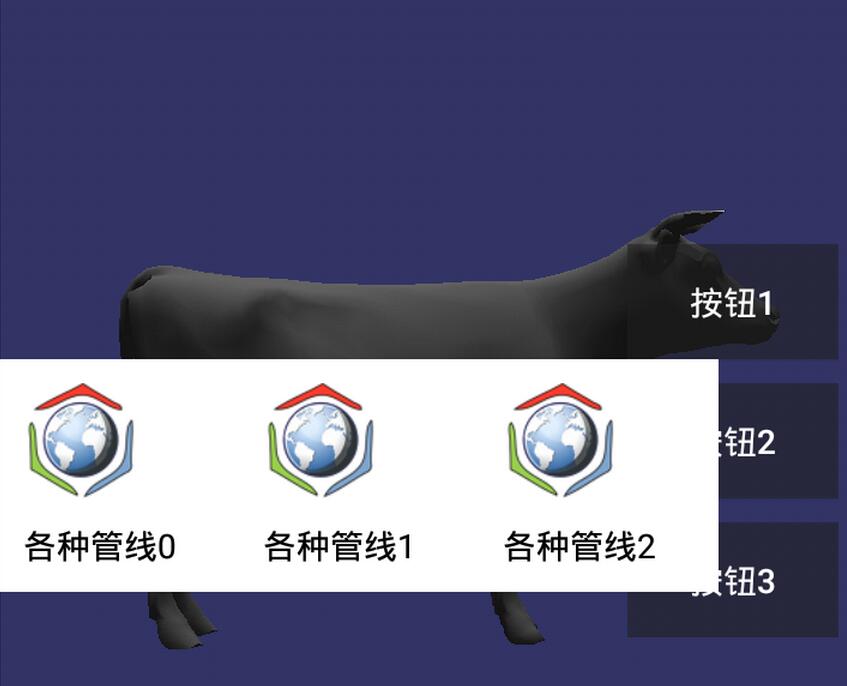
最後扔一張效果圖
以上就是本文的全部內容,希望對大家的學習有所幫助,也希望大家多多支持本站。
 Android藍牙通信編程
項目涉及藍牙通信,所以就簡單的學了學,下面是自己參考了一些資料後的總結,希望對大家有幫助。 以下是開發中的幾個關鍵步驟:1、首先開啟藍牙 2、搜索可用
 Android Training學習筆記之適配不同的設備
Android是一個開源的開放的操作系統,世界上的任何人都可以基於這個系統進行適合自己的定制活動。Android的這樣一個特點使得android世界的碎片化很嚴重,形形色
 Android的SQLite基本操作
涉及SQLite的增刪改查,結果用log顯示 package com.example.sqlconnecttest; import android.content.C
 Android Tinyalsa
tinyalsa位於Android源碼的external/tinyalsa位置。關於tinyalsa,tinyalsa是Google在Android 4.0之後推的基於a