編輯:關於Android編程
先看看效果圖:
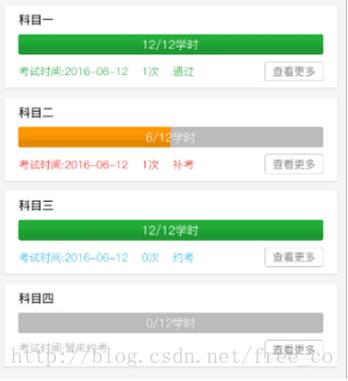
首先是布局文件
<FrameLayout
 android:layout_width="match_parent"
 android:layout_marginLeft="10dp"
 android:layout_marginRight="10dp"
 android:layout_height="wrap_content">

 <ProgressBar
  android:id="@+id/pb_process"

  android:layout_width="match_parent"
  android:layout_height="wrap_content"
  android:indeterminate="false" />

 <TextView
  android:id="@+id/tv_progress"
  android:layout_width="wrap_content"
  android:layout_height="wrap_content"
  android:layout_gravity="center"
  android:textColor="@color/white"/>

</FrameLayout>
添加style-ProgressStyle
<style name="TrainProgressStyle" parent="@android:style/Widget.ProgressBar.Horizontal">
 <item name="android:progressDrawable">@drawable/my_progress</item>
</style>
添加drawable-my_progress
<?xml version="1.0" encoding="utf-8"?>
<layer-list xmlns:android="http://schemas.android.com/apk/res/android">

 <item android:id="@android:id/background">
  <shape>
   <corners android:radius="5dip" />
   <gradient
    android:angle="270"

    android:centerY="0.75"
    android:endColor="@color/gray_BB"
    android:startColor="@color/gray_BB" />
  </shape>
 </item>

 <item android:id="@android:id/secondaryProgress">
  <clip>
   <shape>
    <corners android:radius="5dip" />
    <gradient
     android:angle="270"
     android:centerColor="#f69200"
     android:centerY="0.75"
     android:endColor="#ff9800"
     android:startColor="#ff9800" />
   </shape>
  </clip>
 </item>

 <item android:id="@android:id/progress">
  <level-list>
   <!-- 進度滿時 level = 10000-->
   <item
    android:maxLevel="10000"
    android:minLevel="10000">
    <clip>
     <shape>
      <corners android:radius="5dip" />
      <gradient
       android:angle="270"
       android:centerColor="#21a837"
       android:centerY="0.75"
       android:endColor="#22ac38"
       android:startColor="#22ac38" />
     </shape>
    </clip>
   </item>
   <!-- 進度未滿時 level < 10000-->
   <item
    android:minLevel="0"
    android:maxLevel="9999"
    >
    <clip>
     <shape>
      <corners android:radius="5dip" />
      <gradient
       android:angle="270"
       android:centerColor="#f69200"
       android:centerY="0.75"
       android:endColor="#ff9800"
       android:startColor="#ff9800" />
     </shape>
    </clip>
   </item>
  </level-list>
 </item>

</layer-list>
activity裡的使用和安卓默認的一樣
pb_progress.setMax();
pb_progress.setProgress();
以上就是本文的全部內容,希望對大家的學習有所幫助,也希望大家多多支持本站。
 Android 動畫之屬性動畫ValueAnimator和ObjectAnimator
簡介屬性動畫是API 11新加入的特性,和View動畫不同,它對作用對象進行了擴展,屬性動畫可以對任意對象做動畫,也不像View動畫只支持四種簡單的變化。屬性動畫的默認時
 微信朋友圈怎麼發文字 朋友圈字體顏色可以改嗎
微信很多小伙伴應該都玩過了,但有些小技巧估計有人還不知道,比如微信朋友圈怎麼發文字?朋友圈字體顏色可以改嗎?下面就讓小編來告訴大家! 微信朋友圈怎麼發文字
 Android實現卡片翻轉動畫
最近項目上用到了卡片的翻轉效果,大致研究了下,也參考了網上的一些Demo,簡單實現如下:activity_main.xml<?xml version=1.0
 ndk開發中利用java與c之間互相傳遞數據
1、DataProvider package com.njupt.ndk_passdata; public class DataProvider { public