編輯:關於Android編程
ZXing是谷歌的一個開源庫,可以用來生成二維碼、掃描二維碼。本文所介紹的是第一部分。
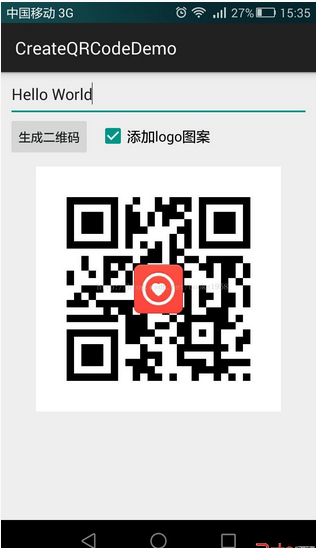
首先上效果圖:
ZXing相關各種文件官方下載地址:https://github.com/zxing/zxing/releases
或者在這裡下載(只有本項目所用的jar包,版本號:3.2.0):鏈接:http://pan.baidu.com/s/1pLqAR5x
1.生成二維碼的工具類
/**
 * 二維碼生成工具類
 */
public class QRCodeUtil {
 /**
  * 生成二維碼Bitmap
  *
  * @param content 內容
  * @param widthPix 圖片寬度
  * @param heightPix 圖片高度
  * @param logoBm 二維碼中心的Logo圖標(可以為null)
  * @param filePath 用於存儲二維碼圖片的文件路徑
  * @return 生成二維碼及保存文件是否成功
  */
 public static boolean createQRImage(String content, int widthPix, int heightPix, Bitmap logoBm, String filePath) {
  try {
   if (content == null || "".equals(content)) {
    return false;
   }
   //配置參數
   Map<encodehinttype, object=""> hints = new HashMap<>();
   hints.put(EncodeHintType.CHARACTER_SET, "utf-8");
   //容錯級別
   hints.put(EncodeHintType.ERROR_CORRECTION, ErrorCorrectionLevel.H);
   //設置空白邊距的寬度
//   hints.put(EncodeHintType.MARGIN, 2); //default is 4
   // 圖像數據轉換,使用了矩陣轉換
   BitMatrix bitMatrix = new QRCodeWriter().encode(content, BarcodeFormat.QR_CODE, widthPix, heightPix, hints);
   int[] pixels = new int[widthPix * heightPix];
   // 下面這裡按照二維碼的算法,逐個生成二維碼的圖片,
   // 兩個for循環是圖片橫列掃描的結果
   for (int y = 0; y < heightPix; y++) {
    for (int x = 0; x < widthPix; x++) {
     if (bitMatrix.get(x, y)) {
      pixels[y * widthPix + x] = 0xff000000;
     } else {
      pixels[y * widthPix + x] = 0xffffffff;
     }
    }
   }
   // 生成二維碼圖片的格式,使用ARGB_8888
   Bitmap bitmap = Bitmap.createBitmap(widthPix, heightPix, Bitmap.Config.ARGB_8888);
   bitmap.setPixels(pixels, 0, widthPix, 0, 0, widthPix, heightPix);
   if (logoBm != null) {
    bitmap = addLogo(bitmap, logoBm);
   }
   //必須使用compress方法將bitmap保存到文件中再進行讀取。直接返回的bitmap是沒有任何壓縮的,內存消耗巨大!
   return bitmap != null && bitmap.compress(Bitmap.CompressFormat.JPEG, 100, new FileOutputStream(filePath));
  } catch (WriterException | IOException e) {
   e.printStackTrace();
  }
  return false;
 }
 /**
  * 在二維碼中間添加Logo圖案
  */
 private static Bitmap addLogo(Bitmap src, Bitmap logo) {
  if (src == null) {
   return null;
  }
  if (logo == null) {
   return src;
  }
  //獲取圖片的寬高
  int srcWidth = src.getWidth();
  int srcHeight = src.getHeight();
  int logoWidth = logo.getWidth();
  int logoHeight = logo.getHeight();
  if (srcWidth == 0 || srcHeight == 0) {
   return null;
  }
  if (logoWidth == 0 || logoHeight == 0) {
   return src;
  }
  //logo大小為二維碼整體大小的1/5
  float scaleFactor = srcWidth * 1.0f / 5 / logoWidth;
  Bitmap bitmap = Bitmap.createBitmap(srcWidth, srcHeight, Bitmap.Config.ARGB_8888);
  try {
   Canvas canvas = new Canvas(bitmap);
   canvas.drawBitmap(src, 0, 0, null);
   canvas.scale(scaleFactor, scaleFactor, srcWidth / 2, srcHeight / 2);
   canvas.drawBitmap(logo, (srcWidth - logoWidth) / 2, (srcHeight - logoHeight) / 2, null);
   canvas.save(Canvas.ALL_SAVE_FLAG);
   canvas.restore();
  } catch (Exception e) {
   bitmap = null;
   e.getStackTrace();
  }
  return bitmap;
 }
}</encodehinttype,>
2.在Activity中的使用:
/**
 * 二維碼生成
 */
public class MainActivity extends ActionBarActivity {

 @Override
 protected void onCreate(Bundle savedInstanceState) {
  super.onCreate(savedInstanceState);
  setContentView(R.layout.activity_main);

  //內容
  final EditText contentET = (EditText) findViewById(R.id.create_qr_content);
  //顯示二維碼圖片
  final ImageView imageView = (ImageView) findViewById(R.id.create_qr_iv);
  //是否添加Logo
  final CheckBox addLogoCB = (CheckBox) findViewById(R.id.create_qr_addLogo);
  Button createQrBtn = (Button) findViewById(R.id.create_qr_btn);

  createQrBtn.setOnClickListener(new View.OnClickListener() {

   @Override
   public void onClick(View v) {
    final String filePath = getFileRoot(MainActivity.this) + File.separator
      + "qr_" + System.currentTimeMillis() + ".jpg";

    //二維碼圖片較大時,生成圖片、保存文件的時間可能較長,因此放在新線程中
    new Thread(new Runnable() {
     @Override
     public void run() {
      boolean success = QRCodeUtil.createQRImage(contentET.getText().toString().trim(), 800, 800,
        addLogoCB.isChecked() ? BitmapFactory.decodeResource(getResources(), R.mipmap.qr_logo) : null,
        filePath);

      if (success) {
       runOnUiThread(new Runnable() {
        @Override
        public void run() {
         imageView.setImageBitmap(BitmapFactory.decodeFile(filePath));
        }
       });
      }
     }
    }).start();

   }
  });
 }

 //文件存儲根目錄
 private String getFileRoot(Context context) {
  if (Environment.getExternalStorageState().equals(Environment.MEDIA_MOUNTED)) {
   File external = context.getExternalFilesDir(null);
   if (external != null) {
    return external.getAbsolutePath();
   }
  }
  return context.getFilesDir().getAbsolutePath();
 }
}
3.本項目中圖片文件保存在
context.getExternalFilesDir(null)
目錄之下的。按照官方的api文檔,從KitKat開始(Android 4.4),保存文件到這個目錄下將不需要SD卡讀寫權限。但是經過測驗表明,在紅米Note和魅族MX3上(系統均為android 4.4.4),的確不需要權限;但是在本人的華為P6上(Android 4.4.2),必須聲明權限才能成功的保存文件,即必須在manifest中添加如下內容:
<uses-permission android:name="android.permission.WRITE_EXTERNAL_STORAGE">
<uses-permission android:name="android.permission.MOUNT_UNMOUNT_FILESYSTEMS"></uses-permission></uses-permission>
因此,個人猜測,所謂的不需要權限是從 Android 4.4.4開始的。
下面再給大家分享Android生成二維碼及添加logo的代碼
具體代碼如下所示:
@Override
public Bitmap generateBitmap(String content, int width, int height) {
 QRCodeWriter qrCodeWriter = new QRCodeWriter();
 Map<EncodeHintType, String> hints = new HashMap<>();
 hints.put(EncodeHintType.CHARACTER_SET, "utf-8");//默認
  hints.put(EncodeHintType.MARGIN, "1");//無白色邊框
 try {
  BitMatrix encode = qrCodeWriter.encode(content, BarcodeFormat.QR_CODE, width, height, hints);
  int[] pixels = new int[width * height];
  for (int i = 0; i < height; i++) {
   for (int j = 0; j < width; j++) {
    if (encode.get(j, i)) {
     pixels[i * width + j] = 0x00000000;
    } else {
     pixels[i * width + j] = 0xffffffff;
    }
   }
  }
  return Bitmap.createBitmap(pixels, 0, width, width, height, Bitmap.Config.RGB_565);
 } catch (WriterException e) {
  e.printStackTrace();
 }
 return null;
}
@Override
public Bitmap addLogo(Bitmap qrBitmap, Bitmap logoBitmap) {
 int qrBitmapWidth = qrBitmap.getWidth();
 int qrBitmapHeight = qrBitmap.getHeight();
 int logoBitmapWidth = logoBitmap.getWidth();
 int logoBitmapHeight = logoBitmap.getHeight();
 Bitmap blankBitmap = Bitmap.createBitmap(qrBitmapWidth, qrBitmapHeight, Bitmap.Config.ARGB_8888);
 Canvas canvas = new Canvas(blankBitmap);
 canvas.drawBitmap(qrBitmap, 0, 0, null);
 canvas.save(Canvas.ALL_SAVE_FLAG);
 float scaleSize = 1.0f;
 while ((logoBitmapWidth / scaleSize) > (qrBitmapWidth / 3.5) || (logoBitmapHeight / scaleSize) > (qrBitmapHeight / 3.5)) {
  scaleSize *= 2;
 }
 float sx = 1.0f / scaleSize;
 canvas.scale(sx, sx, qrBitmapWidth / 2, qrBitmapHeight / 2);
 canvas.drawBitmap(logoBitmap, (qrBitmapWidth - logoBitmapWidth) / 2, (qrBitmapHeight - logoBitmapHeight) / 2, null);
 canvas.restore();
 return blankBitmap;
}
好了,代碼到此結束了,希望對大家有所幫助!
 初涉Rx套餐 之RxBinding
最近下班回家都在WOW,周末就爆肝,感覺人都要GO DIE了,昨天下午看了看RxBinding相關的功能感覺還是蠻強大的,所提供的API也是相當豐富(基本Rx套餐都是互通
 Android最佳實踐之Notification、下拉刷新、內存及性能建議等
Notification通知參考地址:http://developer.android.com/training/notify-user/index.html通知(Not
 360浏覽器文本框獲得焦點後被android軟鍵盤遮罩該怎麼辦
場景是這樣的,站點上篩選按鈕點擊後彈出層(fixed),當輸入框獲取焦點以後彈出系統自帶的軟鍵盤,在android上十款浏覽器挨個測試比對,發現在360浏覽器彈出鍵盤以後
 Android基礎控件——CardView的使用、仿支付寶銀行卡
今天有空學習了下CardView的使用,既然是使用,不凡使用一個實例操作一下CardView是Android5.0的新控件,所以我們需要在dependencies中添加支