編輯:關於Android編程
本文實例為大家分享了閃耀字體效果的具體代碼,供大家參考,具體內容如下
import android.content.Context;
import android.graphics.Canvas;
import android.graphics.Color;
import android.graphics.LinearGradient;
import android.graphics.Matrix;
import android.graphics.Paint;
import android.graphics.Shader;
import android.util.AttributeSet;
import android.widget.TextView;

/**
 * 閃耀字體
 */

public class ShiningFontView extends TextView {
  private int mViewWidth;
  private Paint mPaint;
  private LinearGradient mLinearGradient;
  private Matrix mGradientMatrix;
  private int mTranslate;

  public ShiningFontView(Context context) {
    super(context);
  }

  public ShiningFontView(Context context, AttributeSet attrs) {
    super(context, attrs);
  }

  public ShiningFontView(Context context, AttributeSet attrs, int defStyleAttr) {
    super(context, attrs, defStyleAttr);
  }

  @Override
  protected void onSizeChanged(int w, int h, int oldw, int oldh) {
    super.onSizeChanged(w, h, oldw, oldh);
    if (mViewWidth == 0) {
      mViewWidth = getMeasuredWidth();
      if (mViewWidth > 0) {
        mPaint = getPaint();
        mLinearGradient = new LinearGradient(0, 0, mViewWidth, 0, new int[]{Color.BLUE, 0xffffffff, Color.BLUE}, null, Shader.TileMode.CLAMP);
        mPaint.setShader(mLinearGradient);
        mGradientMatrix = new Matrix();
      }
    }
  }

  @Override
  protected void onDraw(Canvas canvas) {
    super.onDraw(canvas);
    if (mGradientMatrix != null) {
      mTranslate += mViewWidth / 5;
      if (mTranslate > 2 * mViewWidth) {
        mTranslate = -mViewWidth;
      }
      mGradientMatrix.setTranslate(mTranslate, 0);
      mLinearGradient.setLocalMatrix(mGradientMatrix);
      postInvalidateDelayed(100);
    }
  }

}
使用方式如下
 <com.hz56pt.huipaotui.view.ShiningFontView//包裹起來就行
      android:layout_width="wrap_content"
      android:layout_height="wrap_content"
      android:layout_centerVertical="true"
      android:layout_marginLeft="@dimen/margin_10"
      android:layout_toRightOf="@id/iv_tips1_icon"
      android:text="@string/tips1" />
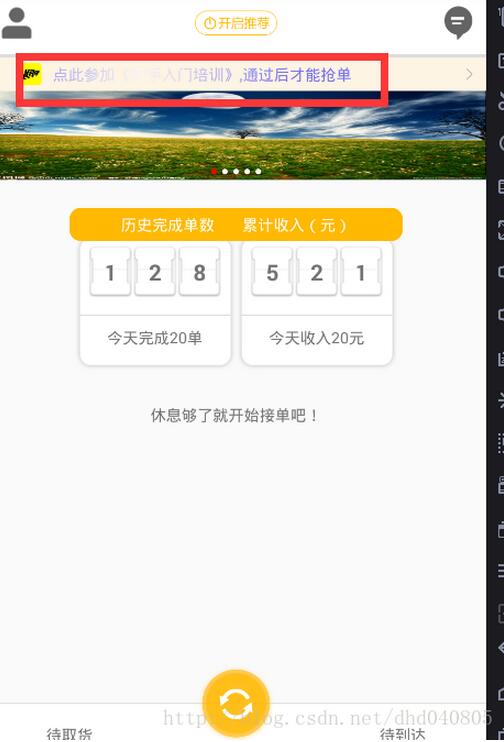
效果圖如下
以上就是本文的全部內容,希望對大家的學習有所幫助,也希望大家多多支持本站。
 Android中可以做的兩件壞事---破解鎖屏密碼和獲取Wifi密碼
之前的文章一直在介紹OC,最近也是在找急忙慌的學習IOS,所以Android方面的知識分享就有點中斷了,但是我現在還是要靠Android吃飯,所以不能Android的工作
 Android TextView設置不同的顏色字體
這裡記錄一個比較方便的方式來解決Textview設置不同顏色的字體的方法。可能第一反應是布局的嵌套,這個方法肯定可以啊,但是肯定不推薦啊,布局要盡量減少布局的嵌套,其次,
 Android帶索引聯系人列表
網上Android聯系人列表的例子也很多,都和微信的聯系人差不多,由於項目用到了聯系人列表索引功能(產品把字母item給去掉了),不過也還是好實現,這裡我也來分享分享我的
 自定義布局流程圖及使用
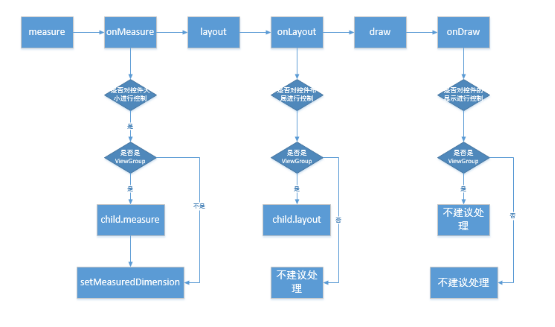
ACRA : Application crash report for android作用: 為自己的應用找bug 使用步驟:參考文檔自定義布局的實現:流程圖參照流程圖: