編輯:關於Android編程
1 SeekBar簡介
SeekBar是進度條。我們使用進度條時,可以使用系統默認的進度條;也可以自定義進度條的圖片和滑塊圖片等。
2 SeekBar示例
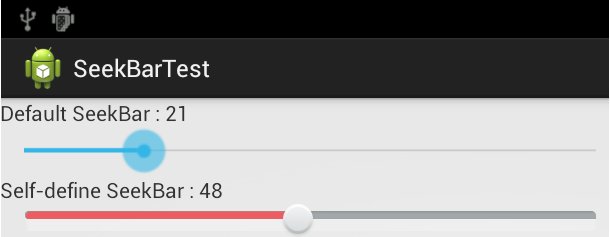
創建一個activity,包含2個SeekBar。
第1個SeekBar是系統默認的SeekBar。
第2個SeekBar是自定義SeekBar,使用自定義的背景圖和滑塊圖片。
應用層代碼
package com.skywang.control;

import android.os.Bundle;
import android.app.Activity;
import android.util.Log;
import android.widget.TextView;
import android.widget.SeekBar;
import android.widget.SeekBar.OnSeekBarChangeListener;

public class SeekBarTest extends Activity implements SeekBar.OnSeekBarChangeListener{
  private static final String TAG = "SKYWANG";

  // 與“系統默認SeekBar”對應的TextView
  private TextView mTvDef;
  // 與“自定義SeekBar”對應的TextView
  private TextView mTvSelf;
  // “系統默認SeekBar”
  private SeekBar mSeekBarDef;
  // “自定義SeekBar”
  private SeekBar mSeekBarSelf;

  @Override
  protected void onCreate(Bundle savedInstanceState) {
    super.onCreate(savedInstanceState);
    setContentView(R.layout.seek_bar_test);

    // 與“系統默認SeekBar”對應的TextView
    mTvDef = (TextView) findViewById(R.id.tv_def);
    // “系統默認SeekBar”
    mSeekBarDef = (SeekBar) findViewById(R.id.seekbar_def);
    mSeekBarDef.setOnSeekBarChangeListener(this);

    // 與“自定義SeekBar”對應的TextView
    mTvSelf = (TextView) findViewById(R.id.tv_self);
    // “自定義SeekBar”
    mSeekBarSelf = (SeekBar) findViewById(R.id.seekbar_self);
    mSeekBarSelf.setOnSeekBarChangeListener(this);
  }

  /*
   * SeekBar停止滾動的回調函數
   */
  @Override
  public void onStopTrackingTouch(SeekBar seekBar) {

  }

  /*
   * SeekBar開始滾動的回調函數
   */
  @Override
  public void onStartTrackingTouch(SeekBar seekBar) {

  }

  /*
   * SeekBar滾動時的回調函數
   */
  @Override
  public void onProgressChanged(SeekBar seekBar, int progress,
      boolean fromUser) {
    Log.d(TAG, "seekid:"+seekBar.getId()+", progess"+progress);
    switch(seekBar.getId()) {
      case R.id.seekbar_def:{
        // 設置“與系統默認SeekBar對應的TextView”的值
        mTvDef.setText(getResources().getString(R.string.text_def)+" : "+String.valueOf(seekBar.getProgress()));
        break;
      }
      case R.id.seekbar_self: {
        // 設置“與自定義SeekBar對應的TextView”的值
        mTvSelf.setText(getResources().getString(R.string.text_self)+" : "+String.valueOf(seekBar.getProgress()));
        break;
      }
      default:
        break;
    }
  }
}
代碼說明:
要監聽SeekBar的滑動消息,通過實現“SeekBar.OnSeekBarChangeListener”接口。這個接口中包含3個方法onStartTrackingTouch()、onStopTrackingTouch()和onProgressChanged()。
layout文件
<LinearLayout xmlns:android="http://schemas.android.com/apk/res/android"
  xmlns:tools="http://schemas.android.com/tools"
  android:layout_width="match_parent"
  android:layout_height="match_parent"
  android:orientation="vertical" >

  <TextView
    android:id="@+id/tv_def"
    android:layout_width="wrap_content"
    android:layout_height="wrap_content"
    android:text="@string/text_def" />

  <!--
    max=100,代表它的取值范圍是0-100,共101個值;
    progress=10,代表默認值是10
  -->
  <SeekBar
    android:id="@+id/seekbar_def"
    android:layout_width="620px"
    android:layout_height="wrap_content"
    android:max="100"
    android:progress="10"
    />

  <TextView
    android:id="@+id/tv_self"
    android:layout_width="wrap_content"
    android:layout_height="wrap_content"
    android:text="@string/text_self" />

  <!--
    max=100,代表它的取值范圍是0-100,共101個值;
    progress=20,代表默認值是20
    progressDrawable,表示SeekBar的背景圖片
    thumbe,表示SeekBar的滑塊圖片
  -->
  <SeekBar
    android:id="@+id/seekbar_self"
    android:layout_width="620px"
    android:layout_height="wrap_content"
    android:max="100"
    android:progress="20"
    android:progressDrawable="@drawable/bg_bar"
    android:thumb="@drawable/thumb_bar" />

</LinearLayout>
自定義SeekBar的背景定義為:android:progressDrawable="@drawable/bg_bar"。
它調用的bg_bar.xml的內容如下:
<?xml version="1.0" encoding="utf-8"?>
<layer-list xmlns:android="http://schemas.android.com/apk/res/android">
  <!-- 背景圖 -->
  <item android:id="@+android:id/background" android:drawable="@drawable/bar_dn" />
  <!-- 第二進度圖 -->
  <item android:id="@+android:id/SecondaryProgress" android:drawable="@drawable/bar_dn" />
  <!-- 進度度 -->
  <item android:id="@+android:id/progress" android:drawable="@drawable/bar_up" />
</layer-list>
bar_dn.png如下圖:

bar_up.png如下圖:

自定義SeekBar的滑塊定義為:android:thumb="@drawable/thumb_bar"。
它調用的thumb_bar.xml的內容如下:
<?xml version="1.0" encoding="UTF-8"?>
<selector xmlns:android="http://schemas.android.com/apk/res/android">
  <!-- 按下狀態 -->
  <item android:state_pressed="true"
    android:drawable="@drawable/thumb_dn" />

  <!-- 焦點狀態 -->
  <item android:state_focused="true"
    android:drawable="@drawable/thumb_up" />

  <!-- 默認狀態 -->
  <item android:drawable="@drawable/thumb_up" />

</selector>
thumb_up.png如下圖:

thumb_dn.png如下圖:

manifest文件
<?xml version="1.0" encoding="utf-8"?>
<manifest xmlns:android="http://schemas.android.com/apk/res/android"
  package="com.skywang.control"
  android:versionCode="1"
  android:versionName="1.0" >

  <uses-sdk
    android:minSdkVersion="8"
    android:targetSdkVersion="17" />

  <application
    android:allowBackup="true"
    android:icon="@drawable/ic_launcher"
    android:label="@string/app_name"
    android:theme="@style/AppTheme" >
    <activity
      android:name="com.skywang.control.SeekBarTest"
      android:label="@string/app_name" >
      <intent-filter>
        <action android:name="android.intent.action.MAIN" />

        <category android:name="android.intent.category.LAUNCHER" />
      </intent-filter>
    </activity>
  </application>

</manifest>
點擊下載:源代碼
運行效果:如圖
以上就是本文的全部內容,希望對大家的學習有所幫助,也希望大家多多支持本站。
 四大組件之Activity(下)——Activity的常用Manifest屬性、啟動模式、ADB調試
第5節 Activity的Manifest配置5.1 Activity的聲明Activity作為四大組件,代碼中每定義一個Activity就需要在AndroidManif
 Android連接Wifi詳細源碼
因項目需求,做一個有關wifi的Demo,現已經上傳到GitHub 上面地址:https://github.com/git-xuhao/WifiDemo源碼片段packa
 Android ToolBar使用
Android Toolbar:ToolBar是Android 5.0(API Level 21)之後用來取代ActionBar的ToolBar的優勢:Toolbar本身
 動態鏈接庫加載原理及HotFix方案介紹
引言隨著項目中動態鏈接庫越來越多,我們也遇到了很多奇怪的問題,比如只在某一種 OS 上會出現的 java.lang.UnsatisfiedLinkError,但是明明我們