編輯:關於Android編程
安卓驗證碼的簡單實現
我們經常在登錄或者注冊的時候要求輸入驗證碼,這裡簡單介紹一下一種方法
效果如下
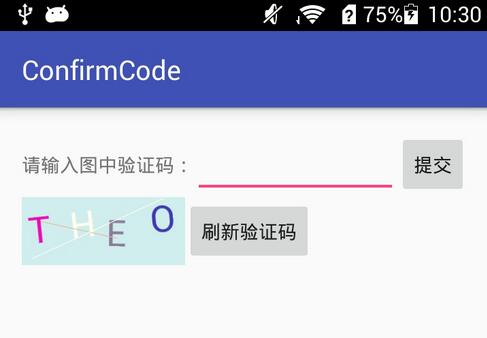
首先是要獲取 隨機的四個字母組合,我這裡是將26個字母存儲到一個數組中,然後隨機生成4個下標值,取這四個下標值對應的字母作為驗證碼。
public class RandomChars {
  char[] chars;

  public RandomChars() {
    chars = new char[26];
    for (int i = 0; i < 26; i++) {
      chars[i] = (char) (i + 65);
    }
  }

  public char[] get4Chars() {
    char[] rlt = new char[4];
    for (int i = 0; i < rlt.length; i++) {
      int randomIndex = (int) (Math.random() * 26);
      rlt[i] = chars[randomIndex];
    }
    return rlt;
  }
}
自定義一個CodeView進行驗證碼的繪制,主要在onDraw方法中操作,學藝不精,還不能好好在onMeasure中控制大小位置等。
    float unitWidth = (float) getWidth() / (float) chars.length;
    for (int i = 0; i < chars.length; i++) {
      String str = chars[i] + "";
      textPaint.getTextBounds(str, 0, str.length(), mRect);
      resetColor();
      int angel = (int) (Math.random()*(8-(-8)+1)+(-8));
      canvas.rotate(angel);//旋轉字母,隨機角度
      canvas.drawText(str, i * unitWidth + 5, getHeight() / 2 - mRect.centerY(), textPaint);
      /**
       * 很關鍵,旋轉
       */
      canvas.save();//保存狀態
      canvas.restore();//恢復
    }

/**
 * 重新設置隨機顏色
 */
  private void resetColor() {
    int r = (int) (Math.random() * 230 - 30);
    int g = (int) (Math.random() * 230 - 30);
    int b = (int) (Math.random() * 230 - 30);
    textPaint.setColor(Color.rgb(r, g, b));
  }
設置該控件並傳入四個字符就ok了,驗證是否輸入正確的時候,考慮到大小寫問題,所以將輸入的字母全部轉換成大寫,一般都是不區分大小寫。
    submit.setOnClickListener(new View.OnClickListener() {
      @Override
      public void onClick(View v) {
        String inputStr = input.getText().toString();
        inputStr = inputStr.toUpperCase();
        str = str.toUpperCase();
        if (str.equals(inputStr)) {
          Toast.makeText(MainActivity.this, "輸入正確", Toast.LENGTH_SHORT).show();
        }else{
          Toast.makeText(MainActivity.this, "驗證碼輸入錯誤", Toast.LENGTH_SHORT).show();
          char[] getchar = randomChars.get4Chars();
          str = new String(getchar);
          codeView.setChars(getchar);
        }
      }
    });
感覺還有挺多不足的地方,以後繼續改進吧!
以上就是本文的全部內容,希望對大家的學習有所幫助,也希望大家多多支持本站。
 解決國內android sdk無法更新,google不能的簡單辦法
在國內屏蔽了許多外國網站,連google 和android都屏蔽了,做程序員的就苦了!不過車到山前必有路,我們也有我們的辦法!首先要先進去google等的一系列網站,那麼
 Android基本控件復習筆記
短暫的暑假已經結束了,假期培訓正式開始。Androidmanifest.XML 清單文件es 資源文件Drawable 顏色改變Layout 布局的文件setConten
 Android 實現微信,微博,微信朋友圈,QQ分享的功能
Android 實現微信,微博,微信朋友圈,QQ分享的功能一、去各自所在的開發者平台注冊相應的Key值;引入相關jar包、權限等二、ShareUtil工具類import
 Android中HttpURLConnection使用詳解
認識Http協議 Android中發送http網絡請求是很常見的,要有GET請求和POST請求。一個完整的http請求需要經歷兩個過程:客戶端發送請求到服務器,然後服務