編輯:關於Android編程
簡單的日歷實現,只是顯示了每一個月,沒有顯示當天和記事這些功能
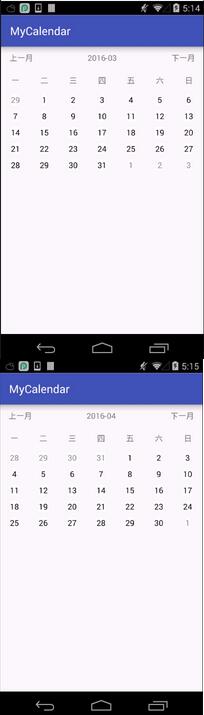
主要是計算月初是周幾,月末是周幾,然後相應的顯示上一月多少天和下一月多少天。
先看一下關於日期的用到的幾個工具類
 /**
   * 獲取該月天數
   */
  public static int getCurrentMonthDay(long millSec) {
    Calendar calendar = Calendar.getInstance();
    calendar.setTimeInMillis(millSec);
    calendar.set(Calendar.DATE, 1);
    calendar.roll(Calendar.DATE, -1);
    int dateCount = calendar.get(Calendar.DATE);
    return dateCount;
  }

  /**
   * 獲取當月第一天
   */
  public static long getFirOfMonth(long millSec) {
    Calendar calendar = Calendar.getInstance();
    calendar.setTimeInMillis(millSec);
    calendar.set(Calendar.DATE, 1);
    return calendar.getTimeInMillis();
  }

  /**
   * 獲取當前時間戳
   */
  public static long getCurrentTime() {
    Calendar calendar = Calendar.getInstance();
    return calendar.getTimeInMillis();
  }

  /**
   * 獲取上一月/下一月
   */
  public static long getLastOrNextMonth(long millSec, int count) {
    Calendar calendar = Calendar.getInstance();
    calendar.setTimeInMillis(millSec);
    calendar.add(Calendar.MONTH, count);
    return calendar.getTimeInMillis();
  }

  /**
   * 格式化到月份
   */
  public static String long2str(long millSec) {
    SimpleDateFormat sdf = new SimpleDateFormat("yyyy-MM");
    return sdf.format(new Date(millSec));
  }
用一個List存放每一天,因為之前考慮到每一天有記事這些,所以封裝了一個類,如果不需要的話可以直接一個時間戳就可以。
打開之後先獲取當前的時間戳,然後初始化到當前月份的第一天,通過工具類中方法。
然後就是計算了,把上月結余的、本月所有、下月的一起添加到List中。
 private void setCalendarList(long millSecs) {
    beans.clear();
    Calendar calendar = Calendar.getInstance();
    calendar.setTimeInMillis(millSecs);
//    int nor = today.getDay();
    int max = DateUtil.getCurrentMonthDay(millSecs);
    /**
     * 當月日歷
     */
    for (int i = 1; i <= max; i++) {
      DayBean bean = new DayBean();
      Calendar cc = Calendar.getInstance();
      cc.setTimeInMillis(millSecs);
      cc.add(Calendar.DAY_OF_MONTH, i - 1);
      setBean(bean, cc);
      bean.setIsCurrentMonth(true);
      beans.add(bean);
    }
    //上月結余
    int fir_day_of_week = beans.get(0).getCalendar().get(Calendar.DAY_OF_WEEK);
    Log.e("AAA", "week_last:" + fir_day_of_week);
    if (fir_day_of_week != 2) {
      if(fir_day_of_week == 1){
        for (int i = 0; i < 6; i++) {
          DayBean bean = new DayBean();
          Calendar cc = Calendar.getInstance();
          cc.setTimeInMillis(millSecs);
          cc.add(Calendar.DAY_OF_MONTH, -i -1);
          setBean(bean, cc);
          Log.e("AAA", "last:" + bean.getDay());
          bean.setIsCurrentMonth(false);
          beans.add(0, bean);
        }
      }else{
        for (int i = 0; i < fir_day_of_week-2; i++) {
          DayBean bean = new DayBean();
          Calendar cc = Calendar.getInstance();
          cc.setTimeInMillis(millSecs);
          cc.add(Calendar.DAY_OF_MONTH, -i-1);
          setBean(bean, cc);
          Log.e("AAA", "last:" + bean.getDay());
          bean.setIsCurrentMonth(false);
          beans.add(0, bean);
        }
      }

    }
    //下月
    int last_day_of_week = beans.get(beans.size() - 1).getCalendar().get(Calendar.DAY_OF_WEEK);
    Log.e("AAA", "week_next:" + last_day_of_week);
    if (last_day_of_week != 1) {
      for (int i = last_day_of_week; i < 8; i++) {
        DayBean bean = new DayBean();
        Calendar cc = Calendar.getInstance();
        cc.setTimeInMillis(millSecs);
        cc.add(Calendar.DAY_OF_MONTH, i - last_day_of_week);
        setBean(bean, cc);
        Log.e("AAA", "next:" + bean.getDay());
        bean.setIsCurrentMonth(false);
        beans.add(bean);
      }
    }
    GridViewAdapter adapter = new GridViewAdapter(this, beans);
    mGridView.setAdapter(adapter);
  }

  private void setBean(DayBean bean, Calendar cc) {
    bean.setCalendar(cc);
    bean.setDay(cc.get(Calendar.DAY_OF_MONTH));
  }
設置每一天時設置了一個字段為是否為本月,如果是,則設置為黑色,否則設為灰色顯示,在Adapter中的getView方法中設置即可。
  @Override
  public View getView(int position, View convertView, ViewGroup parent) {
    ViewHolder holder;
    if (convertView == null) {
      convertView = inflater.inflate(R.layout.item_layout, null);
      holder = new ViewHolder();
      holder.day_text = (TextView) convertView.findViewById(R.id.day_text);
      convertView.setTag(holder);
    } else {
      holder = (ViewHolder) convertView.getTag();
    }
    holder.day_text.setText(beans.get(position).getDay() + "");
    if (beans.get(position).isToday()) {
      holder.day_text.setBackgroundColor(Color.RED);
    } else {
      holder.day_text.setBackgroundColor(Color.WHITE);
    }
    if (beans.get(position).isCurrentMonth()) {
      holder.day_text.setTextColor(Color.BLACK);
    } else {
      holder.day_text.setTextColor(Color.GRAY);
    }

    return convertView;
  }

  class ViewHolder {
    TextView day_text;
  }
以上就是本文的全部內容,希望對大家的學習有所幫助,也希望大家多多支持本站。
 ViewDragHelper詳解(側滑欄)
一、概述Drag拖拽;ViewDrag拖拽視圖,拖拽控件;ViewDragHelper拖拽視圖助手,拖拽操作類。利用ViewDragHelper類可以實現很多絢麗的效果,
 Android5.1中surface和CpuConsumer下生產者和消費者間的處理框架簡述
前沿: 如果對SurfaceFlinger架構的工作原理較為熟悉的話,本文閱讀起來會相對容易些。之所以撰寫本文是因為在閱讀Camera HAL3的實現過程中
 Android開發:AsyncTask源代碼完全解析
從事Java開發以來,接觸過很多的開源代碼,自己能夠明白代碼但是想要表達出來卻有點困難,從今天開始,逐漸開始對一些開源代碼進行解析並記錄成blog分享出來,希望以此提升自
 第三方SDK:百度地圖(二)定位
如圖:Menu: MainActivity.javapackage com.imooc.baidumap;import java.util.List;im