編輯:關於Android編程
本文實例為大家分享了Android聯系人字母排序的具體代碼,供大家參考,具體內容如下
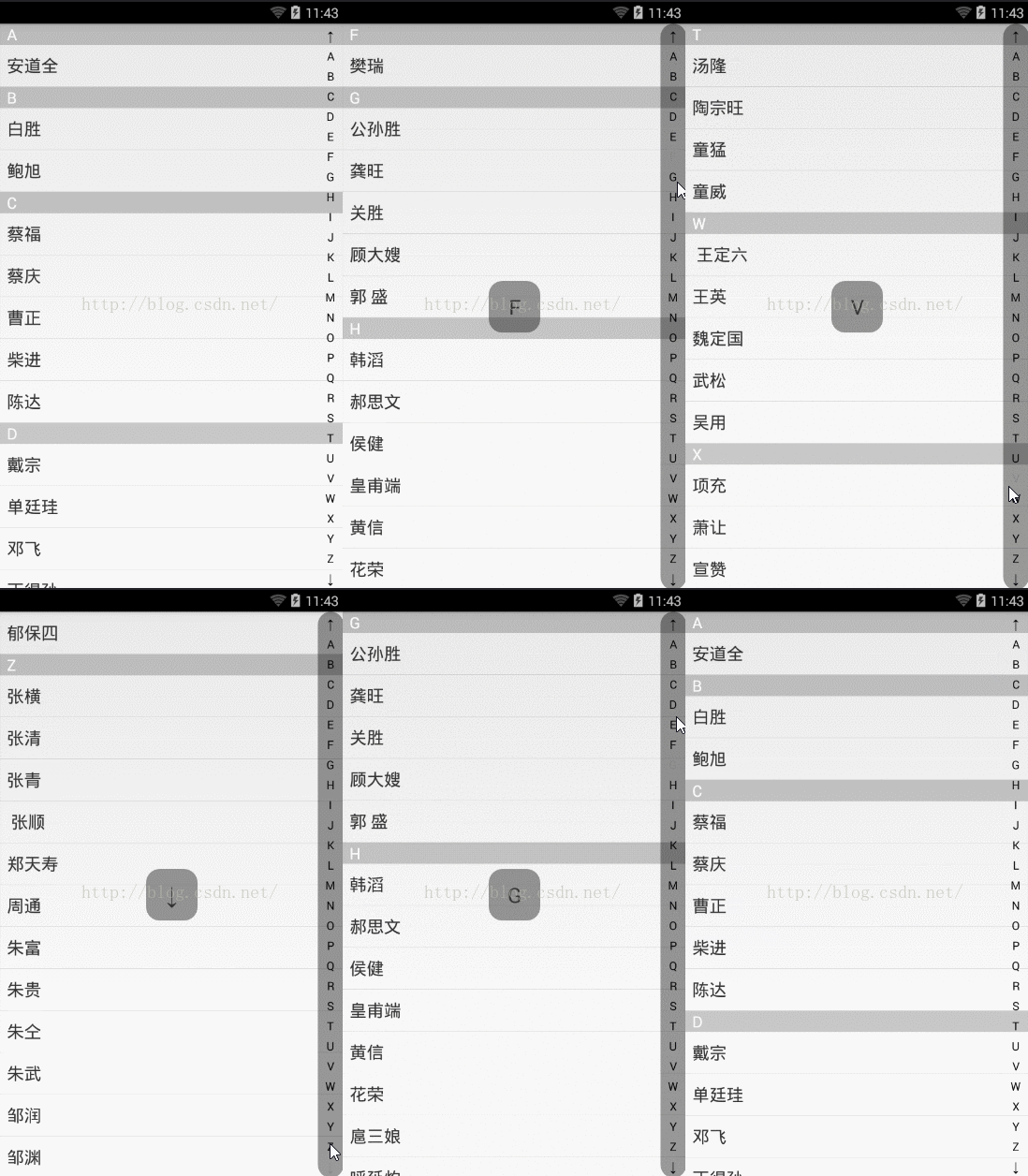
實現思路:首先說下布局,整個是一個相對布局,最下面是一個listview,listview上面是一個自定義的view(右邊顯示字母),最上面是一個textview(屏幕中間的方塊)。
首先說一下右邊自定義view,字母是畫到view上面的,首先計算一下view的高度,然後除以存放字母數組的長的,得到每個字符的高度;每個字母的寬度都是一樣的,所以這裡直接設置30sp;
listview顯示的是108個梁山好漢的名字;
項目裡面使用了一個pinyin4j.jar把每個名字轉換為拼音,然後使用charAt(0)獲得拼音的第一個字母;
listview的每個item是一個線性布局包裹的兩個textview,上面的tv顯示的是拼音的第一個字母,下面的tv顯示的就是名字;在adapter判斷當前條目和上一個條目的拼音首字母是否相同,如果相同隱藏當前item上面的tv;
然後在自定義view設置一個自定義監聽;當點擊自定義view的時候根據高度判斷當前點擊的是那個字母,然後根據字母設置listview要跳轉的位置;
首先看下布局:
<RelativeLayout xmlns:android="http://schemas.android.com/apk/res/android"
  xmlns:tools="http://schemas.android.com/tools"
  android:layout_width="match_parent"
  android:layout_height="match_parent" >

  <ListView
    android:id="@+id/listview"
    android:layout_width="match_parent"
    android:layout_height="match_parent"
    android:cacheColorHint="@android:color/transparent" >
  </ListView>

  <com.wxcontacts.www.view.QuickIndexBar
    android:id="@+id/quickindexbar"
    android:layout_width="30dp"
    android:layout_height="match_parent"
    android:layout_alignParentRight="true"
     />

  <!-- 默認隱藏,當點擊自定義view的時候顯示 -->
  <TextView
    android:visibility="gone"
    android:id="@+id/tv_hint"
    android:gravity="center"
    android:layout_centerInParent="true"
    android:layout_width="60dp"
    android:layout_height="60dp"
    android:background="@drawable/bg_text"
    android:text="A"
    android:textSize="24sp"/>

</RelativeLayout>
先不著急看MainActivity代碼首先看下自定義view的代碼:
//自定義view
public class QuickIndexBar extends View{

  //畫筆
  private Paint paint;

  String[] lettres={"↑","A","B","C","D","E","F","G","H","I","J","K","L","M","N","O","P","Q","R","S"
      ,"T","U","V","W","X","Y","Z","↓"};

  //自定義view的寬高
  private int viewHight;
  private int viewWidth;
  //每個文本的高度;(文本高度等於view高度除以文本個數)
  private int cellHeight;

  //文本的高度
  private float textHeight;

  private int currentIndex=-1;

  public OnLetterChangeListen onLetterChangeListen;

  public OnLetterChangeListen getOnLetterChangeListen(){
    return onLetterChangeListen;
  }


  public void setOnLetterChangeListener(OnLetterChangeListen onLetterChangeListen){
    this.onLetterChangeListen=onLetterChangeListen;
  }
  //自定義一個字母改變的監聽
  public interface OnLetterChangeListen{
    void onLetterChange(String letter);
    void onResert();
  }

  public QuickIndexBar(Context context) {
    this(context,null);
  }
  public QuickIndexBar(Context context, AttributeSet attrs) {
    this(context, attrs,0);
  }

  public QuickIndexBar(Context context, AttributeSet attrs, int defStyle) {
    super(context, attrs, defStyle);
    paint=new Paint();
    //設置字體顏色;默認為黑色;我們這裡使用黑色
    //paint.setColor(Color.WHITE);
    //設置字體大小
    paint.setTextSize(20);
    //抗鋸齒
    paint.setAntiAlias(true);
    //獲取字體寬高,因為每個字體寬度不一樣,所以獲得寬度必須放在循環中做
    //首先獲取字體的屬性
    FontMetrics fontMetrics = paint.getFontMetrics();
    //下邊界 - 上邊界
    textHeight = (float) Math.ceil(fontMetrics.descent-fontMetrics.ascent);
  }

  @Override
  protected void onDraw(Canvas canvas) {
    super.onDraw(canvas);
    //獲取文本的寬高
//   getTextWH();
    //每個文本的高度;
    cellHeight=viewHight/lettres.length;

    //通過循環把字母畫出來
    for(int x=0;x<lettres.length;x++){
      String text=lettres[x];

      //paint給我們提供了一個測量字體寬度的方法
      float textWidth = paint.measureText(text);
      if(currentIndex==x){
        //當點擊某個字母的時候變色
        paint.setColor(Color.GRAY);
      }else{
        paint.setColor(Color.BLACK);
      }

      /*
       * 參數1:要畫的內容   參數23:要畫的位置   參數4:畫筆
       * 參數23所畫的位置指的是字母左下角坐標
       */
      canvas.drawText(text,viewWidth/2-textWidth/2,cellHeight/2+textHeight/2+cellHeight*x,paint);
    }

  }

  //測量view的寬高
  @Override
  protected void onSizeChanged(int w, int h, int oldw, int oldh) {
    super.onSizeChanged(w, h, oldw, oldh);
    viewHight =getMeasuredHeight();
    viewWidth =getMeasuredWidth();
  }

  @Override
  public boolean onTouchEvent(MotionEvent event) {
    switch (event.getAction()) {

    case MotionEvent.ACTION_DOWN:
      //計算當前點擊的字母,寬度不用考慮,因為寬度都是一樣的,計算高度即可,根據你點擊或者移動的高度計算你當前所點擊的是哪個字母
      float downY=event.getY();
      currentIndex = (int)downY/cellHeight;
      if(currentIndex<0 || currentIndex>lettres.length-1){
      }else{
        if(onLetterChangeListen!=null){
          onLetterChangeListen.onLetterChange(lettres[currentIndex]);
        }
      }
      //重新繪制;相當於重新調用onDraw()方法
      invalidate();
      break;
    case MotionEvent.ACTION_MOVE:
      float moveY=event.getY();
      currentIndex = (int)moveY/cellHeight;
      if(currentIndex<0 || currentIndex>lettres.length-1){
      }else{
        if(onLetterChangeListen!=null){
          onLetterChangeListen.onLetterChange(lettres[currentIndex]);
        }
      }
      //重新繪制
      invalidate();
      break;
    case MotionEvent.ACTION_UP:
      currentIndex=-1;
      if(onLetterChangeListen!=null){
        onLetterChangeListen.onResert();
      }
      break;

    default:
      break;
    }
    return true;
  }

}
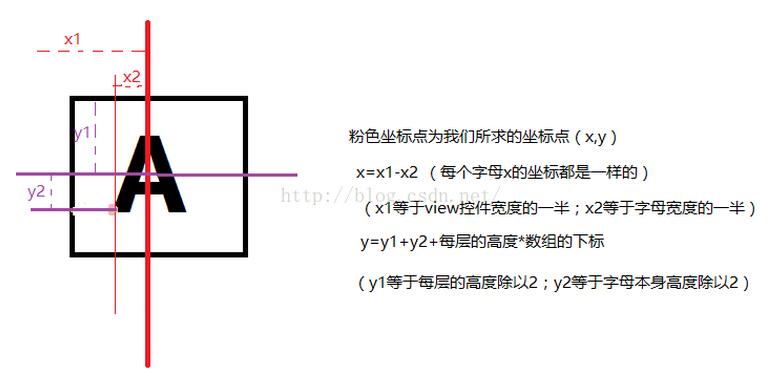
下面我為大家准備了一張計算字母xy坐標的圖片:
最後是MainActivity的代碼:
public class MainActivity extends Activity {

  private com.wxcontacts.www.view.QuickIndexBar quickIndexBar;
  private ListView mListView;
  //當點擊自定義view的時候屏幕中間顯示一個方塊,顯示當前點擊的字母,默認是隱藏的,當點擊的時候才顯示
  private TextView tvHint;

  private List<HaoHan> hhList=new ArrayList<HaoHan>();
  Context context;
  @Override
  protected void onCreate(Bundle savedInstanceState) {
    super.onCreate(savedInstanceState);
    requestWindowFeature(Window.FEATURE_NO_TITLE);
    setContentView(R.layout.activity_main);
    tvHint=(TextView) findViewById(R.id.tv_hint);
    context=this;
    //listview 和 自定義view
    mListView=(ListView) findViewById(R.id.listview);
    quickIndexBar=(QuickIndexBar) findViewById(R.id.quickindexbar);

    initHHListData();

    mListView.setAdapter(new MainListViewAdapter(context,hhList));

    //給自定義view設置自定義監聽,當點擊到某個字母的時候彈出吐司顯示這個字母;
    //當點擊字母的時候遍歷集合,找到首字母為點擊字母的HaoHan的下標,讓listview跳轉到響應位置
    quickIndexBar.setOnLetterChangeListener(new QuickIndexBar.OnLetterChangeListen() {

      @Override
      public void onLetterChange(String letter) {

        quickIndexBar.setBackgroundResource(R.drawable.bg_text);

        tvHint.setVisibility(View.VISIBLE);
        tvHint.setText(letter);

        for(int x=0;x<hhList.size();x++){
          if((hhList.get(x).pinyin.charAt(0)+"").equals(letter)){
            mListView.setSelection(x);
            //找到第一個字母相同的直接結束,不再向下找;
            break;
          }
        }
      }

      @Override
      //當手指彈起的時候此方法執行
      public void onResert() {
        tvHint.setVisibility(View.GONE);
        quickIndexBar.setBackgroundResource(Color.TRANSPARENT);
      }
    });
  }

  //初始化集合數據
  private void initHHListData() {

    HaoHan hh;
    for(int x=0;x<Cheeses.NAMES.length;x++){
      hh=new HaoHan(Cheeses.NAMES[x]);
      hhList.add(hh);
    }

    //給集合排序
    Collections.sort(hhList);

  }

}
源碼下載:http://xiazai.jb51.net/201611/yuanma/AndroidWXcontact(jb51.net).rar
以上就是本文的全部內容,希望對大家的學習有所幫助,也希望大家多多支持本站。
 Android 高清加載長圖或大圖方案
一、概述 對於加載圖片,大家都不陌生,一般為了盡可能避免OOM都會按照如下做法: 對於圖片顯示:根據需要顯示圖片控件的大小對圖片進行壓縮顯示。如果圖片數量非常多:則會使
 小米klo bugreport怎麼用
小米klo bugreport是小米系統中的一個軟件,很多使用小米手機的用戶都見到過這款軟件,那麼小米klo bugreport是什麼軟件?小米klo bu
 android使用AIDL實現跨進程通訊(IPC)
前言:在還沒有做任何一件事情之前,千萬不要覺得這件事情很難,因為還沒有開始做內心就已經對這件事情產生了恐懼,這將會阻止你的進步,也許當你動手開始做了這件事後發現其實並不是
 Android RecyclerView瀑布流布局添加Footer實現上拉加載
這篇文章應該是晚到了好幾個月,之前想寫,但是中途遇到了一些棘手的問題,無奈沒有去寫。寫這篇文章的最初來源是一個朋友問我在Android中如何實現瀑布流布局?,當時我的回答