編輯:關於Android編程
Starting
創建手勢密碼可以查看 CreateGestureActivity.java 文件.
登陸驗證手勢密碼可以看 GestureLoginActivity.java 文件.
Features
使用了 JakeWharton/butterknife butterknife
使用了 ACache 來存儲手勢密碼
/**
 * 保存手勢密碼
 */

private void saveChosenPattern(List<LockPatternView.Cell> cells)
{
 byte[] bytes = LockPatternUtil.patternToHash(cells);
 aCache.put(Constant.GESTURE_PASSWORD, bytes);
}
Warning: 使用 ACache 類保存密碼並不是無限期的. 具體期限可以查看 ACache 類.
使用了 SHA 算法保存手勢密碼
/**
 * Generate an SHA-1 hash for the pattern.
 * Not the most secure, but it is at
 * least a second level of protection. First level is that the file is in a
 * location only readable by the system process.*
 * @param pattern
 * @return the hash of the pattern in a byte array.
 */
public static byte[] patternToHash(List<LockPatternView.Cell> pattern)
 {
  if (pattern == null) {
   return null;
  } else {
   int size = pattern.size();
   byte[] res = new byte[size];
   for (int i = 0; i < size; i++) {
    LockPatternView.Cell cell = pattern.get(i);
    res[i] = (byte) cell.getIndex();
   }
   MessageDigest md = null;
   try {
    md = MessageDigest.getInstance("SHA-1");
    return md.digest(res);
    } catch (NoSuchAlgorithmException e) {
    e.printStackTrace();
    return res;
   }
  }
 }
可以開啟震動模式,當選中一個圈的時候,手機會震動
/** * Set whether the view will use tactile feedback.
 *If true, there will be
 * tactile feedback as the user enters the pattern.
 * @param tactileFeedbackEnabled Whether tactile feedback is enabled
 */

public void setTactileFeedbackEnabled(boolean tactileFeedbackEnabled) {
 mEnableHapticFeedback = tactileFeedbackEnabled;
}
可以開啟繪制路徑隱藏模式
/**
 * Set whether the view is in stealth mode. If true, there will be no
 * visible feedback as the user enters the pattern.
 * @param inStealthMode Whether in stealth mode.
 */public void setInStealthMode(boolean inStealthMode) {
 mInStealthMode = inStealthMode;
}
Example
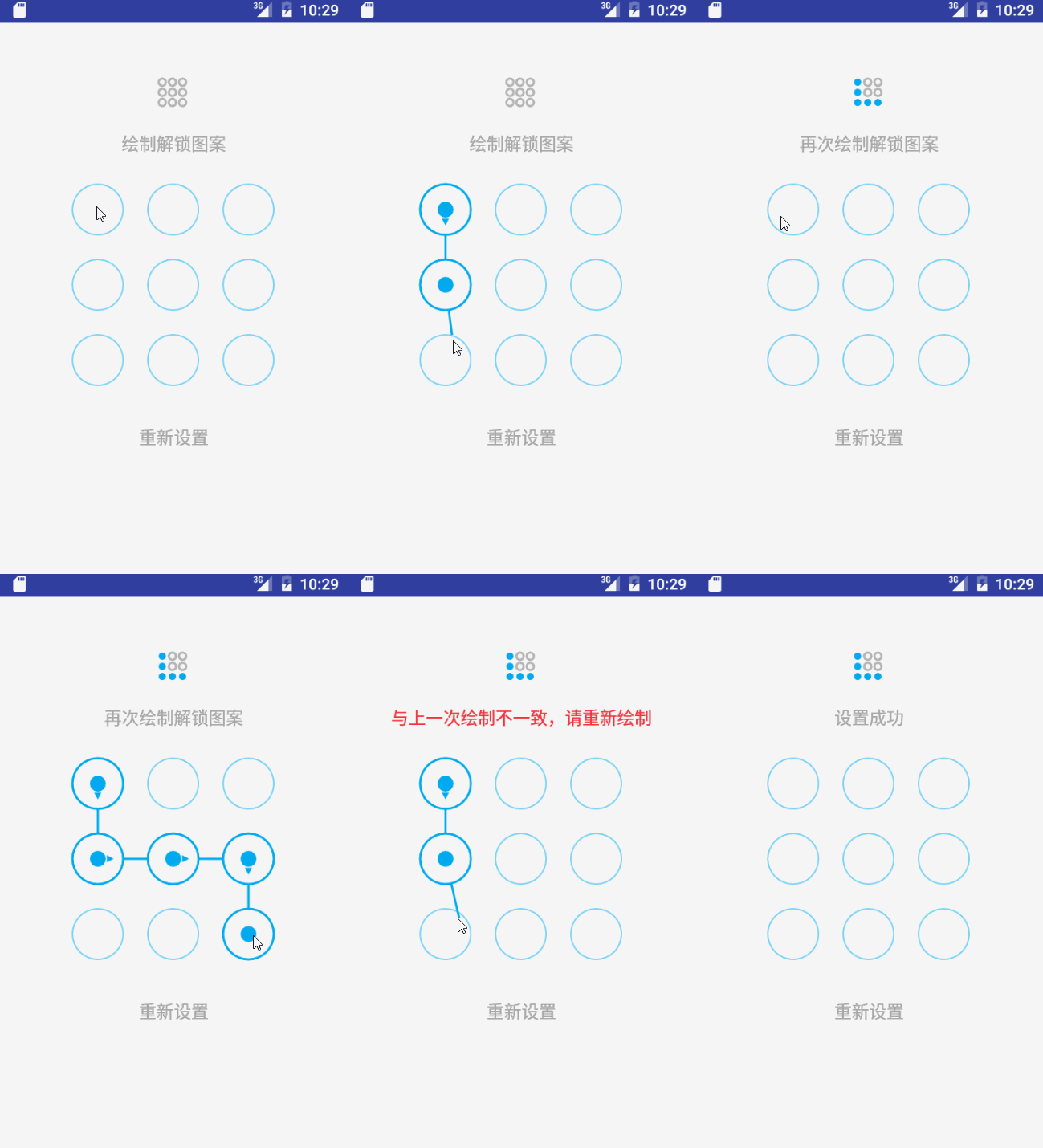
以上就是本文的全部內容,希望對大家的學習有所幫助,也希望大家多多支持本站。
 [Android UI]android-lockpattern圖案解鎖的實現分享
本文屬於學習分享,如有雷同純屬巧合 怎麼會有雷同呢? 本著技術分享,學習互助的原則,我在此分享一款已經開源的android 圖案解鎖的實現。 它也是參考了a
 Android Paint之ColorFilter詳解
在之前講到Android Paint的使用詳解的時候,其中setColorFilter(ColorFilter filter)方法沒有講,今天就來簡單的分析一下,在And
 設計模式之命令模式(Command)摘錄
23種GOF設計模式一般分為三大類:創建型模式、結構型模式、行為模式。創建型模式抽象了實例化過程,它們幫助一個系統獨立於如何創建、組合和表示它的那些對象。一個類創建型模式
 Andorid中.9.png圖片的使用及制作
我們有一個TextView,其裡面的內容是可以通過代碼動態改變的,我們想用一張圖片作為TextView的背景,實現類似於手機QQ對話中的氣泡文本效果。TextView定義