編輯:關於Android編程
Hi~大家好,出來創業快3個月了,一切還不錯,前一段時間用了業余時間搞了個問答類網站YQMA.想做中國的stackoverflow,哈哈,只是YY下,希望大家多多支持!
好了,今天給大家分享的是Path菜單的簡單實現,可以支持自定義方向(左上,右上,右下,左下),並且可以自定義菜單的個數,難點就是菜單的擺放位置(動態設置margin),還有動畫的實現,其實動畫只是簡單用了個TranslateAnimation,N個菜單一起移動的時候感覺很cool~
這裡也用到了自定義標簽,這裡不懂的童鞋可以看我 Android高手進階教程(四)之----Android 中自定義屬性(attr.xml,TypedArray)的使用! 這篇文章.好了廢話不多說了,
首先創建一個android工程命名為PathTest.目錄結構如下圖: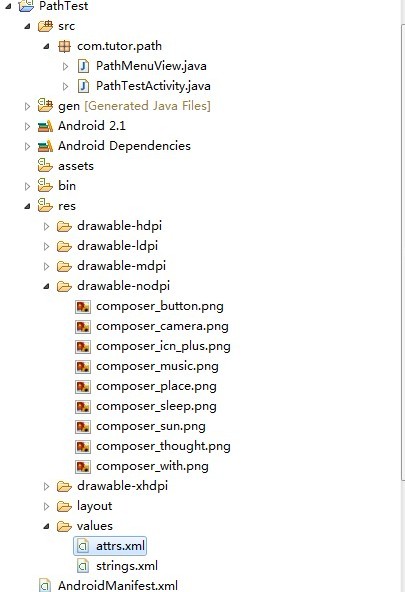
第二步:在values文件夾下新建一個attrs.xml文件,代碼如下:
<?xml version="1.0" encoding="utf-8"?>
<resources>
  <declare-styleable name="PathMenuView">
    <attr name="position">
      <enum name="left_top" value="0"></enum>
      <enum name="right_top" value="1"></enum>
      <enum name="right_bottom" value="2"></enum>
      <enum name="left_bottom" value="3"></enum>
    </attr>
  </declare-styleable>
</resources>
第三步:新建一個PathMenuView.Java這個就是我們自定義的Path菜單控件,代碼如下:
package com.tutor.path;

import androidcontentContext;
import androidcontentresTypedArray;
import androidutilAttributeSet;
import androidviewGravity;
import androidviewView;
import androidviewViewGroup;
import androidviewanimationAnimation;
import androidviewanimationAnticipateInterpolator;
import androidviewanimationOvershootInterpolator;
import androidviewanimationTranslateAnimation;
import androidwidgetFrameLayout;
import androidwidgetImageView;


/**
 * @author frankiewei
 * 超級仿path菜單
 * position定義菜單的位置,目前支持:左上;右上;右下;左下四個方向。
 * menuResIds定義出現的菜單的資源ID
 */
public class PathMenuView extends FrameLayout {

  private static final int LEFT_TOP = 0;

  private static final int RIGHT_TOP = 1;

  private static final int RIGHT_BOTTOM = 2;

  private static final int LEFT_BOTTOM = 3;


  /**
   * 默認的位置是在右下角
   */
  private int position = 3;

  /**
   * 那個圓形菜單
   */
  private ImageView mHome;

  /**
   * 上下文
   */
  private Context mContext;


  /**
   * 設備的寬度
   */
  private int mWIDTH = 0;

  /**
   * 設備的高度
   */
  private int mHEIGHT = 0;

  /**
   * 設備的density
   */
  private float mDensity;

  /**
   * 菜單是否顯示
   */
  private boolean bMenuShow;

  private static int xOffset   = 15;
  private static int yOffset   = -13;

  /**
   * 菜單的資源個數
   */
  private int[] menuResIds = {Rdrawablecomposer_camera,Rdrawablecomposer_music,
      Rdrawablecomposer_sleep,Rdrawablecomposer_music,Rdrawablecomposer_place};


  public PathMenuView(Context context){
    super(context);
    setupViews();
  }

  public PathMenuView(Context context, AttributeSet attrs) {
    super(context, attrs);
    TypedArray a = contextobtainStyledAttributes(attrs,
        RstyleablePathMenuView);

    position = agetInt(RstyleablePathMenuView_position,3);

    arecycle();
    setupViews();
  }

  private void setupViews(){
    mContext = getContext();

    mHEIGHT = mContextgetResources()getDisplayMetrics()heightPixels;
    mWIDTH = mContextgetResources()getDisplayMetrics()widthPixels;
    mDensity = mContextgetResources()getDisplayMetrics()density;

    xOffset = (int) (667 * mDensity);
    yOffset = (int) (667 * mDensity);

    mHome = new ImageView(mContext);

    mHomesetImageResource(Rdrawablecomposer_button);
    mHomesetOnClickListener(listener);

    addView(mHome);

    LayoutParams mHomeparams = (FrameLayoutLayoutParams)mHomegetLayoutParams();
    mHomeparamswidth = LayoutParamsWRAP_CONTENT;
    mHomeparamsheight = LayoutParamsWRAP_CONTENT;

    switch (position) {
    case LEFT_TOP:
      mHomeparamsgravity = GravityLEFT | GravityTOP;
      for (int i = 0; i < menuResIdslength; i++) {

        int width_padding = mWIDTH / ((menuResIdslength - 1) * 2);
        int height_padding = mHEIGHT / ((menuResIdslength - 1) * 2);

        ImageView imageView = new ImageView(mContext);
        imageViewsetImageResource(menuResIds[i]);
        addView(imageView);
        LayoutParams params = (FrameLayoutLayoutParams) imageView
            getLayoutParams();
        paramswidth = LayoutParamsWRAP_CONTENT;
        paramsheight = LayoutParamsWRAP_CONTENT;
        paramsleftMargin = mWIDTH / 2
            - ((menuResIdslength - i - 1) * width_padding);
        paramstopMargin = mHEIGHT / 2 - i * height_padding;
        paramsgravity = GravityLEFT | GravityTOP;
        imageViewsetLayoutParams(params);

      }

      break;
    case RIGHT_TOP:
      mHomeparamsgravity = GravityRIGHT | GravityTOP;
      for (int i = 0; i < menuResIdslength; i++) {

        int width_padding = mWIDTH / ((menuResIdslength - 1) * 2);
        int height_padding = mHEIGHT / ((menuResIdslength - 1) * 2);

        ImageView imageView = new ImageView(mContext);
        imageViewsetImageResource(menuResIds[i]);
        addView(imageView);
        LayoutParams params = (FrameLayoutLayoutParams) imageView
            getLayoutParams();
        paramswidth = LayoutParamsWRAP_CONTENT;
        paramsheight = LayoutParamsWRAP_CONTENT;
        paramsrightMargin = mWIDTH / 2
            - ((menuResIdslength - i - 1) * width_padding);
        paramstopMargin = mHEIGHT / 2 - i * height_padding;
        paramsgravity = GravityRIGHT | GravityTOP;
        imageViewsetLayoutParams(params);

      }
      break;
    case RIGHT_BOTTOM:
      mHomeparamsgravity = GravityRIGHT | GravityBOTTOM;
      for (int i = 0; i < menuResIdslength; i++) {

        int width_padding = mWIDTH / ((menuResIdslength - 1) * 2);
        int height_padding = mHEIGHT / ((menuResIdslength - 1) * 2);

        ImageView imageView = new ImageView(mContext);
        imageViewsetImageResource(menuResIds[i]);
        addView(imageView);
        LayoutParams params = (FrameLayoutLayoutParams) imageView
            getLayoutParams();
        paramswidth = LayoutParamsWRAP_CONTENT;
        paramsheight = LayoutParamsWRAP_CONTENT;
        paramsrightMargin = mWIDTH / 2
            - ((menuResIdslength - i - 1) * width_padding);
        paramsbottomMargin = mHEIGHT / 2 - i * height_padding;
        paramsgravity = GravityRIGHT | GravityBOTTOM;
        imageViewsetLayoutParams(params);

      }
      break;
    case LEFT_BOTTOM:
      mHomeparamsgravity = GravityLEFT | GravityBOTTOM;
      for(int i = 0; i < menuResIdslength; i++){

        int width_padding = mWIDTH / ((menuResIdslength - 1) * 2);
        int height_padding = mHEIGHT / ((menuResIdslength -1) * 2);

        ImageView imageView = new ImageView(mContext);
        imageViewsetImageResource(menuResIds[i]);
        addView(imageView);
        LayoutParams params = (FrameLayoutLayoutParams)imageViewgetLayoutParams();
        paramswidth = LayoutParamsWRAP_CONTENT;
        paramsheight = LayoutParamsWRAP_CONTENT;
        paramsleftMargin = mWIDTH / 2 - ((menuResIdslength - i - 1) * width_padding);
        paramsbottomMargin = mHEIGHT / 2 - i * height_padding;
        paramsgravity = GravityLEFT | GravityBOTTOM;
        imageViewsetLayoutParams(params);
      }
      break;
    default:
        break;
    }

    mHomesetLayoutParams(mHomeparams);
  }

  private OnClickListener listener = new OnClickListener() {

    public void onClick(View v) {
      if (!bMenuShow) {
        startAnimationIn(PathMenuViewthis, 300);
      } else {
        startAnimationOut(PathMenuViewthis, 300);
      }
      bMenuShow = !bMenuShow;
    }
  };


  /**
   * 菜單隱藏動畫
   *
   * @param group
   * @param duration
   */
  private void startAnimationIn(ViewGroup group, int duration) {
    for (int i = 1; i < groupgetChildCount(); i++) {
      ImageView imageview = (ImageView) groupgetChildAt(i);
      imageviewsetVisibility(0);
      MarginLayoutParams mlp = (MarginLayoutParams) imageview
          getLayoutParams();


      Animation animation = null;


      switch (position) {
      case LEFT_TOP:
        animation = new TranslateAnimation(0F,-mlpleftMargin+xOffset,0F,-mlptopMargin + yOffset);
        break;
      case RIGHT_TOP:
        animation = new TranslateAnimation(mlprightMargin - xOffset,0F,-mlptopMargin + yOffset,0F);
        break;
      case LEFT_BOTTOM:
        animation = new TranslateAnimation(0F, -mlpleftMargin+ xOffset, 0F, -yOffset + mlpbottomMargin);
        break;

      case RIGHT_BOTTOM:
        animation = new TranslateAnimation(mlprightMargin-xOffset,0F,-yOffset + mlpbottomMargin, 0F);
        break;
      default:
        break;
      }

      animationsetFillAfter(true);
      animationsetDuration(duration);
      animationsetStartOffset((i * 100) / (-1 + groupgetChildCount()));
      animationsetInterpolator(new OvershootInterpolator(2F));
      imageviewstartAnimation(animation);

    }
  }

  /**
   * 菜單顯示動畫
   *
   * @param group
   * @param duration
   */
  private void startAnimationOut(ViewGroup group,int duration){
    for (int i = 1; i < groupgetChildCount(); i++) {
      final ImageView imageview = (ImageView) group
          getChildAt(i);
      MarginLayoutParams mlp = (MarginLayoutParams) imageviewgetLayoutParams();

      Animation animation = null;

      switch (position) {
      case LEFT_TOP:
        animation = new TranslateAnimation(-mlpleftMargin+xOffset,0F,-mlptopMargin + yOffset,0F);
        break;
      case RIGHT_TOP:
        animation = new TranslateAnimation(0F,mlprightMargin - xOffset,0F,-mlptopMargin + yOffset);
        break;

      case LEFT_BOTTOM:
        animation = new TranslateAnimation(-mlpleftMargin+xOffset,0F, -yOffset + mlpbottomMargin,0F);
        break;

      case RIGHT_BOTTOM:
        animation = new TranslateAnimation(0F,mlprightMargin-xOffset, 0F,-yOffset + mlpbottomMargin);
        break;
      default:
        break;
      }

      animationsetFillAfter(true);animationsetDuration(duration);
      animationsetStartOffset(((groupgetChildCount()-i) * 100)
          / (-1 + groupgetChildCount()));
      animationsetInterpolator(new AnticipateInterpolator(2F));
      imageviewstartAnimation(animation);
    }
  }

}
第四步:PathTestActivity.java以及用到的布局文件main.xml代碼如下:
PathTestActivity.java(基本沒修改代碼)代碼如下:
package comtutorpath;

import androidappActivity;
import androidosBundle;

public class PathTestActivity extends Activity {

  @Override
  public void onCreate(Bundle savedInstanceState) {
    superonCreate(savedInstanceState);
    setContentView(Rlayoutmain);
  }
}
main.xml代碼如下:
<?xml version="0" encoding="utf-8"?>
<LinearLayout xmlns:android="http://schemasandroidcom/apk/res/android"
  xmlns:tutor="http://schemasandroidcom/apk/res/comtutorpath"
  android:layout_width="fill_parent"
  android:layout_height="fill_parent"
  android:orientation="vertical" >

  <comtutorpathPathMenuView
    android:id="@+id/text"
    android:layout_width="fill_parent"
    android:layout_height="fill_parent"
    tutor:position="right_bottom"
     />

</LinearLayout>
運行點擊效果如下:
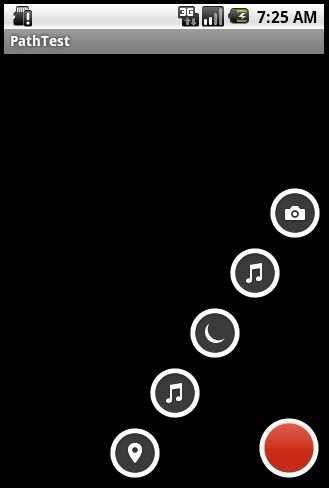
圖1:默認是在右下方這裡menuResIds定義了五個菜單
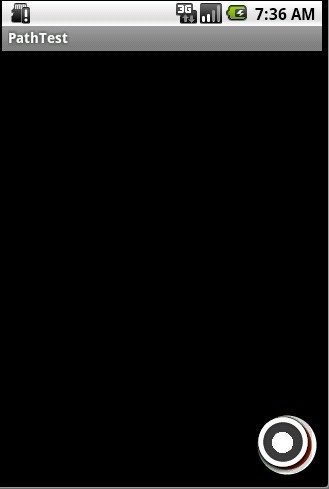
圖2:點擊紅色菜單,菜單收回.
下面我們修改main.xml的tutor屬性為left_bottom,並且修改PathMenuView.java中的menuResIds.
tutor:position="left_bottom"
效果如下:
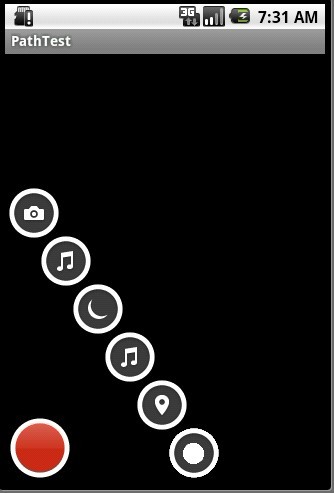
圖3:自定義在左下角,六個菜單。
以上就是本文的全部內容,希望對大家的學習有所幫助,也希望大家多多支持本站。
 Android基礎知識(1)——UI編程
我學習android一段時間了,看著大牛們的各種神博客,心裡也癢癢的,希望有一天也能成為他們一樣。我知道,這些都是一滴一滴的積累,所有我也需要找到我的學習方法,打好基礎,
 android高仿微信底部漸變導航欄
最近有很多人微信底部的變色卡片導航是怎麼做的,我在網上看了好幾個例子,都是效果接近,都存有一些差異,自己琢磨也做了一個,幾乎99%的還原,效果還不錯吧仔細觀察微信圖片,發
 Android-1-電話撥號器
項目包 src --java源代碼 gen文件夾 -- 資源文件,修改後自動生成 ---R.java
 Android線程的優先級設置方法技巧
對於Android平台上的線程優先級設置來說可以處理很多並發線程的阻塞問題,比如很多無關緊要的線程會占用大量的CPU時間,雖然通過了MultiThread來解決慢速I/O