編輯:關於Android編程
本文實例為大家分享了Android發短信功能的實現方法,供大家參考,具體內容如下
首先配置一個布局:
<LinearLayout xmlns:android="http://schemas.android.com/apk/res/android"
 xmlns:tools="http://schemas.android.com/tools"
 android:layout_width="match_parent"
 android:layout_height="match_parent"
 android:paddingBottom="@dimen/activity_vertical_margin"
 android:paddingLeft="@dimen/activity_horizontal_margin"
 android:paddingRight="@dimen/activity_horizontal_margin"
 android:paddingTop="@dimen/activity_vertical_margin"
 tools:context=".MainActivity"
 android:orientation="vertical"
 >

 <EditText
 android:id="@+id/et_phone"
 android:layout_width="match_parent"
 android:layout_height="wrap_content"
 android:inputType="phone"
 android:hint="請輸入對方號碼"
 />
 <EditText
 android:id="@+id/et_content"
 android:layout_width="match_parent"
 android:layout_height="wrap_content"
 android:lines="5"
 android:hint="請輸入短信內容"
 android:gravity="top"
 />
 <Button
 android:layout_width="wrap_content"
 android:layout_height="wrap_content"
 android:text="發送"
 android:onClick="send"
 />

</LinearLayout>
然後在activity中把發短信的代碼寫出來:
package com.ydl.smssender;

import java.util.ArrayList;

//省略導包

public class MainActivity extends Activity {

 @Override
 protected void onCreate(Bundle savedInstanceState) {
 super.onCreate(savedInstanceState);
 setContentView(R.layout.activity_main);
 }


 public void send(View v){
 //拿到用戶輸入的號碼和內容
 EditText et_phone = (EditText) findViewById(R.id.et_phone);
 EditText et_content = (EditText) findViewById(R.id.et_content);

 String phone = et_phone.getText().toString();
 String content = et_content.getText().toString();

 //1.獲取短信管理器
 SmsManager sm = SmsManager.getDefault();

 //2.切割短信,把長短信分成若干個小短信
 ArrayList<String> smss = sm.divideMessage(content);//an ArrayList of strings that, in order, comprise the original message

 //3.for循環把集合中所有短信全部發出去
 for (String string : smss) {

  sm.sendTextMessage(phone, null, string, null, null);//Send a text based SMS.
 }
 }

}
發短信是需要系統權限的:
復制代碼 代碼如下:<uses-permission android:name="android.permission.SEND_SMS"/>
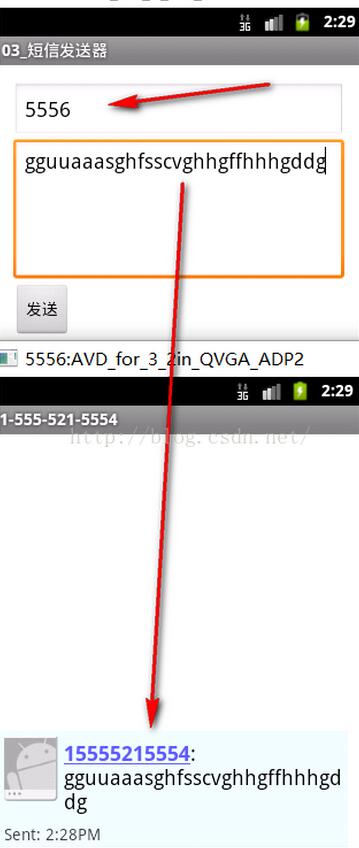
效果:
開了兩個模擬器,實現了發短信功能。
以上就是本文的全部內容,希望對大家的學習有所幫助,也希望大家多多支持本站。
 Android開發中實現應用的前後台切換效果
在介紹程序實現之前,我們先看下Android中Activities和Task的基礎知識。 我們都知道,一個Activity 可以啟動另一個Activity,即使這個Ac
 AndroidStudio中如何使用Git和Github管理項目
轉載請注明出處:http://shenshanlaoyuan.com 本文適用於window系統,Mac系統請參考。Git,設置Git路徑(需要定位到bin目錄
 移動應用地圖工具包WhirlyGlobe-Maply新建android項目
WhirlyGlobe-Maply是一個基於OpenGL ES、專注移動應用的開源地圖工具包,支持ios和android平台,本文以android平台為例。環境:wind
 很棒的Android彈幕效果實例
很多項目需要用到彈幕效果,尤其是在播放視頻的時候需要一起顯示別人發的彈幕,也包括自己的發的。今天就試著寫了一下這個效果。 思路就是將從右往左的動畫效果,字體內容