編輯:關於Android編程
很多項目需要用到彈幕效果,尤其是在播放視頻的時候需要一起顯示別人發的彈幕,也包括自己的發的。
今天就試著寫了一下這個效果。
思路就是將從右往左的動畫效果,字體內容,字體大小,彈幕平移速度等屬性一起與TextView封裝成BarrageItem,並將控制效果與BarrageItem綁定在BarrageView進行顯示。思路還是比較簡單的。這裡沒有考慮到帶有表情的彈幕,我會持續更新的。
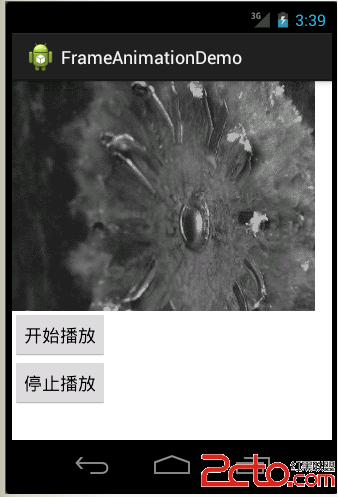
先看效果:

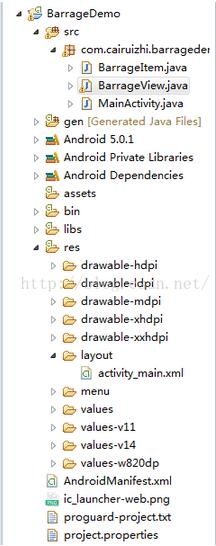
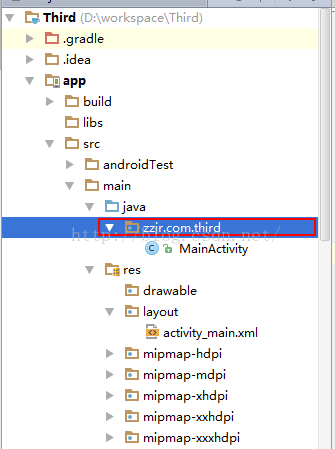
項目目錄結構:
接下來定義Barrageitem.class : 這個類就將TextView與從右往左的動畫效果,字體內容,字體大小,彈幕平移速度等屬性綁定。
public class BarrageItem {

  public TextView textView;

  public int textColor;

  public String text;

  public int textSize;

  // 移動速度
  public int moveSpeed;

  // 垂直方向顯示的位置
  public int verticalPos;

  // 字體顯示占據的寬度
  public int textMeasuredWidth;

}
然後定義BarrageView,由於彈幕的字體顏色大小和移動速度都是隨機的,需要定義最大最小值來限定它們的范圍,然後通過產生隨機數來設置它們在這個范圍內的值。另外還需要定義彈幕的文本內容,這裡是直接寫死的一些固定值。
BarrageView.class:
public class BarrageView extends RelativeLayout {

  private Context mContext;

  private BarrageHandler mHandler = new BarrageHandler();

  private Random random = new Random(System.currentTimeMillis());

  // 兩個彈幕的最小間隔時間
  private static final long BARRAGE_GAP_MIN_DURATION = 1000;

  // 兩個彈幕的最大間隔時間
  private static final long BARRAGE_GAP_MAX_DURATION = 2000;

  // 速度,ms
  private int maxSpeed = 12000;

  // 速度,ms
  private int minSpeed = 8000;

  // 文字最大值
  private int maxSize = 50;

  // 文字最小值
  private int minSize = 10;

  private int totalHeight = 0;

  private int lineHeight = 0;// 每一行彈幕的高度

  private int totalLine = 0;// 彈幕的行數

  private String[] itemText = { "他們都說蔡睿智很帥,但他總覺得自己很丑",
      "他們都說蔡睿智是男神,但他只覺得自己是男生", "蔡睿智不是男神,蔡睿智是男生", "蔡睿智貌似是gay", "蔡睿智是彎的",
      "蔡睿智是彎的,還好現在掰回來了", "他承受了他這個年紀不該有的機智與帥氣,他好累",
      "我恨自己的顏值,我覺得自己的才華才是吸引別人的地方", "他為什麼對妹子不感興趣呢?為什麼?", "他為什麼不想談戀愛","他不會去愛別人,同時也不希望別人去愛他,他已經習慣一個人了",
      "他的心裡是否住著一個蒼老的小孩", "他的世界一直就是他和他的影子,直到遇到她", "她引導他走出了自己的世界,改變他的很多看法",
      "他漸漸的發現自己已經離不開他,他選擇不再去壓抑自己", "因為他已經不是那個無能為力的年紀","她經常說他 高冷,現在越來越覺得他恨悶騷","開始他一直與她保持朋友距離,但他發現自己根本作不到"};
  private int textCount;

  public BarrageView(Context context, AttributeSet attrs, int defStyleAttr) {
    super(context, attrs, defStyleAttr);
    mContext = context;
    _init();
  }

  public BarrageView(Context context, AttributeSet attrs) {
    this(context, null, 0);

  }

  public BarrageView(Context context) {
    this(context, null);

  }

  private void _init() {
    textCount = itemText.length;
    int duration = (int) ((BARRAGE_GAP_MAX_DURATION - BARRAGE_GAP_MIN_DURATION) * Math
        .random());
    mHandler.sendEmptyMessageDelayed(0, duration);
  }

  @Override
  public void onWindowFocusChanged(boolean hasWindowFocus) {
    super.onWindowFocusChanged(hasWindowFocus);
    totalHeight = getMeasuredHeight();
    lineHeight = getLineHeight();
    totalLine = totalHeight / lineHeight;
  }

  private void generateItem() {
    BarrageItem item = new BarrageItem();
    String tx = itemText[(int) (Math.random() * textCount)];
    int sz = (int) (minSize + (maxSize - minSize) * Math.random());
    item.textView = new TextView(mContext);
    item.textView.setText(tx);
    item.textView.setTextSize(sz);
    item.textView.setTextColor(Color.rgb(random.nextInt(256),
        random.nextInt(256), random.nextInt(256)));
    item.textMeasuredWidth = (int) getTextWidth(item, tx, sz);
    item.moveSpeed = (int) (minSpeed + (maxSpeed - minSpeed)
        * Math.random());
    if (totalLine == 0) {
      totalHeight = getMeasuredHeight();
      lineHeight = getLineHeight();
      totalLine = totalHeight / lineHeight;
    }
    item.verticalPos = random.nextInt(totalLine) * lineHeight;
    showBarrageItem(item);
  }

  private void showBarrageItem(final BarrageItem item) {
    int leftMargin = this.getRight() - this.getLeft()
        - this.getPaddingLeft();
    LayoutParams params = new LayoutParams(LayoutParams.WRAP_CONTENT,
        LayoutParams.WRAP_CONTENT);
    params.addRule(RelativeLayout.ALIGN_PARENT_TOP);
    params.topMargin = item.verticalPos;
    this.addView(item.textView, params);
    Animation anim = generateTranslateAnim(item, leftMargin);
    anim.setAnimationListener(new Animation.AnimationListener() {

      @Override
      public void onAnimationStart(Animation arg0) {

      }

      @Override
      public void onAnimationRepeat(Animation arg0) {

      }

      @Override
      public void onAnimationEnd(Animation arg0) {
        item.textView.clearAnimation();
        BarrageView.this.removeView(item.textView);
      }
    });
    item.textView.startAnimation(anim);
  }

  private TranslateAnimation generateTranslateAnim(BarrageItem item,
      int leftMargin) {
    TranslateAnimation anim = new TranslateAnimation(leftMargin,
        -item.textMeasuredWidth, 0, 0);
    anim.setDuration(item.moveSpeed);
    anim.setInterpolator(new AccelerateDecelerateInterpolator());
    anim.setFillAfter(true);
    return anim;
  }

  /**
   * 計算TextView中字符串的長度
   *
   * @param item
   * @param text
   *      要計算的字符串
   * @param Size
   *      字體大小
   * @return TextView中字符串的長度
   */
  public float getTextWidth(BarrageItem item, String text, float Size) {
    Rect bounds = new Rect();
    TextPaint paint;
    paint = item.textView.getPaint();
    paint.getTextBounds(text, 0, text.length(), bounds);
    return bounds.width();
  }

  /**
   * 獲得每一行彈幕的最大高度
   */
  private int getLineHeight() {
    BarrageItem item = new BarrageItem();
    String tx = itemText[0];
    item.textView = new TextView(mContext);
    item.textView.setText(tx);
    item.textView.setTextSize(maxSize);

    Rect bounds = new Rect();
    TextPaint paint;
    paint = item.textView.getPaint();
    paint.getTextBounds(tx, 0, tx.length(), bounds);
    return bounds.height();
  }

  class BarrageHandler extends Handler {
    @Override
    public void handleMessage(Message msg) {
      super.handleMessage(msg);
      generateItem();
      // 每個彈幕產生的時間隨機
      int duration = (int) ((BARRAGE_GAP_MAX_DURATION - BARRAGE_GAP_MIN_DURATION) * Math
          .random());
      this.sendEmptyMessageDelayed(0, duration);
    }
  }

}
如果彈幕顯示的垂直位置是隨機的,就會出現垂直方向上彈幕重疊的情況,所以需要根據高度對垂直方向按照彈幕高度的最大值等分,然後讓彈幕在這些指定的垂直位置隨機分布。這個值在onWindowFocusChanged裡計算,因為在這個方法中通過View的getMeasuredHeight()得到的高度不為空。
MainActivity.class:
<span >public class MainActivity extends Activity {

  @Override
  protected void onCreate(Bundle savedInstanceState) {
    super.onCreate(savedInstanceState);
    setContentView(R.layout.activity_main);
  }
}</span>
以上就是彈幕的源碼,其實我覺得這裡少了自己發送彈幕的功能,我會在以後的更新上去的,共勉。
 Android_AsyncTask
一.AsyncTask的簡介在Android中實現異步任務機制有兩種方式,Handler和AsyncTask。Handler模式需要為每一個任務創建一個新的線程,任務完成
 android studio修改工程包名
今天做項目時,要求更改程序的包名。於是經過查資料與摸索。情況1:直接修改包名的“尾巴”,也就是包名的最後一級。比如:一個包名叫zzjr.com.t
 走進絢爛多彩的屬性動畫-Property Animation之TimeInterpolator和TypeEvaluator(下篇)
??上一篇中,我們已經介紹了屬性動畫的基本使用,至少在動畫應用上問題不大,而本篇我們將來了解插值器(Interpolator)和類型估算器(TypeEvaluator)的
 Android 全局異常錯誤或崩潰捕捉
當出現崩潰,軟件不會閃退,會出現彈出一個對話框,異常錯誤信息會自動保存在sd卡crash這個文件夾下。後續需要還可以發送到服務器的。看效果圖。1、實現效果圖2、全局異常捕