編輯:關於Android編程
本文實例講述了Android編程單選項框RadioGroup用法。分享給大家供大家參考,具體如下:
今天介紹的是RadioGroup 的組事件.RadioGroup 可將各自不同的RadioButton ,設限於同一個Radio 按鈕組,同一個RadioGroup 組裡的按鈕,只能做出單一選擇(單選題).
首先,我們先設計一個TextView Widget ,以及一個RadioGroup ,並將該RadioGroup 內放置兩個RadioButton ,默認為都不選擇,在程序運行階段,利用onCheckedChanged 作為啟動事件裝置,讓User選擇其中一個按鈕,顯示被選擇的內容,最的將RadioButton 的選項文字顯示於TextView 當中.
下面我們看一下效果圖:
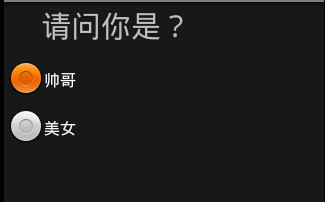
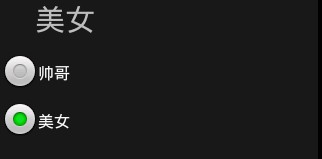
下面是涉及的相關代碼:
string.xml:
<?xml version="1.0" encoding="utf-8"?>
<resources>
 <string name="hello">Hello World, RadioGroupDemo</string>
 <string name="app_name">RadioGroupDemo</string>
 <string name="tr_radio_op1">帥哥</string>
 <string name="tr_radio_op2">美女</string>
 <string name="str_radio_question1">請問你是?</string>
</resources>
主布局main.xml:
<?xml version="1.0" encoding="utf-8"?>
<LinearLayout xmlns:Android="http://schemas.android.com/apk/res/android"
 android:orientation="vertical"
 android:layout_width="fill_parent"
 android:layout_height="fill_parent"
 >
 <!--第一個TextView -->
 <TextView
  android:id="@+id/myTextView"
  android:layout_width="228px"
  android:layout_height="49px"
  android:text="@string/str_radio_question1"
  android:textSize="30sp"
 />
 <!--建立一個RadioGroup -->
 <RadioGroup
  android:id="@+id/myRadioGroup"
  android:layout_width="137px"
  android:layout_height="216px"
  android:orientation="vertical"
  >
  <!--第一個RadioButton -->
  <RadioButton
   android:id="@+id/myRadioButton1"
   android:layout_width="wrap_content"
   android:layout_height="wrap_content"
   android:text="@string/tr_radio_op1"
  />
  <!--第二個RadioButton -->
  <RadioButton
   android:id="@+id/myRadioButton2"
   android:layout_width="wrap_content"
   android:layout_height="wrap_content"
   android:text="@string/tr_radio_op2"
  />
  </RadioGroup>
</LinearLayout>
最後是主控制程序RadioGroupDemo.Java:
package com.android.test;
import android.app.Activity;
import android.os.Bundle;
import android.widget.RadioButton;
import android.widget.RadioGroup;
import android.widget.TextView;
public class RadioGroupDemo extends Activity
{
 public TextView mTextView1;
 public RadioGroup mRadioGroup1;
 public RadioButton mRadio1,mRadio2;
 public void onCreate(Bundle savedInstanceState)
 {
  super.onCreate(savedInstanceState);
  setContentView(R.layout.main);
  /*取得 TextView、RadioGroup、RadioButton對象*/
  mTextView1 = (TextView) findViewById(R.id.myTextView);
  mRadioGroup1 = (RadioGroup) findViewById(R.id.myRadioGroup);
  mRadio1 = (RadioButton) findViewById(R.id.myRadioButton1);
  mRadio2 = (RadioButton) findViewById(R.id.myRadioButton2);
  /*RadioGroup用OnCheckedChangeListener來運行*/
  mRadioGroup1.setOnCheckedChangeListener(mChangeRadio);
 }
 private RadioGroup.OnCheckedChangeListener mChangeRadio = new
      RadioGroup.OnCheckedChangeListener()
 {
  @Override
  public void onCheckedChanged(RadioGroup group, int checkedId)
  {
   // TODO Auto-generated method stub
   if(checkedId==mRadio1.getId())
   {
    /*把mRadio1的內容傳到mTextView1*/
    mTextView1.setText(mRadio1.getText());
   }
   else if(checkedId==mRadio2.getId())
   {
    /*把mRadio2的內容傳到mTextView1*/
    mTextView1.setText(mRadio2.getText());
   }
  }
 };
}
運行RadioGroupDemo.java ,將得到以上效果。
更多關於Android相關內容感興趣的讀者可查看本站專題:《Android視圖View技巧總結》、《Android布局layout技巧總結》、《Android圖形與圖像處理技巧總結》、《Android開發入門與進階教程》、《Android調試技巧與常見問題解決方法匯總》、《Android多媒體操作技巧匯總(音頻,視頻,錄音等)》、《Android基本組件用法總結》及《Android控件用法總結》
希望本文所述對大家Android程序設計有所幫助。
 Android實現帶附件的郵件發送功能
本文實例講解了基於基於JMail實現Android郵件發送功能,分享給大家供大家參考,具體內容如下在android上發送郵件方式:第一種:借助GMail APP客戶端,缺
 Android主題切換之探究白天和夜間模式
智能手機的迅速普及,大大的豐富了我們的娛樂生活。現在大家都喜歡晚上睡覺前玩會兒手機,但是應用的日間模式往往亮度太大,對眼睛有較為嚴重的傷害。因此,如今的應用往往開發了 日
 Android通訊錄管理一之聯系人獲取
正如我們知道的一樣,Android的通訊錄和短信管理是通過contentprovider來向開發者來開發接口的。必須從ContentResolver入手去解決。其中通訊錄
 如何讓你的的小米手機運行更流暢
小米是目前國內用的較多的手機,米粉們用手機用多了發現小米手機變慢了,怎麼提高小米手機的速度呢!要注意以下幾點。 1:開機時間 需要打開權