編輯:關於Android編程
前言
最近項目做用戶登錄模塊需要一個右邊帶圖片的EditText,圖片可以設置點擊效果,所以就查資料做了一個自定義EditText出來,方便以後復用。
原理
下面是自定義EditText的代碼,具體難點是要實現圖片的點擊監聽,因為谷歌官方至今沒有給出一個直接實現EditText裡面圖片的監聽API。我的做法是整個控件綁定一個OnTouchListener,然後監測點擊事件,檢測點擊位置的X坐標是否在圖片的覆蓋范圍內(下面getCompoundDrawables()[2]裡面的2是代表圖片在EditText的右邊),如果是則執行點擊事件。
package scut.userlogin;

import android.content.Context;
import android.util.AttributeSet;
import android.view.MotionEvent;
import android.view.View;
import android.widget.EditText;

/**
 * Created by yany on 2016/7/23.
 */
public class EditText_PassWordDisplay extends EditText implements View.OnTouchListener {

 //需要實現下面的幾個構造函數,不然有可能加載不了這個EditText控件
 public EditText_PassWordDisplay(Context context) {
 super(context);
 init();
 }

 public EditText_PassWordDisplay(Context context, AttributeSet attrs, int defStyle) {
 super(context, attrs, defStyle);
 init();
 }

 public EditText_PassWordDisplay(Context context, AttributeSet attrs) {
 super(context, attrs);
 init();
 }

 //初始化控件,綁定監聽器
 public void init(){
 setOnTouchListener(this);
 }

 @Override
 public boolean onTouch(View v, MotionEvent event) {
 //如果不是按下操作,就不做處理,如果是按下操作但是沒有圖片,也不做處理
 if (event.getAction() == MotionEvent.ACTION_UP && this.getCompoundDrawables()[2] != null) {
  //檢測點擊區域的X坐標是否在圖片范圍內
  if (event.getX() > this.getWidth()
   - this.getPaddingRight()
   - this.getCompoundDrawables()[2].getIntrinsicWidth()) {

  //在此做圖片的點擊處理
  System.out.println("點擊區域");
  MessageShow.ShowToast(getContext(), "點擊了圖片");

  }
  return false;
 }
 return false;
 }
}
只需要在xml裡使用這個控件(記得加上圖片,不然的話就相當於一個普通的EditText了):
<?xml version="1.0" encoding="utf-8"?>
<RelativeLayout xmlns:android="http://schemas.android.com/apk/res/android"
 xmlns:tools="http://schemas.android.com/tools"
 android:layout_width="match_parent"
 android:layout_height="match_parent"
 android:paddingBottom="@dimen/activity_vertical_margin"
 android:paddingLeft="@dimen/activity_horizontal_margin"
 android:paddingRight="@dimen/activity_horizontal_margin"
 android:paddingTop="@dimen/activity_vertical_margin"
 tools:context="scut.userlogin.RegisterActivity3">

 <scut.userlogin.EditText_PassWordDisplay
 android:layout_width="match_parent"
 android:layout_height="wrap_content"
 android:id="@+id/EditText_PasswordRegisterInput"
 android:inputType="textPassword"
 android:hint="請輸入登錄密碼"
 android:drawableRight="@mipmap/ic_launcher"
 android:layout_marginTop="50dp" />

</RelativeLayout>
在Activity裡只需要普通地加載就行了:
 private EditText_PassWordDisplay et_PasswordRegisterInput;
 @Override
 protected void onCreate(Bundle savedInstanceState) {
 super.onCreate(savedInstanceState);
 setContentView(R.layout.activity_register3);
 init();
 }

 private void init(){
 et_PasswordRegisterInput = (EditText_PassWordDisplay) findViewById(R.id.EditText_PasswordRegisterInput);

 }
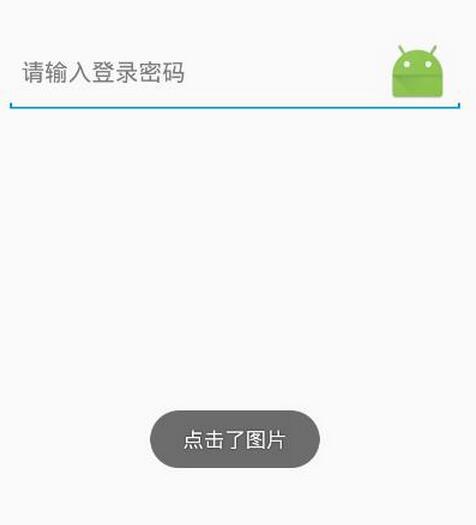
實現效果,點擊圖片就會出現Toast:
參考文章:
Android中EditText的drawableRight屬性設置點擊事件
Android對EditTex的圖片實現監聽
以上就是本文的全部內容,希望對大家的學習有所幫助,也希望大家多多支持本站。
 ListView擴展上拉加載更多,下拉刷新
一、加載過程動態展示動畫在APP的研發中,加載過程用動畫更改時間的消耗,增強用戶體驗。而有個更精細的加載過程動畫,會不斷從細節優化APP的體驗。且隨著APP與服務器交互的
 android NFC 程序設計
NFC簡介 NFC是Near Field Communication縮寫,即近距離無線通訊技術。由飛利浦公司和索尼公司共同開發的NFC是一種非 接觸式識別和
 智能廚房重構-MVP架構
上一篇博客,我們介紹了項目分包的結構,這一篇我們重點來介紹一下MVP架構在項目中的應用,MVP可以說是MVC模式的一種升級,在MVP出現之前,一般都是用MVC,但是使用M
 Android的四大組建Service 簡單、易懂的解析
Service 服務:四大組件之一特性: 沒有界面運行在後台,除了界面相關的之外,Activity能做的Service也能做。service的生命周期:上圖所述一共有兩種