編輯:關於Android編程
通常我們使用Service都要和它通信,當想要與Service通信的時候,那麼Service要處於綁定狀態的。然後客戶端可以拿到一個Binder與服務端進行通信,這個過程是很自然的。
那你真的了解過Service的綁定過程嗎?為什麼可以是Binder和Service通信?
同樣的先看一張圖大致了解一下,灰色背景框起來的是同一個類的方法,如下:
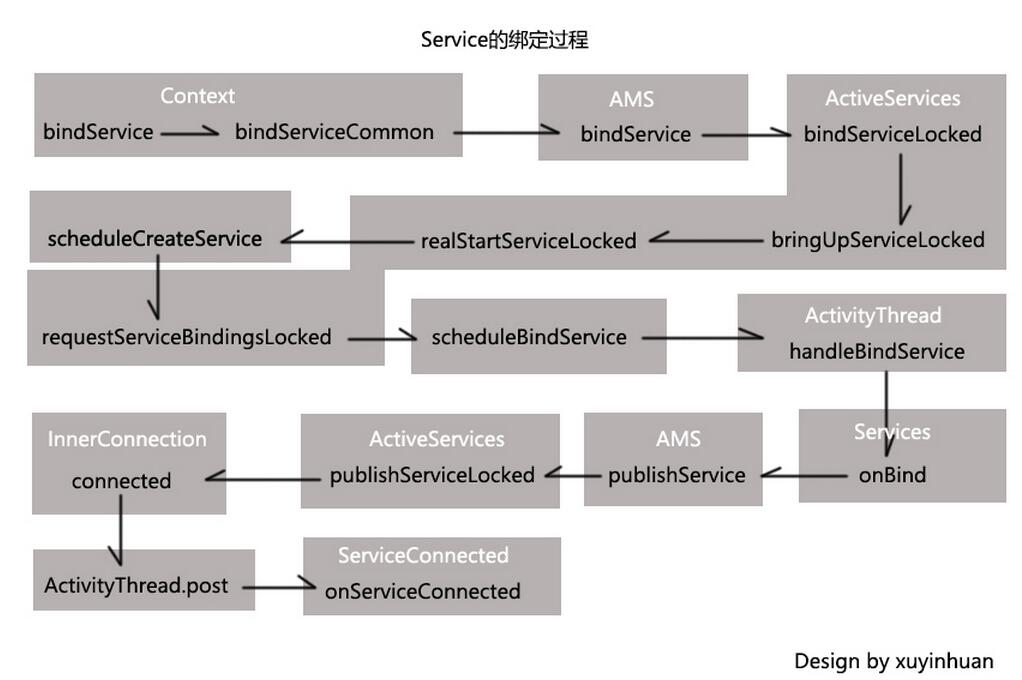
我們知道調用Context的bindService方法即可綁定一個Service,而ContextImpl是Context的實現類。那接下來就從源碼的角度分析Service的綁定過程。
當然是從ContextImpl的bindService方法開始,如下:
@Override
public boolean bindService(Intent service, ServiceConnection conn,
  int flags) {
 warnIfCallingFromSystemProcess();
 return bindServiceCommon(service, conn, flags, mMainThread.getHandler(),
   Process.myUserHandle());
}
在bindService方法中又會轉到bindServiceCommon方法,將Intent,ServiceConnection對象傳進。
那就看看bindServiceCommon方法的實現。
private boolean bindServiceCommon(Intent service, ServiceConnection conn, int flags, Handler
    handler, UserHandle user) {
  IServiceConnection sd;
  if (conn == null) {
    throw new IllegalArgumentException("connection is null");
  }
  if (mPackageInfo != null) {
    sd = mPackageInfo.getServiceDispatcher(conn, getOuterContext(), handler, flags);
  } else {
    throw new RuntimeException("Not supported in system context");
  }
  validateServiceIntent(service);
  try {
    IBinder token = getActivityToken();
    if (token == null && (flags&BIND_AUTO_CREATE) == 0 && mPackageInfo != null
        && mPackageInfo.getApplicationInfo().targetSdkVersion
        < android.os.Build.VERSION_CODES.ICE_CREAM_SANDWICH) {
      flags |= BIND_WAIVE_PRIORITY;
    }
    service.prepareToLeaveProcess(this);
    int res = ActivityManagerNative.getDefault().bindService(
      mMainThread.getApplicationThread(), getActivityToken(), service,
      service.resolveTypeIfNeeded(getContentResolver()),
      sd, flags, getOpPackageName(), user.getIdentifier());
    if (res < 0) {
      throw new SecurityException(
          "Not allowed to bind to service " + service);
    }
    return res != 0;
  } catch (RemoteException e) {
    throw e.rethrowFromSystemServer();
  }
}
在上述代碼中,調用了mPackageInfo(LoadedApk對象)的getServiceDispatcher方法。從getServiceDispatcher方法的名字可以看出是獲取一個“服務分發者”。其實是根據這個“服務分發者”獲取到一個Binder對象的。
那現在就看到getServiceDispatcher方法的實現。
public final IServiceConnection getServiceDispatcher(ServiceConnection c,
    Context context, Handler handler, int flags) {
  synchronized (mServices) {
    LoadedApk.ServiceDispatcher sd = null;
    ArrayMap<ServiceConnection, LoadedApk.ServiceDispatcher> map = mServices.get(context);
    if (map != null) {
      sd = map.get(c);
    }
    if (sd == null) {
      sd = new ServiceDispatcher(c, context, handler, flags);
      if (map == null) {
        map = new ArrayMap<ServiceConnection, LoadedApk.ServiceDispatcher>();
        mServices.put(context, map);
      }
      map.put(c, sd);
    } else {
      sd.validate(context, handler);
    }
    return sd.getIServiceConnection();
  }
}
從getServiceDispatcher方法的實現可以知道,ServiceConnection和ServiceDispatcher構成了映射關系。當存儲集合不為空的時候,根據傳進的key,也就是ServiceConnection,來取出對應的ServiceDispatcher對象。
當取出ServiceDispatcher對象後,最後一行代碼是關鍵,
return sd.getIServiceConnection();
調用了ServiceDispatcher對象的getIServiceConnection方法。這個方法肯定是獲取一個IServiceConnection的。
IServiceConnection getIServiceConnection() {
  return mIServiceConnection;
}
那麼mIServiceConnection是什麼?現在就可以來看下ServiceDispatcher類了。ServiceDispatcher是LoadedApk的內部類,裡面封裝了InnerConnection和ServiceConnection。如下:
static final class ServiceDispatcher {
  private final ServiceDispatcher.InnerConnection mIServiceConnection;
  private final ServiceConnection mConnection;
  private final Context mContext;
  private final Handler mActivityThread;
  private final ServiceConnectionLeaked mLocation;
  private final int mFlags;

  private RuntimeException mUnbindLocation;

  private boolean mForgotten;

  private static class ConnectionInfo {
    IBinder binder;
    IBinder.DeathRecipient deathMonitor;
  }

  private static class InnerConnection extends IServiceConnection.Stub {
    final WeakReference<LoadedApk.ServiceDispatcher> mDispatcher;

    InnerConnection(LoadedApk.ServiceDispatcher sd) {
      mDispatcher = new WeakReference<LoadedApk.ServiceDispatcher>(sd);
    }

    public void connected(ComponentName name, IBinder service) throws RemoteException {
      LoadedApk.ServiceDispatcher sd = mDispatcher.get();
      if (sd != null) {
        sd.connected(name, service);
      }
    }
  }

  private final ArrayMap<ComponentName, ServiceDispatcher.ConnectionInfo> mActiveConnections
    = new ArrayMap<ComponentName, ServiceDispatcher.ConnectionInfo>();

  ServiceDispatcher(ServiceConnection conn,
      Context context, Handler activityThread, int flags) {
    mIServiceConnection = new InnerConnection(this);
    mConnection = conn;
    mContext = context;
    mActivityThread = activityThread;
    mLocation = new ServiceConnectionLeaked(null);
    mLocation.fillInStackTrace();
    mFlags = flags;
  }

  //代碼省略

}
先看到ServiceDispatcher的構造方法,一個ServiceDispatcher關聯一個InnerConnection對象。而InnerConnection呢?,它是一個Binder,有一個很重要的connected方法。至於為什麼要用Binder,因為與Service通信可能是跨進程的。
好,到了這裡先總結一下:調用bindService方法綁定服務,會轉到bindServiceCommon方法。
在bindServiceCommon方法中,會調用LoadedApk的getServiceDispatcher方法,並將ServiceConnection傳進, 根據這個ServiceConnection取出與其映射的ServiceDispatcher對象,最後調用這個ServiceDispatcher對象的getIServiceConnection方法獲取與其關聯的InnerConnection對象並返回。簡單點理解就是用ServiceConnection換來了InnerConnection。
現在回到bindServiceCommon方法,可以看到綁定Service的過程會轉到ActivityManagerNative.getDefault()的bindService方法,其實從拋出的異常類型RemoteException也可以知道與Service通信可能是跨進程的,這個是很好理解的。
而ActivityManagerNative.getDefault()是ActivityManagerService,那麼繼續跟進ActivityManagerService的bindService方法即可,如下:
public int bindService(IApplicationThread caller, IBinder token, Intent service,
    String resolvedType, IServiceConnection connection, int flags, String callingPackage,
    int userId) throws TransactionTooLargeException {
  enforceNotIsolatedCaller("bindService");

  // Refuse possible leaked file descriptors
  if (service != null && service.hasFileDescriptors() == true) {
    throw new IllegalArgumentException("File descriptors passed in Intent");
  }

  if (callingPackage == null) {
    throw new IllegalArgumentException("callingPackage cannot be null");
  }

  synchronized(this) {
    return mServices.bindServiceLocked(caller, token, service,
        resolvedType, connection, flags, callingPackage, userId);
  }
}
在上述代碼中,綁定Service的過程轉到ActiveServices的bindServiceLocked方法,那就跟進ActiveServices的bindServiceLocked方法瞧瞧。如下:
int bindServiceLocked(IApplicationThread caller, IBinder token, Intent service,
    String resolvedType, final IServiceConnection connection, int flags,
    String callingPackage, final int userId) throws TransactionTooLargeException {

    //代碼省略

     ConnectionRecord c = new ConnectionRecord(b, activity,
          connection, flags, clientLabel, clientIntent);

     IBinder binder = connection.asBinder();
     ArrayList<ConnectionRecord> clist = s.connections.get(binder);
     if (clist == null) {
       clist = new ArrayList<ConnectionRecord>();
       s.connections.put(binder, clist);
     }
     clist.add(c);

     //代碼省略

    if ((flags&Context.BIND_AUTO_CREATE) != 0) {
      s.lastActivity = SystemClock.uptimeMillis();
      if (bringUpServiceLocked(s, service.getFlags(), callerFg, false,
          permissionsReviewRequired) != null) {
        return 0;
      }
    }

    //代碼省略

  return 1;
}
將connection對象封裝在ConnectionRecord中,這裡的connection就是上面提到的InnerConnection對象。這一步很重要的。
然後調用了bringUpServiceLocked方法,那麼就探探這個bringUpServiceLocked方法,
private String bringUpServiceLocked(ServiceRecord r, int intentFlags, boolean execInFg,
    boolean whileRestarting, boolean permissionsReviewRequired)
    throws TransactionTooLargeException {

    //代碼省略

    if (app != null && app.thread != null) {
      try {
        app.addPackage(r.appInfo.packageName, r.appInfo.versionCode, mAm.mProcessStats);
        realStartServiceLocked(r, app, execInFg);
        return null;
      } catch (TransactionTooLargeException e) {
        throw e;
      } catch (RemoteException e) {
        Slog.w(TAG, "Exception when starting service " + r.shortName, e);
      }

      // If a dead object exception was thrown -- fall through to
      // restart the application.
    }

    //代碼省略

  return null;
}
可以看到調用了realStartServiceLocked方法,真正去啟動Service了。
那麼跟進realStartServiceLocked方法探探,如下:
private final void realStartServiceLocked(ServiceRecord r,
    ProcessRecord app, boolean execInFg) throws RemoteException {

   //代碼省略

   app.thread.scheduleCreateService(r, r.serviceInfo,
       mAm.compatibilityInfoForPackageLocked(r.serviceInfo.applicationInfo),
    app.repProcState);
    r.postNotification();
    created = true;

   //代碼省略

  requestServiceBindingsLocked(r, execInFg);

  updateServiceClientActivitiesLocked(app, null, true);

  // If the service is in the started state, and there are no
  // pending arguments, then fake up one so its onStartCommand() will
  // be called.
  if (r.startRequested && r.callStart && r.pendingStarts.size() == 0) {
    r.pendingStarts.add(new ServiceRecord.StartItem(r, false, r.makeNextStartId(),
        null, null));
  }

  sendServiceArgsLocked(r, execInFg, true);

//代碼省略
}
這裡會調用app.thread的scheduleCreateService方法去創建一個Service,然後會回調Service的生命周期方法,然而綁定Service呢?
在上述代碼中,找到一個requestServiceBindingsLocked方法,從名字看是請求綁定服務的意思,那麼就是它沒錯了。
private final void requestServiceBindingsLocked(ServiceRecord r, boolean execInFg)
    throws TransactionTooLargeException {
  for (int i=r.bindings.size()-1; i>=0; i--) {
    IntentBindRecord ibr = r.bindings.valueAt(i);
    if (!requestServiceBindingLocked(r, ibr, execInFg, false)) {
      break;
    }
  }
}
咦,我再按住Ctrl+鼠標左鍵,點進去requestServiceBindingLocked方法。如下:
private final boolean requestServiceBindingLocked(ServiceRecord r, IntentBindRecord i,
    boolean execInFg, boolean rebind) throws TransactionTooLargeException {
  if (r.app == null || r.app.thread == null) {
    // If service is not currently running, can't yet bind.
    return false;
  }
  if ((!i.requested || rebind) && i.apps.size() > 0) {
    try {
      bumpServiceExecutingLocked(r, execInFg, "bind");
      r.app.forceProcessStateUpTo(ActivityManager.PROCESS_STATE_SERVICE);
      r.app.thread.scheduleBindService(r, i.intent.getIntent(), rebind,
          r.app.repProcState);
      if (!rebind) {
        i.requested = true;
      }
      i.hasBound = true;
      i.doRebind = false;
    }

  //代碼省略

  return true;
}
r.app.thread調用了scheduleBindService方法來綁定服務,而r.app.thread是ApplicationThread,現在關注到 ApplicationThread即可,scheduleBindService方法如下:
public final void scheduleBindService(IBinder token, Intent intent,
    boolean rebind, int processState) {
  updateProcessState(processState, false);
  BindServiceData s = new BindServiceData();
  s.token = token;
  s.intent = intent;
  s.rebind = rebind;

  if (DEBUG_SERVICE)
    Slog.v(TAG, "scheduleBindService token=" + token + " intent=" + intent + " uid="
        + Binder.getCallingUid() + " pid=" + Binder.getCallingPid());
  sendMessage(H.BIND_SERVICE, s);
}
封裝了待綁定的Service的信息,並發送了一個消息給主線程,
public void handleMessage(Message msg) {
  if (DEBUG_MESSAGES) Slog.v(TAG, ">>> handling: " + codeToString(msg.what));
  switch (msg.what) {

  //代碼省略

    case BIND_SERVICE:
      Trace.traceBegin(Trace.TRACE_TAG_ACTIVITY_MANAGER, "serviceBind");
      handleBindService((BindServiceData)msg.obj);
      Trace.traceEnd(Trace.TRACE_TAG_ACTIVITY_MANAGER);
      break;

  //代碼省略

  }
}
調用了handleBindService方法,即將綁定完成啦。
private void handleBindService(BindServiceData data) {
  Service s = mServices.get(data.token);
  if (DEBUG_SERVICE)
    Slog.v(TAG, "handleBindService s=" + s + " rebind=" + data.rebind);
  if (s != null) {
    try {
      data.intent.setExtrasClassLoader(s.getClassLoader());
      data.intent.prepareToEnterProcess();
      try {
        if (!data.rebind) {
          IBinder binder = s.onBind(data.intent);
          ActivityManagerNative.getDefault().publishService(
              data.token, data.intent, binder);
        } else {
          s.onRebind(data.intent);
          ActivityManagerNative.getDefault().serviceDoneExecuting(
              data.token, SERVICE_DONE_EXECUTING_ANON, 0, 0);
        }
        ensureJitEnabled();
      } catch (RemoteException ex) {
        throw ex.rethrowFromSystemServer();
      }
    } catch (Exception e) {
      if (!mInstrumentation.onException(s, e)) {
        throw new RuntimeException(
            "Unable to bind to service " + s
            + " with " + data.intent + ": " + e.toString(), e);
      }
    }
  }
}
根據token獲取到Service,然後Service回調onBind方法。結束了?
可是onBind方法返回了一個binder是用來干嘛的?
我們再看看ActivityManagerNative.getDefault()調用了publishService方法做了什麼工作,此時又回到了ActivityManagerService。
public void publishService(IBinder token, Intent intent, IBinder service) {
  // Refuse possible leaked file descriptors
  if (intent != null && intent.hasFileDescriptors() == true) {
    throw new IllegalArgumentException("File descriptors passed in Intent");
  }

  synchronized(this) {
    if (!(token instanceof ServiceRecord)) {
      throw new IllegalArgumentException("Invalid service token");
    }
    mServices.publishServiceLocked((ServiceRecord)token, intent, service);
  }
}
又會交給ActiveServices處理,轉到了publishServiceLocked方法,那看到ActiveServices的publishServiceLocked方法,
void publishServiceLocked(ServiceRecord r, Intent intent, IBinder service) {
  final long origId = Binder.clearCallingIdentity();
  try {
    if (DEBUG_SERVICE) Slog.v(TAG_SERVICE, "PUBLISHING " + r
        + " " + intent + ": " + service);
    if (r != null) {
      Intent.FilterComparison filter
          = new Intent.FilterComparison(intent);
      IntentBindRecord b = r.bindings.get(filter);
      if (b != null && !b.received) {
        b.binder = service;
        b.requested = true;
        b.received = true;
        for (int conni=r.connections.size()-1; conni>=0; conni--) {
          ArrayList<ConnectionRecord> clist = r.connections.valueAt(conni);
          for (int i=0; i<clist.size(); i++) {
            ConnectionRecord c = clist.get(i);
            if (!filter.equals(c.binding.intent.intent)) {
              if (DEBUG_SERVICE) Slog.v(
                  TAG_SERVICE, "Not publishing to: " + c);
              if (DEBUG_SERVICE) Slog.v(
                  TAG_SERVICE, "Bound intent: " + c.binding.intent.intent);
              if (DEBUG_SERVICE) Slog.v(
                  TAG_SERVICE, "Published intent: " + intent);
              continue;
            }
            if (DEBUG_SERVICE) Slog.v(TAG_SERVICE, "Publishing to: " + c);
            try {
              c.conn.connected(r.name, service);
            }

  //代碼省略

}
c.conn是什麼? 它是一個InnerConnection對象,對,就是那個那個Binder,上面也貼出了代碼,在ActiveServices的bindServiceLocked方法中,InnerConnection對象被封裝在ConnectionRecord中。那麼現在它調用了connected方法,就很好理解了。
InnerConnection的connected方法如下:
public void connected(ComponentName name, IBinder service) throws RemoteException {
  LoadedApk.ServiceDispatcher sd = mDispatcher.get();
  if (sd != null) {
    sd.connected(name, service);
  }
}
會調用ServiceDispatcher 的connected方法,如下
public void connected(ComponentName name, IBinder service) {
  if (mActivityThread != null) {
    mActivityThread.post(new RunConnection(name, service, 0));
  } else {
    doConnected(name, service);
  }
}
從而ActivityThread會投遞一個消息到主線程,此時就解決了跨進程通信。
那麼你應該猜到了RunConnection一定有在主線程回調的onServiceConnected方法,
private final class RunConnection implements Runnable {
  RunConnection(ComponentName name, IBinder service, int command) {
    mName = name;
    mService = service;
    mCommand = command;
  }

  public void run() {
    if (mCommand == 0) {
      doConnected(mName, mService);
    } else if (mCommand == 1) {
      doDeath(mName, mService);
    }
  }

  final ComponentName mName;
  final IBinder mService;
  final int mCommand;
}
咦,還不出現?繼續跟進doConnected方法,
public void doConnected(ComponentName name, IBinder service) {
  ServiceDispatcher.ConnectionInfo old;
  ServiceDispatcher.ConnectionInfo info;

  synchronized (this) {
    if (mForgotten) {
      // We unbound before receiving the connection; ignore
      // any connection received.
      return;
    }
    old = mActiveConnections.get(name);
    if (old != null && old.binder == service) {
      // Huh, already have this one. Oh well!
      return;
    }

    if (service != null) {
      // A new service is being connected... set it all up.
      info = new ConnectionInfo();
      info.binder = service;
      info.deathMonitor = new DeathMonitor(name, service);
      try {
        service.linkToDeath(info.deathMonitor, 0);
        mActiveConnections.put(name, info);
      } catch (RemoteException e) {
        // This service was dead before we got it... just
        // don't do anything with it.
        mActiveConnections.remove(name);
        return;
      }

    } else {
      // The named service is being disconnected... clean up.
      mActiveConnections.remove(name);
    }

    if (old != null) {
      old.binder.unlinkToDeath(old.deathMonitor, 0);
    }
  }

  // If there was an old service, it is not disconnected.
  if (old != null) {
    mConnection.onServiceDisconnected(name);
  }
  // If there is a new service, it is now connected.
  if (service != null) {
    mConnection.onServiceConnected(name, service);
  }
}
在最後一個if判斷,終於找到了onServiceConnected方法!
總結一下,當Service回調onBind方法,其實還沒有結束,會轉到ActivityManagerService,然後又會在ActiveServices的publishServiceLocked方法中,從ConnectionRecord中取出InnerConnection對象。有了InnerConnection對象後,就回調了它的connected。在InnerConnection的connected方法中,又會調用ServiceDispatcher的connected方法,在ServiceDispatcher的connected方法向主線程扔了一個消息,切換到了主線程,之後就在主線程中回調了客戶端傳進的ServiceConnected對象的onServiceConnected方法。
至此, Service的綁定過程分析完畢。
以上就是本文的全部內容,希望對大家的學習有所幫助,也希望大家多多支持本站。
 Android-銀聯支付
銀聯支付也是一般比較常用的支付功能,這裡簡單了介紹android app如果短期快速應用這一方面的東西。直接上代碼: 1.導入銀聯支付的依賴包: 2.在res目錄下增
 Android APP耗電優化
可能造成耗電的一些原因網絡請求耗電,而且手機數據網絡進行http請求比無線網進行http請求更加耗電,因為數據網絡調用到一些底層的硬件模塊,就如GPS一樣,當手機打開GP
 Android百度地圖定位後獲取周邊位置的實現代碼
本文實例講解Android百度地圖定位後獲取周邊位置的實現代碼,分享給大家供大家參考,具體內容如下效果圖:具體代碼:1.布局文件<?xml version=
 Android自定義View Flyme6的Viewpager指示器
最新更新的Flyme6整體效果不錯,動畫效果增加了很多了,看了看flyme6的Viewpager指示器,覺得有點意思,就模仿寫了一下,整體效果如下: GradleJitP