編輯:關於Android編程
今天發的是TabHost結合ViewPager實現首頁底部導航的效果,雖然說網上有很多這樣的Demo,不過呢,我還是要把自己練習寫的發出來,沒錯!就是這麼任性;
先上效果圖,如下:
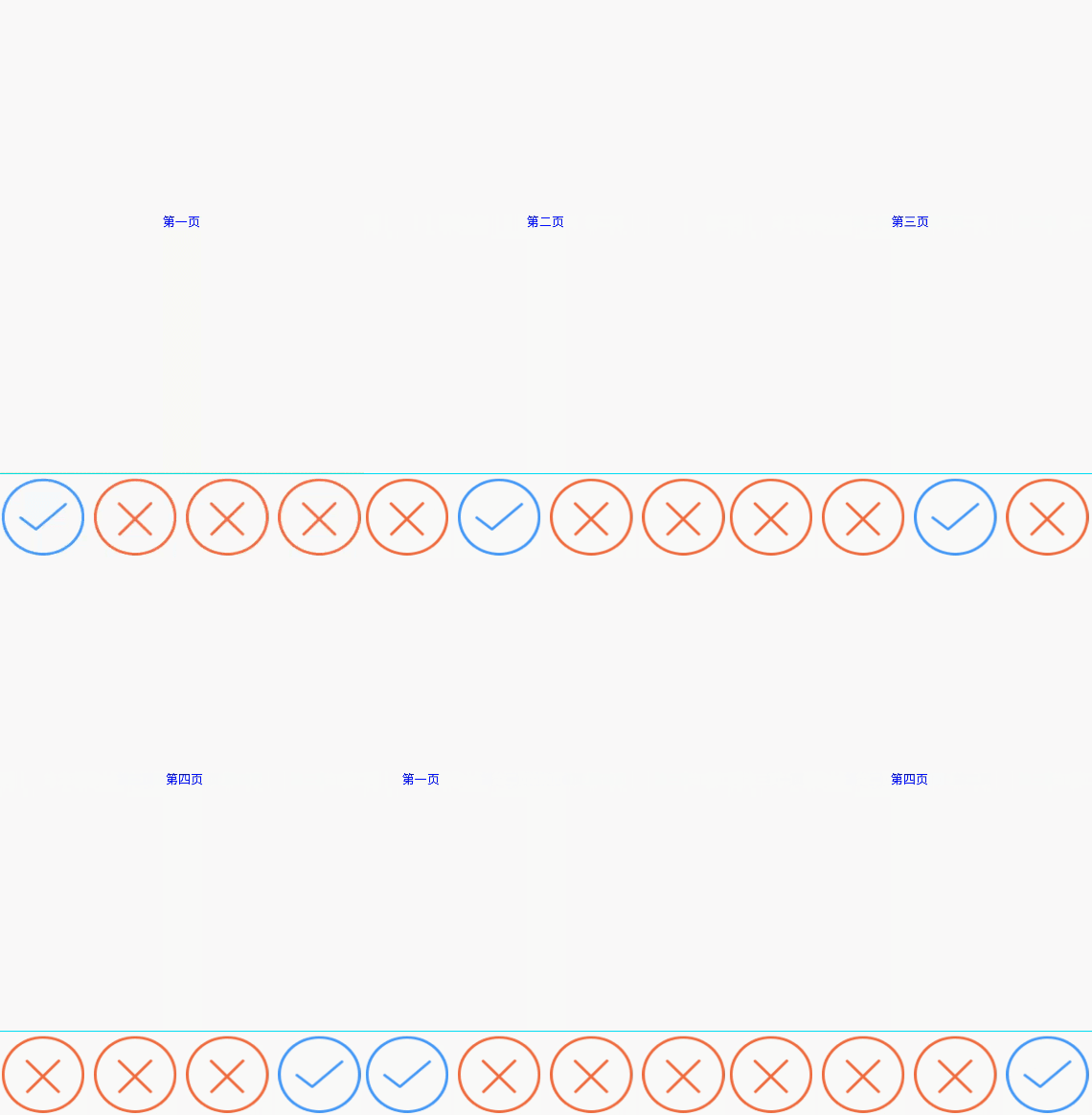
代碼裡面有注釋,就不過多解釋了,說幾點需要注意的問題
1:TabHost 、TabWidget、FrameLayout一定添加id這個屬性,否則會報錯
android:id=”@android:id/tabhost”
android:id=”@android:id/tabcontent”
android:id=”@android:id/tabs”
這個屬性是固定的。
2:ViewPager的適配器要繼承PagerAdapter,別整錯咯;
布局文件xml:
<?xml version="1.0" encoding="utf-8"?>
<TabHost xmlns:android="http://schemas.android.com/apk/res/android"
xmlns:tools="http://schemas.android.com/tools"
android:id="@android:id/tabhost"
android:layout_width="match_parent"
android:layout_height="match_parent"
tools:context="com.example.wgh.tabhostwithviewpager.MainActivity">
<LinearLayout
android:layout_width="match_parent"
android:layout_height="match_parent"
android:orientation="vertical">
<FrameLayout
android:id="@android:id/tabcontent"
android:layout_width="match_parent"
android:layout_height="match_parent"
android:layout_weight="1.0">
<android.support.v4.view.ViewPager
android:id="@+id/viewPager"
android:layout_width="match_parent"
android:layout_height="match_parent"></android.support.v4.view.ViewPager>
</FrameLayout>
<TabWidget
android:id="@android:id/tabs"
android:layout_width="match_parent"
android:layout_height="match_parent"
android:layout_weight="0.0"
android:visibility="gone" />
<View
android:layout_width="match_parent"
android:layout_height="1dp"
android:background="#0ff0f0" />
<RadioGroup
android:id="@+id/radioGroup"
android:layout_width="match_parent"
android:layout_height="wrap_content"
android:orientation="horizontal">
<RadioButton
android:id="@+id/radioButton1"
android:layout_width="0dp"
android:layout_height="wrap_content"
android:layout_margin="5dp"
android:layout_weight="1"
android:background="@drawable/img_draw_money_fail"
android:button="@null"
android:paddingLeft="10dp" />
<RadioButton
android:id="@+id/radioButton2"
android:layout_width="0dp"
android:layout_height="wrap_content"
android:layout_margin="5dp"
android:layout_weight="1"
android:background="@drawable/img_draw_money_fail"
android:button="@null" />
<RadioButton
android:id="@+id/radioButton3"
android:layout_width="0dp"
android:layout_height="wrap_content"
android:layout_margin="5dp"
android:layout_weight="1"
android:background="@drawable/img_draw_money_fail"
android:button="@null" />
<RadioButton
android:id="@+id/radioButton4"
android:layout_width="0dp"
android:layout_height="wrap_content"
android:layout_margin="5dp"
android:layout_weight="1"
android:background="@drawable/img_draw_money_fail"
android:button="@null" />
</RadioGroup>
</LinearLayout>
</TabHost>
Activity:
package com.example.wgh.tabhostwithviewpager;
import android.app.TabActivity;
import android.os.Bundle;
import android.support.v4.view.ViewPager;
import android.view.LayoutInflater;
import android.view.View;
import android.widget.RadioButton;
import android.widget.RadioGroup;
import android.widget.TabHost;
import java.util.ArrayList;
public class MainActivity extends TabActivity {
private TabHost tabHost = null;
private ViewPager viewPager = null;
private RadioGroup radioGroup = null;
private ArrayList<View> list = null;
private View view1 = null;
private View view2 = null;
private View view3 = null;
private View view4 = null;
private RadioButton radioButton1 = null;
private RadioButton radioButton2 = null;
private RadioButton radioButton3 = null;
private RadioButton radioButton4 = null;
@Override
protected void onCreate(Bundle savedInstanceState) {
super.onCreate(savedInstanceState);
setContentView(R.layout.activity_main);
initView();
initData();
//設置初始化默認選項
radioGroup.check(R.id.radioButton1);
radioButton1.setBackgroundResource(R.drawable.img_draw_money_success);
viewPager.setCurrentItem(0);
tabHost.setCurrentTab(0);
//getViewPager添加適配器
MyAdapter adapter = new MyAdapter(list);
viewPager.setAdapter(adapter);
/**
* viewPager設置滑動監聽,根據viewPager選中頁的position,設置tabHost頁卡選項的樣式
*/
viewPager.setOnPageChangeListener(new ViewPager.OnPageChangeListener() {
@Override
public void onPageScrolled(int position, float positionOffset, int positionOffsetPixels) {
}
@Override
public void onPageSelected(int position) {
if (position == 0){
radioButton1.setBackgroundResource(R.drawable.img_draw_money_success);
radioButton2.setBackgroundResource(R.drawable.img_draw_money_fail);
radioButton3.setBackgroundResource(R.drawable.img_draw_money_fail);
radioButton4.setBackgroundResource(R.drawable.img_draw_money_fail);
}else if(position == 1){
radioButton1.setBackgroundResource(R.drawable.img_draw_money_fail);
radioButton2.setBackgroundResource(R.drawable.img_draw_money_success);
radioButton3.setBackgroundResource(R.drawable.img_draw_money_fail);
radioButton4.setBackgroundResource(R.drawable.img_draw_money_fail);
}else if(position == 2){
radioButton1.setBackgroundResource(R.drawable.img_draw_money_fail);
radioButton2.setBackgroundResource(R.drawable.img_draw_money_fail);
radioButton3.setBackgroundResource(R.drawable.img_draw_money_success);
radioButton4.setBackgroundResource(R.drawable.img_draw_money_fail);
}else if(position == 3){
radioButton1.setBackgroundResource(R.drawable.img_draw_money_fail);
radioButton2.setBackgroundResource(R.drawable.img_draw_money_fail);
radioButton3.setBackgroundResource(R.drawable.img_draw_money_fail);
radioButton4.setBackgroundResource(R.drawable.img_draw_money_success);
}
}
@Override
public void onPageScrollStateChanged(int state) {
}
});
/**
* 給radioGroup設置監聽,以此來改變ViewPager的頁面
*/
radioGroup.setOnCheckedChangeListener(new RadioGroup.OnCheckedChangeListener() {
@Override
public void onCheckedChanged(RadioGroup radioGroup, int checkedId) {
switch (checkedId){
case R.id.radioButton1:
viewPager.setCurrentItem(0);
radioButton1.setBackgroundResource(R.drawable.img_draw_money_success);
radioButton2.setBackgroundResource(R.drawable.img_draw_money_fail);
radioButton3.setBackgroundResource(R.drawable.img_draw_money_fail);
radioButton4.setBackgroundResource(R.drawable.img_draw_money_fail);
break;
case R.id.radioButton2:
viewPager.setCurrentItem(1);
radioButton1.setBackgroundResource(R.drawable.img_draw_money_fail);
radioButton2.setBackgroundResource(R.drawable.img_draw_money_success);
radioButton3.setBackgroundResource(R.drawable.img_draw_money_fail);
radioButton4.setBackgroundResource(R.drawable.img_draw_money_fail);
break;
case R.id.radioButton3:
viewPager.setCurrentItem(2);
radioButton1.setBackgroundResource(R.drawable.img_draw_money_fail);
radioButton2.setBackgroundResource(R.drawable.img_draw_money_fail);
radioButton3.setBackgroundResource(R.drawable.img_draw_money_success);
radioButton4.setBackgroundResource(R.drawable.img_draw_money_fail);
break;
case R.id.radioButton4:
viewPager.setCurrentItem(3);
radioButton1.setBackgroundResource(R.drawable.img_draw_money_fail);
radioButton2.setBackgroundResource(R.drawable.img_draw_money_fail);
radioButton3.setBackgroundResource(R.drawable.img_draw_money_fail);
radioButton4.setBackgroundResource(R.drawable.img_draw_money_success);
break;
}
}
});
}
/**
* 初始化數據源
*/
private void initData() {
list = new ArrayList<View>();
list.add(view1);
list.add(view2);
list.add(view3);
list.add(view4);
}
/**
* 初始化控件
*/
private void initView() {
tabHost = getTabHost();
viewPager = (ViewPager) findViewById(R.id.viewPager);
radioGroup = (RadioGroup) findViewById(R.id.radioGroup);
radioButton1 = (RadioButton) findViewById(R.id.radioButton1);
radioButton2 = (RadioButton) findViewById(R.id.radioButton2);
radioButton3 = (RadioButton) findViewById(R.id.radioButton3);
radioButton4 = (RadioButton) findViewById(R.id.radioButton4);
/**
* 將每頁要展示的layout實例出來,添加到list裡面,最後通過適配器return回來要展示的相應的layout
*/
LayoutInflater inflater = LayoutInflater.from(this);
view1 = inflater.inflate(R.layout.layout_one,null);
view2 = inflater.inflate(R.layout.layout_two,null);
view3 = inflater.inflate(R.layout.layout_three,null);
view4 = inflater.inflate(R.layout.layout_four,null);
}
}
ViewPager適配器MyAdapter:
public class MyAdapter extends PagerAdapter {
private ArrayList<View> list = null;
public MyAdapter(ArrayList<View> list) {
this.list = list;
}
@Override
public int getCount() {
return list.size();
}
@Override
public boolean isViewFromObject(View arg0, Object arg1) {
return arg0 == arg1;
}
@Override
public Object instantiateItem(ViewGroup container, int position) {
container.addView(list.get(position));
return list.get(position);
}
@Override
public void destroyItem(ViewGroup container, int position, Object object) {
container.removeView(list.get(position));
}
}
以上所述是小編給大家介紹的Android 中 TabHost與ViewPager結合實現首頁導航效果,希望對大家有所幫助,如果大家有任何疑問請給我留言,小編會及時回復大家的。在此也非常感謝大家對本站網站的支持!
 安卓自定義View進階-Matrix原理
前言畫布操作 有重疊的部分,本文會讓你更加深入的了解其中的原理。本篇的主角Matrix,是一個一直在後台默默工作的勞動模范,雖然我們所有看到View背後都有著Matrix
 微信怎麼批量加好友
微信的用戶數量日益增多,甚至有取代qq的趨勢,當我們跟一群人參加戶外活動的時候想加其他人的微信好友,您是不是要一個個的掃二維碼添加呢,那麼下面就
 Android ListView的item點擊無響應的解決方法
如果listitem裡面包括button或者checkbox等控件,默認情況下listitem會失去焦點,導致無法響應item的事件,最常用的解決辦法 是在listite
 Android自定義ViewGroup(四、打造自己的布局容器)
通過前面幾篇博客,我們能夠自定義出一些比較簡單的自定義控件,但是這在實際應用中是遠遠不夠的,為了實現一些比較牛X的效果,比如側滑菜單、滑動卡片等等,我們還需要了解自定義V