編輯:關於Android編程
本文演示android中圖片加載到內存
首先設計界面:
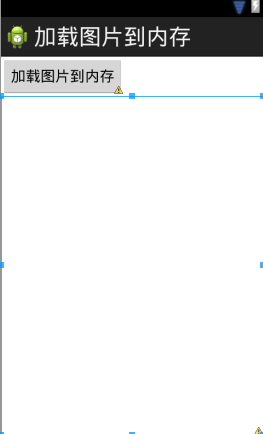
代碼如下:
<LinearLayout xmlns:android="http://schemas.android.com/apk/res/android"
xmlns:tools="http://schemas.android.com/tools"
android:layout_width="match_parent"
android:layout_height="match_parent"
android:orientation="vertical"
tools:context=".MainActivity" >
<Button
android:layout_width="wrap_content"
android:layout_height="wrap_content"
android:onClick="load"
android:text="加載圖片到內存" />
<ImageView
android:id="@+id/iv"
android:layout_width="fill_parent"
android:layout_height="fill_parent" />
</LinearLayout>
往mnt/sdcard中上傳測試圖片
添加邏輯部分代碼:
public class MainActivity extends Activity {
private ImageView iv;
@Override
protected void onCreate(Bundle savedInstanceState) {
super.onCreate(savedInstanceState);
setContentView(R.layout.activity_main);
iv = (ImageView) findViewById(R.id.iv);
}
public void load() {
Bitmap bitmap = BitmapFactory.decodeFile("/sdcard/a.jpg");
iv.setImageBitmap(bitmap);
}
}
運行代碼,產生錯誤,原因是圖片太大(選取的是大照片)
可以使用BitmapFactory中包含的靜態類Options在不解析圖片信息的前提下得到圖片的寬高信息:
BitmapFactory.Options opts = new Options();
// 不去解析圖片信息,只是得到圖片的頭部信息 寬高
opts.inJustDecodeBounds = true;

BitmapFactory.decodeFile("/sdcard/a.jpg", opts);
int imageHeight = opts.outHeight;
int imagewidth = opts.outWidth;
System.out.println("圖片寬:" + imagewidth);
System.out.println("圖片高" + imageHeight);
運行一下:
09-04 06:09:10.519: I/System.out(1812): 圖片寬:2560
09-04 06:09:10.519: I/System.out(1812): 圖片高1920
接下來得到手機屏幕的寬高:
//得到手機屏幕的寬高
WindowManager wm = (WindowManager)getSystemService(WINDOW_SERVICE);
int height = wm.getDefaultDisplay().getHeight();
int width = wm.getDefaultDisplay().getWidth();
可以看到getHeight與getWidth方法均已過時,使用下面的方法替代:
// 得到手機屏幕的寬高
WindowManager wm = (WindowManager) getSystemService(WINDOW_SERVICE);
Point outSize = new Point();
wm.getDefaultDisplay().getSize(outSize); // 3.0以後的版本才能使用
完整代碼如下:
package com.wuyudong.loadimage;
import android.os.Bundle;
import android.annotation.SuppressLint;
import android.app.Activity;
import android.graphics.Bitmap;
import android.graphics.BitmapFactory;
import android.graphics.BitmapFactory.Options;
import android.graphics.Point;
import android.view.Menu;
import android.view.View;
import android.view.WindowManager;
import android.widget.ImageView;
public class MainActivity extends Activity {
private ImageView iv;
private int windowHeight;
private int windowWidth;
protected void onCreate(Bundle savedInstanceState) {
super.onCreate(savedInstanceState);
setContentView(R.layout.activity_main);
iv = (ImageView) findViewById(R.id.iv);
// 得到手機屏幕的寬高
WindowManager wm = (WindowManager) getSystemService(WINDOW_SERVICE);
windowHeight = wm.getDefaultDisplay().getHeight();
windowWidth = wm.getDefaultDisplay().getWidth();
//Point outSize = new Point();
//wm.getDefaultDisplay().getSize(outSize); // 3.0以後的版本才能使用
//windowHeight = outSize.y;
//windowWidth = outSize.x;
}
public void load(View view) {
// Bitmap bitmap = BitmapFactory.decodeFile("/sdcard/a.jpg");
// iv.setImageBitmap(bitmap);
// 圖片解析的配置
BitmapFactory.Options opts = new Options();
// 不去解析圖片信息,只是得到圖片的頭部信息 寬高
opts.inJustDecodeBounds = true;
BitmapFactory.decodeFile("/sdcard/a.jpg", opts);
int imageHeight = opts.outHeight;
int imagewidth = opts.outWidth;
System.out.println("圖片寬:" + imagewidth);
System.out.println("圖片高" + imageHeight);
// 計算縮放比例
int scaleX = imagewidth / windowWidth;
int scaleY = imageHeight / windowHeight;
int scale = 1;
if (scaleX > scaleY & scaleY >= 1) {
scale = scaleX;
}
if (scaleY > scaleX & scaleX >= 1) {
scale = scaleY;
}
//解析圖片
opts.inJustDecodeBounds = false;
//采樣率
opts.inSampleSize = scale;
Bitmap bitmap = BitmapFactory.decodeFile("/sdcard/a.jpg", opts);
iv.setImageBitmap(bitmap);
}
}
以上所述是小編給大家介紹的android中圖片加載到內存的實例代碼,希望對大家有所幫助,如果大家有任何疑問請給我留言,小編會及時回復大家的。在此也非常感謝大家對本站網站的支持!
 Android 實現自定義圓形進度條的功能
Android 實現自定義圓形進度條:
 安卓圖片輪播Banner的實現
圖片輪播Banner現在算是比較常見的功能了,可以用來循環播放廣告或者是熱門內容在這裡我利用ViewPager模擬實現了Banner的功能,效果圖如下:可以看到,在剛打開
 android自定義popupwindow仿微信右上角彈出菜單效果
微信右上角的操作菜單看起來很好用,就照著仿了一下,不過是舊版微信的,手裡剛好有一些舊版微信的資源圖標,給大家分享一下。不知道微信是用什麼實現的,我使用popupwindo
 Android Volley 的基本使用/設置HTTP請求參數、apikey
最近在做一個Android的新聞客戶端,感覺收獲頗豐。這裡分享一下Volley獲取網絡數據的方法Volley是Google I/O 2013推出的網絡通信庫,它的拓展性很