編輯:關於Android編程
Android Dialog 對話框
1、Dialog介紹
2、AlertDialog的基本使用
3、自定義對話框 Custom Dialog
一、Dialog介紹
Dialog也是Android中常用的用戶界面元素,他同Menu一樣也不是View的子類。讓我們看一下它的繼承關系:
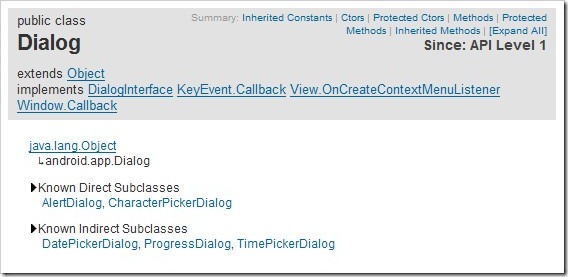
這裡要留意一下他的直接子類 AlertDialog,和間接子類 DatePickerDialog,ProgressDialog,TimePickerDialog,其中後三個我們在前面的章節已經講過,今天我們把重點放在AlertDialog上。
二、AlertDialog的基本使用
AlertDialog對話框是Dialog的子類,它提供一個圖標,一個標題,一個文本和3個按鈕。我們在Activity裡可以自行創建和顯示Dialog,也可以通過Activity的方法對其進行管理。我們可以通過下面的例子學習它的使用方法,同樣請注意代碼中的注釋。
1、創建一個項目 Lesson17_HelloAlertDialog,Activity的文件名叫 MainHelloAlertDialog.java
2、res/layout/main.xml 的內容如下:
<?xml version="1.0" encoding="utf-8"?>
<linearlayout android:layout_height="fill_parent" android:layout_width="fill_parent" android:orientation="vertical" xmlns:android="http://schemas.android.com/apk/res/android">

  <textview android:layout_height="wrap_content" android:layout_width="wrap_content" android:id="@+id/TextView01" android:text="對話框示例" android:textsize="20sp" android:layout_margintop="5dp">
  </textview>

  <button android:layout_height="wrap_content" android:layout_width="wrap_content" android:id="@+id/Button01" android:text="顯示對話框|ShowDialog()" android:textsize="20sp" android:layout_margintop="5dp">
  </button>

  <button android:layout_height="wrap_content" android:layout_width="wrap_content" android:id="@+id/Button02" android:text="關閉對話框|dismissDialog()" android:textsize="20sp" android:layout_margintop="5dp">
  </button>

  <button android:layout_height="wrap_content" android:layout_width="wrap_content" android:id="@+id/Button03" android:text="移除對話框|removeDialog()" android:textsize="20sp" android:layout_margintop="5dp">
  </button>
</linearlayout>
3、MainHelloAlertDialog.java的內容如下:
package android.basic.lesson17;

import android.app.Activity;
import android.app.AlertDialog;
import android.app.Dialog;
import android.content.DialogInterface;
import android.content.DialogInterface.OnClickListener;
import android.os.Bundle;
import android.view.View;
import android.widget.Button;
import android.widget.Toast;

public class MainHelloAlertDialog extends Activity {

  //定義一個對話框的ID
  int Edward_Movie_Dialog = 1;

  // 對話框按鈕點擊事件監聽器
  OnClickListener ocl = new OnClickListener() {
    @Override
    public void onClick(DialogInterface dialog, int which) {
      switch (which) {
      case Dialog.BUTTON_NEGATIVE:
        Toast.makeText(MainHelloAlertDialog.this, "我不喜歡他的電影。",
            Toast.LENGTH_LONG).show();
        break;
      case Dialog.BUTTON_NEUTRAL:
        Toast.makeText(MainHelloAlertDialog.this, "說不上喜歡不喜歡。",
            Toast.LENGTH_LONG).show();
        break;
      case Dialog.BUTTON_POSITIVE:
        Toast.makeText(MainHelloAlertDialog.this, "我很喜歡他的電影。",
            Toast.LENGTH_LONG).show();
        break;
      }
    }
  };

  @Override
  /** Called when the activity is first created. */
  public void onCreate(Bundle savedInstanceState) {
    super.onCreate(savedInstanceState);
    setContentView(R.layout.main);

    // 定義對話框對象
    Dialog dialog = new AlertDialog.Builder(this)
    .setIcon(android.R.drawable.btn_star).setTitle("喜好調查")
    .setMessage("你喜歡看愛德華.諾頓Edward Norton的電影嗎?")
    .setNegativeButton("不喜歡", ocl).setNeutralButton("一般般", ocl)
    .setPositiveButton("很喜歡", ocl).create();

    //顯示對話框
    dialog.show();

    //定義 按鈕 UI組件
    Button b1 = (Button) findViewById(R.id.Button01);
    Button b2 = (Button) findViewById(R.id.Button02);
    Button b3 = (Button) findViewById(R.id.Button03);

    //定義按鈕的單擊事件監聽器
    View.OnClickListener b_ocl= new View.OnClickListener() {

      @Override
      public void onClick(View v) {
        switch(v.getId()){
        case R.id.Button01:
          //顯示對話框
          showDialog(Edward_Movie_Dialog);
          break;
        case R.id.Button02:
          //關閉對話框 這個功能好傻X,根本點不到的按鈕
          dismissDialog(Edward_Movie_Dialog);
          break;
        case R.id.Button03:
          //移除對話框 這個功能好傻X,根本點不到的按鈕
          removeDialog(Edward_Movie_Dialog);
          break;
        }
      }
    };

    //綁定按鈕監聽器
    b1.setOnClickListener(b_ocl);
    b2.setOnClickListener(b_ocl);
    b3.setOnClickListener(b_ocl);

  }

  // 創建會話框時調用
  @Override
  public Dialog onCreateDialog(int id) {
    Toast.makeText(this, "onCreateDialog方法被調用", Toast.LENGTH_LONG).show();

    return new AlertDialog.Builder(this)
    .setIcon(android.R.drawable.btn_star).setTitle("喜好調查")
    .setMessage("你喜歡看愛德華.諾頓Edward Norton的電影嗎?")
    .setNegativeButton("不喜歡", ocl).setNeutralButton("一般般", ocl)
    .setPositiveButton("很喜歡", ocl).create();
  }

  // 每次顯示對話框之前會被調用
  @Override
  public void onPrepareDialog(int id, Dialog dialog){
    Toast.makeText(this, "onPrepareDialog方法被調用", Toast.LENGTH_LONG).show();
     super.onPrepareDialog(id, dialog);
  }

}
4、運行結果如下:
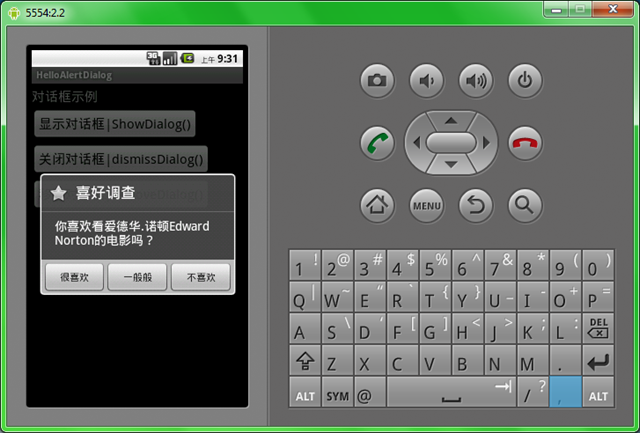
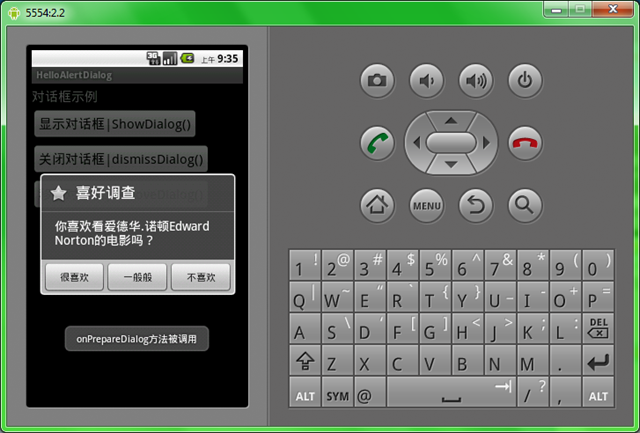
有興趣的同學可以考慮一下如何改進關閉和移除對話框按鈕。
以上就是對Android Dialog 資料的整理,後續繼續補充,謝謝大家對本站的支持!
 Android中Fab(FloatingActionButton)實現上下滑動的漸變效果
前言Promoted Actions是指一種操作按鈕,它不是放在actionbar中,而是直接在可見的UI布局中(當然這裡的UI指的是setContentView所管轄的
 Android性能測試
一直以來Android性能測試一直是Android測試中一個被一部分人遺忘,有被一部分人無可奈何的東西。在絕大部分的創業公司,性能測試基本上都是被遺忘的,因為功能測試和穩
 史上最詳細的Android Studio系列教程一--下載和安裝
背景相信大家對Android Studio已經不陌生了,Android Studio是Google於2013 I/O大會針對Android開發推出的新的開發工具,目前很多
 紅米note4什麼時候上市?紅米Note4真機疑曝光
前兩天,一張小米的宣傳海報在網上曝光,海報中是小米剛簽下的紅米代言人之一劉昊然,而亮點在於他手中的手機,這部手機采用了雙攝像頭設計,應該是一部還未發布的紅米