編輯:關於Android編程
本文實例講述了Android實現的仿淘寶購物車。分享給大家供大家參考,具體如下:
夏的熱情漸漸退去,秋如期而至,豐收的季節,小編繼續著實習之路,走著走著,就走到了購物車,逛過淘寶或者是京東的小伙伴都知道購物車裡面的寶貝可不止一件,對於愛購物的姑娘來說,購物車裡面的商品恐怕是爆滿,添加不進去了,以前逛淘寶的時候,小編沒有想過要怎麼樣實現購物車,就知道在哪兒一個勁兒的逛,但是現在不一樣了,小編做為一個開發者,想的就是該如何實現,搗鼓了兩天的時間,用listview來實現,已經有模有樣了,現在小編就來簡單的總結一下實現購物車的心路歷程,幫助有需要的小伙伴,歡迎小伙伴們留言交流。
首先,小編簡單的介紹一下listview,ListView 控件可使用四種不同視圖顯示項目。通過此控件,可將項目組成帶有或不帶有列標頭的列,並顯示伴隨的圖標和文本。 可使用 ListView 控件將稱作 ListItem 對象的列表條目組織成下列四種不同的視圖之一:1.大(標准)圖標2.小圖標3.列表4.報表 View 屬性決定在列表中控件使用何種視圖顯示項目。還可用 LabelWrap 屬性控制列表中與項目關聯的標簽是否可換行顯示。另外,還可管理列表中項目的排序方法和選定項目的外觀。今天小編主要和小伙伴們分享一下,如何使用listview實現購物的功能。做過Android的小伙伴都知道一個xml對應一個Java類,但是購物車有點不一樣,因為她裡面的商品有可能不只一件,所以我們需要有兩個xml,兩個java類,相對應的還需要一個適配器adapter,一個model,下面小編來詳細的介紹一下實現購物車的過程。
第一步,寫model層,類似我們之前寫過的實體層,具體代碼如下所示:
/***
 * 說明:購物車的相關信息
 * 作者:丁國華
 * 時間:2015年8月10日 09:41:18
 */
package jczb.shoping.model;
import java.io.Serializable;
import java.util.ArrayList;
import java.util.List;
import android.R.string;
public class shoppingCart implements Serializable {
    private String proImg;
    private String ProName;
    private String shopPrice;
    private String markPrice;
    private String proCount;
    public String getProImg() {
      return proImg;
    }
    public void setProImg(String proImg) {
      this.proImg = proImg;
    }
    public String getProName() {
      return ProName;
    }
    public void setProName(String proName) {
      ProName = proName;
    }
    public String getShopPrice() {
      return shopPrice;
    }
    public void setShopPrice(String shopPrice) {
      this.shopPrice = shopPrice;
    }
    public String getMarkPrice() {
      return markPrice;
    }
    public void setMarkPrice(String markPrice) {
      this.markPrice = markPrice;
    }
    public String getProCount() {
      return proCount;
    }
    public void setProCount(String proCount) {
      this.proCount = proCount;
    }
}
第二步,我們編寫xml裡面的文件,需要編寫兩個xml文件,首先我們來編寫activity_shoppingcart.xml的文件,代碼如下所示:
<?xml version="1.0" encoding="utf-8"?>
<LinearLayout xmlns:android="http://schemas.android.com/apk/res/android"
  android:layout_width="match_parent"
  android:layout_height="match_parent"
  android:orientation="vertical" >
  <LinearLayout
     android:layout_width="match_parent"
     android:layout_height="50dp"
     android:background="#438FCB"
     android:orientation="horizontal">
     <!-- 尖括號的布局 -->
     <ImageView
        android:layout_width="0dp"
        android:layout_height="match_parent"
        android:layout_weight="1"
        android:padding="8dp"
        android:src="@drawable/tb_icon_actionbar_back" />
     <!-- 購物車的布局 -->
     <TextView
       android:layout_width="0dp"
       android:layout_height="match_parent"
       android:layout_weight="5.49"
       android:gravity="center"
       android:text="購物車"
       android:textColor="#FFFFFF"
       android:textSize="20sp"/>
     <!-- 編輯的布局 -->
     <TextView
       android:layout_width="0dp"
       android:layout_height="match_parent"
       android:layout_weight="3.18"
       android:gravity="center"
       android:text="編輯"
       android:textColor="#FFFFFF"
       android:textSize="20sp" />
  </LinearLayout>
  <!-- listview,購物車裡面的東西有可能比較多,需要用listview來進行顯示 -->
  <LinearLayout
        android:layout_width="fill_parent"
        android:layout_height="wrap_content"
        android:layout_weight="1"
        android:orientation="vertical"
        android:layout_marginTop="0dp">
    <ListView
       android:id="@+id/cart_shopping_listview"
       android:layout_width="wrap_content"
       android:layout_height="wrap_content"
       android:divider="#808080"
       android:dividerHeight="0.5dp">
    </ListView>
  </LinearLayout>
  <LinearLayout
    android:layout_width="match_parent"
    android:layout_height="50dp"
    android:layout_alignParentBottom="true"
    android:orientation="horizontal">
     <!-- 全選的布局 -->
     <CheckBox
       android:layout_width="wrap_content"
       android:layout_height="wrap_content"
       android:layout_marginLeft="10dp"
       android:text="全選"/>
     <!-- 合計的布局 -->
     <TextView
       android:layout_width="0dp"
       android:layout_height="wrap_content"
       android:layout_weight="1"
       android:gravity="right"
       android:paddingRight="10dp"
       android:textColor="#F63A19"
       android:text="合計:¥88"/>
     <!-- 去結算的布局 -->
    <TextView
       android:id="@+id/jiesuan_button"
       android:layout_width="80dp"
       android:layout_height="wrap_content"
       android:layout_marginRight="10dp"
       android:background="@drawable/android_login_color"
       android:gravity="center"
       android:padding="10dp"
       android:text="結算"/>
  </LinearLayout>
</LinearLayout >
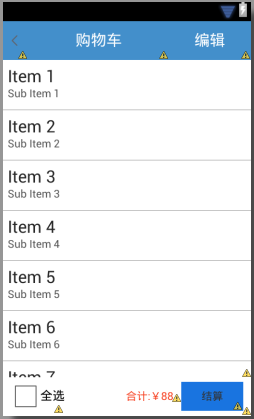
我們來看一下xml布局的效果,如下圖所示:
接著我們來布局第二個xml,activity_shoppingcart_item.xml,代碼如下所示:
<?xml version="1.0" encoding="utf-8"?>
<LinearLayout xmlns:android="http://schemas.android.com/apk/res/android"
  android:layout_width="match_parent"
  android:layout_height="match_parent"
  android:orientation="vertical" >
  <LinearLayout
    android:layout_width="match_parent"
    android:layout_height="wrap_content"
    android:orientation="horizontal">
     <!-- 小對勾的布局 -->
    <CheckBox
      android:id="@+id/pro_checkbox"
      android:layout_width="wrap_content"
      android:layout_height="wrap_content"
      android:focusable="false"
      android:focusableInTouchMode="false" />
     <!-- 圖片布局 -->
     <ImageView
       android:id="@+id/pro_image"
       android:layout_width="80dp"
       android:layout_height="80dp"
       android:layout_margin="5dp"
       android:scaleType="centerCrop"
       android:src="@drawable/detail_show_1"/>
     <!-- 商品名稱和價格的布局 -->
     <LinearLayout
       android:layout_width="fill_parent"
       android:layout_height="wrap_content"
       android:orientation="vertical">
       <!-- 商品名稱的布局 -->
       <TextView
         android:id="@+id/pro_name"
         android:layout_width="wrap_content"
         android:layout_height="wrap_content"
         android:layout_marginTop="10dp"
         android:text="連衣裙女夏季"
         />
       <!-- 價格的布局 -->
       <LinearLayout
         android:layout_width="match_parent"
         android:layout_height="33dp"
         android:orientation="horizontal" >
    <TextView
       android:id="@+id/pro_shopPrice"
           android:layout_width="wrap_content"
           android:layout_height="wrap_content"
           android:layout_gravity="bottom"
           android:layout_marginTop="10dp"
           android:text="¥88"
           android:textSize="16sp"/>
      <!-- <TextView
       android:id="@+id/pro_markPrice"
           android:layout_width="wrap_content"
           android:layout_height="wrap_content"
           android:layout_gravity="bottom"
           android:layout_marginTop="10dp"
           android:text="¥66"
           android:textSize="16sp"/> -->
        </LinearLayout>
       <LinearLayout
         android:layout_width="150dp"
         android:layout_height="33dp"
         android:orientation="horizontal" >
          <!-- 加號 -->
         <Button
           android:id="@+id/pro_add"
           android:layout_width="wrap_content"
           android:layout_height="34dp"
           android:text="+" />
         <TextView
           android:id="@+id/pro_count"
           android:layout_width="wrap_content"
           android:layout_height="wrap_content"
           android:layout_gravity="bottom"
           android:layout_marginTop="10dp"
           android:text="88"
           android:textSize="13sp"/>
           <!-- 減號-->
          <Button
           android:id="@+id/pro_reduce"
           android:layout_width="wrap_content"
           android:layout_height="34dp"
           android:layout_marginRight="0dp"
           android:text="-" />
         </LinearLayout>
     </LinearLayout>
 </LinearLayout>
</LinearLayout>
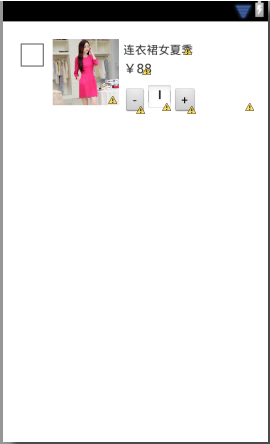
布局效果如下所示:
第三步、我們來編寫適配器adapter中的代碼,即ShoppingCartAdapter,具體代碼如下所示:
package jczb.shoping.adapter;
import java.util.List;
import cn.jpush.android.data.r;
import jczb.shoping.adapter.productsListAdapter.ViewHolder;
import jczb.shoping.adapter.productsListAdapter.searchList;
import jczb.shoping.model.productSonSorting_cate;
import jczb.shoping.model.shoppingCart;
import jczb.shoping.model.sonSortigns;
import jczb.shoping.ui.R;
import jczb.shoping.ui.ShoppingCartActivity;
import android.content.Context;
import android.content.Intent;
import android.content.DialogInterface.OnClickListener;
import android.os.Bundle;
import android.view.LayoutInflater;
import android.view.View;
import android.view.ViewGroup;
import android.widget.BaseAdapter;
import android.widget.Button;
import android.widget.CheckBox;
import android.widget.ImageView;
import android.widget.LinearLayout;
import android.widget.TextView;
public class ShoppingCartAdapter extends BaseAdapter {
  private Context mContext;
  private List<shoppingCart> mList;
  public ShoppingCartAdapter(Context mContext,List<shoppingCart> mList) {
    super();
    this.mContext = mContext;
    this.mList = mList;
    }
  @Override
  public int getCount() {
    // TODO Auto-generated method stub
    if (mList==null) {
      return 0;
    }else {
      return this.mList.size();
    }
  }
  @Override
  public Object getItem(int position) {
    // TODO Auto-generated method stub
    if (mList == null) {
      return null;
    } else {
      return this.mList.get(position);
    }
  }
  @Override
  public long getItemId(int position) {
    // TODO Auto-generated method stub
    return position;
  }
  @Override
  public View getView(int position, View convertView, ViewGroup parent) {
    // TODO Auto-generated method stub
    ViewHolder holder = null;
    if (convertView == null) {
      holder = new ViewHolder();
  convertView = LayoutInflater.from(this.mContext).inflate(R.layout.activity_shoppingcart_item, null,true);
      holder.image=(ImageView) convertView.findViewById(R.id.pro_image);
      holder.chose=(CheckBox) convertView.findViewById(R.id.pro_checkbox);
      holder.proName=(TextView) convertView.findViewById(R.id.pro_name);
      holder.proPrice=(TextView)convertView.findViewById(R.id.pro_shopPrice);
      holder.proCount=(TextView) convertView.findViewById(R.id.pro_count);
      convertView.setTag(holder);
    } else {
      holder = (ViewHolder) convertView.getTag();
    }
    if (this.mList != null) {
      shoppingCart shoppingList=this.mList.get(position);
      holder.proName.setText(shoppingList.getProName().toString());
      holder.proPrice.setText(shoppingList.getShopPrice().toString());
      holder.proCount.setText(shoppingList.getProCount().toString());
    }
    return convertView;
  }
  /*定義item對象*/
  public class ViewHolder {
    ImageView image;
    TextView proName;
    CheckBox chose;
    TextView proPrice;
    TextView proCount;
 }
}
第四步,編寫java類裡面的代碼,我們先來編寫ShoppingCartItemActivity.java中的內容,具體代碼如下所示:
package jczb.shoping.ui;
import android.app.Activity;
import android.os.Bundle;
public class ShoppingCartItemActivity extends Activity {
  protected void onCreate(Bundle savedInstanceState) {
    super.onCreate(savedInstanceState);
    setContentView(R.layout.activity_shoppingcart_item);
 }
}
第五步,編寫ShoppingCartActivity.java裡面的內容,如下所示:
package jczb.shoping.ui;
import java.util.HashMap;
import java.util.List;
import java.util.Map;
import jczb.shoping.adapter.ShoppingCartAdapter;
import jczb.shoping.common.AgentApi;
import jczb.shoping.model.shoppingCart;
import jczb.shoping.ui.SearchActivity.ViewHolder;
import jczb.shoping.ui.ShoppingcartActivity2.myThread;
import com.alibaba.fastjson.JSON;
import android.R.string;
import android.app.Activity;
import android.content.Intent;
import android.os.Bundle;
import android.os.Handler;
import android.os.Message;
import android.view.LayoutInflater;
import android.view.View;
import android.view.ViewGroup;
import android.widget.BaseAdapter;
import android.widget.CheckBox;
import android.widget.ImageView;
import android.widget.ListView;
import android.widget.TextView;
import android.widget.Toast;
public class ShoppingCartActivity extends Activity{
  TextView jiesuan,proName,shopPrice,proCount;
  ListView aListView;
  private LayoutInflater layoutInflater;
  private TextView name;
    protected void onCreate(Bundle savedInstanceState) {
    super.onCreate(savedInstanceState);
    setContentView(R.layout.activity_shoppingcart);
    findViewByID();
    /*開始線程*/
    new Thread(new myThread()).start();{
  }
   /*根據ID找到控件*/
   public void findViewByID(){
     aListView=(ListView) findViewById(R.id.cart_shopping_listview);
    }
  //開辟線程
    public class myThread implements Runnable {
      public void run() {
        Message msg = new Message();
        try {
          Map<String, String> parmas = new HashMap<String, String>();
          parmas.put("username", "1");
          parmas.put("password", "2");
    String url = "http://192.168.1.110:8080/SchoolShopJson/ShoppingCart.txt";
          // 要發送的數據和訪問的地址
          String result = AgentApi.dopost(parmas, url);
 // 如果返回的為空或者初始化時輸入的ip地址無效(會返回下面的字符串),說明服務器連接失敗!
          if (result == null) {
            // 使用-1代表服務器連接失敗
            msg.what = -1;
          } else {
            msg.what=1;
            msg.obj=result;
          }
        } catch (Exception e) {
          e.printStackTrace();
          // 使用-1代表程序異常
          msg.what = -2;
          msg.obj = e;
        }
        mHandler.sendMessage(msg);
      }
    }
    protected void initView() {
      // TODO Auto-generated method stub
    }
     /*子線程-解析數據*/
     private Handler mHandler = new Handler(){
      public void handleMessage(Message msg) {
        switch (msg.what) {
        case -1:
          Toast.makeText(ShoppingCartActivity.this, "服務器連接失敗!",
              Toast.LENGTH_SHORT).show();
          break;
        case -2:
          Toast.makeText(ShoppingCartActivity.this, "哎呀,出錯啦...",
              Toast.LENGTH_SHORT).show();
          break;
        case 1:
          String temp = (String)msg.obj;
          //將拿到的json轉換為數組
      List<shoppingCart> ShoppingcartInfo = JSON.parseArray(temp,shoppingCart.class);
    ListView.setAdapter(new ShoppingCartAdapter(ShoppingCartActivity.this, ShoppingcartInfo));
          break;
        default:
          break;
        }
      }
    };
}
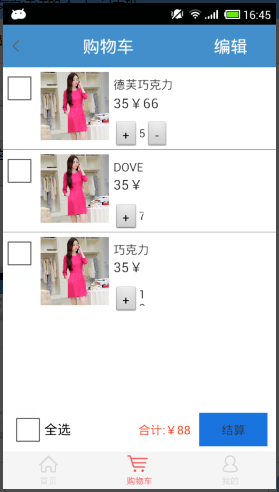
我們來看一下運行的效果,如下所示:
更多關於Android相關內容感興趣的讀者可查看本站專題:《Android布局layout技巧總結》、《Android視圖View技巧總結》、《Android編程之activity操作技巧總結》、《Android操作SQLite數據庫技巧總結》、《Android操作json格式數據技巧總結》、《Android數據庫操作技巧總結》、《Android文件操作技巧匯總》、《Android編程開發之SD卡操作方法匯總》、《Android開發入門與進階教程》、《Android資源操作技巧匯總》及《Android控件用法總結》
希望本文所述對大家Android程序設計有所幫助。
 Android實現便於批量操作可多選的圖片ListView實例
本文實例講述了Android實現便於批量操作可多選的圖片ListView。分享給大家供大家參考,具體如下:之前項目需要實現一個可多選的圖片列表,用戶選中一到多張圖片後,批
 Android/java源代碼實現DES算法原理+整理
1.初始置換/IP置換// 初始置換表 private static final int[] IP_Table = { 58, 50, 42, 34, 26, 18, 1
 android adb使用
#####################################################################################
 Android實現Banner界面廣告圖片循環輪播(包括實現手動滑動循環)
前言:經常會看到有一些app的banner界面可以實現循環播放多個廣告圖片和手動滑動循環。本以為單純的ViewPager就可以實現這些功能。但是蛋疼的事情來了
 Android adt v22.6.2-1085508 自動創建 appcompat_v7 解決方法,最低版本2.2也不會出現
Android 開發工具升級到22.6.2在創建工程時只要選擇的最低版本