編輯:關於Android編程
Toast大家都很熟,不多說。直接上圖上代碼。
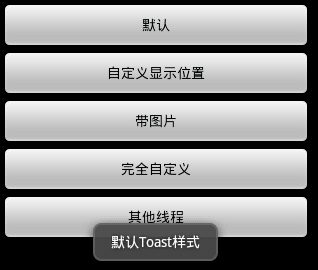
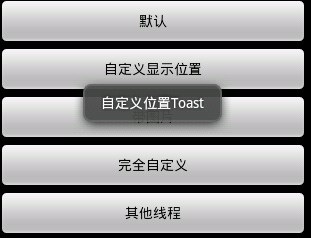
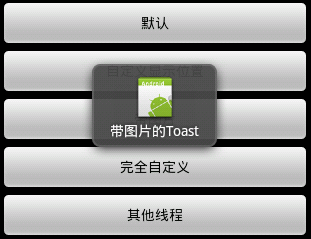
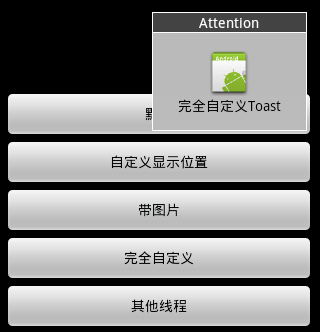
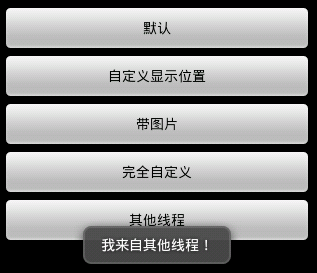
具體代碼如下:
main.xml:
custom.xml:
package com.example.test;

import android.app.Activity;
import android.app.ActionBar;
import android.app.Fragment;
import android.content.Intent;
import android.os.Bundle;
import android.os.Handler;
import android.view.Gravity;
import android.view.LayoutInflater;
import android.view.Menu;
import android.view.MenuItem;
import android.view.View;
import android.view.View.OnClickListener;
import android.view.ViewGroup;
import android.widget.Button;
import android.widget.EditText;
import android.widget.ImageView;
import android.widget.LinearLayout;
import android.widget.TextView;
import android.widget.Toast;
import android.os.Build;

public class MainActivity extends Activity implements OnClickListener {
    Handler handler = new Handler();

    @Override
    public void onCreate(Bundle savedInstanceState) {
        super.onCreate(savedInstanceState);
        setContentView(R.layout.main);

        findViewById(R.id.btnSimpleToast).setOnClickListener(this);
        findViewById(R.id.btnSimpleToastWithCustomPosition).setOnClickListener(
                this);
        findViewById(R.id.btnSimpleToastWithImage).setOnClickListener(this);
        findViewById(R.id.btnCustomToast).setOnClickListener(this);
        findViewById(R.id.btnRunToastFromOtherThread).setOnClickListener(this);

    }

    public void showToast() {
        handler.post(new Runnable() {

            @Override
            public void run() {
                Toast.makeText(getApplicationContext(), "我來自其他線程!",
                        Toast.LENGTH_SHORT).show();

            }
        });
    }

    @Override
    public void onClick(View v) {
        Toast toast = null;
        switch (v.getId()) {
        case R.id.btnSimpleToast:
            Toast.makeText(getApplicationContext(), "默認Toast樣式",
                    Toast.LENGTH_SHORT).show();
            break;
        case R.id.btnSimpleToastWithCustomPosition:
            toast = Toast.makeText(getApplicationContext(), "自定義位置Toast",
                    Toast.LENGTH_LONG);
            toast.setGravity(Gravity.CENTER, 0, 0);
            toast.show();
            break;
        case R.id.btnSimpleToastWithImage:
            toast = Toast.makeText(getApplicationContext(), "帶圖片的Toast",
                    Toast.LENGTH_LONG);
            toast.setGravity(Gravity.CENTER, 0, 0);
            LinearLayout toastView = (LinearLayout) toast.getView();
            ImageView imageCodeProject = new ImageView(getApplicationContext());
            imageCodeProject.setImageResource(R.drawable.ic_launcher);
            toastView.addView(imageCodeProject, 0);
            toast.show();
            break;
        case R.id.btnCustomToast:
            LayoutInflater inflater = getLayoutInflater();
            View layout = inflater.inflate(R.layout.custom,
                    (ViewGroup) findViewById(R.id.llToast));
            ImageView image = (ImageView) layout
                    .findViewById(R.id.tvImageToast);
            image.setImageResource(R.drawable.ic_launcher);
            TextView title = (TextView) layout.findViewById(R.id.tvTitleToast);
            title.setText("Attention");
            TextView text = (TextView) layout.findViewById(R.id.tvTextToast);
            text.setText("完全自定義Toast");
            toast = new Toast(getApplicationContext());
            toast.setGravity(Gravity.RIGHT | Gravity.TOP, 12, 40);
            toast.setDuration(Toast.LENGTH_LONG);
            toast.setView(layout);
            toast.show();
            break;
        case R.id.btnRunToastFromOtherThread:
            new Thread(new Runnable() {
                public void run() {
                    showToast();
                }
            }).start();
            break;

        }

    }

}
運行即可。
 Android開發必知 九種對話框的實現方法
在開發過程中,與用戶交互式免不了會用到對話框以實現更好的用戶體驗,所以掌握幾種對話框的實現方法還是非常有必要的。在看具體實例之前先對AlertDialog做一個簡單介紹。
 Android利用ObjectAnimator實現ArcMenu
本文介紹利用ObjectAnimator簡單地實現ArcMenu,直接使用本文的ArcMenu類即可快捷地實現菜單功能。 最終使用效果:先看下最終的使用效果:
 新浪微博客戶端怎麼取消自動定位
新浪微博擁有超過5億注冊用戶通過140字記錄,“織圍脖”是網友隨時隨地記錄生活、分享社會新鮮事的生活方式。新浪微博客戶端的朋友登錄之
 Android -SQLite數據庫存儲
android 系統集成了一個輕量級的數據庫,SQLite只是一個嵌入式的數據庫引擎;android提供SQLiteDatabase代表一個數據庫,一旦應用程序獲得了SQ