編輯:關於Android編程
本文實例講述了Android開發中CheckBox的簡單用法。分享給大家供大家參考,具體如下:
CheckBox是一種在界面開發中比較常見的控件,Android中UI開發也有CheckBox,簡單的說下它的使用,每個CheckBox都要設置監聽,設置的監聽為CompouButton.OnCheckedChangedListener()。
package com.zhuguangwei;
import android.app.Activity;
import android.os.Bundle;
import android.widget.CheckBox;
import android.widget.CompoundButton;
import android.widget.TextView;
public class ChkBoxActivity extends Activity {
  private TextView myTextView;
  private CheckBox myApple;
  private CheckBox myOrange;
  private CheckBox myBanana;
  private CheckBox myWaterMelon;
  private CheckBox myStrawBerry;
  /** Called when the activity is first created. */
  @Override
  public void onCreate(Bundle savedInstanceState) {
    super.onCreate(savedInstanceState);
    setContentView(R.layout.main);
    //通過ID找到TextView
    myTextView = (TextView) findViewById(R.id.myTextView);
    //通過ID找到這幾個CheckBox
    myApple = (CheckBox) findViewById(R.id.Apple);
    myOrange = (CheckBox) findViewById(R.id.Orange);
    myBanana = (CheckBox) findViewById(R.id.banana);
    myWaterMelon = (CheckBox) findViewById(R.id.watermelon);
    myStrawBerry = (CheckBox) findViewById(R.id.strawberry);
    myApple.setOnCheckedChangeListener(new CompoundButton.OnCheckedChangeListener() {
      @Override
      public void onCheckedChanged(CompoundButton buttonView, boolean isChecked) {
        // TODO Auto-generated method stub
        if(isChecked){
          myTextView.append(myApple.getText().toString());
        }
        else{
          if(myTextView.getText().toString().contains("蘋果")){
            myTextView.setText(myTextView.getText().toString().replace("蘋果", ""));
          }
        }
      }
    });
    myOrange.setOnCheckedChangeListener(new CompoundButton.OnCheckedChangeListener() {
      @Override
      public void onCheckedChanged(CompoundButton buttonView, boolean isChecked) {
        // TODO Auto-generated method stub
        if(isChecked){
          myTextView.append(myOrange.getText().toString());
        }
        else{
          if(myTextView.getText().toString().contains("橘子")){
            myTextView.setText(myTextView.getText().toString().replace("橘子", ""));
          }
        }
      }
    });
    myBanana.setOnCheckedChangeListener(new CompoundButton.OnCheckedChangeListener() {
      @Override
      public void onCheckedChanged(CompoundButton buttonView, boolean isChecked) {
        // TODO Auto-generated method stub
        if(isChecked){
          myTextView.append(myBanana.getText().toString());
        }
        else{
          if(myTextView.getText().toString().contains("香蕉")){
            myTextView.setText(myTextView.getText().toString().replace("香蕉", ""));
          }
        }
      }
    });
    myWaterMelon.setOnCheckedChangeListener(new CompoundButton.OnCheckedChangeListener() {
      @Override
      public void onCheckedChanged(CompoundButton buttonView, boolean isChecked) {
        // TODO Auto-generated method stub
        if(isChecked){
          myTextView.append(myWaterMelon.getText().toString());
        }
        else{
          if(myTextView.getText().toString().contains("西瓜")){
            myTextView.setText(myTextView.getText().toString().replace("西瓜", ""));
          }
        }
      }
    });
    myStrawBerry.setOnCheckedChangeListener(new CompoundButton.OnCheckedChangeListener() {
      @Override
      public void onCheckedChanged(CompoundButton buttonView, boolean isChecked) {
        // TODO Auto-generated method stub
        if(isChecked){
          myTextView.append(myStrawBerry.getText().toString());
        }
        else{
          if(myTextView.getText().toString().contains("草莓")){
            myTextView.setText(myTextView.getText().toString().replace("草莓", ""));
          }
        }
      }
    });
  }
}
main.xml文件內容為:
<?xml version="1.0" encoding="utf-8"?>
<LinearLayout xmlns:android="http://schemas.android.com/apk/res/android"
  android:orientation="vertical"
  android:layout_width="fill_parent"
  android:layout_height="fill_parent"
  >
  <TextView
    android:id="@+id/myTextView"
    android:layout_width="fill_parent"
    android:layout_height="wrap_content"
    android:text="請選擇你一下你喜歡吃的水果:"
  />
  <CheckBox
    android:id="@+id/Apple"
    android:layout_width="wrap_content"
    android:layout_height="wrap_content"
    android:text="蘋果"
  />
  <CheckBox
    android:id="@+id/Orange"
    android:layout_width="wrap_content"
    android:layout_height="wrap_content"
    android:text="橘子"
  />
  <CheckBox
    android:id="@+id/banana"
    android:layout_width="wrap_content"
    android:layout_height="wrap_content"
    android:text="香蕉"
  />
  <CheckBox
    android:id="@+id/watermelon"
    android:layout_width="wrap_content"
    android:layout_height="wrap_content"
    android:text="西瓜"
  />
  <CheckBox
    android:id="@+id/strawberry"
    android:layout_width="wrap_content"
    android:layout_height="wrap_content"
    android:text="草莓"
  />
</LinearLayout>
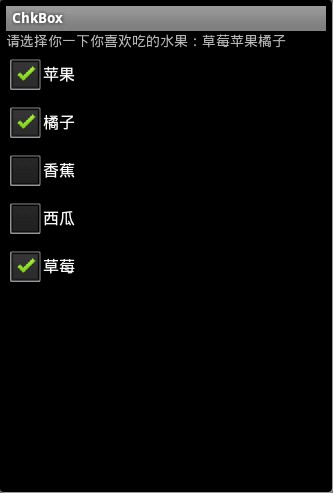
運行結果為:
更多關於Android相關內容感興趣的讀者可查看本站專題:《Android控件用法總結》、《Android編程之activity操作技巧總結》、《Android視圖View技巧總結》、《Android操作SQLite數據庫技巧總結》、《Android操作json格式數據技巧總結》、《Android數據庫操作技巧總結》、《Android文件操作技巧匯總》、《Android編程開發之SD卡操作方法匯總》、《Android資源操作技巧匯總》及《Android開發入門與進階教程》
希望本文所述對大家Android程序設計有所幫助。
 Android 手勢鎖的實現 讓自己的應用更加安全吧
今天偶遇以github上gesturelock關於手勢鎖的一個例子(有興趣的去搜索下看看),於是下載下來研究,無奈基本沒有注釋,代碼上存在一些問題(當設置gravity=
 android調用系統郵件組件(intent匹配的流程)
直接代碼 package com.example.demoemail; import android.net.Uri; import android.os.Bundl
 Android UI(四)雲通訊錄項目之雲端更新進度條實現
作者:泥沙磚瓦漿木匠 網站:http://blog.csdn.net/jeffli1993 個人簽名:打算起手不凡寫出鴻篇巨作的人,往往堅持不了完成第一章節。 交流QQ
 微信聊天記錄怎麼遷移?換手機後微信聊天記錄怎麼移動?
有不少小伙伴想知道怎麼在換手機後吧微信的聊天記錄轉移到iPhone上吧,在新版的微信裡已經取消了聊天記錄的上傳和下載,怎麼辦呢?微信聊天記錄怎麼遷移?換手機