編輯:關於Android編程
本文實例講述了Android通過json向MySQL中讀取數據的方法。分享給大家供大家參考,具體如下:
首先 要定義幾個解析json的方法parseJsonMulti,代碼如下:
private void parseJsonMulti(String strResult) {
  try {
   Log.v("strResult11","strResult11="+strResult);
    int index=strResult.indexOf("[");
    if(index>0)
     strResult=strResult.substring(index, strResult.length());
    Log.v("strResult22","strResult22="+strResult);
    wifiMapData = new JSONArray(strResult);
    Log.v("wifiMapDataLength",""+wifiMapData.length());
   for(int i = 0; i < wifiMapData.length() ; i++){///基站信息處理
    ///MapData m=new MapData(1, dLat[5], dLong[5], 10, 20, 300, 500, 105, "教1", 1, 1, 4);
    JSONObject jsonObject = wifiMapData.getJSONObject(i);
     int id=Integer.parseInt(jsonObject.getString("id")); //id
    // if(jsonObject.isNull("mac_address")) mac_address="";
     String mac_address = jsonObject.getString("mac_address");//wifi的mac地址
     String wifi_name=jsonObject.getString("wifi_name"); //ssid
     if(!jsonObject.isNull("lat")&&!jsonObject.isNull("lon")){
     lat= Double.valueOf(jsonObject.getString("lat"));//緯度
     lon=Double.valueOf(jsonObject.getString("lon"));//經度
     }
     String location_name=jsonObject.getString("location_name"); //ssid
     String wifi_adds = jsonObject.getString("wifi_adds");//wifi地址 具體到多少路多少號
     String area = jsonObject.getString("area");//北京的什麼區
     String location_type = jsonObject.getString("location_type");//地點是個什麼類型的,寫字樓??
     String ap_free = jsonObject.getString("ap_free");//ap是否免費
     String category = jsonObject.getString("category");//ap是否免費
     String password = jsonObject.getString("password");//ap是否免費
     String capabilities = jsonObject.getString("capabilities");//ap是否免費
     String user_score = jsonObject.getString("user_score");//ap是否免費
     String NW_score = jsonObject.getString("NW_score");//ap是否免費
   }
   // tvJson.setText(s);
  } catch (JSONException e) {
   System.out.println("Jsons parse error !");
   e.printStackTrace();
  }
}
再定義一個向MySql發送http請求的方法connServerForResult,代碼如下:
private String connServerForResult(String strUrl) {
  // HttpGet對象
  HttpGet httpRequest = new HttpGet(strUrl);
  String strResult = "";
  try {
   // HttpClient對象
   HttpClient httpClient = new DefaultHttpClient();
   // 獲得HttpResponse對象
   HttpResponse httpResponse = httpClient.execute(httpRequest);
   if (httpResponse.getStatusLine().getStatusCode() == HttpStatus.SC_OK) {
    // 取得返回的數據
    strResult = EntityUtils.toString(httpResponse.getEntity());
   }
  } catch (ClientProtocolException e) {
   Toast.makeText(Setting.this,
     "protocol error", Toast.LENGTH_SHORT).show();
   e.printStackTrace();
  } catch (IOException e) {
   Toast.makeText(Setting.this,
     "IO error", Toast.LENGTH_SHORT).show();
   e.printStackTrace();
  }
  return strResult;
}
然後就是在主程序中調用這兩個方法:代碼如下
String strUrl1 = "http://192.168.1.2/call_for_wifiMapData.php";
//獲得返回的Json字符串
String strResult1 = connServerForResult(strUrl1);
Log.v("strResult1",strResult1);
parseJsonMulti(strResult1);
只有幾句話而已,php同樣要替換成你自己的文件路徑,
php代碼如下:
<?php
  $jsonArrayString = $_POST["jsonArrayString"];
  $jsonString = $_POST["jsonString"];
  $objArray=json_decode($jsonArrayString,true);
  $obj=json_decode($jsonString);
  $lon = (float)$obj->lon;
  $lat = (float)$obj->lat;
  $distance=(float)$obj->distance;
  if($lat==null||$lat==0){
  $lat=39.990132;
  $lon=116.332224;
  $distance=100000;
  }
  ////將cell表中與點(lat,lon)距離小於distance的點打包回來
  $con = mysql_connect("localhost","root",null);
  if (!$con) {
    die('Could not connect:'.mysql_error() );
  }
  mysql_select_db("a0722152915", $con);
  mysql_query("set names 'utf8'");
  $sqlfind = "select * from `wifi`";
  $resultFind = mysql_query($sqlfind, $con);
  $length=mysql_num_rows($resultFind);
  $arr=array();
  $j=0;
  for($i=0;$i<$length;$i++)
  {
    $row = mysql_fetch_array($resultFind);
    $arr[$j]['id'] = $row['id'];
    $arr[$j]['mac_address']=$row['mac_address'];
    $arr[$j]['wifi_name']=$row['wifi_name'];
    $arr[$j]['lat']=$row['gps_lat'];
    $arr[$j]['lon']=$row['gps_lon'];
    $arr[$j]['location_name']=$row['location_name'];
    $arr[$j]['wifi_adds']=$row['wifi_adds'];
    $arr[$j]['area']=$row['area'];
    $arr[$j]['location_type']=$row['location_type'];
    $arr[$j]['ap_free']=$row['ap_free'];
    $arr[$j]['category']=$row['category'];
    $arr[$j]['password']=$row['password'];
    $arr[$j]['capabilities']=$row['capabilities'];
    $arr[$j]['user_score']=$row['user_score'];
    $arr[$j]['NW_score']=$row['NW_score'];
    $j++;
  }
  //print_r($arr);\
  echo json_encode($arr);
?>
還有一點需要注意,就是如果你的終端上的操作系統是android4.0以上的,要添加上那一段代碼,上一篇《Android通過json向MySQL中讀寫數據的方法詳解【寫入篇】》有寫,這裡略過
如此一來,可以從MySql中成功地將數據讀取下來
更多關於Android相關內容感興趣的讀者可查看本站專題:《Android操作json格式數據技巧總結》、《Android數據庫操作技巧總結》、《Android編程之activity操作技巧總結》、《Android文件操作技巧匯總》、《Android編程開發之SD卡操作方法匯總》、《Android開發入門與進階教程》、《Android資源操作技巧匯總》、《Android視圖View技巧總結》及《Android控件用法總結》
希望本文所述對大家Android程序設計有所幫助。
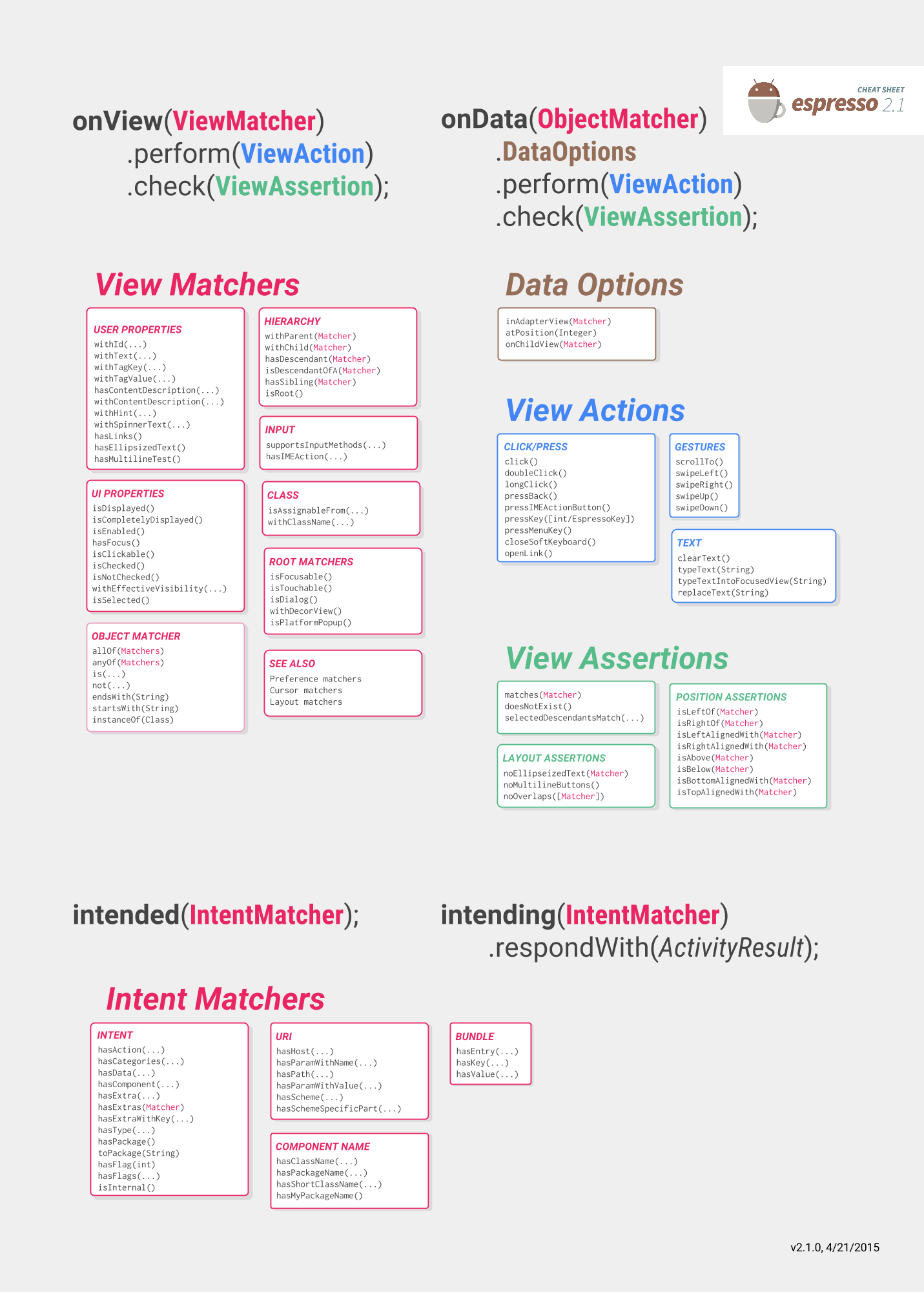 Android Espresso Test UI
ps:Espresso英文文檔,本人翻譯水平有限,可能存在不足Espresso的重要組成部分: 1.Espresso:通過onView()和onData()與view交互
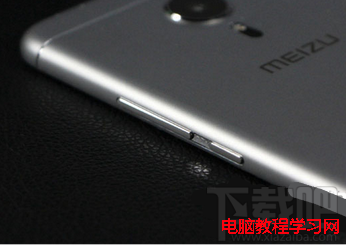 魅族pro5手機怎麼截屏截圖教程
魅族pro5怎麼截屏?很多初次使用魅族pro5的用戶,還不知道該如何截圖,魅族pro5是有多鐘截屏方法,快捷組合鍵截圖。也可以借用第三方軟件進行截圖:借助第
 TextView實戰
寫在前面的話對於TextView,我想大家都已經熟的不能再熟了。但是它的用法我們真的熟麼?為了避免總是一言不合就去翻官方文檔,在這裡我總結一下我也可能是你容易忽視的一些細
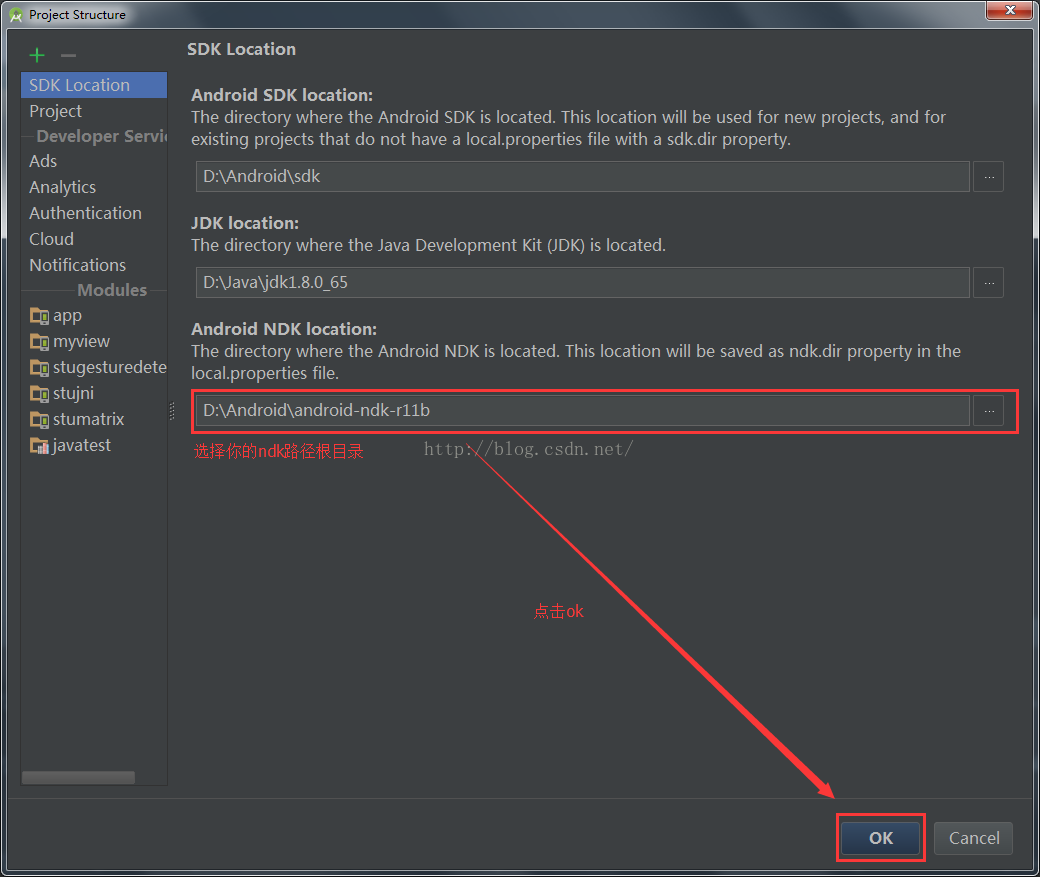 android studio 編譯C生成.so文件
一、前言前段時間有個同事離職了,用C編譯的.SO文件需要更改,結果C文件是他寫的,無賴啊,自己又是一個小白,不會啊,所以自己又好好鑽研了一天,不會,看什麼都難啊,痛苦啊,