編輯:關於Android編程
Linux文件的訪問權限
* 在Android中,每一個應用是一個獨立的用戶
* drwxrwxrwx
* 第1位:d表示文件夾,-表示文件
* 第2-4位:rwx,表示這個文件的擁有者(創建這個文件的應用)用戶對該文件的權限
* r:讀
* w:寫
* x:執行
* 第5-7位:rwx,表示跟文件擁有者用戶同組的用戶對該文件的權限
* 第8-10位:rwx,表示其他用戶組的用戶對該文件的權限
openFileOutput的四種模式
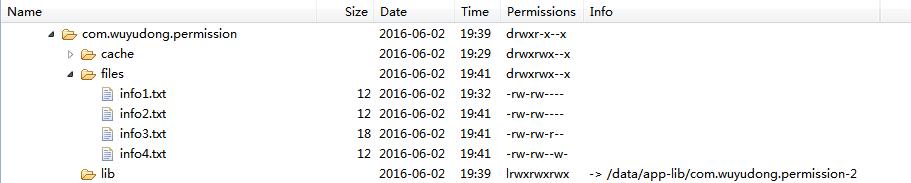
* MODE_PRIVATE:-rw-rw----
* MODE_APPEND:-rw-rw----
* MODE_WORLD_WRITEABLE:-rw-rw--w-
* MODE_WORLD_READABLE:-rw-rw-r--
下面實戰一下:
首先完成布局
<LinearLayout xmlns:android="http://schemas.android.com/apk/res/android"


xmlns:tools="http://schemas.android.com/tools"
android:layout_width="match_parent"
android:layout_height="match_parent"
android:orientation="vertical"
android:paddingBottom="@dimen/activity_vertical_margin"
android:paddingLeft="@dimen/activity_horizontal_margin"
android:paddingRight="@dimen/activity_horizontal_margin"
android:paddingTop="@dimen/activity_vertical_margin"
tools:context=".MainActivity" >
<Button
android:layout_width="wrap_content"
android:layout_height="wrap_content"
android:text="按鈕1"
android:onClick="click1" />
</LinearLayout>
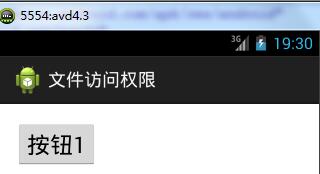
添加按鈕事件
public void click1(View v) {
//data/data/com.wuyudong.permission.files
try {
FileOutputStream fos = openFileOutput("info1.txt", MODE_PRIVATE);
fos.write("私有模式".getBytes());
fos.close();
} catch (Exception e) {
// TODO Auto-generated catch block
e.printStackTrace();
}
}
點擊按鈕後生成相應的文件info1.txt,如圖

然後再生成其他的按鈕布局:
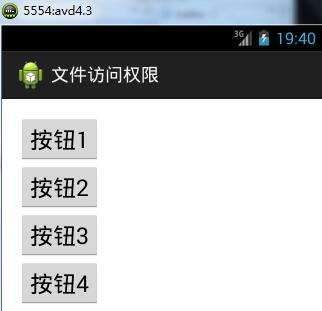
相應的代碼如下:
package com.wuyudong.permission;
import java.io.FileNotFoundException;
import java.io.FileOutputStream;
import android.os.Bundle;
import android.app.Activity;
import android.view.View;
public class MainActivity extends Activity {
@Override
protected void onCreate(Bundle savedInstanceState) {
super.onCreate(savedInstanceState);
setContentView(R.layout.activity_main);
}
public void click1(View v) {
// data/data/com.wuyudong.permission.files
try {
FileOutputStream fos = openFileOutput("info1.txt", MODE_PRIVATE);
fos.write("私有模式".getBytes());
fos.close();
} catch (Exception e) {
// TODO Auto-generated catch block
e.printStackTrace();
}
}
public void click2(View v) {
// data/data/com.wuyudong.permission.files
try {
FileOutputStream fos = openFileOutput("info2.txt", MODE_APPEND);
fos.write("追加模式".getBytes());
fos.close();
} catch (Exception e) {
// TODO Auto-generated catch block
e.printStackTrace();
}
}
public void click3(View v) {
// data/data/com.wuyudong.permission.files
try {
FileOutputStream fos = openFileOutput("info3.txt", MODE_WORLD_READABLE);
fos.write("全局可讀模式".getBytes());
fos.close();
} catch (Exception e) {
// TODO Auto-generated catch block
e.printStackTrace();
}
}
public void click4(View v) {
// data/data/com.wuyudong.permission.files
try {
FileOutputStream fos = openFileOutput("info4.txt", MODE_WORLD_WRITEABLE);
fos.write("私有模式".getBytes());
fos.close();
} catch (Exception e) {
// TODO Auto-generated catch block
e.printStackTrace();
}
}
}
依次點擊按鈕,生成相應權限的文件:
再創建一個應用來讀取之前生成的info3.txt文件
package com.wuyudong.other;
import java.io.BufferedReader;
import java.io.File;
import java.io.FileInputStream;
import java.io.FileNotFoundException;
import java.io.InputStreamReader;
import android.os.Bundle;
import android.app.Activity;
import android.view.Menu;
import android.view.View;
import android.widget.Toast;
public class MainActivity extends Activity {
@Override
protected void onCreate(Bundle savedInstanceState) {
super.onCreate(savedInstanceState);
setContentView(R.layout.activity_main);
}
public void click(View v) {
File file = new File("data/data/com.wuyudong.permission/files/info3.txt");
try {
FileInputStream fis = new FileInputStream(file);
//把字節流轉換成字符流
BufferedReader br = new BufferedReader(new InputStreamReader(fis));
String text = br.readLine();
Toast.makeText(this, text, 0).show();
} catch (Exception e) {
// TODO Auto-generated catch block
e.printStackTrace();
}
}
}
以上所述是小編給大家介紹的Android 訪問文件權限的四種模式的相關內容,希望對大家有所幫助,如果大家想了解更多內容敬請關注本站網站!
 android手把手教你開發launcher(一)
我們要開發一個自己的launcher,使其替代系統的默認launcher。怎樣使我們的應用程序成為一個launcher?下面我們就新建一個叫做SAOLauncher的工程
 Android開發之網絡部分
/***@author StormMaybin*@Date 2016-09-1*/ 生命不息,奮斗不止!WebView 對於,WebView 顧名思義,就是顯示各種各樣的
 React-Native Android 與 IOS App使用一份代碼實現方法
React-Native Android 與 IOS 共用代碼React-Native 開發的App, 所有組件iOS & Android 共用, 共享一份代
 Android成長之路(7)——關於隱式Intent的用法
Android其中最重要的特性之一,就是一個應用可以基於“action”來切換到另一個應用。比如,你的應用想要查找地方,在地圖上顯示。但是不一定要