編輯:關於Android編程
先看效果圖:(以公司附近的國貿為中心點)
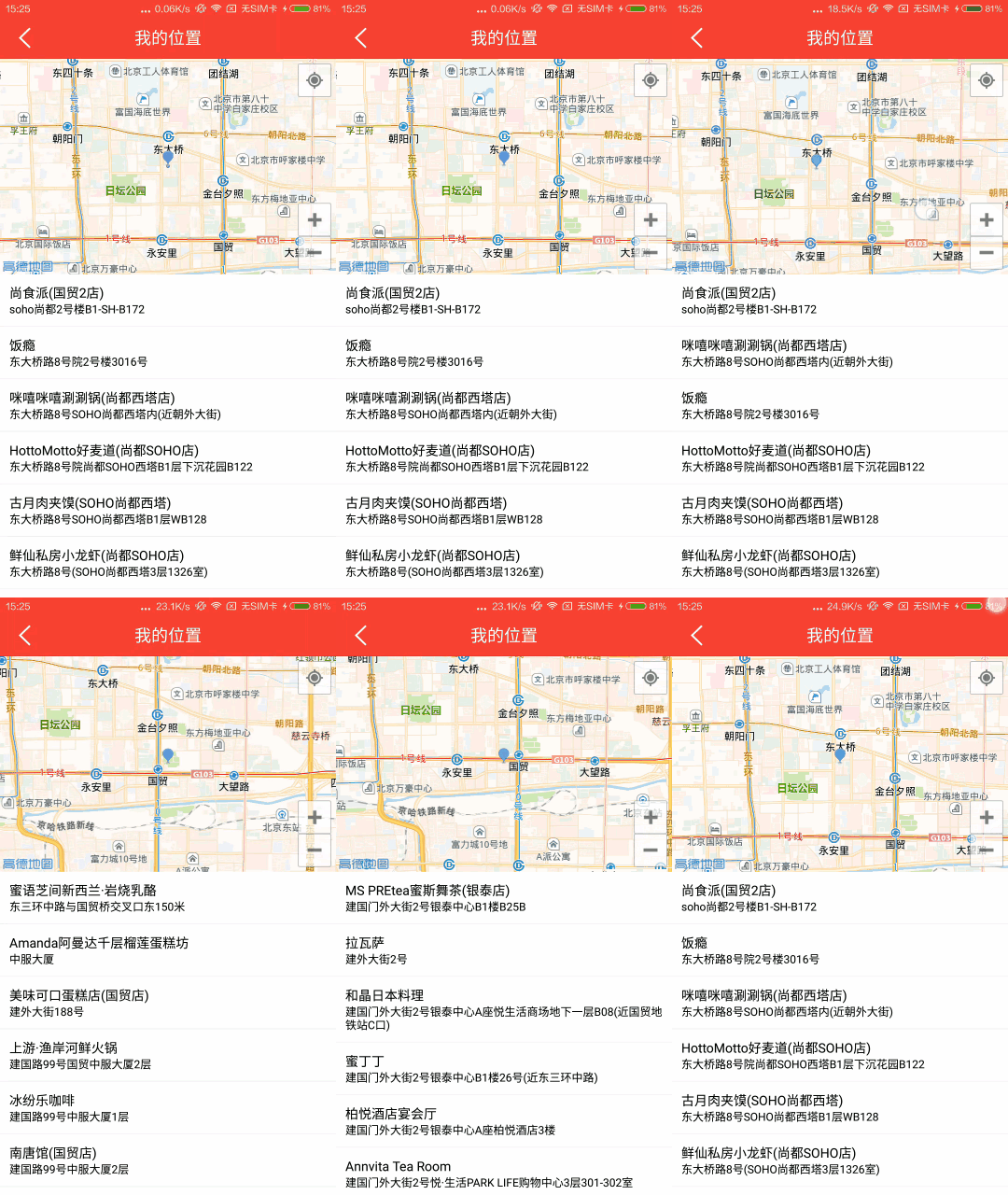
上面是地圖,下面是地理位置列表,有的只有地理位置列表(QQ動態的位置),這是個很常見的功能。它有個專門的叫法:POI周邊搜索。
實現:
這個效果實現起來其實很簡單,不過需要你先閱讀下地圖的API,這裡使用的是高德地圖的Android SDK,SDK的配置這裡不作講解,文末會放一些鏈接供學習。
思路:
1、利用地圖的定位功能,獲取用戶當前的位置
2、根據獲得的位置信息調用POI搜索,獲取位置列表
3、ListView展示位置列表
4、用戶拖動地圖,獲取地圖中心坐標的位置信息,並執行2~3的步驟
代碼:
Layout:
<LinearLayout
  xmlns:android="http://schemas.android.com/apk/res/android"
  android:layout_width="match_parent"
  android:layout_height="match_parent"
  android:orientation="vertical"
  >

  <com.amap.api.maps2d.MapView
    android:id="@+id/map_local"
    android:layout_width="match_parent"
    android:layout_height="0dp"
    android:layout_weight="2"/>

  <ListView
    android:id="@+id/map_list"
    android:layout_width="match_parent"
    android:layout_height="0dp"
    android:layout_weight="3"
    android:divider="@color/space"
    android:dividerHeight="1dp"
    android:scrollbars="none"/>

</LinearLayout>
Activity:
public class New_LocalActivity extends Activity implements LocationSource,
    AMapLocationListener, AMap.OnCameraChangeListener, PoiSearch.OnPoiSearchListener {

  @BindView(R.id.map_local)
  MapView mapView;
  @BindView(R.id.map_list)
  ListView mapList;

  public static final String KEY_LAT = "lat";
  public static final String KEY_LNG = "lng";
  public static final String KEY_DES = "des";


  private AMapLocationClient mLocationClient;
  private LocationSource.OnLocationChangedListener mListener;
  private LatLng latlng;
  private String city;
  private AMap aMap;
  private String deepType = "";// poi搜索類型
  private PoiSearch.Query query;// Poi查詢條件類
  private PoiSearch poiSearch;
  private PoiResult poiResult; // poi返回的結果
  private PoiOverlay poiOverlay;// poi圖層
  private List<PoiItem> poiItems;// poi數據

  private PoiSearch_adapter adapter;


  @Override
  protected void onCreate(Bundle savedInstanceState) {
    super.onCreate(savedInstanceState);
    setContentView(R.layout.activity_new__local);
    ButterKnife.bind(this);
    mapView.onCreate(savedInstanceState);
    init();
  }

  private void init() {
    if (aMap == null) {
      aMap = mapView.getMap();
      aMap.setOnCameraChangeListener(this);
      setUpMap();
    }

    deepType = "餐飲";//這裡以餐飲為例
  }

  //-------- 定位 Start ------

  private void setUpMap() {
    if (mLocationClient == null) {
      mLocationClient = new AMapLocationClient(getApplicationContext());
      AMapLocationClientOption mLocationOption = new AMapLocationClientOption();
      //設置定位監聽
      mLocationClient.setLocationListener(this);
      //設置為高精度定位模式
      mLocationOption.setOnceLocation(true);
      mLocationOption.setLocationMode(AMapLocationClientOption.AMapLocationMode.Hight_Accuracy);
      //設置定位參數
      mLocationClient.setLocationOption(mLocationOption);
      mLocationClient.startLocation();
    }
    // 自定義系統定位小藍點
    MyLocationStyle myLocationStyle = new MyLocationStyle();
    myLocationStyle.myLocationIcon(BitmapDescriptorFactory
        .fromResource(R.drawable.location_marker));// 設置小藍點的圖標
    myLocationStyle.strokeColor(Color.BLACK);// 設置圓形的邊框顏色
    myLocationStyle.radiusFillColor(Color.argb(100, 0, 0, 180));// 設置圓形的填充顏色
    myLocationStyle.strokeWidth(1.0f);// 設置圓形的邊框粗細
    aMap.setMyLocationStyle(myLocationStyle);
    aMap.setLocationSource(this);// 設置定位監聽
    aMap.getUiSettings().setMyLocationButtonEnabled(true);// 設置默認定位按鈕是否顯示
    aMap.setMyLocationEnabled(true);// 設置為true表示顯示定位層並可觸發定位,false表示隱藏定位層並不可觸發定位,默認是false
  }

  /**
   * 開始進行poi搜索
   */
  protected void doSearchQuery() {
    aMap.setOnMapClickListener(null);// 進行poi搜索時清除掉地圖點擊事件
    int currentPage = 0;
    query = new PoiSearch.Query("", deepType, city);// 第一個參數表示搜索字符串,第二個參數表示poi搜索類型,第三個參數表示poi搜索區域(空字符串代表全國)
    query.setPageSize(20);// 設置每頁最多返回多少條poiitem
    query.setPageNum(currentPage);// 設置查第一頁
    LatLonPoint lp = new LatLonPoint(latlng.latitude, latlng.longitude);

    poiSearch = new PoiSearch(this, query);
    poiSearch.setOnPoiSearchListener(this);
    poiSearch.setBound(new PoiSearch.SearchBound(lp, 5000, true));
    // 設置搜索區域為以lp點為圓心,其周圍2000米范圍
    poiSearch.searchPOIAsyn();// 異步搜索

  }

  @Override
  public void onLocationChanged(AMapLocation aMapLocation) {
    if (mListener != null && aMapLocation != null) {
      if (aMapLocation.getErrorCode() == 0) {
        // 顯示我的位置
        mListener.onLocationChanged(aMapLocation);
        //設置第一次焦點中心
        latlng = new LatLng(aMapLocation.getLatitude(), aMapLocation.getLongitude());
        aMap.animateCamera(CameraUpdateFactory.newLatLngZoom(latlng, 14), 1000, null);
        city = aMapLocation.getProvince();
        doSearchQuery();
      } else {
        String errText = "定位失敗," + aMapLocation.getErrorCode() + ": " + aMapLocation.getErrorInfo();
        Log.e("AmapErr", errText);
      }
    }
  }

  @Override
  public void activate(OnLocationChangedListener listener) {
    mListener = listener;
    mLocationClient.startLocation();
  }

  @Override
  public void deactivate() {
    mListener = null;
    if (mLocationClient != null) {
      mLocationClient.stopLocation();
      mLocationClient.onDestroy();
    }
    mLocationClient = null;
  }

  @Override
  public void onCameraChange(CameraPosition cameraPosition) {
  }

  @Override
  public void onCameraChangeFinish(CameraPosition cameraPosition) {
    latlng = cameraPosition.target;
    aMap.clear();
    aMap.addMarker(new MarkerOptions().position(latlng));
    doSearchQuery();
  }

  @Override
  public void onPoiSearched(PoiResult result, int rCode) {
    if (rCode == 0) {
      if (result != null && result.getQuery() != null) {// 搜索poi的結果
        if (result.getQuery().equals(query)) {// 是否是同一條
          poiResult = result;
          poiItems = poiResult.getPois();// 取得第一頁的poiitem數據,頁數從數字0開始
          List<SuggestionCity> suggestionCities = poiResult
              .getSearchSuggestionCitys();
          if (poiItems != null && poiItems.size() > 0) {
            adapter = new PoiSearch_adapter(this, poiItems);
            mapList.setAdapter(adapter);
            mapList.setOnItemClickListener(new mOnItemClickListener());

           }
          }
          else {
            Logger.d("無結果");
          }
        }
      } else {
        Logger.e("無結果");
      }
    } else if (rCode == 27) {
      Logger.e("error_network");
    } else if (rCode == 32) {
      Logger.e("error_key");
    } else {
      Logger.e("error_other:" + rCode);
    }
  }

  @Override
  public void onPoiItemSearched(PoiItem poiItem, int i) {

  }

  //-------- 定位 End ------

  @Override
  protected void onResume() {
    super.onResume();
    mLocationClient.startLocation();
  }

  @Override
  protected void onPause() {
    super.onPause();
    mLocationClient.stopLocation();
  }

  @Override
  protected void onDestroy() {
    mLocationClient.onDestroy();
    super.onDestroy();
  }

  private class mOnItemClickListener implements AdapterView.OnItemClickListener {
    @Override
    public void onItemClick(AdapterView<?> parent, View view, int position, long id) {
      Intent intent = new Intent();
      intent.putExtra(KEY_LAT, poiItems.get(position).getLatLonPoint().getLatitude());
      intent.putExtra(KEY_LNG, poiItems.get(position).getLatLonPoint().getLongitude());
      intent.putExtra(KEY_DES, poiItems.get(position).getTitle());
      setResult(RESULT_OK, intent);
      finish();
    }
  }
示例中的Activity是使用startActivityForResult方式啟動的,最後點擊位置之後會返回點選的位置信息。
總結:我第一次准備實現上述的效果時,也是不知所措,因為還沒有對地圖API有比較全面的認識,後來看了不少資料,自己便結合了一下地圖的功能點,實現了設計圖中的效果。
本文作者:他叫自己MR張
本文地址:http://blog.csdn.net/ys743276112/article/details/51519223
以上就是本文的全部內容,非常感謝作者的分享,希望對大家的學習有所幫助,大家共同進步。
 Android之史上最全最簡單最有用的第三方開源庫收集整理
Android開源庫自己一直很喜歡Android開發,就如博客簽名一樣, 我是程序猿,我為自己代言 。在摸索過程中,GitHub上搜集了很多很棒的An
 Android跨線程通信狀態框架Simple2Develop
基本信息Simple2Develop 是一款基於Android平台的跨線程通信框架,可以讓你以一種簡單的方式進行復雜的通信,支持同進程中多Activity之間即時交互,子
 百度地圖API提示230 錯誤app scode碼校驗失敗的解決辦法
筆者近2天在 Android Studio上玩了一下百度地圖,碰到了常見的230錯誤 APP Scode校驗失敗,下面我來介紹一下具體的解決辦法. 1.在andriod
 微信熱補丁Tinker的實踐演進之路
Dev Club 是一個交流移動開發技術,結交朋友,擴展人脈的社群,成員都是經過審核的移動開發工程師。每周都會舉行嘉賓分享,話題討論等活動。本期,我們邀請了騰訊WXG A