編輯:關於Android編程
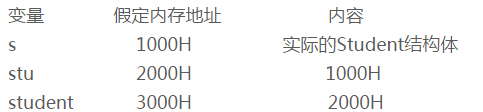
有時候利用android的TextView顯示中文跟數字的組合會對不齊,如下面截圖,文字還沒有到達屏幕右邊就開始換行了

為了解決這個文字,自己子定義了一個TextView的子類來實現,具體步驟如下:
import android.content.Context;
import android.content.res.TypedArray;
import android.graphics.Canvas;
import android.graphics.Color;
import android.graphics.Paint;
import android.text.TextUtils;
import android.util.AttributeSet;
import android.widget.TextView;

import java.util.ArrayList;

/**
 * Created by crab on 15-3-16.
 * 解決中文跟數字在一起的是時候textView顯示不正確問題
 */
public class AlignTextView extends TextView {
    //行間距
    private float mLineGap = 0.0f;
    private Paint mPaint;
    private ArrayList mTexts = new ArrayList();

    public AlignTextView(Context context) {
        super(context);
        init();
    }

    public AlignTextView(Context context, AttributeSet attrs) {
        super(context, attrs);
        TypedArray typedArray = context.obtainStyledAttributes(attrs, R.styleable.AlignTextView);
        mLineGap = typedArray.getDimension(R.styleable.AlignTextView_lineSpacingExtra, 0.0f);
        float textSize = typedArray.getDimension(R.styleable. AlignTextView_textSize, 24.0f);
        int textColor = typedArray.getColor(R.styleable. AlignTextView_textColor, Color.WHITE);
        // 構建paint對象
        mPaint = new Paint();
        mPaint.setAntiAlias(true);
        mPaint.setColor(textColor);
        mPaint.setTextSize(textSize);

        typedArray.recycle();
        init();
    }

    public AlignTextView(Context context, AttributeSet attrs, int defStyle) {
        super(context, attrs, defStyle);
        TypedArray typedArray = context.obtainStyledAttributes(attrs, R.styleable.AlignTextView);
        mLineGap = typedArray.getDimension(R.styleable.AlignTextView_lineSpacingExtra, 0.0f);
        float textSize = typedArray.getDimension(R.styleable. AlignTextView_textSize, 24.0f);
        int textColor = typedArray.getColor(R.styleable. AlignTextView_textColor, Color.WHITE);
        // 構建paint對象
        mPaint = new Paint();
        mPaint.setAntiAlias(true);
        mPaint.setColor(textColor);
        mPaint.setTextSize(textSize);
        typedArray.recycle();
        init();
    }

    private void init() {
        mTexts.clear();
    }

    @Override
    protected void onMeasure(int widthMeasureSpec, int heightMeasureSpec) {
        super.onMeasure(widthMeasureSpec, heightMeasureSpec);
        int width = MeasureSpec.getSize(widthMeasureSpec);
        String text = getText().toString();
        if (!TextUtils.isEmpty(text)) {
            mTexts.clear();
            int iStart = 0;
            int w = 0;
            int line = 0;
            Paint paint=mPaint;
            for (int i = 0; i < text.length(); i++) {
                char ch = text.charAt(i);
                float[] charWidth = new float[1];
                String charStr = String.valueOf(ch);
                paint.getTextWidths(charStr, charWidth);
                if (ch == '\n') {
                    String subText = text.substring(iStart, i);
                    mTexts.add(line, subText);
                    line++;
                    iStart = i + 1;
                    w = 0;
                } else {
                    w += ((int) Math.ceil(charWidth[0]));
                    if (w > width) {
                        String subText = text.substring(iStart, i);
                        mTexts.add(line, subText);
                        iStart = i;
                        w = 0;
                        line++;
                    } else {
                        if (i == text.length() - 1) {
                            String subText = text.substring(iStart, i+1);
                            mTexts.add(line, subText);
                        }
                    }
                }
            }
            Paint.FontMetrics fontMetrics=paint.getFontMetrics();
            float fontHeight=fontMetrics.bottom-fontMetrics.top;
            int size=mTexts.size();
            float textHeight=0.0f;
            for(int i=0;i2.res/values/attrs.xml文件中增加如下屬性


3.在布局文件中使用自定義的View
 粗淺看 Tomcat系統架構分析
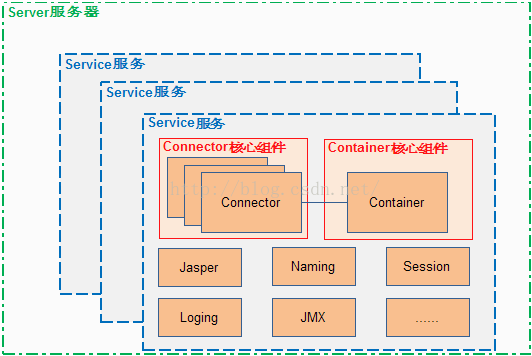
Tomcat的結構很復雜,但是Tomcat也非常的模塊化,找到了Tomcat最核心的模塊,就抓住了Tomcat的“七寸”。整體結構Tomcat 總
 詳述Canvas(五)/繪制圓角矩形
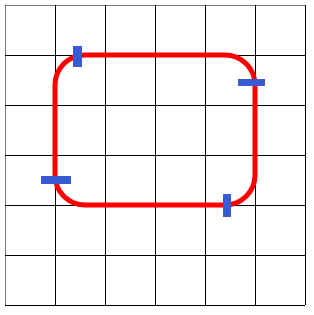
Canvas並沒有提供繪制圓角矩形的方法,但是通過觀察,我們可以發現,其實我們可以將圓角矩形分為四段,可以通過使用arcTo來實現。現在再看下第二段曲線:因此我們直接使用
 Android中View實現彈性滑動的方法——Android開發藝術探索筆記
介紹彈性滑動也就是漸進式滑動,實現彈性滑動的方法有很多,但是他們都有一個共同的思想:將一次大的滑動分成若干次小的滑動並在一段時間內完成。本文主要介紹三種彈性滑動方式,Sc
 Android camera實時預覽 實時處理,人臉識別示例
Android camera實時預覽 實時處理,面部認證。預覽操作是網友共享的代碼,我在繼承SurfaceView 的CameraSurfaceView 中加入了幀監聽事