編輯:關於Android編程
本文為大家分享了兩款選擇器,一款可以針對時間進行選擇、一款可以針對日期進行選擇,供大家參考,具體內容如下
一、時間選擇器
1.1.布局
<?xml version="1.0" encoding="utf-8"?>
<LinearLayout xmlns:android="http://schemas.android.com/apk/res/android"
 xmlns:tools="http://schemas.android.com/tools"
 android:layout_width="match_parent"
 android:layout_height="match_parent"
 android:orientation="vertical"
 tools:context="com.rj141.sb.kongjian.DateActivity">

 <LinearLayout
 android:orientation="horizontal"
 android:layout_width="match_parent"
 android:layout_height="wrap_content">
 <TextView
  android:layout_width="wrap_content"
  android:layout_height="wrap_content"
  android:textSize="20dp"
  android:text="幾點吃飯:"
  />
 <TextView
  android:layout_width="wrap_content"
  android:layout_height="wrap_content"
  android:textSize="20dp"
  android:id="@+id/tv" />
 </LinearLayout>
 <Button
 android:layout_width="wrap_content"
 android:layout_height="wrap_content"
 android:text="時間"
 android:id="@+id/btndate" />
</LinearLayout>
1.2.Java文件
public class DateActivity extends ActionBarActivity {

 private Button btn;
 private TextView tv;
 @Override
 protected void onCreate(Bundle savedInstanceState) {
 super.onCreate(savedInstanceState);
 setContentView(R.layout.activity_date);

 btn=(Button)this.findViewById(R.id.btndate);
 tv= (TextView) this.findViewById(R.id.tv);
 btn.setOnClickListener(new View.OnClickListener() {
  @Override
  public void onClick(View v) {
  new TimePickerDialog(DateActivity.this, new TimePickerDialog.OnTimeSetListener() {
   @Override
   public void onTimeSet(TimePicker view, int hourOfDay, int minute) {
   tv.setText(String.format("%d:%d",hourOfDay,minute));
   }
  //0,0指的是時間,true表示是否為24小時,true為24小時制
  },0,0,true).show();
  }
 });
 }
}
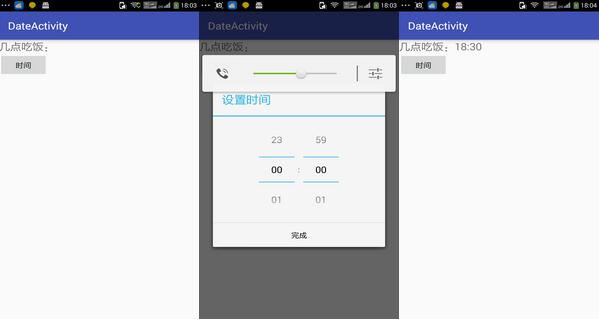
效果圖:
二、日期選擇器
2.1.activity.xml
<?xml version="1.0" encoding="utf-8"?>
<LinearLayout xmlns:android="http://schemas.android.com/apk/res/android"
xmlns:tools="http://schemas.android.com/tools"
android:layout_width="match_parent"
android:layout_height="match_parent"
android:orientation="vertical"
tools:context="com.rj141.sb.kongjian.DateActivity">

<TextView
android:layout_width="match_parent"
android:layout_height="wrap_content"
android:textSize="20dp"
android:id="@+id/tv" />

<Button
android:layout_width="wrap_content"
android:layout_height="wrap_content"
android:text="日歷"
android:id="@+id/btndate" />
</LinearLayout>
2.2.DateActivity.class
public class DateActivity extends ActionBarActivity {

private Button btn;
private TextView tv;
@Override
protected void onCreate(Bundle savedInstanceState) {
super.onCreate(savedInstanceState);
setContentView(R.layout.activity_date);

btn=(Button)this.findViewById(R.id.btndate);
tv= (TextView) this.findViewById(R.id.tv);
btn.setOnClickListener(new View.OnClickListener() {
@Override
public void onClick(View v) {
new DatePickerDialog(DateActivity.this, new DatePickerDialog.OnDateSetListener() {
@Override
public void onDateSet(DatePicker view, int year, int monthOfYear, int dayOfMonth) {
tv.setText("您的出生日期是:"+String.format("%d-%d-%d",year,monthOfYear+1,dayOfMonth));
}
},2000,1,2).show();
}
});
}
}
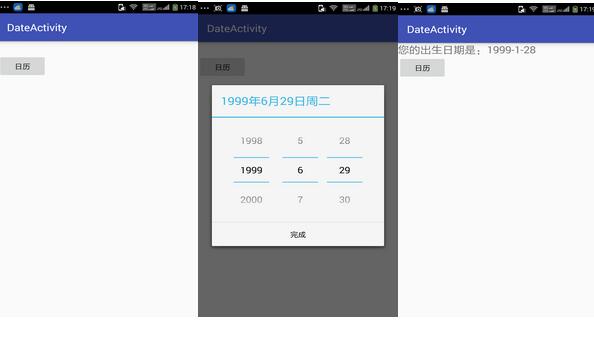
DatePickerDialog日歷選擇器的對話框,監聽為OnDateSetListener(){..}
效果圖:
以上就是兩款Android時間選擇器、Android日期選擇器的實現代碼,希望對大家學習Android軟件編程有所幫助。
 Android使用音頻信息繪制動態波紋
在一些音樂類應用中, 經常會展示隨著節奏上下起伏的波紋信息, 這些波紋形象地傳達了聲音信息, 可以提升用戶體驗, 那麼是如何實現的呢? 可以使用Visualize
 仿知乎日報第六篇:為MainFragement加載數據
一.前面講了,MainFragment的布局就是一個ViewPager,而ViewPager的一個個頁面就是首頁,日常心理學,用戶推薦日報,電影日報,不許無聊,設計日報,
 qq厘米秀膠囊有什麼用 qq厘米秀膠囊多久成熟 qq厘米秀膠囊孵化時間
qq厘米秀膠囊孵化時間是多久?qq厘米秀膠囊多久成熟?qq厘米秀中的膠囊是需要孵化成熟才可以使用的,下面我們一起來看看吧!qq厘米秀膠囊用途: qq厘米秀
 Android簡單的學生管理系統
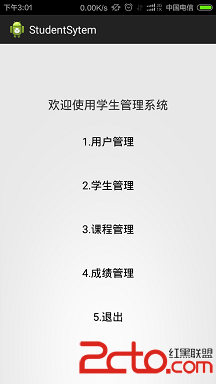
(1)管理系統實現的功能主要是:學生、教師的注冊登錄,和選課,以及修改學生的成績等基本簡單的功能,最主要的是實現一些Dialog的使用。界面如下:(2)主要代碼如下:(個