編輯:關於Android編程
ContentProvider為Android四大組件之一,主要用來應用程序之間的數據共享,也就是說一個應用程序用ContentProvider將自己的數據暴露出來,其他應用程序通過ContentResolver來對其暴露出來的數據進行增刪改查。
ContenProvider與ContentResolver之間的對話同過Uri(通用資源標識符),一個不恰當的比喻就好像浏覽器要顯示一個網頁要有一個東西發送請求,這相當於ContentResolver,你要拿東西就要知道去哪裡拿,你就得知道服務器的域名或網址,而這個網址就相當於Uri,當到達服務器的時候服務器要有個東西來處理,這就相當於ContenProvider。
A程序通過ContenProvider來暴露數據的基本步驟:
1、實現一個ContenProvider的子類,並重寫query,insert,update,delete等這幾個方法,
2、在androidmanifest.xml中注冊ContenProvider,指定的android:authorities屬性
B程序通過ContentResolver來操作A程序暴露出來的數據的基本步驟
1、通過content的getContentResolver()來獲取ContentResolver對象
2、通過ContentResolver對象來query,insert,update,delete來進行操作
在實現query,insert,update,delete時有一個重要的參數Uri類,Uri一個中要的方法Uri.parse(String str)用來解析str字符串,而str字符串格式一般都有A程序提供給B程序,B程序按照指定的格式去請求 。比如:content//:com.android.xiong.ConentProviderTestA.firstContentProvider/xiong 其格式一般分為三個部分:content//:這部分是固定不變的 而com.android.xiong.ConentProviderTestA.firstContentProvider表A程序在androidmanifest.xml注冊的android:authorities屬性,xiong則表示資源部分
<provider
      android:name="com.android.xiong.conentprovidertesta.FirstContentProvider"
      android:authorities="com.android.xiong.ConentProviderTestA.firstContentProvider"
      android:exported="true" >
</provider>
實例如下
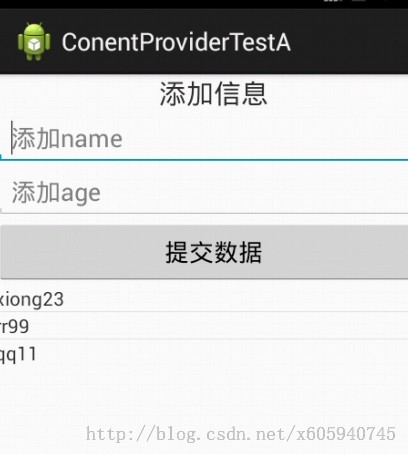
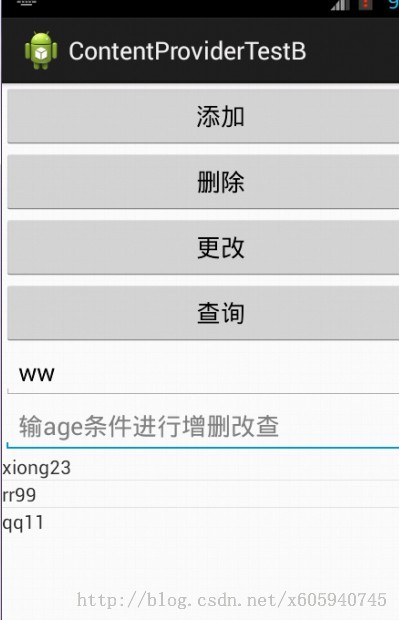
A程序:
UserInfo.java
package com.android.xiong.conentprovidertesta;

import android.content.ContentProvider;
import android.content.ContentValues;
import android.content.UriMatcher;
import android.database.Cursor;
import android.database.sqlite.SQLiteDatabase;
import android.net.Uri;

public class FirstContentProvider extends ContentProvider {

  // UriMatcher類主要用來匹配Uri
  private static final UriMatcher uriMatcher = new UriMatcher(
      UriMatcher.NO_MATCH);
  private MySqlite mysqlite;
  static {
    // 注冊向外部程序提供的Uri
    uriMatcher.addURI(UserInfo.AUTOR, "userinfo", 1);
    uriMatcher.addURI(UserInfo.AUTOR, "userinfoall", 2);
  }
  //刪除數據
  @Override
  public int delete(Uri uri, String selection, String[] selectionArgs) {
    int number = 0;
    if (uriMatcher.match(uri) == 1) {
      // 根據條件刪除數據,並獲取刪除的行數
      number = mysqlite.getReadableDatabase().delete("user_info",
          selection, selectionArgs);
    }
    // 通知數據已經改變
    getContext().getContentResolver().notifyChange(uri, null);
    return number;
  }

  @Override
  public String getType(Uri uri) {

    return null;
  }
  //插入數據
  @Override
  public Uri insert(Uri uri, ContentValues values) {
    String name = values.getAsString(UserInfo.User.NAME).toString();
    String age = values.getAsInteger(UserInfo.User.AGE).toString();
    String maxId = "select max(id) id from user_info";
    Cursor cursor = mysqlite.getReadableDatabase().rawQuery(maxId, null);
    cursor.moveToFirst();
    int userid = cursor.getInt(0) + 1;
    if (uriMatcher.match(uri) == 1) {

      mysqlite.getWritableDatabase().execSQL(
          "insert into user_info values(?,?,?)",
          new String[] { String.valueOf(userid), name, age });
    }
    return uri;
  }

  // 連接數據庫
  @Override
  public boolean onCreate() {
    mysqlite = new MySqlite(getContext(), "userinfo.db", null, 1);
    return true;
  }
  //查詢數據
  @Override
  public Cursor query(Uri uri, String[] projection, String selection,
      String[] selectionArgs, String sortOrder) {
    SQLiteDatabase sqlite = mysqlite.getReadableDatabase();
    String str = "select name,age from user_info";
    if (uriMatcher.match(uri) == 1) {
      str += " where " + selection;
    }
    Cursor cursor = sqlite.rawQuery(str, selectionArgs);
    return cursor;
  }
  //修改數據
  @Override
  public int update(Uri uri, ContentValues values, String selection,
      String[] selectionArgs) {
    SQLiteDatabase sqlite = mysqlite.getReadableDatabase();
    int number = 0;
    if (uriMatcher.match(uri) == 1) {
      number = sqlite.update("user_info", values, selection,
          selectionArgs);
    }
    return number;
  }

}
FirstContentProvider.java
package com.android.xiong.conentprovidertesta;

import android.content.ContentProvider;
import android.content.ContentValues;
import android.content.UriMatcher;
import android.database.Cursor;
import android.database.sqlite.SQLiteDatabase;
import android.net.Uri;

public class FirstContentProvider extends ContentProvider {

  // UriMatcher類主要用來匹配Uri
  private static final UriMatcher uriMatcher = new UriMatcher(
      UriMatcher.NO_MATCH);
  private MySqlite mysqlite;
  static {
    // 注冊向外部程序提供的Uri
    uriMatcher.addURI(UserInfo.AUTOR, "userinfo", 1);
    uriMatcher.addURI(UserInfo.AUTOR, "userinfoall", 2);
  }
  //刪除數據
  @Override
  public int delete(Uri uri, String selection, String[] selectionArgs) {
    int number = 0;
    if (uriMatcher.match(uri) == 1) {
      // 根據條件刪除數據,並獲取刪除的行數
      number = mysqlite.getReadableDatabase().delete("user_info",
          selection, selectionArgs);
    }
    // 通知數據已經改變
    getContext().getContentResolver().notifyChange(uri, null);
    return number;
  }

  @Override
  public String getType(Uri uri) {

    return null;
  }
  //插入數據
  @Override
  public Uri insert(Uri uri, ContentValues values) {
    String name = values.getAsString(UserInfo.User.NAME).toString();
    String age = values.getAsInteger(UserInfo.User.AGE).toString();
    String maxId = "select max(id) id from user_info";
    Cursor cursor = mysqlite.getReadableDatabase().rawQuery(maxId, null);
    cursor.moveToFirst();
    int userid = cursor.getInt(0) + 1;
    if (uriMatcher.match(uri) == 1) {

      mysqlite.getWritableDatabase().execSQL(
          "insert into user_info values(?,?,?)",
          new String[] { String.valueOf(userid), name, age });
    }
    return uri;
  }

  // 連接數據庫
  @Override
  public boolean onCreate() {
    mysqlite = new MySqlite(getContext(), "userinfo.db", null, 1);
    return true;
  }
  //查詢數據
  @Override
  public Cursor query(Uri uri, String[] projection, String selection,
      String[] selectionArgs, String sortOrder) {
    SQLiteDatabase sqlite = mysqlite.getReadableDatabase();
    String str = "select name,age from user_info";
    if (uriMatcher.match(uri) == 1) {
      str += " where " + selection;
    }
    Cursor cursor = sqlite.rawQuery(str, selectionArgs);
    return cursor;
  }
  //修改數據
  @Override
  public int update(Uri uri, ContentValues values, String selection,
      String[] selectionArgs) {
    SQLiteDatabase sqlite = mysqlite.getReadableDatabase();
    int number = 0;
    if (uriMatcher.match(uri) == 1) {
      number = sqlite.update("user_info", values, selection,
          selectionArgs);
    }
    return number;
  }

}
MySqlite.java
package com.android.xiong.conentprovidertesta;

import android.content.Context;
import android.database.sqlite.SQLiteDatabase;
import android.database.sqlite.SQLiteDatabase.CursorFactory;
import android.database.sqlite.SQLiteOpenHelper;

public class MySqlite extends SQLiteOpenHelper {

  static final String sql = "create table user_info(id int,name varchar(30),age int)";

  public MySqlite(Context context, String name, CursorFactory factory,
      int version) {
    super(context, name, factory, version);
    // TODO Auto-generated constructor stub
  }

  @Override
  public void onCreate(SQLiteDatabase db) {
    //創建數據表
    db.execSQL(sql);

  }

  @Override
  public void onUpgrade(SQLiteDatabase db, int oldVersion, int newVersion) {
    // TODO Auto-generated method stub

  }

}
MainActivity.java
package com.android.xiong.conentprovidertesta;

import android.content.Context;
import android.database.sqlite.SQLiteDatabase;
import android.database.sqlite.SQLiteDatabase.CursorFactory;
import android.database.sqlite.SQLiteOpenHelper;

public class MySqlite extends SQLiteOpenHelper {

  static final String sql = "create table user_info(id int,name varchar(30),age int)";

  public MySqlite(Context context, String name, CursorFactory factory,
      int version) {
    super(context, name, factory, version);
    // TODO Auto-generated constructor stub
  }

  @Override
  public void onCreate(SQLiteDatabase db) {
    //創建數據表
    db.execSQL(sql);

  }

  @Override
  public void onUpgrade(SQLiteDatabase db, int oldVersion, int newVersion) {
    // TODO Auto-generated method stub

  }

}
activity_main.xml
<LinearLayout xmlns:android="http://schemas.android.com/apk/res/android"
  xmlns:tools="http://schemas.android.com/tools"
  android:layout_width="match_parent"
  android:layout_height="match_parent"
  android:orientation="vertical"
  tools:context=".MainActivity" >

  <TextView
    android:id="@+id/txt1"
    android:layout_width="match_parent"
    android:layout_height="wrap_content"
    android:gravity="center_horizontal"
    android:text="添加信息"
    android:textSize="20dp" />

  <EditText
    android:id="@+id/ed1"
    android:layout_width="match_parent"
    android:layout_height="wrap_content"
    android:hint="添加name" />

  <EditText
    android:id="@+id/ed2"
    android:layout_width="match_parent"
    android:layout_height="wrap_content"
    android:hint="添加age"
    android:inputType="number" />

  <Button
    android:id="@+id/bt1"
    android:layout_width="match_parent"
    android:layout_height="wrap_content"
    android:text="提交數據" />

    <ListView
      android:id="@+id/lists"
      android:layout_width="match_parent"
      android:layout_height="wrap_content" >
    </ListView>


</LinearLayout>
item.xml
<?xml version="1.0" encoding="utf-8"?>
<LinearLayout xmlns:android="http://schemas.android.com/apk/res/android"
  android:layout_width="match_parent"
  android:layout_height="match_parent"
  android:orientation="horizontal" >
  <TextView
    android:id="@+id/item_txt1"
    android:layout_width="wrap_content"
    android:layout_height="wrap_content"/>
    <TextView
    android:id="@+id/item_txt2"
    android:layout_width="wrap_content"
    android:layout_height="wrap_content"/>


</LinearLayout>
B程序
UserInfo.java
package com.android.xiong.contentprovidertestb;

//向外部程序提供一個工具類
public class UserInfo {

  // 獲取ContentProvider的“域名”
  public static final String AUTOR = "com.android.xiong.ConentProviderTestA.firstContentProvider";

  //定義一個靜態內部類,提供ContentProvider可操作的列
  public static final class User {

    public static final String ID="id";
    public static final String NAME="name";
    public static final String AGE="age";
    //定義該content提供服務的一個Uri
    public static final String uri="content://"+AUTOR+"/userinfo";
    public static final String uriall="content://"+AUTOR+"/userinfoall";

  }

}
MainActivity.java
package com.android.xiong.contentprovidertestb;

import java.util.ArrayList;
import java.util.HashMap;
import java.util.List;
import java.util.Map;

import android.app.Activity;
import android.content.ContentValues;
import android.database.Cursor;
import android.net.Uri;
import android.os.Bundle;
import android.view.Menu;
import android.view.View;
import android.view.View.OnClickListener;
import android.widget.Button;
import android.widget.EditText;
import android.widget.ListView;
import android.widget.ScrollView;
import android.widget.SimpleAdapter;
import android.widget.Toast;

public class MainActivity extends Activity {

  private Button bt1, bt2, bt3, bt4;
  private EditText ed1, ed2;
  private ListView list1;
  private ScrollView sc1;

  @Override
  protected void onCreate(Bundle savedInstanceState) {
    super.onCreate(savedInstanceState);
    setContentView(R.layout.activity_main);
    bt1 = (Button) findViewById(R.id.bt1);
    bt2 = (Button) findViewById(R.id.bt2);
    bt3 = (Button) findViewById(R.id.bt3);
    bt4 = (Button) findViewById(R.id.bt4);
    ed1 = (EditText) findViewById(R.id.ed1);
    ed2 = (EditText) findViewById(R.id.ed2);
    list1 = (ListView) findViewById(R.id.list);
    // 顯示所有數據
    list1.setAdapter(adapter(0));
    sc1 = (ScrollView) findViewById(R.id.scr1);
    // 向添加ContentProviderA應用的數據
    bt1.setOnClickListener(new OnClickListener() {

      @Override
      public void onClick(View v) {
        String eds1 = ed1.getText().toString();
        String eds2 = ed2.getText().toString();
        ContentValues content = new ContentValues();
        if (!eds1.equals("") && !eds2.equals("")) {
          content.put(UserInfo.User.NAME, eds1);
          content.put(UserInfo.User.AGE, eds2);
          MainActivity.this.getContentResolver().insert(
              Uri.parse(UserInfo.User.uri), content);
          Toast.makeText(MainActivity.this, "數據插入成功",
              Toast.LENGTH_LONG).show();
          // 刷新ListView界面
          list1.setAdapter(adapter(0));
        } else {
          Toast.makeText(MainActivity.this, "name和age不能為空",
              Toast.LENGTH_LONG).show();
        }

      }
    });
    // 根據條件刪除ContentProviderA應用的數據
    bt2.setOnClickListener(new OnClickListener() {

      @Override
      public void onClick(View v) {
        String eds1 = ed1.getText().toString();
        String eds2 = ed2.getText().toString();
        if (!eds1.equals("") || !eds2.equals("")) {
          HashMap<String, String[]> wheres = wheres(eds1, eds2);
          String sql = wheres.get("sql")[0];
          String[] selectags = wheres.get("selectages");
          MainActivity.this.getContentResolver().delete(
              Uri.parse(UserInfo.User.uri), sql, selectags);

        } else {
          Toast.makeText(MainActivity.this, "請輸入刪除條件",
              Toast.LENGTH_LONG).show();
        }
        // 刷新ListView界面
        list1.setAdapter(adapter(0));
      }
    });
    // 修改數據
    bt3.setOnClickListener(new OnClickListener() {

      @Override
      public void onClick(View v) {
        String eds1 = ed1.getText().toString();
        String eds2 = ed2.getText().toString();
        ContentValues values = new ContentValues();
        // 根據條件將列修改為xiong,23
        values.put(UserInfo.User.NAME, "xiong");
        values.put(UserInfo.User.AGE, "23");
        if (!eds1.equals("") || !eds2.equals("")) {
          HashMap<String, String[]> wheres = wheres(eds1, eds2);
          String sql = wheres.get("sql")[0];
          String[] selectags = wheres.get("selectages");
          int i=MainActivity.this.getContentResolver().update(
              Uri.parse(UserInfo.User.uri), values, sql,
              selectags);

        } else {
          Toast.makeText(MainActivity.this, "請輸入刪除條件",
              Toast.LENGTH_LONG).show();
        }
        // 刷新ListView界面
        list1.setAdapter(adapter(0));

      }
    });
    // 根據條件查詢ContentProviderA應用的數據
    bt4.setOnClickListener(new OnClickListener() {
      @Override
      public void onClick(View v) {
        if (!ed1.getText().toString().equals("")
            || !ed2.getText().toString().equals(""))
          list1.setAdapter(adapter(1));
        else
          list1.setAdapter(adapter(0));
      }
    });
  }

  // 用來判別條件
  public HashMap<String, String[]> wheres(String eds1, String eds2) {
    HashMap<String, String[]> where = new HashMap<String, String[]>();
    if (!eds1.equals("") && !eds2.equals("")) {
      String[] sql = { UserInfo.User.NAME + "=? and " + UserInfo.User.AGE
          + " =?" };
      String[] selectages = { eds1, eds2 };
      where.put("sql", sql);
      where.put("selectages", selectages);

    }
    if (!eds1.equals("") && eds2.equals("")) {
      String[] sql = { UserInfo.User.NAME + "=? " };
      String[] selectages = { eds1 };
      where.put("sql", sql);
      where.put("selectages", selectages);

    }
    if (eds1.equals("") && !eds2.equals("")) {
      String[] sql = { UserInfo.User.AGE + " =?" };
      String[] selectages = { eds2 };
      where.put("sql", sql);
      where.put("selectages", selectages);

    }
    return where;
  }

  // 用來顯示數據
  public SimpleAdapter adapter(int i) {
    Cursor cs = MainActivity.this.getContentResolver().query(
        Uri.parse(UserInfo.User.uriall), null, null, null, null);
    String eds1 = ed1.getText().toString();
    String eds2 = ed2.getText().toString();
    if (i == 1) {
      if (!eds1.equals("") || !eds2.equals("")) {
        HashMap<String, String[]> wheres = wheres(eds1, eds2);
        String sql = wheres.get("sql")[0];
        String[] selectags = wheres.get("selectages");
        cs = MainActivity.this.getContentResolver().query(
            Uri.parse(UserInfo.User.uri), null, sql, selectags,
            null);
      }

    }

    List<Map<String, Object>> lists = new ArrayList<Map<String, Object>>();
    while (cs.moveToNext()) {
      Map<String, Object> map = new HashMap<String, Object>();
      map.put("name", cs.getString(0));
      map.put("age", cs.getString(1));
      lists.add(map);
    }
    SimpleAdapter simepl = new SimpleAdapter(MainActivity.this, lists,
        R.layout.item, new String[] { "name", "age" }, new int[] {
            R.id.item_txt1, R.id.item_txt2 });
    return simepl;
  }

  @Override
  public boolean onCreateOptionsMenu(Menu menu) {
    // Inflate the menu; this adds items to the action bar if it is present.
    getMenuInflater().inflate(R.menu.main, menu);
    return true;
  }

}
activity.xml
<LinearLayout xmlns:android="http://schemas.android.com/apk/res/android"
  xmlns:tools="http://schemas.android.com/tools"
  android:layout_width="match_parent"
  android:layout_height="match_parent"
  android:orientation="vertical"
  tools:context=".MainActivity" >

  <ScrollView
    android:id="@+id/scr1"
    android:layout_width="match_parent"
    android:layout_height="wrap_content" >

    <LinearLayout
      android:layout_width="match_parent"
      android:layout_height="wrap_content"
      android:orientation="vertical" >

      <Button
        android:id="@+id/bt1"
        android:layout_width="match_parent"
        android:layout_height="wrap_content"
        android:text="添加" />

      <Button
        android:id="@+id/bt2"
        android:layout_width="match_parent"
        android:layout_height="wrap_content"
        android:text="刪除" />

      <Button
        android:id="@+id/bt3"
        android:layout_width="match_parent"
        android:layout_height="wrap_content"
        android:text="更改" />

      <Button
        android:id="@+id/bt4"
        android:layout_width="match_parent"
        android:layout_height="wrap_content"
        android:text="查詢" />

      <EditText
        android:id="@+id/ed1"
        android:layout_width="match_parent"
        android:layout_height="wrap_content"
        android:hint="輸入name條件進行增刪改查" />

      <EditText
        android:id="@+id/ed2"
        android:layout_width="match_parent"
        android:layout_height="wrap_content"
        android:hint="輸age條件進行增刪改查" />
    </LinearLayout>
  </ScrollView>

  <ListView
    android:id="@+id/list"
    android:layout_width="match_parent"
    android:layout_height="wrap_content" >
  </ListView>

</LinearLayout>
item.xml
<?xml version="1.0" encoding="utf-8"?>
<LinearLayout xmlns:android="http://schemas.android.com/apk/res/android"
  android:layout_width="match_parent"
  android:layout_height="match_parent"
  android:orientation="horizontal" >
  <TextView
    android:id="@+id/item_txt1"
    android:layout_width="wrap_content"
    android:layout_height="wrap_content"/>
    <TextView
    android:id="@+id/item_txt2"
    android:layout_width="wrap_content"
    android:layout_height="wrap_content"/>


</LinearLayout>
監聽ContentProvider數據改變
當程序A在執行insert、update、delete時,通過getContext().getContentResolver().notifyChange(uri, null)方法來告訴所有注冊在該Uri的監聽者數據發生改變
//刪除數據
  @Override
  public int delete(Uri uri, String selection, String[] selectionArgs) {
    int number = 0;
    if (uriMatcher.match(uri) == 1) {
      // 根據條件刪除數據,並獲取刪除的行數
      number = mysqlite.getReadableDatabase().delete("user_info",
          selection, selectionArgs);
    }
    // 通知數據已經改變
    getContext().getContentResolver().notifyChange(uri, null);
    return number;
  }
在B程序通過registerContentObserver(Uri uri,boolean notifyForDescendents, ContentObserver observer)方法來監聽A程序的數據改變
@Override
protected void onCreate(Bundle savedInstanceState) {
  super.onCreate(savedInstanceState);
  setContentView(R.layout.activity_main);
  // 為uri的數據改變注冊監聽器
  getContentResolver().registerContentObserver(
      Uri.parse("content://com.android.xiong.ConentProviderTestA.firstContentProvider/userinfo"), true,
      new SmsObserver(new Handler()));
}
registerContentObserver中第三個參數為監聽實例 ,需要通過繼承ContentObserver類,並重寫onChange(booleab selfChange)方法,該方法在監聽Uri的ContentProvider的數據發生改變時觸發該方法
// 提供方自定義的ContentOberver監聽器
private final class Observer extends ContentObserver {

  public SmsObserver(Handler handler) {
    super(handler);
  }

  @Override
  public void onChange(boolean selfChange, Uri uri) {

    // 查詢發送郵箱中的短息(處於正在發送狀態的短信放在發送箱)
    Cursor cursor = getContentResolver().query(
        Uri.parse("content://com.android.xiong.ConentProviderTestA.firstContentProvider/userinfo"), null, null, null, null);
    }
  }

}
 Android消息機制Handler的實現原理解析
線程是一個動態執行的過程,從產生到死亡包括五個狀態:新建、就緒、運行、死亡和堵塞。只要線程沒有執行完畢或者沒有被其它線程殺死,線程就不會進入死亡狀態。Android中的
 Android打造屬於自己的新聞平台(客戶端+服務器)
完全屬於自己的新聞展示平台,展示給大家,希望大家喜歡。一、新聞的數據庫的構建腳本代碼如下:(使用的mysql5.0 數據庫)SET SQL_MODE = NO_AUTO_
 Android圖片裁剪功能實現代碼
在Android應用中,圖片裁剪也是一個經常用到的功能。Android系統中可以用隱式意圖調用系統應用進行裁剪,但是這樣做在不同的手機可能表現出不同的效果,甚至在某些奇葩
 Android 性能優化 UI優化
前言:本篇文章主要學習UI性能優化。1. 應用UI卡頓的原理1.1 原理用戶感覺到卡頓的原理就是在渲染時出現了掉幀。Android系統要求 1s內渲染60幀,即渲染1幀必