編輯:關於Android編程
主要實現兩個步驟:
1、實現打開和關閉閃光燈;而實現操作閃光燈主要通過Camera類
Camera camera = Camera.open();
Parameters mParameters = camera.getParameters();
mParameters.setFlashMode(Camera.Parameters.FLASH_MODE_TORCH);//打開Camera.Parameters.FLASH_MODE_OFF
則為關閉
amera.setParameters(mParameters)
2、自定義閃光燈的按鈕;自定義控件主要是設置設置view的大小
onMeasure(int widthMeasureSpec, int heightMeasureSpec)
效果如下:
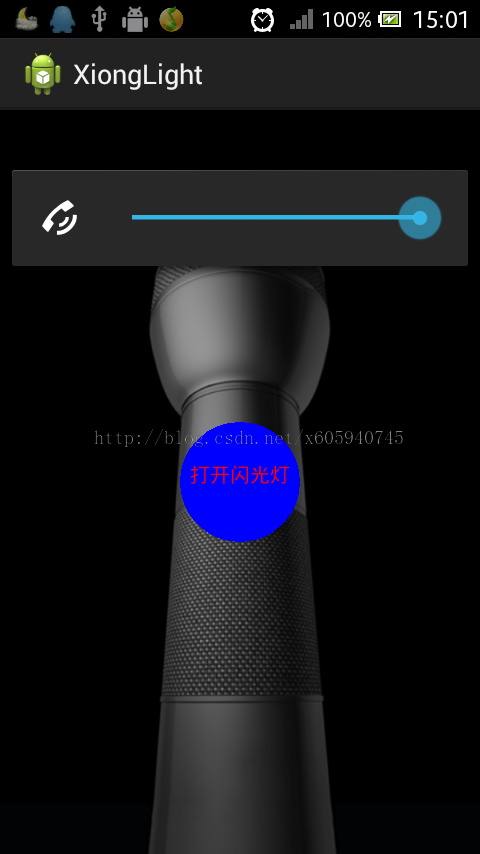
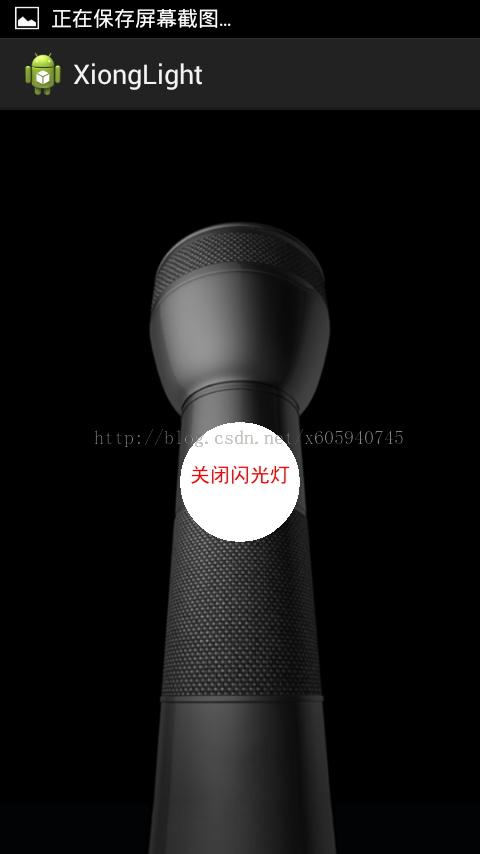
源碼如下:
<RelativeLayout xmlns:android="http://schemas.android.com/apk/res/android"
  xmlns:tools="http://schemas.android.com/tools"
  android:layout_width="match_parent"
  android:layout_height="match_parent"
  android:gravity="center"
  android:background="@drawable/light"
  tools:context=".MainActivity" >


  <com.android.xiong.xionglight.LightBkView
    android:id="@+id/light1"
    android:layout_width="wrap_content"
    android:layout_height="wrap_content"/>

</RelativeLayout>

<uses-permission android:name="android.permission.CAMERA" />
package com.android.xiong.xionglight;

import android.app.Activity;
import android.os.Bundle;
import android.view.KeyEvent;
import android.view.Menu;

public class MainActivity extends Activity {

  private LightBkView light1;

  @Override
  protected void onCreate(Bundle savedInstanceState) {
    super.onCreate(savedInstanceState);
    setContentView(R.layout.activity_main);
    light1 = (LightBkView) findViewById(R.id.light1);
    //定義單擊事件
    light1.setOnClickListener(light1);

  }

  @Override
  public boolean onCreateOptionsMenu(Menu menu) {
    getMenuInflater().inflate(R.menu.main, menu);
    return true;
  }


}
package com.android.xiong.xionglight;

import android.content.Context;
import android.graphics.Canvas;
import android.graphics.Color;
import android.graphics.Paint;
import android.hardware.Camera;
import android.hardware.Camera.Parameters;
import android.util.AttributeSet;
import android.view.View;
import android.view.View.OnClickListener;

public class LightBkView extends View implements OnClickListener {

  Camera camera = Camera.open();
  // 定義畫皮
  Paint paint = new Paint();
  Paint paint1 = new Paint();
  int x = 0;
  int y = 0;
  // 打開閃光燈
  boolean islight;

  public LightBkView(Context context, AttributeSet set) {
    super(context, set);
  }

  @Override
  protected void onDraw(Canvas canvas) {
    // 獲取控件的寬度和高度
    int width = this.getWidth();
    int heigth = this.getHeight();
    // 圓點的坐標
    x = width / 2;
    y = heigth / 2;
    //更換開關背景
    if(!islight){
    paint.setColor(Color.BLUE);
    canvas.drawCircle(x, y, 60, paint);
    paint1.setColor(Color.RED);
    paint1.setTextSize(20);
    canvas.drawText("打開閃光燈", x-50, y, paint1);
    invalidate();
    }else{
      paint.setColor(Color.WHITE);
      canvas.drawCircle(x, y, 60, paint);
      paint1.setColor(Color.RED);
      paint1.setTextSize(20);
      canvas.drawText("關閉閃光燈", x-50, y, paint1);
      invalidate();
    }
  }

  // 定義View的大小
  @Override
  protected void onMeasure(int widthMeasureSpec, int heightMeasureSpec) {
    setMeasuredDimension(getWidth(widthMeasureSpec),
        getHeight(heightMeasureSpec));

  }
  //定義view的寬度
  public int getWidth(int widthMeasureSpec) {
    int reslut = 0;
    int widthMode = MeasureSpec.getMode(widthMeasureSpec);
    if (widthMode == MeasureSpec.AT_MOST) {
      reslut = 120;
    }
    if (widthMode == MeasureSpec.EXACTLY) {
      reslut = MeasureSpec.getSize(widthMeasureSpec);
    }
    return reslut;
  }
  //定義view的高度
  public int getHeight(int heightMeasureSpec) {
    int reslut = 0;
    int heightMode = MeasureSpec.getMode(heightMeasureSpec);
    if (heightMode == MeasureSpec.AT_MOST) {
      reslut = 120;
    }
    if (heightMode == MeasureSpec.EXACTLY) {
      reslut = MeasureSpec.getSize(heightMeasureSpec);
    }
    return reslut;
  }

  // 實現閃光燈的的開關
  @Override
  public void onClick(View v) {
    if (!islight) {
      Parameters mParameters = camera.getParameters();
      mParameters.setFlashMode(Camera.Parameters.FLASH_MODE_TORCH);
      camera.setParameters(mParameters);
      islight = true;
    } else {
      Parameters mParameters = camera.getParameters();
      mParameters.setFlashMode(Camera.Parameters.FLASH_MODE_OFF);
      camera.setParameters(mParameters);
      islight = false;
    }
  }

}
 Android仿微信實現首字母導航條
本文介紹Android實現首字母導航條,先看張效果圖,具體怎麼實現看代碼吧具體的步驟1.整體布局的顯示 2. 實現A-Z的分組 3. 自定義A-Z的導航條 4. 中間顯示
 [Android Studio 權威教程]斷點調試和高級調試
有人說Android 的調試是最坑的,那我只能說是你不會用而已,我可以說Android Studio的調試是我見過最棒的。 好了開始寫一個簡單的調試程序,我們先來一個f
 為你的android App實現自簽名的ssl證書(https)
不願意看啰嗦的可以直接去 實現步驟 最近公司項目用到https的接口形式,對於一般的網絡請求 我們用的是http://****** 使用
 Android開發學習之路--基於vitamio的視頻播放器(一)
之前也試過vitamio這個庫,後來不知道被什麼事情給耽擱了,就沒繼續下去。近來覺得視頻還是需要學習一下的,誰讓直播那麼火呢,就想著寫一個簡單的視頻播放的app先吧。好了