編輯:關於Android編程
基本屬性要求
<LinearLayout
  android:layout_width="match_parent"
  android:layout_height="match_parent"

  android:orientation="vertical">
 </LinearLayout>
垂直排列 Button
<LinearLayout
  android:layout_width="match_parent"
  android:layout_height="match_parent"
  android:orientation="vertical" >

  <Button
    android:layout_width="wrap_content"
    android:layout_height="wrap_content"
    android:text="Button 1" />
  <Button
    android:layout_width="wrap_content"
    android:layout_height="wrap_content"
    android:text="Button 2" />

</LinearLayout>
水平排列 Button
<LinearLayout
  android:layout_width="match_parent"
  android:layout_height="match_parent"
  android:orientation="vertical" >

  <Button
    android:layout_width="wrap_content"
    android:layout_height="wrap_content"
    android:text="Button 1" />
  <Button
    android:layout_width="wrap_content"
    android:layout_height="wrap_content"
    android:text="Button 2" />

</LinearLayout>
重心設定
<LinearLayout
  android:layout_width="match_parent"
  android:layout_height="match_parent"
  android:orientation="vertical"

  android:gravity="left">
</LinearLayout>
水平、垂直置中
<LinearLayout
  android:layout_width="match_parent"
  android:layout_height="match_parent"
  android:orientation="vertical"
  android:gravity="center_vertical">

  <Button
    android:layout_width="wrap_content"
    android:layout_height="wrap_content"
    android:text="Button 1" />

</LinearLayout>

<LinearLayout
  android:layout_width="match_parent"
  android:layout_height="match_parent"
  android:orientation="vertical"
  android:gravity="center_horizontal">

  <Button
    android:layout_width="wrap_content"
    android:layout_height="wrap_content"
    android:text="Button 1" />

</LinearLayout>

<LinearLayout
  android:layout_width="match_parent"
  android:layout_height="match_parent"
  android:orientation="vertical"
  android:gravity="center">

  <Button
    android:layout_width="wrap_content"
    android:layout_height="wrap_content"
    android:text="Button 1" />

</LinearLayout>
透過 OR 運算子組合重心
<LinearLayout
  android:layout_width="match_parent"
  android:layout_height="match_parent"
  android:orientation="vertical"
  android:gravity="top|right">

  <Button
    android:layout_width="wrap_content"
    android:layout_height="wrap_content"
    android:text="Button 1" />

</LinearLayout>

<LinearLayout
  android:layout_width="match_parent"
  android:layout_height="match_parent"
  android:orientation="vertical"
  android:gravity="bottom|left">

  <Button
    android:layout_width="wrap_content"
    android:layout_height="wrap_content"
    android:text="Button 1" />

</LinearLayout>

<LinearLayout
  android:layout_width="match_parent"
  android:layout_height="match_parent"
  android:orientation="vertical"
  android:gravity="center_vertical|center_horizontal">

  <Button
    android:layout_width="wrap_content"
    android:layout_height="wrap_content"
    android:text="Button 1" />

</LinearLayout>
比例分配
<LinearLayout
  android:layout_width="match_parent"
  android:layout_height="match_parent"
  android:orientation="horizontal">

  <Button
    android:layout_width="wrap_content"
    android:layout_height="wrap_content"
    android:text="Button 1"

    android:layout_weight="1"/>

</LinearLayout>
等比例分配
<LinearLayout
  android:layout_width="match_parent"
  android:layout_height="match_parent"
  android:orientation="horizontal">

  <Button
    android:layout_width="wrap_content"
    android:layout_height="wrap_content"
    android:text="Button 1"
    android:layout_weight="1"/>

  <Button
    android:layout_width="wrap_content"
    android:layout_height="wrap_content"
    android:text="Button 2"
    android:layout_weight="1"/>

  <Button
    android:layout_width="wrap_content"
    android:layout_height="wrap_content"
    android:text="Button 3"
    android:layout_weight="1"/>

</LinearLayout>
比重都是 1,所以大小相同。
非等比例分配
<LinearLayout
  android:layout_width="match_parent"
  android:layout_height="match_parent"
  android:orientation="horizontal">

  <Button
    android:layout_width="wrap_content"
    android:layout_height="wrap_content"
    android:text="Button 1"
    android:layout_weight=".10"/>

  <Button
    android:layout_width="wrap_content"
    android:layout_height="wrap_content"
    android:text="Button 2"
    android:layout_weight=".20"/>
  <Button
    android:layout_width="wrap_content"
    android:layout_height="wrap_content"
    android:text="Button 3"
    android:layout_weight=".70"/>

</LinearLayout>
.10 代表 0.10
.20 代表 0.20
.70 代表 0.70
合起來剛好是 1 ,作 100% 分配。
 Android——ViewPager和內部view之間的事件分發及輪播圖
viewpager 在滑動的過程中是如何觸發view身上的事件的,換句話說,viewpager在滑動的過程中到底是滑動的它裡面的view,還是滑動的viewpager本身
 Android應用自定義View繪制方法手冊
背景這篇遲遲難產的文章算是對2015前半年的一個交代吧,那時候有一哥們要求來一發Android Canvas相關總結,這哥們還打賞了,實在不好意思,可是這事一放就給放忘了
 Android雷達掃描動態界面制作
先看看效果圖:源碼:package com.zihao.radar; import android.app.Activity; import android.os.Bu
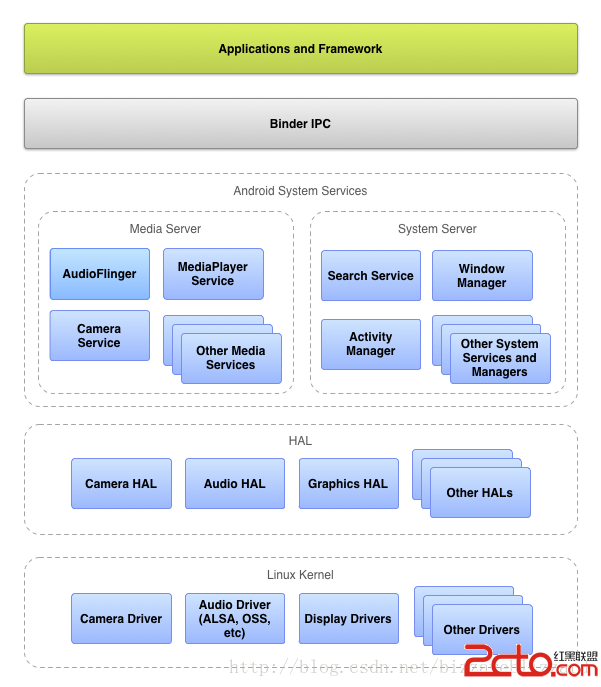 Android系統移植 http://source.android.com/devices/index.html
移植Android到不同的設備 Android允許提供不同的硬件平台和驅動支持Android的運行。硬件抽象層(Hardware Abstraction Layer)