編輯:關於Android編程
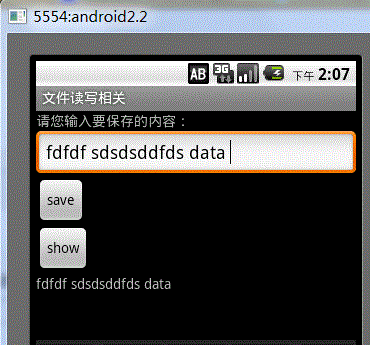
最終效果圖,點擊save會保存到文件中,點擊show會從文件中讀取出內容並顯示。
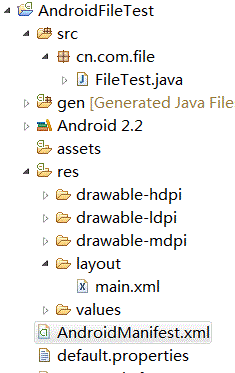
main.xml
<?xml version="1.0" encoding="utf-8"?>
<LinearLayout xmlns:android="http://schemas.android.com/apk/res/android"
  android:orientation="vertical"
  android:layout_width="fill_parent"
  android:layout_height="fill_parent"
  >
<TextView
  android:layout_width="fill_parent"
  android:layout_height="wrap_content"
  android:text="請您輸入要保存的內容:"
  />
 <EditText
  android:id="@+id/addText"
  android:layout_width="fill_parent"
  android:layout_height="wrap_content"
  android:hint="請您在此處輸入文件內容!"
 />
 <Button
  android:id="@+id/addButton"
  android:layout_width="wrap_content"
  android:layout_height="wrap_content"
  android:text="save"
 />
 <Button
  android:id="@+id/showButton"
  android:layout_width="wrap_content"
  android:layout_height="wrap_content"
  android:text="show"
 />
 <TextView
  android:id="@+id/showText"
  android:layout_width="fill_parent"
  android:layout_height="wrap_content"
  />

</LinearLayout>
activity代碼
package cn.com.file;

import java.io.ByteArrayOutputStream;
import java.io.FileInputStream;
import java.io.FileNotFoundException;
import java.io.FileOutputStream;
import java.io.IOException;

import android.app.Activity;
import android.os.Bundle;
import android.view.View;
import android.view.View.OnClickListener;
import android.widget.Button;
import android.widget.EditText;
import android.widget.TextView;
import android.widget.Toast;

public class FileTest extends Activity {
  private EditText editText;
  private TextView showTextView;
  // 要保存的文件名
  private String fileName = "chenzheng_java.txt";

  @Override
  public void onCreate(Bundle savedInstanceState) {
    super.onCreate(savedInstanceState);
    setContentView(R.layout.main);
    // 獲取頁面中的組件
    editText = (EditText) findViewById(R.id.addText);
    showTextView = (TextView) findViewById(R.id.showText);
    Button addButton = (Button) this.findViewById(R.id.addButton);
    Button showButton = (Button) this.findViewById(R.id.showButton);
    // 綁定單擊事件
    addButton.setOnClickListener(listener);
    showButton.setOnClickListener(listener);

  }

  // 聲明監聽器
  private View.OnClickListener listener = new OnClickListener() {
    public void onClick(View v) {
      Button view = (Button) v;
      switch (view.getId()) {
      case R.id.addButton:
        save();
        break;
      case R.id.showButton:
        read();
        break;

      }

    }

  };

  /**
   *@author chenzheng_Java
   *保存用戶輸入的內容到文件
   */
  private void save() {

    String content = editText.getText().toString();
    try {
      /* 根據用戶提供的文件名,以及文件的應用模式,打開一個輸出流.文件不存系統會為你創建一個的,
       * 至於為什麼這個地方還有FileNotFoundException拋出,我也比較納悶。在Context中是這樣定義的
       *  public abstract FileOutputStream openFileOutput(String name, int mode)
       *  throws FileNotFoundException;
       * openFileOutput(String name, int mode);
       * 第一個參數,代表文件名稱,注意這裡的文件名稱不能包括任何的/或者/這種分隔符,只能是文件名
       *     該文件會被保存在/data/data/應用名稱/files/chenzheng_java.txt
       * 第二個參數,代表文件的操作模式
       *     MODE_PRIVATE 私有(只能創建它的應用訪問) 重復寫入時會文件覆蓋
       *     MODE_APPEND 私有  重復寫入時會在文件的末尾進行追加,而不是覆蓋掉原來的文件
       *     MODE_WORLD_READABLE 公用 可讀
       *     MODE_WORLD_WRITEABLE 公用 可讀寫
       * */
      FileOutputStream outputStream = openFileOutput(fileName,
          Activity.MODE_PRIVATE);
      outputStream.write(content.getBytes());
      outputStream.flush();
      outputStream.close();
      Toast.makeText(FileTest.this, "保存成功", Toast.LENGTH_LONG).show();
    } catch (FileNotFoundException e) {
      e.printStackTrace();
    } catch (IOException e) {
      e.printStackTrace();
    }

  }

  /**
   * @author chenzheng_java
   * 讀取剛才用戶保存的內容
   */
  private void read() {
    try {
      FileInputStream inputStream = this.openFileInput(fileName);
      byte[] bytes = new byte[1024];
      ByteArrayOutputStream arrayOutputStream = new ByteArrayOutputStream();
      while (inputStream.read(bytes) != -1) {
        arrayOutputStream.write(bytes, 0, bytes.length);
      }
      inputStream.close();
      arrayOutputStream.close();
      String content = new String(arrayOutputStream.toByteArray());
      showTextView.setText(content);

    } catch (FileNotFoundException e) {
      e.printStackTrace();
    } catch (IOException e) {
      e.printStackTrace();
    }

  }

}
其他的都為默認。
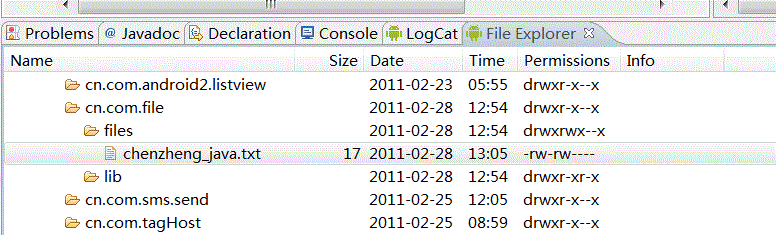
關於文件保存的路徑可以通過ADT攜帶的File Explorer工具進行查看。如何調出File Explorer工具呢;我們可以通過Windows--showView--others-android下面看到File Explorer。這裡是我的一個截圖。
對於這個程序,基本上沒什麼難點,就是純粹的java流知識。唯一不同的就是context為我們提供了兩個方法來獲取輸入輸出流。簡單、方便、快捷啊。
 Android IntentService的使用和源碼分析
引言Service服務是Android四大組件之一,在Android中有著舉足重輕的作用。Service服務是工作的UI線程中,當你的應用需要下載一個文件或者播放音樂等長
 Dialog的使用與總結
Dialog 使用總結Dialog 是Android中對話框相關的類,起到相關提示的作用。Dialog在Android 中主要分為以下幾類:AlertDialog :警告
 Android自定義popupwindow實例代碼
先來看看效果圖:一、布局 <?xml version=1.0 encoding=utf-8?><LinearLayout xm
 詳解Android/IOS平台下抓包工具使用以及如何模仿一個app
抓包(Packet Capture),實際上就是對網絡請求(包括發送與接收)的數據包進行截獲、重發、編輯、轉存等操作,在Android下,也經常被用來進行數據截取等。學會