編輯:關於Android編程
傳統界面的布局方式總是行列分明、坐落有序的,這種布局已是司空見慣,在不知不覺中大家都已經對它產生了審美疲勞。這個時候瀑布流布局的出現,就給人帶來了耳目一新的感覺,這種布局雖然看上去貌似毫無規律,但是卻有一種說不上來的美感,以至於湧現出了大批的網站和應用紛紛使用這種新穎的布局來設計界面。
記得我在之前已經寫過一篇關於如何在Android上實現照片牆功能的文章了,但那個時候是使用的GridView來進行布局的,這種布局方式只適用於“牆”上的每張圖片大小都相同的情況,如果圖片的大小參差不齊,在GridView中顯示就會非常的難看。而使用瀑布流的布局方式就可以很好地解決這個問題,因此今天我們也來趕一下潮流,看看如何在Android上實現瀑布流照片牆的功能。
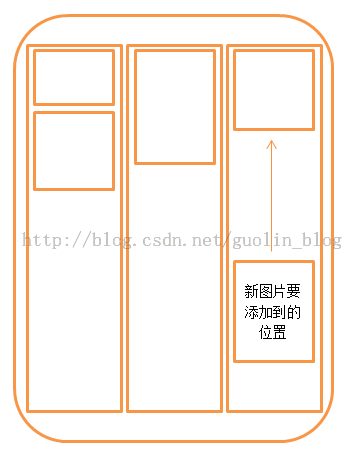
首先還是講一下實現原理,瀑布流的布局方式雖然看起來好像排列的很隨意,其實它是有很科學的排列規則的。整個界面會根據屏幕的寬度劃分成等寬的若干列,由於手機的屏幕不是很大,這裡我們就分成三列。每當需要添加一張圖片時,會將這張圖片的寬度壓縮成和列一樣寬,再按照同樣的壓縮比例對圖片的高度進行壓縮,然後在這三列中找出當前高度最小的一列,將圖片添加到這一列中。之後每當需要添加一張新圖片時,都去重復上面的操作,就會形成瀑布流格局的照片牆,示意圖如下所示。
聽我這麼說完後,你可能會覺得瀑布流的布局非常簡單嘛,只需要使用三個LinearLayout平分整個屏幕寬度,然後動態地addView()進去就好了。確實如此,如果只是為了實現功能的話,就是這麼簡單。可是別忘了,我們是在手機上進行開發,如果不停地往LinearLayout裡添加圖片,程序很快就會OOM。因此我們還需要一個合理的方案來對圖片資源進行釋放,這裡仍然是准備使用LruCache算法,這個具體的在文後會專門講,先知道是用這麼回事~
下面我們就來開始實現吧,新建一個Android項目,起名叫PhotoWallFallsDemo,並選擇4.0的API。
第一個要考慮的問題是,我們到哪兒去收集這些大小參差不齊的圖片呢?這裡我事先在百度上搜索了很多張風景圖片,並且為了保證它們訪問的穩定性,我將這些圖片都上傳到了我的CSDN相冊裡,因此只要從這裡下載圖片就可以了。新建一個Images類,將所有相冊中圖片的網址都配置進去,代碼如下所示:
public class Images {

 public final static String[] imageUrls = new String[] {
   "http://img.my.csdn.net/uploads/201309/01/1378037235_3453.jpg",
   "http://img.my.csdn.net/uploads/201309/01/1378037235_7476.jpg",
   "http://img.my.csdn.net/uploads/201309/01/1378037235_9280.jpg",
   "http://img.my.csdn.net/uploads/201309/01/1378037234_3539.jpg",
   "http://img.my.csdn.net/uploads/201309/01/1378037234_6318.jpg",
   "http://img.my.csdn.net/uploads/201309/01/1378037194_2965.jpg",
   "http://img.my.csdn.net/uploads/201309/01/1378037193_1687.jpg",
   "http://img.my.csdn.net/uploads/201309/01/1378037193_1286.jpg",
   "http://img.my.csdn.net/uploads/201309/01/1378037192_8379.jpg",
   "http://img.my.csdn.net/uploads/201309/01/1378037178_9374.jpg",
   "http://img.my.csdn.net/uploads/201309/01/1378037177_1254.jpg",
   "http://img.my.csdn.net/uploads/201309/01/1378037177_6203.jpg",
   "http://img.my.csdn.net/uploads/201309/01/1378037152_6352.jpg",
   "http://img.my.csdn.net/uploads/201309/01/1378037151_9565.jpg",
   "http://img.my.csdn.net/uploads/201309/01/1378037151_7904.jpg",
   "http://img.my.csdn.net/uploads/201309/01/1378037148_7104.jpg",
   "http://img.my.csdn.net/uploads/201309/01/1378037129_8825.jpg",
   "http://img.my.csdn.net/uploads/201309/01/1378037128_5291.jpg",
   "http://img.my.csdn.net/uploads/201309/01/1378037128_3531.jpg",
   "http://img.my.csdn.net/uploads/201309/01/1378037127_1085.jpg",
   "http://img.my.csdn.net/uploads/201309/01/1378037095_7515.jpg",
   "http://img.my.csdn.net/uploads/201309/01/1378037094_8001.jpg",
   "http://img.my.csdn.net/uploads/201309/01/1378037093_7168.jpg",
   "http://img.my.csdn.net/uploads/201309/01/1378037091_4950.jpg",
   "http://img.my.csdn.net/uploads/201308/31/1377949643_6410.jpg",
   "http://img.my.csdn.net/uploads/201308/31/1377949642_6939.jpg",
   "http://img.my.csdn.net/uploads/201308/31/1377949630_4505.jpg",
   "http://img.my.csdn.net/uploads/201308/31/1377949630_4593.jpg",
   "http://img.my.csdn.net/uploads/201308/31/1377949629_7309.jpg",
   "http://img.my.csdn.net/uploads/201308/31/1377949629_8247.jpg",
   "http://img.my.csdn.net/uploads/201308/31/1377949615_1986.jpg",
   "http://img.my.csdn.net/uploads/201308/31/1377949614_8482.jpg",
   "http://img.my.csdn.net/uploads/201308/31/1377949614_3743.jpg",
   "http://img.my.csdn.net/uploads/201308/31/1377949614_4199.jpg",
   "http://img.my.csdn.net/uploads/201308/31/1377949599_3416.jpg",
   "http://img.my.csdn.net/uploads/201308/31/1377949599_5269.jpg",
   "http://img.my.csdn.net/uploads/201308/31/1377949598_7858.jpg",
   "http://img.my.csdn.net/uploads/201308/31/1377949598_9982.jpg",
   "http://img.my.csdn.net/uploads/201308/31/1377949578_2770.jpg",
   "http://img.my.csdn.net/uploads/201308/31/1377949578_8744.jpg",
   "http://img.my.csdn.net/uploads/201308/31/1377949577_5210.jpg",
   "http://img.my.csdn.net/uploads/201308/31/1377949577_1998.jpg",
   "http://img.my.csdn.net/uploads/201308/31/1377949482_8813.jpg",
   "http://img.my.csdn.net/uploads/201308/31/1377949481_6577.jpg",
   "http://img.my.csdn.net/uploads/201308/31/1377949480_4490.jpg",
   "http://img.my.csdn.net/uploads/201308/31/1377949455_6792.jpg",
   "http://img.my.csdn.net/uploads/201308/31/1377949455_6345.jpg",
   "http://img.my.csdn.net/uploads/201308/31/1377949442_4553.jpg",
   "http://img.my.csdn.net/uploads/201308/31/1377949441_8987.jpg",
   "http://img.my.csdn.net/uploads/201308/31/1377949441_5454.jpg",
   "http://img.my.csdn.net/uploads/201308/31/1377949454_6367.jpg",
   "http://img.my.csdn.net/uploads/201308/31/1377949442_4562.jpg" };
}
然後新建一個ImageLoader類,用於方便對圖片進行管理,代碼如下所示:
public class ImageLoader {

 /**
  * 圖片緩存技術的核心類,用於緩存所有下載好的圖片,在程序內存達到設定值時會將最少最近使用的圖片移除掉。
  */
 private static LruCache<String, Bitmap> mMemoryCache;

 /**
  * ImageLoader的實例。
  */
 private static ImageLoader mImageLoader;

 private ImageLoader() {
  // 獲取應用程序最大可用內存
  int maxMemory = (int) Runtime.getRuntime().maxMemory();
  int cacheSize = maxMemory / 8;
  // 設置圖片緩存大小為程序最大可用內存的1/8
  mMemoryCache = new LruCache<String, Bitmap>(cacheSize) {
   @Override
   protected int sizeOf(String key, Bitmap bitmap) {
    return bitmap.getByteCount();
   }
  };
 }

 /**
  * 獲取ImageLoader的實例。
  *
  * @return ImageLoader的實例。
  */
 public static ImageLoader getInstance() {
  if (mImageLoader == null) {
   mImageLoader = new ImageLoader();
  }
  return mImageLoader;
 }

 /**
  * 將一張圖片存儲到LruCache中。
  *
  * @param key
  *   LruCache的鍵,這裡傳入圖片的URL地址。
  * @param bitmap
  *   LruCache的鍵,這裡傳入從網絡上下載的Bitmap對象。
  */
 public void addBitmapToMemoryCache(String key, Bitmap bitmap) {
  if (getBitmapFromMemoryCache(key) == null) {
   mMemoryCache.put(key, bitmap);
  }
 }

 /**
  * 從LruCache中獲取一張圖片,如果不存在就返回null。
  *
  * @param key
  *   LruCache的鍵,這裡傳入圖片的URL地址。
  * @return 對應傳入鍵的Bitmap對象,或者null。
  */
 public Bitmap getBitmapFromMemoryCache(String key) {
  return mMemoryCache.get(key);
 }

 public static int calculateInSampleSize(BitmapFactory.Options options,
   int reqWidth) {
  // 源圖片的寬度
  final int width = options.outWidth;
  int inSampleSize = 1;
  if (width > reqWidth) {
   // 計算出實際寬度和目標寬度的比率
   final int widthRatio = Math.round((float) width / (float) reqWidth);
   inSampleSize = widthRatio;
  }
  return inSampleSize;
 }

 public static Bitmap decodeSampledBitmapFromResource(String pathName,
   int reqWidth) {
  // 第一次解析將inJustDecodeBounds設置為true,來獲取圖片大小
  final BitmapFactory.Options options = new BitmapFactory.Options();
  options.inJustDecodeBounds = true;
  BitmapFactory.decodeFile(pathName, options);
  // 調用上面定義的方法計算inSampleSize值
  options.inSampleSize = calculateInSampleSize(options, reqWidth);
  // 使用獲取到的inSampleSize值再次解析圖片
  options.inJustDecodeBounds = false;
  return BitmapFactory.decodeFile(pathName, options);
 }

}
這裡我們將ImageLoader類設成單例,並在構造函數中初始化了LruCache類,把它的最大緩存容量設為最大可用內存的1/8。然後又提供了其它幾個方法可以操作LruCache,以及對圖片進行壓縮和讀取。
接下來新建MyScrollView繼承自ScrollView,代碼如下所示:
public class MyScrollView extends ScrollView implements OnTouchListener {

 /**
  * 每頁要加載的圖片數量
  */
 public static final int PAGE_SIZE = 15;

 /**
  * 記錄當前已加載到第幾頁
  */
 private int page;

 /**
  * 每一列的寬度
  */
 private int columnWidth;

 /**
  * 當前第一列的高度
  */
 private int firstColumnHeight;

 /**
  * 當前第二列的高度
  */
 private int secondColumnHeight;

 /**
  * 當前第三列的高度
  */
 private int thirdColumnHeight;

 /**
  * 是否已加載過一次layout,這裡onLayout中的初始化只需加載一次
  */
 private boolean loadOnce;

 /**
  * 對圖片進行管理的工具類
  */
 private ImageLoader imageLoader;

 /**
  * 第一列的布局
  */
 private LinearLayout firstColumn;

 /**
  * 第二列的布局
  */
 private LinearLayout secondColumn;

 /**
  * 第三列的布局
  */
 private LinearLayout thirdColumn;

 /**
  * 記錄所有正在下載或等待下載的任務。
  */
 private static Set<LoadImageTask> taskCollection;

 /**
  * MyScrollView下的直接子布局。
  */
 private static View scrollLayout;

 /**
  * MyScrollView布局的高度。
  */
 private static int scrollViewHeight;

 /**
  * 記錄上垂直方向的滾動距離。
  */
 private static int lastScrollY = -1;

 /**
  * 記錄所有界面上的圖片,用以可以隨時控制對圖片的釋放。
  */
 private List<ImageView> imageViewList = new ArrayList<ImageView>();

 /**
  * 在Handler中進行圖片可見性檢查的判斷,以及加載更多圖片的操作。
  */
 private static Handler handler = new Handler() {

  public void handleMessage(android.os.Message msg) {
   MyScrollView myScrollView = (MyScrollView) msg.obj;
   int scrollY = myScrollView.getScrollY();
   // 如果當前的滾動位置和上次相同,表示已停止滾動
   if (scrollY == lastScrollY) {
    // 當滾動的最底部,並且當前沒有正在下載的任務時,開始加載下一頁的圖片
    if (scrollViewHeight + scrollY >= scrollLayout.getHeight()
      && taskCollection.isEmpty()) {
     myScrollView.loadMoreImages();
    }
    myScrollView.checkVisibility();
   } else {
    lastScrollY = scrollY;
    Message message = new Message();
    message.obj = myScrollView;
    // 5毫秒後再次對滾動位置進行判斷
    handler.sendMessageDelayed(message, 5);
   }
  };

 };

 /**
  * MyScrollView的構造函數。
  *
  * @param context
  * @param attrs
  */
 public MyScrollView(Context context, AttributeSet attrs) {
  super(context, attrs);
  imageLoader = ImageLoader.getInstance();
  taskCollection = new HashSet<LoadImageTask>();
  setOnTouchListener(this);
 }

 /**
  * 進行一些關鍵性的初始化操作,獲取MyScrollView的高度,以及得到第一列的寬度值。並在這裡開始加載第一頁的圖片。
  */
 @Override
 protected void onLayout(boolean changed, int l, int t, int r, int b) {
  super.onLayout(changed, l, t, r, b);
  if (changed && !loadOnce) {
   scrollViewHeight = getHeight();
   scrollLayout = getChildAt(0);
   firstColumn = (LinearLayout) findViewById(R.id.first_column);
   secondColumn = (LinearLayout) findViewById(R.id.second_column);
   thirdColumn = (LinearLayout) findViewById(R.id.third_column);
   columnWidth = firstColumn.getWidth();
   loadOnce = true;
   loadMoreImages();
  }
 }

 /**
  * 監聽用戶的觸屏事件,如果用戶手指離開屏幕則開始進行滾動檢測。
  */
 @Override
 public boolean onTouch(View v, MotionEvent event) {
  if (event.getAction() == MotionEvent.ACTION_UP) {
   Message message = new Message();
   message.obj = this;
   handler.sendMessageDelayed(message, 5);
  }
  return false;
 }

 /**
  * 開始加載下一頁的圖片,每張圖片都會開啟一個異步線程去下載。
  */
 public void loadMoreImages() {
  if (hasSDCard()) {
   int startIndex = page * PAGE_SIZE;
   int endIndex = page * PAGE_SIZE + PAGE_SIZE;
   if (startIndex < Images.imageUrls.length) {
    Toast.makeText(getContext(), "正在加載...", Toast.LENGTH_SHORT)
      .show();
    if (endIndex > Images.imageUrls.length) {
     endIndex = Images.imageUrls.length;
    }
    for (int i = startIndex; i < endIndex; i++) {
     LoadImageTask task = new LoadImageTask();
     taskCollection.add(task);
     task.execute(Images.imageUrls[i]);
    }
    page++;
   } else {
    Toast.makeText(getContext(), "已沒有更多圖片", Toast.LENGTH_SHORT)
      .show();
   }
  } else {
   Toast.makeText(getContext(), "未發現SD卡", Toast.LENGTH_SHORT).show();
  }
 }

 /**
  * 遍歷imageViewList中的每張圖片,對圖片的可見性進行檢查,如果圖片已經離開屏幕可見范圍,則將圖片替換成一張空圖。
  */
 public void checkVisibility() {
  for (int i = 0; i < imageViewList.size(); i++) {
   ImageView imageView = imageViewList.get(i);
   int borderTop = (Integer) imageView.getTag(R.string.border_top);
   int borderBottom = (Integer) imageView
     .getTag(R.string.border_bottom);
   if (borderBottom > getScrollY()
     && borderTop < getScrollY() + scrollViewHeight) {
    String imageUrl = (String) imageView.getTag(R.string.image_url);
    Bitmap bitmap = imageLoader.getBitmapFromMemoryCache(imageUrl);
    if (bitmap != null) {
     imageView.setImageBitmap(bitmap);
    } else {
     LoadImageTask task = new LoadImageTask(imageView);
     task.execute(imageUrl);
    }
   } else {
    imageView.setImageResource(R.drawable.empty_photo);
   }
  }
 }

 /**
  * 判斷手機是否有SD卡。
  *
  * @return 有SD卡返回true,沒有返回false。
  */
 private boolean hasSDCard() {
  return Environment.MEDIA_MOUNTED.equals(Environment
    .getExternalStorageState());
 }

 /**
  * 異步下載圖片的任務。
  *
  * @author guolin
  */
 class LoadImageTask extends AsyncTask<String, Void, Bitmap> {

  /**
   * 圖片的URL地址
   */
  private String mImageUrl;

  /**
   * 可重復使用的ImageView
   */
  private ImageView mImageView;

  public LoadImageTask() {
  }

  /**
   * 將可重復使用的ImageView傳入
   *
   * @param imageView
   */
  public LoadImageTask(ImageView imageView) {
   mImageView = imageView;
  }

  @Override
  protected Bitmap doInBackground(String... params) {
   mImageUrl = params[0];
   Bitmap imageBitmap = imageLoader
     .getBitmapFromMemoryCache(mImageUrl);
   if (imageBitmap == null) {
    imageBitmap = loadImage(mImageUrl);
   }
   return imageBitmap;
  }

  @Override
  protected void onPostExecute(Bitmap bitmap) {
   if (bitmap != null) {
    double ratio = bitmap.getWidth() / (columnWidth * 1.0);
    int scaledHeight = (int) (bitmap.getHeight() / ratio);
    addImage(bitmap, columnWidth, scaledHeight);
   }
   taskCollection.remove(this);
  }

  /**
   * 根據傳入的URL,對圖片進行加載。如果這張圖片已經存在於SD卡中,則直接從SD卡裡讀取,否則就從網絡上下載。
   *
   * @param imageUrl
   *   圖片的URL地址
   * @return 加載到內存的圖片。
   */
  private Bitmap loadImage(String imageUrl) {
   File imageFile = new File(getImagePath(imageUrl));
   if (!imageFile.exists()) {
    downloadImage(imageUrl);
   }
   if (imageUrl != null) {
    Bitmap bitmap = ImageLoader.decodeSampledBitmapFromResource(
      imageFile.getPath(), columnWidth);
    if (bitmap != null) {
     imageLoader.addBitmapToMemoryCache(imageUrl, bitmap);
     return bitmap;
    }
   }
   return null;
  }

  /**
   * 向ImageView中添加一張圖片
   *
   * @param bitmap
   *   待添加的圖片
   * @param imageWidth
   *   圖片的寬度
   * @param imageHeight
   *   圖片的高度
   */
  private void addImage(Bitmap bitmap, int imageWidth, int imageHeight) {
   LinearLayout.LayoutParams params = new LinearLayout.LayoutParams(
     imageWidth, imageHeight);
   if (mImageView != null) {
    mImageView.setImageBitmap(bitmap);
   } else {
    ImageView imageView = new ImageView(getContext());
    imageView.setLayoutParams(params);
    imageView.setImageBitmap(bitmap);
    imageView.setScaleType(ScaleType.FIT_XY);
    imageView.setPadding(5, 5, 5, 5);
    imageView.setTag(R.string.image_url, mImageUrl);
    findColumnToAdd(imageView, imageHeight).addView(imageView);
    imageViewList.add(imageView);
   }
  }

  /**
   * 找到此時應該添加圖片的一列。原則就是對三列的高度進行判斷,當前高度最小的一列就是應該添加的一列。
   *
   * @param imageView
   * @param imageHeight
   * @return 應該添加圖片的一列
   */
  private LinearLayout findColumnToAdd(ImageView imageView,
    int imageHeight) {
   if (firstColumnHeight <= secondColumnHeight) {
    if (firstColumnHeight <= thirdColumnHeight) {
     imageView.setTag(R.string.border_top, firstColumnHeight);
     firstColumnHeight += imageHeight;
     imageView.setTag(R.string.border_bottom, firstColumnHeight);
     return firstColumn;
    }
    imageView.setTag(R.string.border_top, thirdColumnHeight);
    thirdColumnHeight += imageHeight;
    imageView.setTag(R.string.border_bottom, thirdColumnHeight);
    return thirdColumn;
   } else {
    if (secondColumnHeight <= thirdColumnHeight) {
     imageView.setTag(R.string.border_top, secondColumnHeight);
     secondColumnHeight += imageHeight;
     imageView
       .setTag(R.string.border_bottom, secondColumnHeight);
     return secondColumn;
    }
    imageView.setTag(R.string.border_top, thirdColumnHeight);
    thirdColumnHeight += imageHeight;
    imageView.setTag(R.string.border_bottom, thirdColumnHeight);
    return thirdColumn;
   }
  }

  /**
   * 將圖片下載到SD卡緩存起來。
   *
   * @param imageUrl
   *   圖片的URL地址。
   */
  private void downloadImage(String imageUrl) {
   HttpURLConnection con = null;
   FileOutputStream fos = null;
   BufferedOutputStream bos = null;
   BufferedInputStream bis = null;
   File imageFile = null;
   try {
    URL url = new URL(imageUrl);
    con = (HttpURLConnection) url.openConnection();
    con.setConnectTimeout(5 * 1000);
    con.setReadTimeout(15 * 1000);
    con.setDoInput(true);
    con.setDoOutput(true);
    bis = new BufferedInputStream(con.getInputStream());
    imageFile = new File(getImagePath(imageUrl));
    fos = new FileOutputStream(imageFile);
    bos = new BufferedOutputStream(fos);
    byte[] b = new byte[1024];
    int length;
    while ((length = bis.read(b)) != -1) {
     bos.write(b, 0, length);
     bos.flush();
    }
   } catch (Exception e) {
    e.printStackTrace();
   } finally {
    try {
     if (bis != null) {
      bis.close();
     }
     if (bos != null) {
      bos.close();
     }
     if (con != null) {
      con.disconnect();
     }
    } catch (IOException e) {
     e.printStackTrace();
    }
   }
   if (imageFile != null) {
    Bitmap bitmap = ImageLoader.decodeSampledBitmapFromResource(
      imageFile.getPath(), columnWidth);
    if (bitmap != null) {
     imageLoader.addBitmapToMemoryCache(imageUrl, bitmap);
    }
   }
  }

  /**
   * 獲取圖片的本地存儲路徑。
   *
   * @param imageUrl
   *   圖片的URL地址。
   * @return 圖片的本地存儲路徑。
   */
  private String getImagePath(String imageUrl) {
   int lastSlashIndex = imageUrl.lastIndexOf("/");
   String imageName = imageUrl.substring(lastSlashIndex + 1);
   String imageDir = Environment.getExternalStorageDirectory()
     .getPath() + "/PhotoWallFalls/";
   File file = new File(imageDir);
   if (!file.exists()) {
    file.mkdirs();
   }
   String imagePath = imageDir + imageName;
   return imagePath;
  }
 }

}
MyScrollView是實現瀑布流照片牆的核心類,這裡我來重點給大家介紹一下。首先它是繼承自ScrollView的,這樣就允許用戶可以通過滾動的方式來浏覽更多的圖片。這裡提供了一個loadMoreImages()方法,是專門用於加載下一頁的圖片的,因此在onLayout()方法中我們要先調用一次這個方法,以初始化第一頁的圖片。然後在onTouch方法中每當監聽到手指離開屏幕的事件,就會通過一個handler來對當前ScrollView的滾動狀態進行判斷,如果發現已經滾動到了最底部,就會再次調用loadMoreImages()方法去加載下一頁的圖片。
那我們就要來看一看loadMoreImages()方法的內部細節了。在這個方法中,使用了一個循環來加載這一頁中的每一張圖片,每次都會開啟一個LoadImageTask,用於對圖片進行異步加載。然後在LoadImageTask中,首先會先檢查一下這張圖片是不是已經存在於SD卡中了,如果還沒存在,就從網絡上下載,然後把這張圖片存放在LruCache中。接著將這張圖按照一定的比例進行壓縮,並找出當前高度最小的一列,把壓縮後的圖片添加進去就可以了。
另外,為了保證照片牆上的圖片都能夠合適地被回收,這裡還加入了一個可見性檢查的方法,即checkVisibility()方法。這個方法的核心思想就是檢查目前照片牆上的所有圖片,判斷出哪些是可見的,哪些是不可見。然後將那些不可見的圖片都替換成一張空圖,這樣就可以保證程序始終不會占用過高的內存。當這些圖片又重新變為可見的時候,只需要再從LruCache中將這些圖片重新取出即可。如果某張圖片已經從LruCache中被移除了,就會開啟一個LoadImageTask,將這張圖片重新加載到內存中。
然後打開或新建activity_main.xml,在裡面設置好瀑布流的布局方式,如下所示:
<com.example.photowallfallsdemo.MyScrollView xmlns:android="http://schemas.android.com/apk/res/android"
 android:id="@+id/my_scroll_view"
 android:layout_width="match_parent"
 android:layout_height="match_parent" >

 <LinearLayout
  android:layout_width="match_parent"
  android:layout_height="wrap_content"
  android:orientation="horizontal" >

  <LinearLayout
   android:id="@+id/first_column"
   android:layout_width="0dp"
   android:layout_height="wrap_content"
   android:layout_weight="1"
   android:orientation="vertical" >
  </LinearLayout>

  <LinearLayout
   android:id="@+id/second_column"
   android:layout_width="0dp"
   android:layout_height="wrap_content"
   android:layout_weight="1"
   android:orientation="vertical" >
  </LinearLayout>

  <LinearLayout
   android:id="@+id/third_column"
   android:layout_width="0dp"
   android:layout_height="wrap_content"
   android:layout_weight="1"
   android:orientation="vertical" >
  </LinearLayout>
 </LinearLayout>

</com.example.photowallfallsdemo.MyScrollView>
可以看到,這裡我們使用了剛才編寫好的MyScrollView作為根布局,然後在裡面放入了一個直接子布局LinearLayout用於統計當前滑動布局的高度,然後在這個布局下又添加了三個等寬的LinearLayout分別作為第一列、第二列和第三列的布局,這樣在MyScrollView中就可以動態地向這三個LinearLayout裡添加圖片了。
最後,由於我們使用到了網絡和SD卡存儲的功能,因此還需要在AndroidManifest.xml中添加以下權限:
<uses-permission android:name="android.permission.WRITE_EXTERNAL_STORAGE" />
<uses-permission android:name="android.permission.INTERNET" />
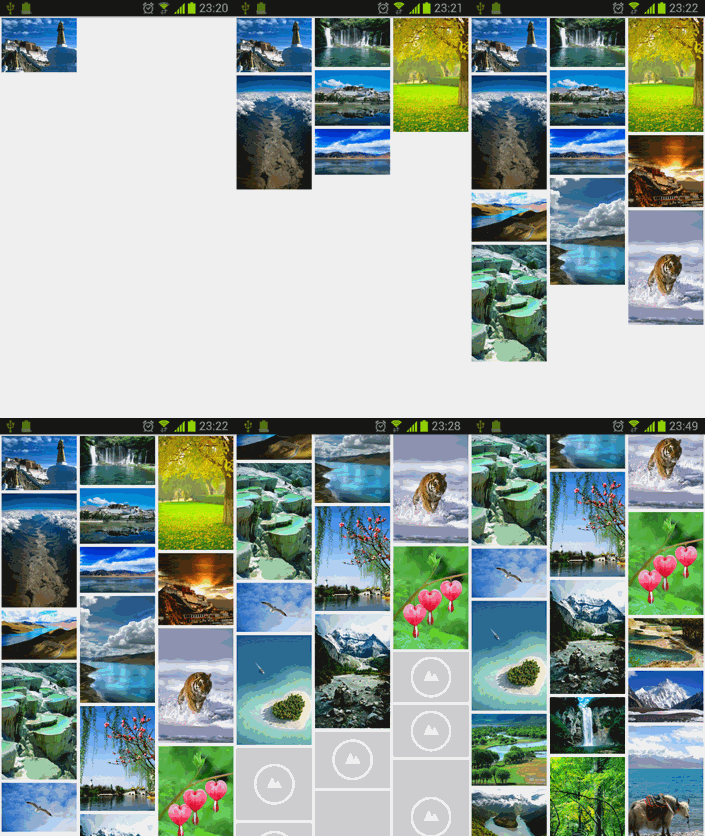
這樣我們所有的編碼工作就已經完成了,現在可以嘗試運行一下,效果如下圖所示:
LruCache圖片緩存技術
在你應用程序的UI界面加載一張圖片是一件很簡單的事情,但是當你需要在界面上加載一大堆圖片的時候,情況就變得復雜起來。在很多情況下,(比如使用ListView, GridView 或者 ViewPager 這樣的組件),屏幕上顯示的圖片可以通過滑動屏幕等事件不斷地增加,最終導致OOM。
為了保證內存的使用始終維持在一個合理的范圍,通常會把被移除屏幕的圖片進行回收處理。此時垃圾回收器也會認為你不再持有這些圖片的引用,從而對這些圖片進行GC操作。用這種思路來解決問題是非常好的,可是為了能讓程序快速運行,在界面上迅速地加載圖片,你又必須要考慮到某些圖片被回收之後,用戶又將它重新滑入屏幕這種情況。這時重新去加載一遍剛剛加載過的圖片無疑是性能的瓶頸,你需要想辦法去避免這個情況的發生。
這個時候,使用內存緩存技術可以很好的解決這個問題,它可以讓組件快速地重新加載和處理圖片。下面我們就來看一看如何使用內存緩存技術來對圖片進行緩存,從而讓你的應用程序在加載很多圖片的時候可以提高響應速度和流暢性。
內存緩存技術對那些大量占用應用程序寶貴內存的圖片提供了快速訪問的方法。其中最核心的類是LruCache (此類在android-support-v4的包中提供) 。這個類非常適合用來緩存圖片,它的主要算法原理是把最近使用的對象用強引用存儲在 LinkedHashMap 中,並且把最近最少使用的對象在緩存值達到預設定值之前從內存中移除。
在過去,我們經常會使用一種非常流行的內存緩存技術的實現,即軟引用或弱引用 (SoftReference or WeakReference)。但是現在已經不再推薦使用這種方式了,因為從 Android 2.3 (API Level 9)開始,垃圾回收器會更傾向於回收持有軟引用或弱引用的對象,這讓軟引用和弱引用變得不再可靠。另外,Android 3.0 (API Level 11)中,圖片的數據會存儲在本地的內存當中,因而無法用一種可預見的方式將其釋放,這就有潛在的風險造成應用程序的內存溢出並崩潰。
為了能夠選擇一個合適的緩存大小給LruCache, 有以下多個因素應該放入考慮范圍內,例如:
你的設備可以為每個應用程序分配多大的內存?
設備屏幕上一次最多能顯示多少張圖片?有多少圖片需要進行預加載,因為有可能很快也會顯示在屏幕上?
你的設備的屏幕大小和分辨率分別是多少?一個超高分辨率的設備(例如 Galaxy Nexus) 比起一個較低分辨率的設備(例如 Nexus S),在持有相同數量圖片的時候,需要更大的緩存空間。
圖片的尺寸和大小,還有每張圖片會占據多少內存空間。
圖片被訪問的頻率有多高?會不會有一些圖片的訪問頻率比其它圖片要高?如果有的話,你也許應該讓一些圖片常駐在內存當中,或者使用多個LruCache 對象來區分不同組的圖片。
你能維持好數量和質量之間的平衡嗎?有些時候,存儲多個低像素的圖片,而在後台去開線程加載高像素的圖片會更加的有效。
並沒有一個指定的緩存大小可以滿足所有的應用程序,這是由你決定的。你應該去分析程序內存的使用情況,然後制定出一個合適的解決方案。一個太小的緩存空間,有可能造成圖片頻繁地被釋放和重新加載,這並沒有好處。而一個太大的緩存空間,則有可能還是會引起 java.lang.OutOfMemory 的異常。
下面是一個使用 LruCache 來緩存圖片的例子:
private LruCache<String, Bitmap> mMemoryCache;

@Override
protected void onCreate(Bundle savedInstanceState) {
  // 獲取到可用內存的最大值,使用內存超出這個值會引起OutOfMemory異常。
  // LruCache通過構造函數傳入緩存值,以KB為單位。
  int maxMemory = (int) (Runtime.getRuntime().maxMemory() / 1024);
  // 使用最大可用內存值的1/8作為緩存的大小。
  int cacheSize = maxMemory / 8;
  mMemoryCache = new LruCache<String, Bitmap>(cacheSize) {
    @Override
    protected int sizeOf(String key, Bitmap bitmap) {
      // 重寫此方法來衡量每張圖片的大小,默認返回圖片數量。
      return bitmap.getByteCount() / 1024;
    }
  };
}

public void addBitmapToMemoryCache(String key, Bitmap bitmap) {
  if (getBitmapFromMemCache(key) == null) {
    mMemoryCache.put(key, bitmap);
  }
}

public Bitmap getBitmapFromMemCache(String key) {
  return mMemoryCache.get(key);
}
在這個例子當中,使用了系統分配給應用程序的八分之一內存來作為緩存大小。在中高配置的手機當中,這大概會有4兆(32/8)的緩存空間。一個全屏幕的 GridView 使用4張 800x480分辨率的圖片來填充,則大概會占用1.5兆的空間(800*480*4)。因此,這個緩存大小可以存儲2.5頁的圖片。
當向 ImageView 中加載一張圖片時,首先會在 LruCache 的緩存中進行檢查。如果找到了相應的鍵值,則會立刻更新ImageView ,否則開啟一個後台線程來加載這張圖片。
public void loadBitmap(int resId, ImageView imageView) {
  final String imageKey = String.valueOf(resId);
  final Bitmap bitmap = getBitmapFromMemCache(imageKey);
  if (bitmap != null) {
    imageView.setImageBitmap(bitmap);
  } else {
    imageView.setImageResource(R.drawable.image_placeholder);
    BitmapWorkerTask task = new BitmapWorkerTask(imageView);
    task.execute(resId);
  }
}
BitmapWorkerTask 還要把新加載的圖片的鍵值對放到緩存中。
class BitmapWorkerTask extends AsyncTask<Integer, Void, Bitmap> {
  // 在後台加載圖片。
  @Override
  protected Bitmap doInBackground(Integer... params) {
    final Bitmap bitmap = decodeSampledBitmapFromResource(
        getResources(), params[0], 100, 100);
    addBitmapToMemoryCache(String.valueOf(params[0]), bitmap);
    return bitmap;
  }
}
掌握了以上兩種方法,不管是要在程序中加載超大圖片,還是要加載大量圖片,都不用擔心OOM的問題了!
 Android與服務器通訊:如何保證兩端時間一致性
在AChat項目的開發過程中,項目要求無論終端是什麼時區設置、地處何方,終端的時間是否正確,post到服務器的數據包裡面的時間字段均要求跟服務器同步,也就是說,用戶買來一
 細說JVM系列:自動內存管理內存回收:垃圾收集理論-垃圾收集算法
這裡主要講解垃圾收集理論上的算法,下一篇會介紹一些實現了這些算法的垃圾收集器。一般我們談垃圾收集從三個問題來幫你理解jvm的垃圾收集策略:1.怎麼判斷哪些內存是垃圾?2.
 Android實現標題顯示隱藏功能
本文實例嘗試模仿實現Android標題顯示隱藏功能,通過給listview設置 mListView.setOnTouchListener 監聽 重寫ontouch方法 監
 android源碼解析(二十三)--)Android異常處理流程
前面的幾篇文章都是講解的android中的窗口顯示機制,包括Activity窗口加載繪制流程,Dialog窗口加載繪制流程,PopupWindow窗口加載繪制流程,Toa