編輯:關於Android編程
Activity是Android系統的4個應用程序組件之一。通過傳統方法顯示的Activity都是充滿整個屏幕,也就是全屏的Activity。事實上,Activity不僅可以全屏顯示,還可以象對話框一樣直接顯示在屏幕上。而且可以通過單擊屏幕的任何位置(包括Activity內部和Activity外部)來關閉Activity。 Activity的傳統風格 Activity是學習Android的入門技術。幾乎所有的初學者都會從Activity學起。因此,Activity這個組件對於Android的開發人員是再熟悉不過了。下面來看一下Activity的基本配置。
<activity android:name=".Main" android:label="@string/app_name">
<intent-filter>
<action android:name="android.intent.action.MAIN" />
<category android:name="android.intent.category.LAUNCHER" />
</intent-filter>
</activity>
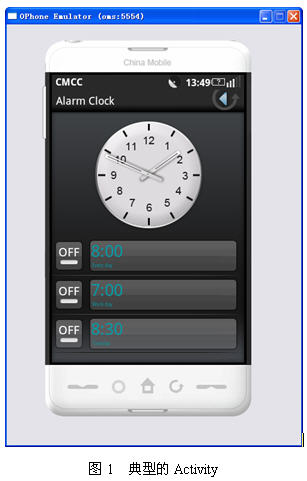
上面的配置代碼是一個典型的Activity配置。在這個配置中主要指定了action和category。按著這個配置顯示的Activity會充滿整個屏幕。在Android中也內置了很多程序,大多數都會包含Activity,例如,圖1是一個時鐘程序,也是一個典型的Activity。
懸浮Activity
所謂懸浮Activity,就是懸浮在桌面上,看起來象一個對話框。如圖2所示。
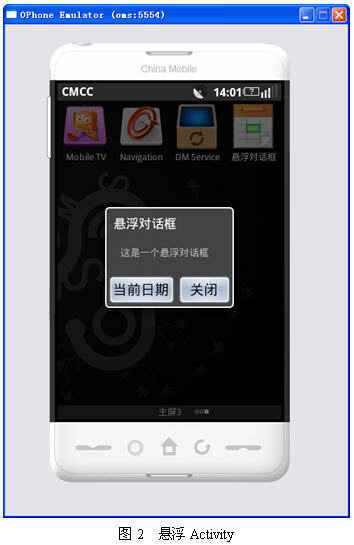
事實上,實現上面的效果並不復雜,只需要在AndroidManifest.xml文件中定義Activity的<activity>標簽中添加一個android:theme屬性,並指定對話框主題即可,代碼如下:
<?xml version="1.0" encoding="utf-8"?>
<manifest xmlns:android="http://schemas.android.com/apk/res/android"
package="net.blogjava.mobile"
android:versionCode="1"
android:versionName="1.0">
<application android:icon="@drawable/date" android:label="@string/app_name">
<activity android:name=".Main" android:label="@string/app_name" android:theme="@android:style/Theme.Dialog">
<intent-filter>
<action android:name="android.intent.action.MAIN" />
<category android:name="android.intent.category.LAUNCHER" />
</intent-filter>
</activity>
</application>
<uses-sdk android:minSdkVersion="3" />
</manifest>
<?xml version="1.0" encoding="utf-8"?>
<LinearLayout xmlns:android="http://schemas.android.com/apk/res/android"
android:orientation="vertical" android:layout_width="fill_parent"
android:layout_height="fill_parent">
<TextView android:layout_width="fill_parent"
android:layout_height="wrap_content" android:text="這是一個懸浮對話框"
android:layout_marginLeft="20dp" android:layout_marginRight="20dp" />
<LinearLayout xmlns:android="http://schemas.android.com/apk/res/android"
android:orientation="horizontal" android:layout_width="fill_parent"
android:layout_height="fill_parent" android:gravity="center"
android:layout_marginTop="20dp">
<Button android:id="@+id/btnCurrentDate"
android:layout_width="100dp" android:layout_height="wrap_content"
android:text="當前日期" />
<Button android:id="@+id/btnFinish" android:layout_width="80dp"
android:layout_height="wrap_content" android:text="關閉" />
</LinearLayout>
</LinearLayout>
這兩個按鈕的單擊事件代碼如下:
public void onClick(View view)
{
switch (view.getId())
{
case R.id.btnCurrentDate:
// 顯示當前日期對話框
SimpleDateFormat simpleDateFormat = new SimpleDateFormat(
"yyyy-MM-dd");
dateDialog.setIcon(R.drawable.date);
dateDialog.setTitle("當前日期:"
+ simpleDateFormat.format(new Date()));
dateDialog.setButton("確定", new OnClickListener()
{
@Override
public void onClick(DialogInterface dialog, int which)
{
}
});
dateDialog.setOnDismissListener(new OnDismissListener()
{
@Override
public void onDismiss(DialogInterface dialog)
{
new DateDialog.Builder(Main.this).setMessage(
"您已經關閉的當前對話框.").create().show();
}
});
dateDialog.show();
break;
case R.id.btnFinish:
// 關閉懸浮Activity
finish();
break;
}
}
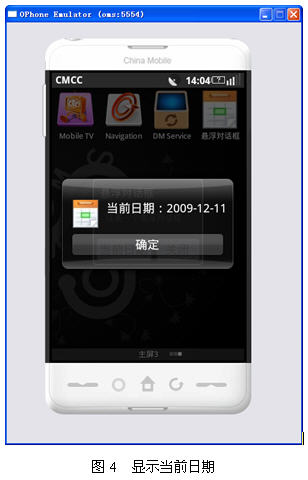
單擊“顯示日期”按鈕後,效果如圖4所示。
觸摸任何位置都可以關閉的對話框
通常需要單擊“關閉”或其他類似的按鈕來關閉Activity或對話框。但有時需要單擊(觸摸)屏幕的任何位置來關閉Activity或對話框。關閉Activity很好處理,只需要處理Activity的觸摸事件即可,代碼如下:
@Override
public boolean onTouchEvent(MotionEvent event)
{
finish();
return true;
}
如果是對話框,也同樣可以使用onTouchEvent事件方法。不過一般使用了AlertDialog對話框都是封裝好的。因此,要使用onTouchEvent事件方法,就需要繼承AlertDialog類。在上一節給出的onClick方法中彈出當前顯示對話框的代碼中使用了一個DateDialog類,該類是AlertDialog的子類,代碼如下:
package net.blogjava.mobile;
import android.app.AlertDialog;
import android.content.Context;
import android.view.MotionEvent;
public class DateDialog extends AlertDialog
{
public DateDialog(Context context)
{
super(context);
}
@Override
public boolean onTouchEvent(MotionEvent event)
{
// 關閉顯示日期對話框
dismiss();
return super.onTouchEvent(event);
}
}
在上面的代碼中也使用了onTouchEvent事件方法。在該方法中調用了dismiss方法來關閉對話框。讀者可以運行本文的例子,看看是否能通過單擊屏幕的任何位置來關閉對話框和懸浮Activity。
總結
本文介紹了懸浮Activity和觸摸任何位置都可以關閉的對話框的實現。懸浮Activity只需要在<activity>元素中添加android:theme="@android:style/Theme.Dialog"即可。要想觸摸任何位置關閉對話框或Activity,需要使用觸摸事件(onTouchEvent方法)。如果是對話框,需要通過繼承AlertDialog類的方式來使用onTouchEvent方法。
當使用上面的配置代碼時,顯示的Activity就會如圖2所示。在本例中向Activity添加了兩個按鈕,分別用來顯示當前日期和關閉對話框。
 Android提高之MediaPlayer播放網絡音頻的實現方法
前面有文章曾經地介紹過MediaPlayer的基本用法,這裡就更加深入地講解MediaPlayer的在線播放功能。本文主要實現MediaPlayer在線播放音頻的功能,由
 仿QQ5.0側滑(基於ViewDragHelper實現)
QQ5.0側滑效果實現方案有很多方式,今天我們使用ViewDragHelper來實現一下。先上效果圖: ①自定義控件SlidingMenu繼承FrameLayout,放在
 Android中SQLite應用詳解
上次我向大家介紹了SQLite的基本信息和使用過程,相信朋友們對SQLite已經有所了解了,那今天呢,我就和大家分享一下在Android中如何使用SQLite。現在的主流
 android:ListView緩存機制及BaseAdapter的三重境界(逗比式,普通式,文藝式)
大家都知道listview的格式是一定的 而數據源確是多重多樣的 這時候 就需要一種適配器來把數據源轉換成listview要顯示的格式baseAdapter就誕生了。li