編輯:關於Android編程
表格布局模型以行列的形式管理子控件,每一行為一個TableRow的對象,當然也可以是一個View的對象。TableRow可以添加子控件,每添加一個為一列。
TableLayout屬性:
android:collapseColumns:將TableLayout裡面指定的列隱藏,若有多列需要隱藏,請用逗號將需要隱藏的列序號隔開。
android:stretchColumns:設置指定的列為可伸展的列,以填滿剩下的多余空白空間,若有多列需要設置為可伸展,請用逗號將需要伸展的列序號隔開。
android:shrinkColumns:設置指定的列為可收縮的列。當可收縮的列太寬(內容過多)不會被擠出屏幕。當需要設置多列為可收縮時,將列序號用逗號隔開。
列元素(Button)屬性:(奇怪的是button 裡面沒有android:layout_column 和android:layout_span兩個屬性,寫進去無反應,還不知道為什麼)
android:layout_colum:設置該控件在TableRow中指定的列。
android:layout_span:設置該控件所跨越的列數。
圖片:
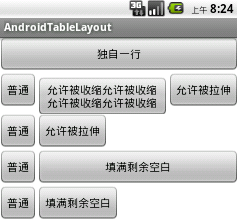
代碼:
  <LinearLayout xmlns:android="http://schemas.android.com/apk/res/android"
   xmlns:tools="http://schemas.android.com/tools"
    android:layout_width="match_parent"
    android:layout_height="match_parent"
    android:orientation="vertical"
    tools:context=".AndroidTableLayoutActivity" >

    <!-- 定義第一個表格,指定第2列允許收縮,第3列允許拉伸 -->

   <TableLayout
     android:id="@+id/tablelayout01"
     android:layout_width="match_parent"
     android:layout_height="wrap_content"
     android:shrinkColumns="1"
     android:stretchColumns="2" >

     <!-- 直接添加按鈕,自己占用一行 -->

     <Button
       android:id="@+id/btn01"
       android:layout_width="wrap_content"
       android:layout_height="wrap_content"
       android:text="獨自一行" >
     </Button>

     <TableRow>

       <Button
         android:id="@+id/btn02"
         android:layout_width="wrap_content"
         android:layout_height="wrap_content"
         android:text="普通" >
       </Button>

       <Button
         android:id="@+id/btn03"
         android:layout_width="wrap_content"
         android:layout_height="wrap_content"
         android:text="允許被收縮允許被收縮允許被收縮允許被收縮" >
       </Button>

       <Button
         android:id="@+id/btn04"
         android:layout_width="wrap_content"
         android:layout_height="wrap_content"
         android:text="允許被拉伸" >
       </Button>
     </TableRow>
   </TableLayout>
   <!-- 定義第2個表格,指定第2列隱藏 -->

   <TableLayout
     android:id="@+id/tablelayout02"
     android:layout_width="match_parent"
     android:layout_height="wrap_content"
     android:collapseColumns="1" >

     <TableRow>

       <Button
         android:id="@+id/btn05"
         android:layout_width="wrap_content"
         android:layout_height="wrap_content"
         android:text="普通" >
       </Button>

       <Button
         android:id="@+id/btn06"
         android:layout_width="wrap_content"
         android:layout_height="wrap_content"
         android:text="被隱藏列" >
       </Button>

       <Button
         android:id="@+id/btn07"
         android:layout_width="wrap_content"
         android:layout_height="wrap_content"
         android:text="允許被拉伸" >
       </Button>
    </TableRow>
   </TableLayout>
   <!-- 定義第3個表格,指定第2列填滿空白-->

   <TableLayout
     android:id="@+id/tablelayout03"
     android:layout_width="match_parent"
     android:layout_height="wrap_content"
     android:stretchColumns="1"
      >

     <TableRow>

       <Button
         android:id="@+id/btn08"
         android:layout_width="wrap_content"
         android:layout_height="wrap_content"
         android:text="普通" >
      </Button>

       <Button
         android:id="@+id/btn09"
         android:layout_width="wrap_content"
         android:layout_height="wrap_content"
        android:text="填滿剩余空白" >
      </Button>
     </TableRow>
   </TableLayout>
  <!-- 定義第3個表格,指定第2列橫跨2列-->

   <TableLayout
     android:id="@+id/tablelayout04"
     android:layout_width="match_parent"
     android:layout_height="wrap_content"
     >

     <TableRow>

      <Button
         android:id="@+id/btn10"
         android:layout_width="wrap_content"
         android:layout_height="wrap_content"
         android:text="普通" >
       </Button>

       <Button
         android:id="@+id/btn11"
        android:layout_column="2"
         android:layout_width="wrap_content"
         android:layout_height="wrap_content"
         android:text="填滿剩余空白" >
       </Button>
    </TableRow>
   </TableLayout>
 </LinearLayout>
希望本文所述對大家學習Android軟件編程有所幫助。
 Android 通過廣播來異步更新UI
之前的項目裡要做一個異步更新UI的功能,但是結果出現了ANR,所以想寫個demo來測試到底是哪個地方出現了問題,結果發現原來的思路是沒有問題,郁悶~~ 現在這個demo
 Android學習筆記之數據的內部存儲方式實習數據的讀寫、存儲到Cache實現讀寫
(1)目錄結構 (2) 布局文件: (3)保存數據、讀取數據的工具類:FileService.java +file.getAbs
 使用AndroidStudio上傳忽略文件至SVN Server的解決辦法
在同組項目進行共享時,容易把本地的配置文件比如*.iml等文件上傳至共享服務器,這樣會對隊友造成巨大的麻煩,為了解決這個問題,可以使用下面方法解決,下面以上傳到服務器的a
 Android直播推流學習
第一部本文也主要是一步步分析spydroid源碼。 首先spydroid的采用的協議是RTSP,目前我知道支持RTSP協議的服務器是Darwin,但是Darwin比較復雜