編輯:關於Android編程
在Android中,每個應用程序都有自己的進程,當需要在不同的進程之間傳遞對象時,該如何實現呢?顯然, Java中是不支持跨進程內存共享的。因此要傳遞對象,需要把對象解析成操作系統能夠理解的數據格式,以達到跨界對象訪問的目的。在JavaEE中,采用RMI通過序列化傳遞對象。在Android中,則采用AIDL(Android Interface DefinitionLanguage:接口描述語言)方式實現。
AIDL是一種接口定義語言,用於約束兩個進程間的通訊規則,供編譯器生成代碼,實現Android設備上的兩個進程間通信(IPC)。AIDL的IPC機制和EJB所采用的CORBA很類似,進程之間的通信信息,首先會被轉換成AIDL協議消息,然後發送給對方,對方收到AIDL協議消息後再轉換成相應的對象。由於進程之間的通信信息需要雙向轉換,所以android采用代理類在背後實現了信息的雙向轉換,代理類由android編譯器生成,對開發人員來說是透明的。
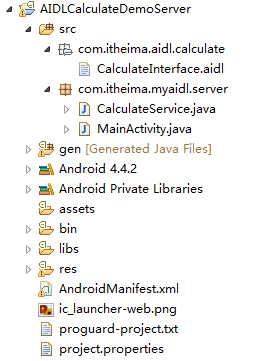
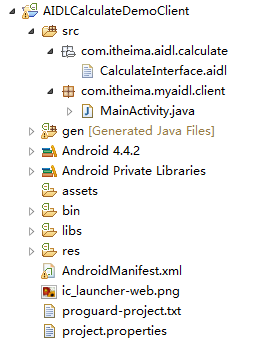
服務端:
//CalculateInterface.aidl
package com.itheima.aidl.calculate;
interface CalculateInterface {
double doCalculate(double a, double b);
}
//CalculateService.java
package com.itheima.myaidl.server;
import com.itheima.aidl.calculate.CalculateInterface;
import android.app.Service;
import android.content.Intent;
import android.os.IBinder;
import android.os.RemoteException;
import android.util.Log;
public class CalculateService extends Service{
private final CalculateInterface.Stub mBinder = new CalculateInterface.Stub() {
@Override
public double doCalculate(double a, double b) throws RemoteException {
return a+b;
}
};
@Override
public IBinder onBind(Intent intent) {
Log.i("test","onBind...");
return mBinder;
}
@Override
public boolean onUnbind(Intent intent) {
Log.i("test","onUnbind...");
return super.onUnbind(intent);
}
@Override
public void onCreate() {
super.onCreate();
Log.i("test","onCreate...");
}
@Override
public void onDestroy() {
super.onDestroy();
Log.i("test","onDestroy...");
}
}
//服務端manifast文件
<manifest xmlns:android="http://schemas.android.com/apk/res/android"
package="com.itheima.myaidl.server"
android:versionCode="1"
android:versionName="1.0" >
<uses-sdk
android:minSdkVersion="14"
android:targetSdkVersion="19" />
<application
android:allowBackup="true"
android:icon="@drawable/ic_launcher"
android:label="@string/app_name"
android:theme="@style/AppTheme" >
<activity
android:name="com.itheima.myaidl.server.MainActivity"
android:configChanges="locale|layoutDirection"
android:theme="@android:style/Theme.Light.NoTitleBar"
android:screenOrientation="portrait">
<intent-filter>
<action android:name="android.intent.action.MAIN" />
<category android:name="android.intent.category.LAUNCHER" />
</intent-filter>
</activity>
<service android:name="com.itheima.myaidl.server.CalculateService">
<intent-filter>
<action android:name="com.itheima.myaidl.server.CalculateService" />
</intent-filter>
</service>
</application>
</manifest>
//客戶端
//MainActivity.java
package com.itheima.myaidl.client;
import android.app.Activity;
import android.content.ComponentName;
import android.content.Context;
import android.content.Intent;
import android.content.ServiceConnection;
import android.os.Bundle;
import android.os.IBinder;
import android.os.RemoteException;
import android.util.Log;
import com.itheima.aidl.calculate.CalculateInterface;
public class MainActivity extends Activity {
private CalculateInterface mService;
private ServiceConnection mServiceConnection = new ServiceConnection() {
@Override
public void onServiceDisconnected(ComponentName name) {
Log.i("test","service disconnected...");
mService = null;
}
@Override
public void onServiceConnected(ComponentName name, IBinder service) {
Log.i("test","service connected...");
mService = CalculateInterface.Stub.asInterface(service); //獲取接口實例
}
};
@Override
protected void onCreate(Bundle savedInstanceState) {
super.onCreate(savedInstanceState);
setContentView(R.layout.activity_main);
//綁定遠程服務
Bundle bundle = new Bundle();
Intent intent = new Intent();
intent.putExtras(bundle);
intent.setAction("com.itheima.myaidl.server.CalculateService");
bindService(intent, mServiceConnection, Context.BIND_AUTO_CREATE);
}
//TODO activity加載完畢時回調此方法
@Override
public void onWindowFocusChanged(boolean hasFocus) {
if(hasFocus){
try{
double result = mService.doCalculate(1, 2);
Log.i("test","result===>"+result);
}catch(RemoteException e){
e.printStackTrace();
}
}
super.onWindowFocusChanged(hasFocus);
}
@Override
protected void onDestroy() {
unbindService(mServiceConnection); //解綁遠程服務
super.onDestroy();
}
}
運行結果截圖:

以上所述是小編給大家介紹的Android中如何利用AIDL機制調用遠程服務的相關知識,希望對大家有所幫助!
 Android學習筆記二十五之ListView多布局實現
Android學習筆記二十五之ListView多布局實現 這一節是介紹ListView這個控件的最後一節,實現一個Item的多布局。像我們經常在用的各種即時通訊工具,Q
 Android模仿微信語音聊天功能
項目效果如下:項目目錄結構如下:代碼如下:AudioManager.javapackage com.xuliugen.weichat;import java.io.Fil
 WiFi放大器,電力貓無線放大&小米放大器橫向對比
Wifi是在智能設備無線傳輸中,使用最多的就無線連接設備。在空間大的公司,空間大,單間多的房子裡。由於有水泥牆,或者最隔信號鋁皮車間,使無線傳輸受到很大的影
 Android開發各類常見錯誤解決方案
本文屬於個人平時項目開發過程遇到的一些問題,記錄下來並總結解決方案,希望能幫到大家解決問題,有些問題的解決方案是在StackoverFlow上找到的,建議大家遇到問題多去