編輯:關於Android編程
首先我們來理解下監聽器的機制。
Android的事件處理機制有兩種:監聽和回調。
A基於監聽的事件處理
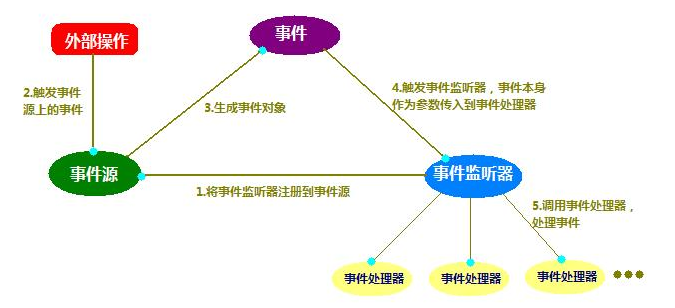
主要涉及三類對象:EventSource(事件源),Event(事件),EventListener(事件監聽器)
監聽機制處理事件的流程圖如下(委派式:Delegation):
1:需要在AndroidManifest.xml清單中添加權限
<uses-permission android:name="android.permission.PROCESS_OUTGOING_CALLS"/>
<uses-permission android:name="android.permission.READ_PHONE_STATE" />
2:注冊廣播 要注意事件的級別 (android中的級別-1000~1000)
<receiver android:name=".PhoneBroadcastReceiver">
<intent-filter android:priority="1000">
<action android:name="android.intent.action.NEW_OUTGOING_CALL"/>
<action android:name="android.intent.action.PHONE_STATE"/>
</intent-filter>
</receiver>
詳細配置請看 AndroidManifest.xml
<manifest xmlns:android="http://schemas.android.com/apk/res/android"
package="com.zyw.broadcastsendsms"
android:versionCode="1"
android:versionName="1.0" >
<uses-sdk
android:minSdkVersion="8"
android:targetSdkVersion="15" />
<application
android:icon="@drawable/ic_launcher"
android:label="@string/app_name"
android:theme="@style/AppTheme" >
<activity
android:name=".SendSMS"
android:label="@string/title_activity_send_sms" >
<intent-filter>
<action android:name="android.intent.action.MAIN" />
<category android:name="android.intent.category.LAUNCHER" />
</intent-filter>
</activity>
<receiver android:name=".PhoneBroadcastReceiver">
<intent-filter android:priority="1000">
<action android:name="android.intent.action.NEW_OUTGOING_CALL"/>
<action android:name="android.intent.action.PHONE_STATE"/>
</intent-filter>
</receiver>
</application>
<uses-permission android:name="android.permission.PROCESS_OUTGOING_CALLS"/>
<uses-permission android:name="android.permission.READ_PHONE_STATE" />
</manifest>
3:編寫廣播的實現類 這裡需要繼承BroadcastReceiver 實現onReceive()方法
程序的源代碼如下:
package com.zyw.broadcastsendsms;
import android.app.Service;
import android.content.BroadcastReceiver;
import android.content.Context;
import android.content.Intent;
import android.telephony.TelephonyManager;
import android.util.Log;
public class PhoneBroadcastReceiver extends BroadcastReceiver {
private static final String TAG = "message";
private static boolean mIncomingFlag = false;
private static String mIncomingNumber = null;
@Override
public void onReceive(Context context, Intent intent) {
// 如果是撥打電話
if (intent.getAction().equals(Intent.ACTION_NEW_OUTGOING_CALL)) {
mIncomingFlag = false;
String phoneNumber = intent.getStringExtra(Intent.EXTRA_PHONE_NUMBER);
Log.i(TAG, "call OUT:" + phoneNumber);
} else {
// 如果是來電
TelephonyManager tManager = (TelephonyManager) context
.getSystemService(Service.TELEPHONY_SERVICE);
switch (tManager.getCallState()) {
case TelephonyManager.CALL_STATE_RINGING:
mIncomingNumber = intent.getStringExtra("incoming_number");
Log.i(TAG, "RINGING :" + mIncomingNumber);
break;
case TelephonyManager.CALL_STATE_OFFHOOK:
if (mIncomingFlag) {
Log.i(TAG, "incoming ACCEPT :" + mIncomingNumber);
}
break;
case TelephonyManager.CALL_STATE_IDLE:
if (mIncomingFlag) {
Log.i(TAG, "incoming IDLE");
}
break;
}
}
}
/*@Override
public void onReceive(Context context, Intent intent) {
String number = getResultData();
if("5556".equals(number)){
setResultData(null);//掛斷
}else{
number = "12593"+ number; //其他,則加區號
setResultData(number);
}
}*/
}
以上內容給大家介紹了Android廣播接實現監聽電話狀態(電話的狀態,攔截)的相關知識,希望對大家有所幫助!
 友盟集成系列之用友盟SDK解決產品經理,營銷經理的各種需求
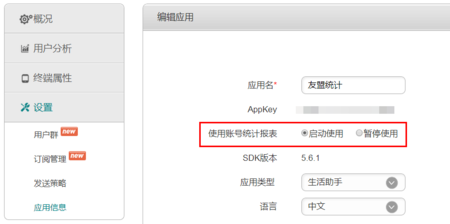
在上一篇文章中我們已經完成對友盟SDK的基本集成,但是要滿足產品經理對一個APP的期望,基本集成的功能遠遠是不夠的,此時我們需要更進一步的集成友盟SDK的功能1.賬號統計
 Android開發之搜芽項目的圖片加載問題(使用Volley進行網絡圖片加載)
搜芽的移動開發這幾天進度相對來說非常的快。但是美中不足的就是網絡圖片的加載問題。我有兩套方案: 1)沿用迅雷動漫的圖片加載。迅雷動漫也是用的一個開源的庫。但是不知道是我使
 BottomSheet底部動作條使用
底部動作條底部動作條(Bottom Sheets)是一個從屏幕底部邊緣向上滑出的一個面板,使用這種方式向用戶呈現一組功能。底部動作條呈現了簡單、清晰、無需額外解釋的一組操
 通過源碼,手把手帶你學屬性動畫(一) - 相關類總覽
在 Android 3.0(API level 11) 之後,Google 為 Android添加了屬性動畫(Property Animation),該動畫系統是一個強大