編輯:關於Android編程
首篇作為開始,先講講簡單的反編譯。反編譯通常有幾種目的:互相學習、借來用用、嘿嘿(干你,又分為小干干類似微信紅包,和大干干改別人的apk幫他上架)。
因為沒帶kvm回來,mbpr屏幕太小,所以下文環境為windows。
一、反編譯
讓我們從實戰開始,先實踐一下怎麼去反編譯一個apk,看看某些功能的實現。畢竟沒有實踐的原理都是耍流氓。
這裡我們保留互相學習的心態,所以是友善的第一種目的,嘻嘻。
1、准備
工具
安裝包
手機QQ 6.2.3 (目標就設定為看看口令紅包是怎麼做的吧)
2、Apktool的使用
首先確保你安裝了java 7或以上,並能直接在命令行調用java。
Apktool v2.0.3 - a tool for reengineering Android apk files
with smali v2.1.0 and baksmali v2.1.0

usage: apktool
 -advance,--advanced  prints advance information.
 -version,--version  prints the version then exits

usage: apktool if|install-framework [options] <framework.apk>
 -p,--frame-path <dir>  Stores framework files into <dir>.
 -t,--tag <tag>     Tag frameworks using <tag>.

usage: apktool d[ecode] [options] <file_apk>
 -f,--force       Force delete destination directory.
 -o,--output <dir>    The name of folder that gets written. Default is apk.out
 -p,--frame-path <dir>  Uses framework files located in <dir>.
 -r,--no-res       Do not decode resources.
 -s,--no-src       Do not decode sources.
 -t,--frame-tag <tag>  Uses framework files tagged by <tag>.

usage: apktool b[uild] [options] <app_path>
 -f,--force-all     Skip changes detection and build all files.
 -o,--output <dir>    The name of apk that gets written. Default is dist/name.apk
 -p,--frame-path <dir>  Uses framework files located in <dir>.
3、jadx的使用
4、分析APK文件
First Try
雖然我們可以用jadx直接打開apk傻瓜式地去查看源代碼,但是為了更理解反編譯的過程和工作原理,以便以後在碰到一些問題(比如加殼)的時候可以自己解決,這裡我們先裝逼一下,使用Apktool去進行分析。
D:\dev\reverse>apktool d -o qq mobileqq_android_6.2.3.apk
I: Using Apktool 2.0.3 on mobileqq_android_6.2.3.apk
I: Loading resource table...
Exception in thread "main" brut.androlib.AndrolibException: Multiple res specs: attr/name
    at brut.androlib.res.data.ResTypeSpec.addResSpec(ResTypeSpec.java:78)
    at brut.androlib.res.decoder.ARSCDecoder.readEntry(ARSCDecoder.java:248)
    at brut.androlib.res.decoder.ARSCDecoder.readTableType(ARSCDecoder.java:212)
    at brut.androlib.res.decoder.ARSCDecoder.readTableTypeSpec(ARSCDecoder.java:154)
    at brut.androlib.res.decoder.ARSCDecoder.readTablePackage(ARSCDecoder.java:116)
    at brut.androlib.res.decoder.ARSCDecoder.readTableHeader(ARSCDecoder.java:78)
    at brut.androlib.res.decoder.ARSCDecoder.decode(ARSCDecoder.java:47)
    at brut.androlib.res.AndrolibResources.getResPackagesFromApk(AndrolibResources.java:544)
    at brut.androlib.res.AndrolibResources.loadMainPkg(AndrolibResources.java:63)
    at brut.androlib.res.AndrolibResources.getResTable(AndrolibResources.java:55)
    at brut.androlib.Androlib.getResTable(Androlib.java:66)
    at brut.androlib.ApkDecoder.setTargetSdkVersion(ApkDecoder.java:198)
    at brut.androlib.ApkDecoder.decode(ApkDecoder.java:96)
    at brut.apktool.Main.cmdDecode(Main.java:165)
    at brut.apktool.Main.main(Main.java:81)
竟然報錯了,Multiple res specs: attr/name,在網上找了找資料,應該是騰訊利用Apktool的bug去進行了加殼,除了添加同名id外還做了若干加固,好,你狠,我們下篇文章針對騰訊的殼來分析並修改Apktool,這次先用jadx來試試。
Second Try
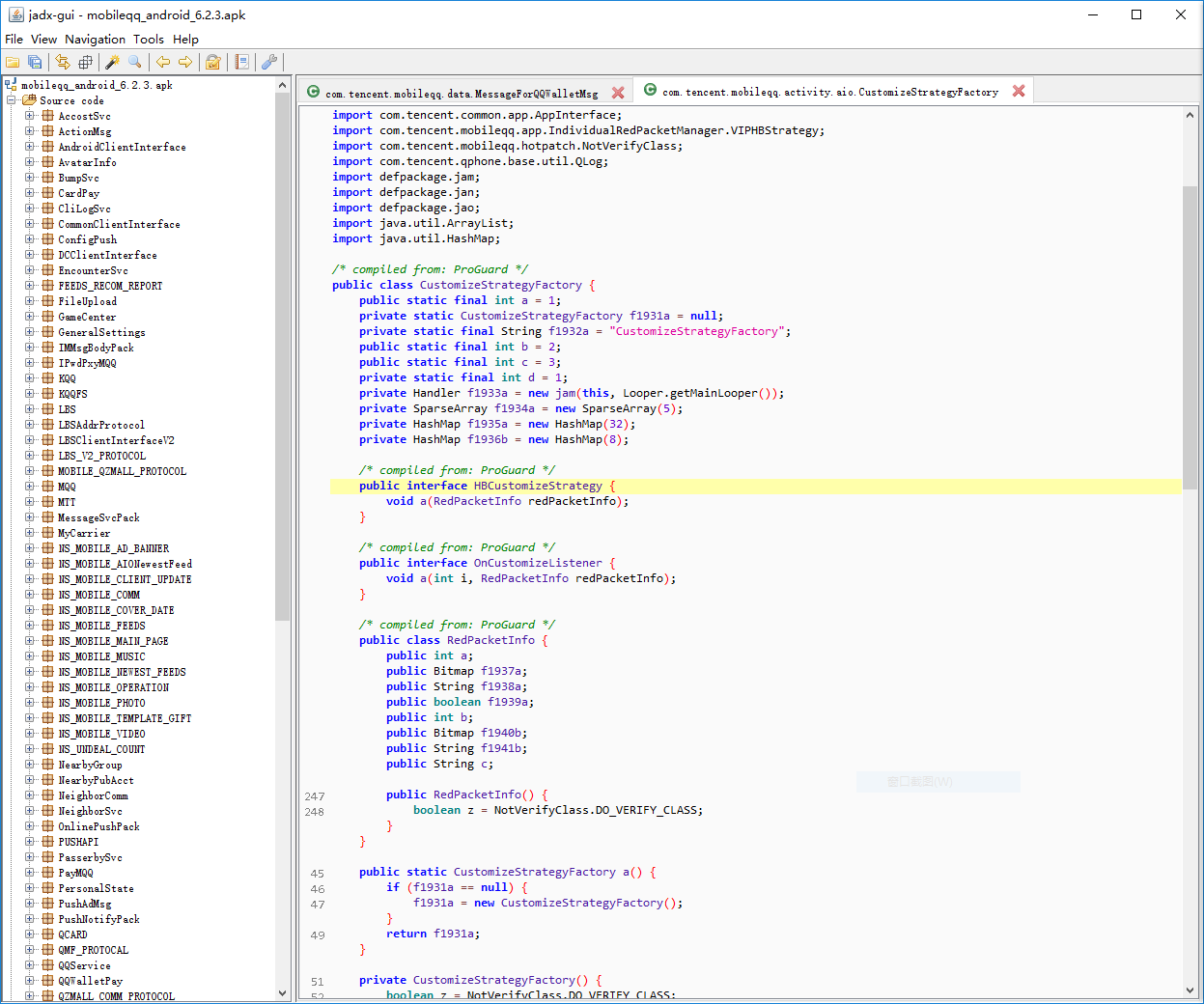
如果直接用jadx-gui打開QQ的apk,你會發現,卡死了。不錯,就是卡死了,因為太大了…
我們打開jadx-gui文件(其實就是個啟動的script),加上:
set JAVA_OPTS=-server -Xms1024m -Xmx8192m -XX:PermSize=256m -XX:MaxPermSize=1024m
就跟我們加速as/idea的原理差不多,多給點內存,這樣就能順利地打開了(可能會需要比較久的時間)。
5、字符串大法
為了找到我們的目標,紅包,我們首先嘗試用字符串搜索大法:在Resources -> resources.arsc -> res -> values -> strings.xml找到口令紅包對應的
<string name="qb_hbdetail_command_word">口令紅包</string>
然後Crtl+Shift+F進行Text Search,結果…沒找到。
我們再使用資源id大法,直接在resources.arsc找到
0x7f0a0e5a (2131365466) = string.qb_hbdetail_command_word: 口令紅包
再搜,好,你狠。。。還是沒有。是在下輸了。
6、類/函數名大法
我們再祭出第二大殺器,類/函數/變量名大法搜索大法。
通常類名符合的范圍更小,所以先只使用Class。
試試看紅包的英語:RedPacket(類名命名所以R和P大寫)
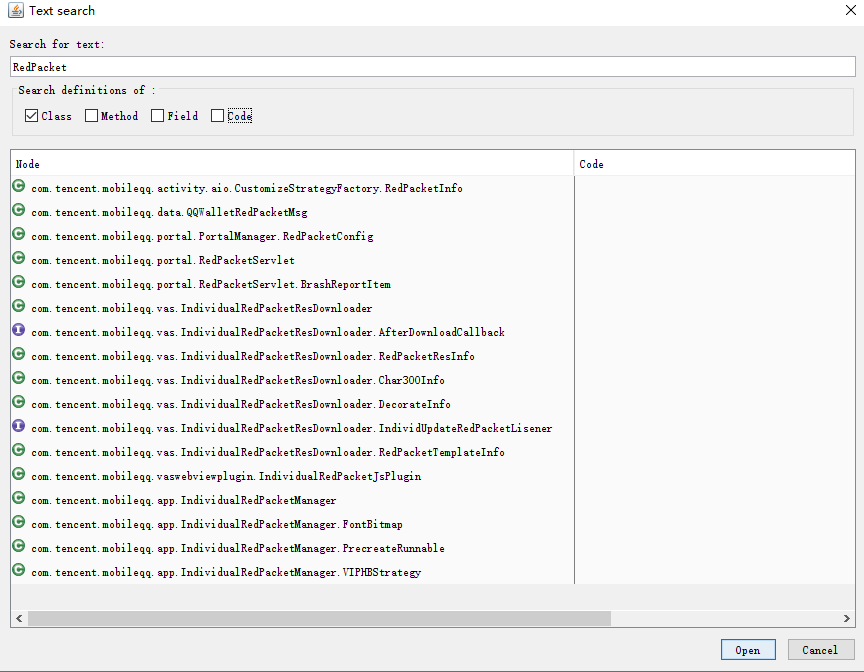
OK,我們找到了十幾條,開始逐一排查,第一條RedPacketInfo點進去一看就是個包含了各種field的ui用的vo類,跳過,再看下一個,從包名com.tencent.mobileqq.data看上去,似乎有戲,QQWalletRedPacketMsg:
package com.tencent.mobileqq.data;

import android.text.TextUtils;
import com.tencent.mobileqq.hotpatch.NotVerifyClass;
import cooperation.qzone.util.WiFiDash;
import java.io.IOException;
import java.io.ObjectInput;
import java.io.ObjectOutput;
import tencent.im.msg.im_msg_body.QQWalletAioBody;

/* compiled from: ProGuard */
public class QQWalletRedPacketMsg {
  public String authkey;
  private int channelId;
  public int conftype;
  public QQWalletTransferMsgElem elem;
  public String envelopeName;
  public int envelopeid;
  public boolean isOpened;
  public int msgFrom;
  public String redPacketId;
  public int redtype;
  private int resend;
  public int templateId;
...串行化、讀寫、構建方法等,可以無視。
從field名來看,這裡還是比較可疑的,猜測redtype是不是描述紅包類型的。
我們再次使用關鍵詞redtype進行搜索,這次選擇Code,只進行代碼內搜索,結果卻發現貌似不對,找到相關的字符串是”查看詳情”,貌似是描述紅包領取狀態的。
不放棄,繼續抓住QQWalletRedPacketMsg這個類進行搜索,看看是不是有外面包著這個類的Class,搜索QQWalletRedPacketMsg,范圍使用Field,排除掉類本身外,只有唯一的結果:MessageForQQWalletMsg:
public class MessageForQQWalletMsg extends ChatMessage {
  // 哦哦?COMMAND_REDPACKET?口令紅包
  public static final int MSG_TYPE_COMMAND_REDPACKET = 6;
  public static final int MSG_TYPE_COMMON_REDPACKET = 2;
  public static final int MSG_TYPE_COMMON_THEME_REDPACKET = 4;
  public static final int MSG_TYPE_INDIVIDUAL_REDPACKET = 2001;
  public static final int MSG_TYPE_LUCY_REDPACKET = 3;
  public static final int MSG_TYPE_LUCY_THEME_REDPACKET = 5;
  public static final int MSG_TYPE_PUBLIC_ACCOUNT_REDPACKET = 2002;
  public static final int MSG_TYPE_TRANSFER = 1;
  ...
我們找到了一個常量字段,目測就是這個描述了是否是口令紅包了。在該類搜索此字段還找到
public static boolean isCommandRedPacketMsg(MessageRecord messageRecord) {
  if (messageRecord != null && (messageRecord instanceof MessageForQQWalletMsg) && ((MessageForQQWalletMsg) messageRecord).messageType == MSG_TYPE_COMMAND_REDPACKET) {
    return true;
  }
  return false;
}
果然,我們再接著分別查找MSG_TYPE_COMMAND_REDPACKET和isCommandRedPacketMsg,結果只在TroopMessageManager裡面找到了一段沒成功反編譯的代碼中對方法isCommandRedPacketMsg的引用:
L_0x0100:
  r2 = com.tencent.mobileqq.data.MessageForQQWalletMsg.isCommandRedPacketMsg(r25);
  if (r2 == 0) goto L_0x011e;
這裡如果是口令紅包會繼續走下去,而如果不是則會跳到L_0x011e。
而從類的名字來看,TroopMessageManager應該是指群消息管理者,應該沒錯,畢竟紅包也是群消息的一種。
於是我們只能耐心地看下去這段神奇的充滿goto的代碼。暈著看完後大概看到就是各種邏輯判斷和調用MsgProxyUtils.java去處理消息處理邏輯和緩存。然後就沒了…好,你屌,是在下輸了。我再試試別的。
7、常量大法
常量大法其實也可以算是字符串搜索的一種,只是不去搜索xml裡的,而是使用中文轉化為unicode後的字符串去進行查找。自行搜索Unicode編碼轉化可以找到online convertor。
口令紅包對應的是”\u53e3\u4ee4\u7ea2\u5305”:
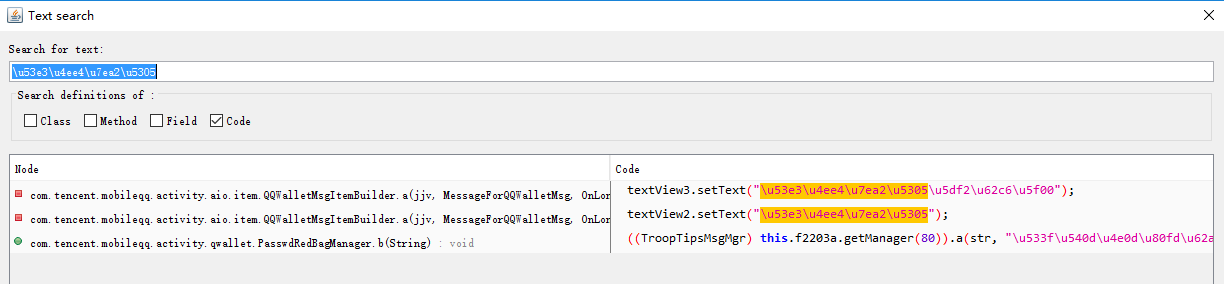
找到2個類共3處代碼引用。
最後那個類的起名有點耐人尋味,PasswdRedBagManager,密碼紅包管理器,有點意思:
public void b(String str) {
  ((TroopTipsMsgMgr) this.f2203a.getManager(80)).a(str, "\u533f\u540d\u4e0d\u80fd\u62a2\u53e3\u4ee4\u7ea2\u5305\u54e6", NetConnInfoCenter.getServerTime(), BaseConstants.DEFAULT_QUICK_HEARTBEAT_TIMEOUT, f);
}
這串Unicode轉換成中文後是”匿名不能搶口令紅包哦”,原來還有這種邏輯,產品經理你真是夠了。
這裡我們重新從該類的上面看下來,大致掃一掃,發現onDestroy下面有一個方法打的log很神奇:
public long[] m883a(SessionInfo sessionInfo, String str) {
  if (QLog.isColorLevel()) {
    QLog.d(f2197a, (int) h, "openPasswdRedBagByPassword, passwd = " + str);
  }
  long[] jArr = new long[]{0, 0};
  if (sessionInfo == null) {
    return jArr;
  }
  if (TextUtils.isEmpty(str)) {
    return jArr;
  }
  c();
  List<String> list = (List) this.f2206a.get(str);
  if (list == null || list.isEmpty()) {
    return jArr;
  }
  PasswdRedBagInfo passwdRedBagInfo;
  String str2 = a(sessionInfo.a) + "_" + sessionInfo.f1757a;
  for (String str3 : list) {
    HashMap hashMap = (HashMap) this.f2209b.get(str3);
    if (hashMap != null) {
      passwdRedBagInfo = (PasswdRedBagInfo) hashMap.get(str2);
      if (!(passwdRedBagInfo == null || a(str3))) {
        jArr[g] = passwdRedBagInfo.a.uint64_creator_uin.get();
        if (!b(str3)) {
          if (!c(str3)) {
            hashMap.put(str2, passwdRedBagInfo);
            jArr[f] = 1;
            break;
          }
          jArr[f] = 3;
        } else {
          jArr[f] = 2;
        }
      }
    }
  }
  passwdRedBagInfo = null;
  if (passwdRedBagInfo == null) {
    return jArr;
  }
  b(sessionInfo.a, sessionInfo.f1757a, passwdRedBagInfo.a.string_redbag_id.get().toStringUtf8());
  a(sessionInfo, passwdRedBagInfo);
  return jArr;
}
isColorLevel目測是某種debug用的tag,可能某些環境下部分用戶會打開,而從log結合我們平時打log習慣來看,這個方法應該就叫openPasswdRedBagByPassword了,第二個參數就是password。終於找到了。看一下邏輯大致是從外面load進來所有紅包信息到本類的各種hashmap和list(有一個tag,只會加載第一次,本類多個方法都會調用這個方法),然後根據password從裡面找到對應passwdRedBagInfo,設置result tag,然後調用了
b(sessionInfo.a, sessionInfo.f1757a, passwdRedBagInfo.a.string_redbag_id.get().toStringUtf8());
a(sessionInfo, passwdRedBagInfo);
我們先不急看這兩個方法是做什麼的。再往下看下一個方法,直接就有:
public long[] b(SessionInfo sessionInfo, String str) {
  if (QLog.isColorLevel()) {
    QLog.d(f2197a, (int) h, "openPasswdRedBagById, id = " + str);
  }
openPasswdRedBagById用id打開紅包,猜測該id就是我們最早看到的結構裡的redPacketId字段。
而該方法同樣調用了
b(sessionInfo.a, sessionInfo.f1757a, str);
a(sessionInfo, passwdRedBagInfo);
看看這兩個方法:
public void a(SessionInfo sessionInfo, PasswdRedBagInfo passwdRedBagInfo) {
  if (sessionInfo != null && passwdRedBagInfo != null) {
    Object obj = (sessionInfo.a == 0 || sessionInfo.a == h || sessionInfo.a == Action.ACTION_REGISTNEWACCOUNT_COMMITSMS || sessionInfo.a == Action.ACTION_LOGIN) ? g : null;
    String str = sessionInfo.f1757a;
    String valueOf = String.valueOf(passwdRedBagInfo.a.uint64_creator_uin.get());
    if (obj != null) {
      str = valueOf.equals(this.f2213d) ? sessionInfo.f1757a : this.f2213d;
    }
    JSONObject a = QQWalletMsgItemBuilder.a(this.f2203a, sessionInfo, passwdRedBagInfo.a.string_redbag_id.get().toStringUtf8(), passwdRedBagInfo.a.string_authkey.get().toStringUtf8(), str, "appid#1344242394|bargainor_id#1000030201|channel#msg", "graphb", null);
    Bundle bundle = new Bundle();
    bundle.putString("json", a.toString());
    bundle.putString("callbackSn", jbi.a);
    Intent intent = new Intent(this.f2200a, PayBridgeActivity.class);
    intent.putExtras(bundle);
    intent.addFlags(268435456);
    intent.putExtra("pay_requestcode", 5);
    this.f2200a.startActivity(intent);
  }
}

public void b(int i, String str, String str2) {
  if (!TextUtils.isEmpty(str2)) {
    HashMap hashMap = (HashMap) this.f2209b.get(str2);
    if (hashMap != null) {
      PasswdRedBagInfo passwdRedBagInfo = (PasswdRedBagInfo) hashMap.get(a(i) + "_" + str);
      if (passwdRedBagInfo != null && !passwdRedBagInfo.f4810a) {
        passwdRedBagInfo.f4810a = true;
        ThreadManager.a(new kmr(this, str2), h, null, true);
      }
    }
  }
}
發現第一個方法似乎就直接發請求了,看來只要調用到這裡,就是可以領紅包了。那最初又是如何來這裡的呢?我們搜索對PasswdRedBagManager內這兩個方法的引用找到BaseChatPie.java:
public PasswdRedBagManager f25190a;
...
public class EnterForSend implements OnKeyListener, OnEditorActionListener {
  ...
  // 這裡從方法名判斷是每次輸入點擊發送後調用
  public boolean onEditorAction(TextView textView, int i, KeyEvent keyEvent) {
    if (i != BaseChatPie.dr) {
      return false;
    }
    String obj = this.a.f25220a.getText().toString();
    if (obj.length() > 0) {
      // 調用了外部類的下述方法
      long[] a = this.a.a(obj);
      // 再進行消息發送
      SendMsgParams sendMsgParams = new SendMsgParams();
      sendMsgParams.b = this.a.dL;
      sendMsgParams.a = this.a.dJ;
      sendMsgParams.c = this.a.dN;
      sendMsgParams.f26863c = this.a.dL;
      ...
    }
    return true;
  }
}

// 這裡調用了那2個openPasswdRedBagxxx方法
public long[] m5613a(String str) {
  long[] jArr = null;
  // 非匿名模式才會繼續嘗試匹配口令紅包,原來裡裡外外都做了判斷
  if (!AnonymousChatHelper.a().a(this.f25174a.a)) {
    if (TextUtils.isEmpty(this.f25269d) || !str.equals(this.f25278e)) {
      // 使用密碼打開
      jArr = this.f25190a.a(this.f25174a, str);
    } else {
      // 使用redPacketId直接打開
      jArr = this.f25190a.b(this.f25174a, this.f25269d);
    }
    // 無意義的打log打點啥的,華麗麗地無視吧
    if (jArr != null && jArr[s] == 1) {
      this.f25269d = QunUppUploadTask.QunUppAppId;
      this.f25278e = QunUppUploadTask.QunUppAppId;
      this.f25228a.sendEmptyMessage(dz);
      if (QLog.isColorLevel()) {
        QLog.d(PasswdRedBagManager.a, u, "passwdredbags result[0]=" + jArr[s] + ",result[1]=" + jArr[t] + ",send str=" + str);
      }
    }
  } else if (QLog.isColorLevel()) {
    QLog.d(PasswdRedBagManager.a, u, "current is in Anonymous, dont search passwdredbags");
  }
  return jArr;
}
可見每次我們輸入消息發送時,都發生了判斷,會去查詢是不是紅包口令,如果是則直接發請求拿紅包然後繼續,否則直接當做普通消息繼續發送。所以如果想要做自動搶紅包的話,其實只要直接在收到消息時,調用PasswdRedBagManager的open方法即可,連模擬UI、生成請求、發送消息都不用了,我們再也不用昧著良心說口令了。順便我們還看到了手機QQ確實喜歡用Activity,這裡的紅包彈框也是一個單獨的Activity,而且請求是發送到手Q紅包那邊去的,看來還分業務線。
到此為止我們的目的告一段落,其實繼續下去,還可以嘗試dump當前Activity,用Activity名字去查找,或者用hierarchy view看看view id試試。
經過上文的折騰,我們成功反編譯了手機QQ,並追溯到手機QQ紅包的數據結構和判斷流程。期間經歷過數次無用功,但逆向工程正是這麼一回事,尤其是靜態分析,如果不及時找其他的路,而一路鑽牛角尖從一個線索一路去看,很可能會越陷越深,本文的跟蹤流程正是不斷在坑還小的時候鑽出來,然後去找其他的路徑,最後才快速地找到了想看的東西。
以上就是本文的全部內容,希望對大家的學習有所幫助。
 Android ListView動畫實現方法
在Android中listview是最常用的控件之一,但是有時候我們會覺得千篇一律的listview看起來過於單調,於是就產生了listView動畫,listview加載
 android百度定位後顯示在地圖上點擊彈出氣泡
1.到百度地圖頁面申請key,注意key和項目包名和數字簽名一一對應的。http://developer.baidu.com/map/index.php?title=%E
 Android進程間通信(IPC)常用方式解析
進程間通信方式在Android開發中我們可以通過Intent、ContentProviders來實現進程間通信,如果不限於Android特有的話,我們還可以使用File、
 掌握CoordinatorLayout
原文鏈接Mastering the Coordinator Layout在Google I/0 2015大會上,Google發布了一個與Material Design相關