編輯:關於Android編程
本文實例講述了Android自定義圓形進度條,分享給大家供大家參考。具體如下:
大家也可以參考這兩篇文章進行學習: 《自定義Android圓形進度條(附源碼)》 《Android帶進度的圓形進度條》
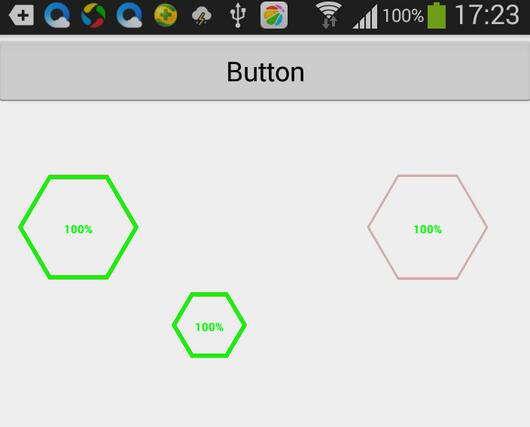
運行效果截圖如下:
主要代碼:
package com.sxc.hexagonprogress;

import java.util.Random;
import android.content.Context;
import android.content.res.ColorStateList;
import android.content.res.Resources;
import android.content.res.TypedArray;
import android.graphics.Canvas;
import android.graphics.Color;
import android.graphics.Paint;
import android.graphics.PaintFlagsDrawFilter;
import android.graphics.Path;
import android.graphics.RectF;
import android.graphics.Typeface;
import android.util.AttributeSet;
import android.util.Log;
import android.view.View;


/**
 * 六邊形帶進度的進度條,線程安全的View,可直接在線程中更新進度
 *
 * @author sunxunchao
 *
 */
public class HexagonProgress extends View {
 /**
  * 畫筆對象的引用
  */
 private Paint paint, mPaint;

 /**
  * 畫筆路徑
  */
 private Path path, mPath;

 /**
  * 環的顏色
  */
 private int roundColor;

 /**
  * 環進度的顏色
  */
 private int roundProgressColor;

 /**
  * 中間進度百分比的字符串的顏色
  */
 private int textColor;

 /**
  * 中間進度百分比的字符串的字體
  */
 private float textSize;

 /**
  * 環的寬度
  */
 private float roundWidth;

 /**
  * 最大進度
  */
 private double max;

 /**
  * 當前進度
  */
 private double progress;
 /**
  * 是否顯示中間的進度
  */
 private boolean textIsDisplayable;

 /**
  * 進度的風格,實心或者空心
  */
 private int style;

 public static final int STROKE = 0;
 public static final int FILL = 1;

 public HexagonProgress(Context context) {
  this(context, null);
 }

 public HexagonProgress(Context context, AttributeSet attrs) {
  this(context, attrs, 0);
 }

 public HexagonProgress(Context context, AttributeSet attrs, int defStyle) {
  super(context, attrs, defStyle);

  paint = new Paint();
  mPaint = new Paint();

  TypedArray mTypedArray = context.obtainStyledAttributes(attrs,
    R.styleable.HexagonProgressBar);

  // 獲取自定義屬性和默認值
  roundColor = mTypedArray.getColor(
    R.styleable.HexagonProgressBar_hexagonColor, Color.RED);
  roundProgressColor = mTypedArray.getColor(
    R.styleable.HexagonProgressBar_hexagonProgressColor, Color.GREEN);
  textColor = mTypedArray.getColor(
    R.styleable.HexagonProgressBar_textColor, Color.GREEN);
  textSize = mTypedArray.getDimension(
    R.styleable.HexagonProgressBar_textSize, 15);
  roundWidth = mTypedArray.getDimension(
    R.styleable.HexagonProgressBar_hexagonWidth, 5);
  max = mTypedArray.getInteger(R.styleable.HexagonProgressBar_max, 100);
  textIsDisplayable = mTypedArray.getBoolean(
    R.styleable.HexagonProgressBar_textIsDisplayable, true);

  mTypedArray.recycle();
 }

 @Override
 protected void onDraw(Canvas canvas) {
  super.onDraw(canvas);

  /**
   * 畫外六邊形
   */
  int centre = getWidth() / 2;// 中心坐標
  int radius = (int) (centre - roundWidth / 2);// 六邊形邊長
  mPaint.setColor(roundColor); // 設置圓環的顏色
  mPaint.setStyle(Paint.Style.STROKE); // 設置空心
  mPaint.setStrokeWidth(roundWidth); // 設置圓環的寬度
  mPaint.setAntiAlias(true); // 消除鋸齒
  mPath = new Path();//設置路徑
  // 第一個點坐標(centre-radius, getHeight()/2)
  // 第二個點坐標(centre-radius/2,getHeight()/2-Math.sqrt(3)*radius/2)
  // 第三個點坐標(centre+radius/2,getHeight()/2-Math.sqrt(3)*radius/2)
  // 第四個點坐標(centre+radius,getHeight()/2)
  // 第五個點坐標 (centre+radius/2,Math.sqrt(3)*radius/2+getHeight()/2)
  // 第六個點坐標 (centre-radius/2,Math.sqrt(3)*radius/2+getHeight()/2)
  mPath.moveTo(centre - radius, centre); // A
  mPath.lineTo(centre - radius / 2, (float) (centre - Math.sqrt(3)* radius / 2));// B
  mPath.lineTo(centre + radius / 2, (float) (centre - Math.sqrt(3)* radius / 2));// C
  mPath.lineTo(centre + radius, centre);// D
  mPath.lineTo(centre + radius / 2,(float) ((Math.sqrt(3) * radius / 2) + centre));// E
  mPath.lineTo(centre - radius / 2,(float) ((Math.sqrt(3) * radius / 2) + centre));// F
  mPath.close();
  canvas.drawPath(mPath, mPaint);

  /**
   * 畫進度百分比
   */
  mPaint.setStrokeWidth(0);
  mPaint.setColor(textColor);
  mPaint.setTextSize(textSize);
  mPaint.setTypeface(Typeface.DEFAULT_BOLD); // 設置字體
  int percent = (int) (((float) progress / (float) max) * 100); // 中間的進度百分比,先轉換成float在進行除法運算,不然都為0
  float textWidth = mPaint.measureText(percent + "%"); // 測量字體寬度,我們需要根據字體的寬度設置在圓環中間

  if (textIsDisplayable && style == STROKE) {
   canvas.drawText(percent + "%", centre - textWidth / 2, centre
     + textSize / 2, mPaint); // 畫出進度百分比
  }

  /**
   * 畫六邊形進度
   */

  path = new Path();
  paint.setStrokeWidth(roundWidth); // 設置圓環的寬度
  paint.setColor(roundProgressColor); // 設置進度的顏色
  paint.setAntiAlias(true);

  double k= (progress*6) / max;

  paint.setStyle(Paint.Style.STROKE);
   if (k <= 1|| k==0) {
    path.moveTo(centre + radius, centre);
    path.lineTo((float)(centre+radius-k*radius/2), (float) (centre+k*radius*Math.sqrt(3)/2));
   }
   else if (k>1&&k<=2) {
    path.moveTo(centre + radius, centre);
    path.lineTo(centre + radius / 2, (float) ((Math.sqrt(3) * radius / 2) + centre));
    path.lineTo((float) (centre+1.5*radius-k*radius), (float) (centre+0.5*Math.sqrt(3)*radius));
   }else if (k>2&&k<=3) {
    path.moveTo(centre + radius, centre);
    path.lineTo(centre + radius / 2, (float) ((Math.sqrt(3) * radius / 2) + centre));
    path.lineTo(centre - radius / 2, (float) ((Math.sqrt(3) * radius / 2) + centre));
    path.lineTo((float)(centre+0.5*radius-0.5*radius*k), (float) (centre+1.5*Math.sqrt(3)*radius-0.5*k*radius*Math.sqrt(3)));
   }else if (k>3&&k<=4) {
    path.moveTo(centre + radius, centre);
    path.lineTo(centre + radius / 2, (float) ((Math.sqrt(3) * radius / 2) + centre));
    path.lineTo(centre - radius / 2, (float) ((Math.sqrt(3) * radius / 2) + centre));
    path.lineTo(centre-radius, centre);
    path.lineTo((float)(centre-radius+0.5*k*radius-1.5*radius), (float) (centre-0.5*(k-3)*radius*Math.sqrt(3)));
   }else if (k>4&&k<=5) {
    path.moveTo(centre + radius, centre);
    path.lineTo(centre + radius / 2, (float) ((Math.sqrt(3) * radius / 2) + centre));
    path.lineTo(centre - radius / 2, (float) ((Math.sqrt(3) * radius / 2) + centre));
    path.lineTo(centre - radius, centre);
    path.lineTo(centre - radius / 2, (float) (centre - Math.sqrt(3)* radius / 2));
    path.lineTo((float) ((k-4)*radius+centre-0.5*radius),(float) (centre - Math.sqrt(3)* radius / 2));
   }else if (k>5&&k<6) {
    path.moveTo(centre + radius, centre);
    path.lineTo(centre + radius / 2, (float) ((Math.sqrt(3) * radius / 2) + centre));
    path.lineTo(centre - radius / 2, (float) ((Math.sqrt(3) * radius / 2) + centre));
    path.lineTo(centre - radius, centre);
    path.lineTo(centre - radius / 2, (float) (centre - Math.sqrt(3)* radius / 2));
    path.lineTo(centre + radius / 2,(float) (centre - Math.sqrt(3)* radius / 2));
    path.lineTo((float)(centre+0.5*radius+0.5*(k-5)*radius),(float) (centre-0.5*Math.sqrt(3)*radius+0.5*Math.sqrt(3)*(k-5)*radius));
   }else {
    path.moveTo(centre + radius, centre);
    path.lineTo(centre + radius / 2, (float) ((Math.sqrt(3) * radius / 2) + centre));
    path.lineTo(centre - radius / 2, (float) ((Math.sqrt(3) * radius / 2) + centre));
    path.lineTo(centre - radius, centre);
    path.lineTo(centre - radius / 2, (float) (centre - Math.sqrt(3)* radius / 2));
    path.lineTo(centre + radius / 2,(float) (centre - Math.sqrt(3)* radius / 2));
    path.lineTo(centre + radius , centre);
    path.close();
   }

   canvas.drawPath(path, paint);

 }

 public synchronized double getMax() {
  return max;
 }

 /**
  * 設置進度的最大值
  *
  * @param max
  */
 public synchronized void setMax(int max) {
  if (max < 0) {
   throw new IllegalArgumentException("max not less than 0");
  }
  this.max = max;
 }

 /**
  * 獲取進度.需要同步
  *
  * @return
  */
 public synchronized double getProgress() {
  return progress;
 }

 /**
  * 設置進度,此為線程安全控件,由於考慮多線的問題,需要同步 刷新界面調用postInvalidate()能在非UI線程刷新
  *
  * @param progress
  */
 public synchronized void setProgress(double progress) {
  if (progress < 0) {
   throw new IllegalArgumentException("progress not less than 0");
  }
  if (progress > max) {
   progress = max;
  }
  if (progress <= max) {
   this.progress = progress;
   postInvalidate();
  }

 }

 public int getCricleColor() {
  return roundColor;
 }

 public void setCricleColor(int cricleColor) {
  this.roundColor = cricleColor;
 }

 public int getCricleProgressColor() {
  return roundProgressColor;
 }

 public void setCricleProgressColor(int cricleProgressColor) {
  this.roundProgressColor = cricleProgressColor;
 }

 public int getTextColor() {
  return textColor;
 }

 public void setTextColor(int textColor) {
  this.textColor = textColor;
 }

 public float getTextSize() {
  return textSize;
 }

 public void setTextSize(float textSize) {
  this.textSize = textSize;
 }

 public float getRoundWidth() {
  return roundWidth;
 }

 public void setRoundWidth(float roundWidth) {
  this.roundWidth = roundWidth;
 }

}
在values中新建一個attrs.xml文件:
<?xml version="1.0" encoding="UTF-8"?>
<resources>
 <declare-styleable name="HexagonProgressBar">
  <attr name="hexagonColor" format="color"/>
  <attr name="hexagonProgressColor" format="color"/>
  <attr name="hexagonWidth" format="dimension"></attr>
  <attr name="textColor" format="color" />
  <attr name="textSize" format="dimension" />
  <attr name="max" format="integer"></attr>
  <attr name="textIsDisplayable" format="boolean"></attr>
  <!-- <attr name="style">
   <enum name="STROKE" value="0"></enum>
   <enum name="FILL" value="1"></enum>
  </attr> -->
 </declare-styleable>
</resources>
項目免費下載: 《Android六邊形進度條》
希望本文所述對大家學習Android軟件編程有所幫助。
 如何判斷軟件程序是否聯網 聯網狀態提示信息Android實現
在項目中,經常需要判斷是否有網絡連接。最近學習了如何判斷軟件是否聯網,如果沒有聯網,彈出提示信息,連接網絡。效果:(1)聯網情況下: (2)不聯網情況下:(3)
 四大組件之ContentProvider(一)-使用系統提供的ContentProvider
第1節 ContentProvider介紹ContentProvider是安卓系統的四大組件之一,可以向其他組件提供數據訪問的能力。它就像是一個網站,其他組件(或者其他應
 Android 中LayoutInflater原理分析
概述在Android開發中LayoutInflater的應用非常普遍,可以將res/layout/下的xml布局文件,實例化為一個View或者ViewGroup的控件。與
 Andriod React Native 樣式表中可用樣式屬性
寫了這麼多篇Android React Native的博文,基本上把復雜的東西都搞定了,接下來來看看一些輕松的東西,和布局有關,就是css樣式,那麼一個View可以設置哪