編輯:關於Android編程
package com.cumt.opengeschange;

import com.cumt.render.MyRender;
import android.content.Context;
import android.opengl.GLSurfaceView;
import android.view.MotionEvent;

public class MySurfaceView extends GLSurfaceView {

	private MyRender myRender;

	public MySurfaceView(Context context) {
		super(context);
		// TODO Auto-generated constructor stub
		myRender = new MyRender(context);
		this.setEGLContextClientVersion(2);
		this.setRenderer(myRender);
		// 設置渲染模式為主動渲染
		this.setRenderMode(GLSurfaceView.RENDERMODE_CONTINUOUSLY);
	}

	@Override
	public boolean onTouchEvent(MotionEvent event) {
		// TODO Auto-generated method stub
		return super.onTouchEvent(event);
	}
}
package com.cumt.opengeschange;

import com.cumt.render.MyRender;
import android.content.Context;
import android.opengl.GLSurfaceView;
import android.view.MotionEvent;
import android.view.View;

public class MySurfaceView extends GLSurfaceView {

	private MyRender myRender;

	public MySurfaceView(Context context) {
		super(context);
		// TODO Auto-generated constructor stub
		myRender = new MyRender(context);
		this.setEGLContextClientVersion(2);
		this.setRenderer(myRender);
		// 設置渲染模式為主動渲染
		this.setRenderMode(GLSurfaceView.RENDERMODE_CONTINUOUSLY);
		this.setOnTouchListener(new OnTouchListener() {

			public boolean onTouch(View v, MotionEvent event) {
				// TODO Auto-generated method stub
				return false;
			}
		});
	}
}package com.cumt.opengeschange;
import android.app.Activity;
import android.content.pm.ActivityInfo;
import android.os.Bundle;
import android.view.Window;
import android.view.WindowManager;
public class MainActivity extends Activity {
private MySurfaceView glSurfaceView;
@Override
protected void onCreate(Bundle savedInstanceState) {
super.onCreate(savedInstanceState);
// 設置為全屏
requestWindowFeature(Window.FEATURE_NO_TITLE);
getWindow().setFlags(WindowManager.LayoutParams.FLAG_FULLSCREEN,
WindowManager.LayoutParams.FLAG_FULLSCREEN);
// 設置為橫屏模式
setRequestedOrientation(ActivityInfo.SCREEN_ORIENTATION_LANDSCAPE);
glSurfaceView = new MySurfaceView(this);
setContentView(glSurfaceView);
}
@Override
protected void onPause() {
// TODO Auto-generated method stub
super.onPause();
glSurfaceView.onPause();
}
@Override
protected void onResume() {
// TODO Auto-generated method stub
super.onResume();
glSurfaceView.onResume();
}
}
 vc/ytcTOu9LGPC9kaXY+CjxkaXY+PGJyPgo8L2Rpdj4KPGRpdj48aW1nIHNyYz0="/uploadfile/Collfiles/20160611/20160611095137238.png" alt="\">
package com.cumt.utils;
import android.opengl.Matrix;
//存儲系統矩陣狀態的類
public class MatrixState {
private static float[] mProjMatrix = new float[16];// 4x4矩陣 存儲投影矩陣
private static float[] mVMatrix = new float[16];// 攝像機位置朝向9參數矩陣
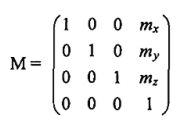
/*
* 第一步 :新建平移變換矩陣
*/
private static float[] mtMatrix = new float[16];// 平移變換矩陣
/*
* 第二步: 初始化為單位矩陣
*/
static{
//初始化為單位矩陣
Matrix.setIdentityM(mtMatrix, 0);
}
/*
* 第三步 : 平移變換方法共外部使用
*/
public static void translate(float x,float y,float z)//設置沿xyz軸移動
{
Matrix.translateM(mtMatrix, 0, x, y, z);
}
// 設置攝像機
public static void setCamera(float cx, // 攝像機位置x
float cy, // 攝像機位置y
float cz, // 攝像機位置z
float tx, // 攝像機目標點x
float ty, // 攝像機目標點y
float tz, // 攝像機目標點z
float upx, // 攝像機UP向量X分量
float upy, // 攝像機UP向量Y分量
float upz // 攝像機UP向量Z分量
) {
Matrix.setLookAtM(mVMatrix, 0, cx, cy, cz, tx, ty, tz, upx, upy, upz);
}
// 設置透視投影參數
public static void setProjectFrustum(float left, // near面的left
float right, // near面的right
float bottom, // near面的bottom
float top, // near面的top
float near, // near面距離
float far // far面距離
) {
Matrix.frustumM(mProjMatrix, 0, left, right, bottom, top, near, far);
}
// 獲取具體物體的總變換矩陣
static float[] mMVPMatrix = new float[16];
public static float[] getFinalMatrix() {
/*
* 第四步 : 乘以平移變換矩陣
*/
Matrix.multiplyMM(mMVPMatrix, 0, mVMatrix, 0, mtMatrix, 0);
Matrix.multiplyMM(mMVPMatrix, 0, mProjMatrix, 0, mMVPMatrix, 0);
return mMVPMatrix;
}
}
package com.cumt.opengeschange;

import com.cumt.render.MyRender;
import com.cumt.utils.MatrixState;
import android.content.Context;
import android.opengl.GLSurfaceView;
import android.view.MotionEvent;
import android.view.View;

public class MySurfaceView extends GLSurfaceView {

	private MyRender myRender;
	private float mPreviousX;//上次的觸控位置X坐標

	public MySurfaceView(Context context) {
		super(context);
		// TODO Auto-generated constructor stub
		myRender = new MyRender(context);
		this.setEGLContextClientVersion(2);
		this.setRenderer(myRender);
		// 設置渲染模式為主動渲染
		this.setRenderMode(GLSurfaceView.RENDERMODE_CONTINUOUSLY);

		this.setOnTouchListener(new OnTouchListener() {

			public boolean onTouch(View v, MotionEvent event) {
				// TODO Auto-generated method stub
				float x = event.getX();//當前的觸控位置X坐標
				switch (event.getAction()) {
				case MotionEvent.ACTION_MOVE://檢測到移動事件時
					float dx = x - mPreviousX;
					if(dx > 0){
						MatrixState.translate(0.1f, 0, 0);
					}else{
						MatrixState.translate(-0.1f, 0, 0);
					}
				}
				mPreviousX=x;
				return true;
			}

		});
	}
}
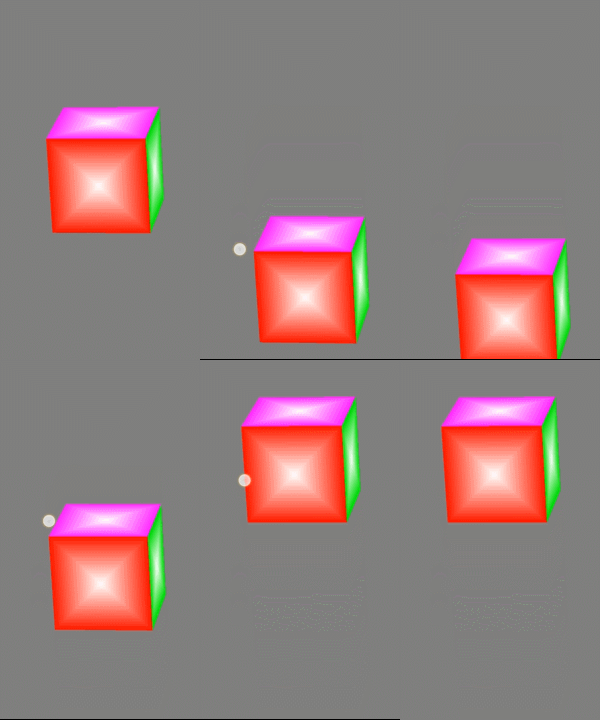
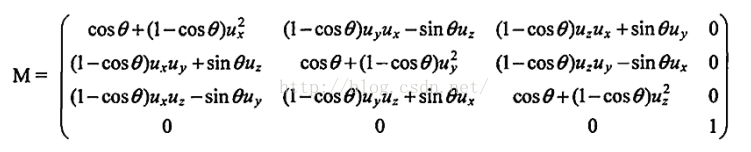
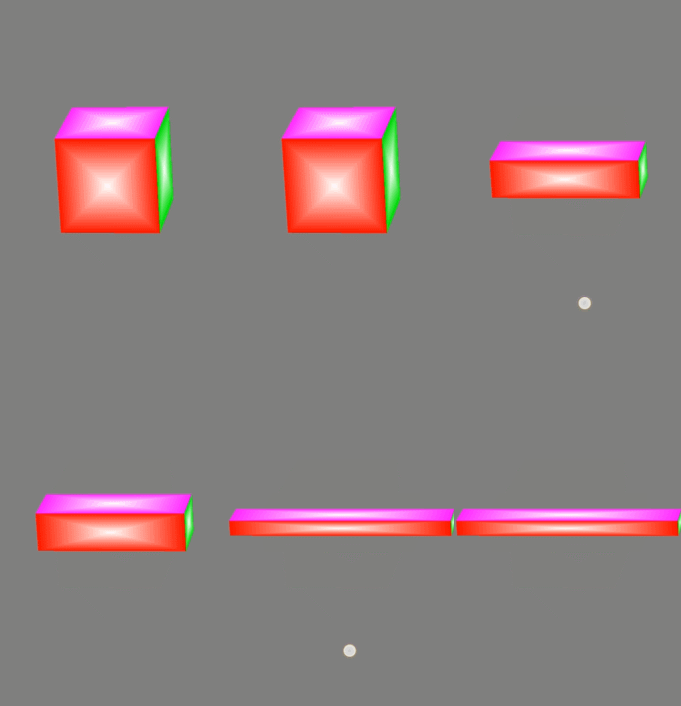
//旋轉變換
	public static void rotate(float angle, float x, float y, float z) {// 設置繞xyz軸移動
		Matrix.rotateM(mtMatrix, 0, angle, x, y, z);
}package com.cumt.opengeschange;
import com.cumt.render.MyRender;
import com.cumt.utils.MatrixState;
import android.content.Context;
import android.opengl.GLSurfaceView;
import android.view.MotionEvent;
import android.view.View;
public class MySurfaceView extends GLSurfaceView {
private MyRender myRender;
public MySurfaceView(Context context) {
super(context);
// TODO Auto-generated constructor stub
myRender = new MyRender(context);
this.setEGLContextClientVersion(2);
this.setRenderer(myRender);
// 設置渲染模式為主動渲染
this.setRenderMode(GLSurfaceView.RENDERMODE_CONTINUOUSLY);
this.setOnTouchListener(new OnTouchListener() {
public boolean onTouch(View v, MotionEvent event) {
// TODO Auto-generated method stub
switch (event.getAction()) {
case MotionEvent.ACTION_DOWN://檢測到點擊事件時
MatrixState.rotate(30, 0, 1, 0);
}
return true;
}
});
}
}
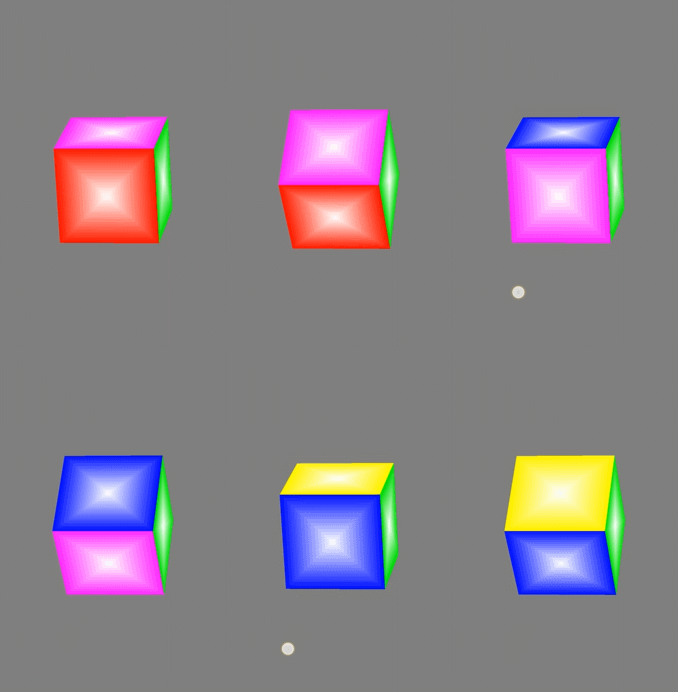
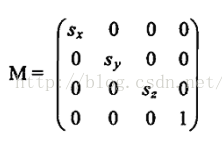
//縮放變換
	public static void scale(float x,float y,float z)
    {
    	Matrix.scaleM(mtMatrix,0, x, y, z);
    }
package com.cumt.opengeschange;

import com.cumt.render.MyRender;
import com.cumt.utils.MatrixState;
import android.content.Context;
import android.opengl.GLSurfaceView;
import android.view.MotionEvent;
import android.view.View;

public class MySurfaceView extends GLSurfaceView {

	private MyRender myRender;

	public MySurfaceView(Context context) {
		super(context);
		// TODO Auto-generated constructor stub
		myRender = new MyRender(context);
		this.setEGLContextClientVersion(2);
		this.setRenderer(myRender);
		// 設置渲染模式為主動渲染
		this.setRenderMode(GLSurfaceView.RENDERMODE_CONTINUOUSLY);

		this.setOnTouchListener(new OnTouchListener() {

			public boolean onTouch(View v, MotionEvent event) {
				// TODO Auto-generated method stub
				switch (event.getAction()) {
				case MotionEvent.ACTION_DOWN://檢測到點擊事件時
					MatrixState.scale(0.4f, 1.5f, 0.6f);//xyz三個方向按各自的縮放因子進行縮放
				}
				return true;
			}
		});
	}
}
 靈活使用Android中ActionBar和ViewPager切換頁面
本文實例講述了Android使用ActionBar和ViewPager切換頁面,分享給大家供大家參考。具體如下:運行效果截圖如下:項目布局如下:具體代碼如下:MainAc
 Android應用耗電分析與優化
應用的耗電是個長期持續優化的事情,而且隨著Android系統的不斷更新,系統本身也提供了越來越詳細的信息來輔助統計分析耗電。這裡基於Android 6.0介紹一些耗電分析
 Android開發學習之路--Annotation注解簡化view控件之初體驗
一般我們在寫android Activity的時候總是會在onCreate方法中加上setContentView方法來加載layout,通過findViewById來實現
 Android Activity與Intent詳解及示例代碼
Android有三個基礎組件Activity,Service和BroadcastReceiver,他們都是依賴Intent來啟動。本文介紹的是Activity的生命周期以