編輯:關於Android編程
本文實例講述了Android編程實現自動調整TextView字體大小以適應文字長度的方法。分享給大家供大家參考,具體如下:
package com.test.android.textview;
import android.content.Context;
import android.graphics.Paint;
import android.util.AttributeSet;
import android.widget.TextView;
public class CustomTextView extends TextView {
  private static float DEFAULT_MIN_TEXT_SIZE = 10;
  private static float DEFAULT_MAX_TEXT_SIZE = 20;
  // Attributes
  private Paint testPaint;
  private float minTextSize;
  private float maxTextSize;
  public CustomTextView(Context context, AttributeSet attrs) {
    super(context, attrs);
    initialise();
  }
  private void initialise() {
    testPaint = new Paint();
    testPaint.set(this.getPaint());
    // max size defaults to the intially specified text size unless it is
    // too small
    maxTextSize = this.getTextSize();
    if (maxTextSize <= DEFAULT_MIN_TEXT_SIZE) {
      maxTextSize = DEFAULT_MAX_TEXT_SIZE;
    }
    minTextSize = DEFAULT_MIN_TEXT_SIZE;
  }
  /**
  * Re size the font so the specified text fits in the text box * assuming
  * the text box is the specified width.
  */
  private void refitText(String text, int textWidth) {
    if (textWidth > 0) {
      int availableWidth = textWidth - this.getPaddingLeft() -
        this.getPaddingRight();
      float trySize = maxTextSize;
      testPaint.setTextSize(trySize);
      while ((trySize > minTextSize) &&
          (testPaint.measureText(text) > availableWidth)) {
        trySize -= 1;
        if (trySize <= minTextSize) {
          trySize = minTextSize;
          break;
        }
        testPaint.setTextSize(trySize);
      }
      this.setTextSize(trySize);
    }
  }
  @Override
  protected void onTextChanged(CharSequence text, int start, int before,
    int after) {
    super.onTextChanged(text, start, before, after);
    refitText(text.toString(), this.getWidth());
  }
  @Override
  protected void onSizeChanged(int w, int h, int oldw, int oldh) {
    if (w != oldw) {
      refitText(this.getText().toString(), w);
    }
  }
}
希望本文所述對大家Android程序設計有所幫助。
 android paint cap join 理解 圖示
網上查了很多資料,對paint的裡面的枚舉類cap join講的不是很透徹。在這裡自己做一個比較深入的研究。 首先說Cap,比較形象的解釋就是 用來控制我們
 Android 中的 Service 全面總結分析
1、Service的種類 按運行地點分類: 類別 區別 優點 缺點 應用 本地服務(Local) 該服務依附在主進程上, 服務依附在主進程上而不是獨立的進
 android:模擬水波效果的自定義View
歡迎Fork,歡迎Star1.先看效果2.再看關鍵代碼描繪函數y = Asin(wx+d)+offset /** * 使用路徑描繪繪制的區域 *
 Android APP--兩個Activity傳遞數據
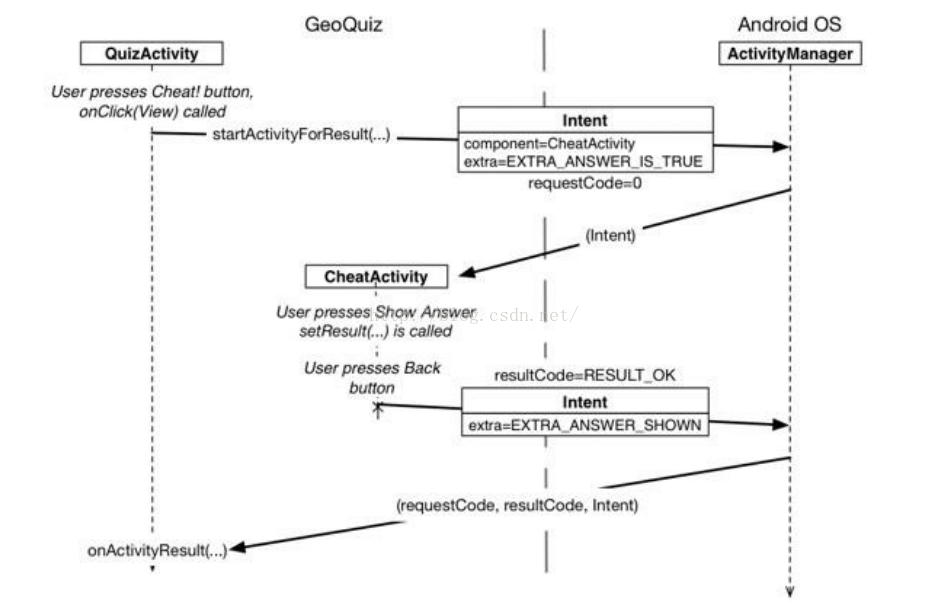
父Activity啟動子Activity,並且向其傳遞消息,子Activity啟動後完成相應的操作後回饋父Activity消息,父Activity完成相應的操作。The